ISSUE TYPE
- Bug Report
COMPONENT NAME
- API
- UI
SUMMARY
CSRF token errors causing users to log out and log back in. Duplicate of closed issue #2537. Reinstalled and reinitialized server from scratch, still having the same error using Github authentication.
It seems to only be happening when the site automatically logs you out.
ENVIRONMENT
- AWX version: 2.1.2.0
- AWX install method: docker on linux
- Ansible version: 2.7.4
- Operating System: OSX High Sierra
- Web Browser: Chrome
STEPS TO REPRODUCE
- Log into AWX
- Navigate to any form with an associated POST action, EG a job template
- Click the button to perform an API Post (click run)
EXPECTED RESULTS
- Action is performed (job is started)
ACTUAL RESULTS
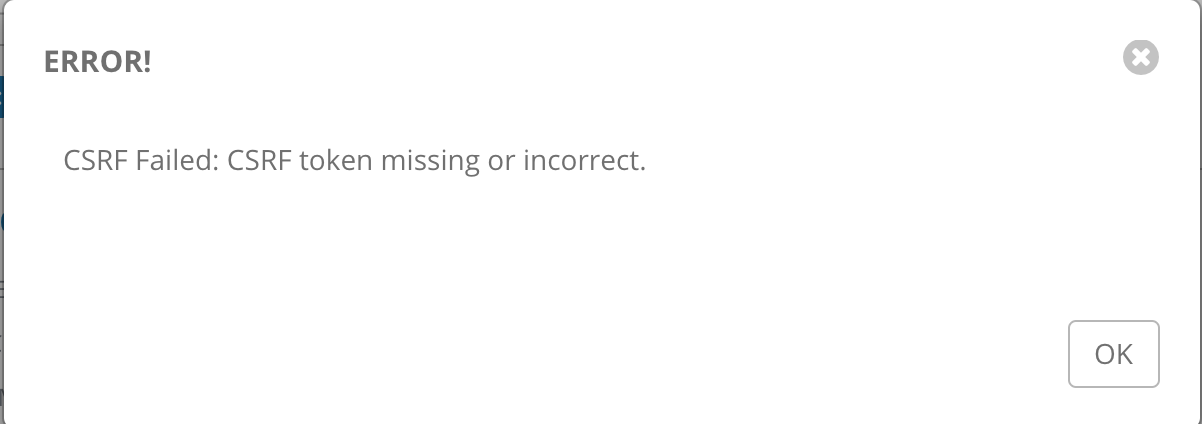
- Modal Window pops up stating that your CSRF token is missing or invalid
- User logs out, clears the browser cache/cookies
- User logs back in, everything works as expected
ADDITIONAL INFORMATION
This started happening with the upgrade to 2.0.0, it didn't happen in the previous version we ran (1.0.3).
The database is from a former Tower installation, that was re-used for AWX.
"Wiping the database and starting from scratch" isn't an option.
 dtardoin
All 11 comments
Are you encountering this in other browsers, or just Chrome? What version of Chrome? Have you tried upgrading?
 ryanpetrello
on 15 Feb 2019
ryanpetrello
on 15 Feb 2019
We're encountering this in every browser. Also we're running AWX 2.1.2.0, not 2.0.0. We've upgraded since I put in the initial bug report.
dtardoin
on 19 Feb 2019
@dtardoin,
It seems to only be happening when the site automatically logs you out.
Can you expand on this? Are users keeping browser windows open and coming back hours/days later, or are they closing their browser window/tab and revisiting the AWX install again? Do you have a custom SESSION_COOKIE_AGE setting value set, or are you relying on the default (30 minutes)? When you log out, are you logging back in and then immediately launching a job template (and seeing the CSRF error)?
The middleware we're using in Django _should_ be setting a new CSRF token cookie _every_ time you log in - if you've found some way to make that _not_ happen, it would explain the behavior you're seeing.
Here are the steps I've tried (with no luck):
- Log into AWX and set a really low
SESSION_COOKIE_AGEe.g., 2 minutes. - Visit some page in the UI, e.g., the Jobs list. Copy the URL, close your browser window and wait 2+ minutes.
- Reopen your browser at the copied URL. You'll be shown a login UI. Log in and then go try to launch a job (it works for me in all the OSX browsers I've tried on the latest AWX).
ryanpetrello
on 20 Feb 2019
Also, when you encounter these pop-ups, are you able to see a csrftoken cookie in your browser console?

ryanpetrello
on 20 Feb 2019
Iirc the Django csrf middleware will return an invalid csrf token response
when it receives no csrf_token in a POST request, or when it can't find the
token it has received in the user session.
You really need your session backend to persist perfectly, ie. local memory
cache backend will fail the session cache backend in numbers of cases,
because the cookie only stores the id of the session data such as csrf
token, the data itself lives in the cache backend. Restarting Django with
locmem cache backend will clear all session data, making the cookie useless.
Honestly this can happen because of a variety of issues, so please bare
with me as I'm just taking a wild guess:
What session backend do you have ? Does using the database session backend
fix the issue for you ?
To be sure about the settings you are running, spawn a Django shell and
import settings from django.conf, check the settings attributes from there.
 jpic
on 20 Feb 2019
jpic
on 20 Feb 2019
Users are keeping browser windows open longer than the "Idle Time Force Logout," getting logged out and when they re-authenticate and try to post any form, whether it's running a playbook or editing a template it throws the CSRF validation error.
I should note that this only happens to users that are using Github Org authentication. I haven't seen it with native authentication.
No on the custom SESSION_COOKIE_AGE, it's set to the default.
dtardoin
on 20 Feb 2019
@dtardoin,
Yea, I'm also unable to reproduce this with Github Org authentication enabled.
- Log into Github Org SSO
- Wait a bit for auto-logout.
- Log into Github Org SSO again
- Jobs launch fine for me.
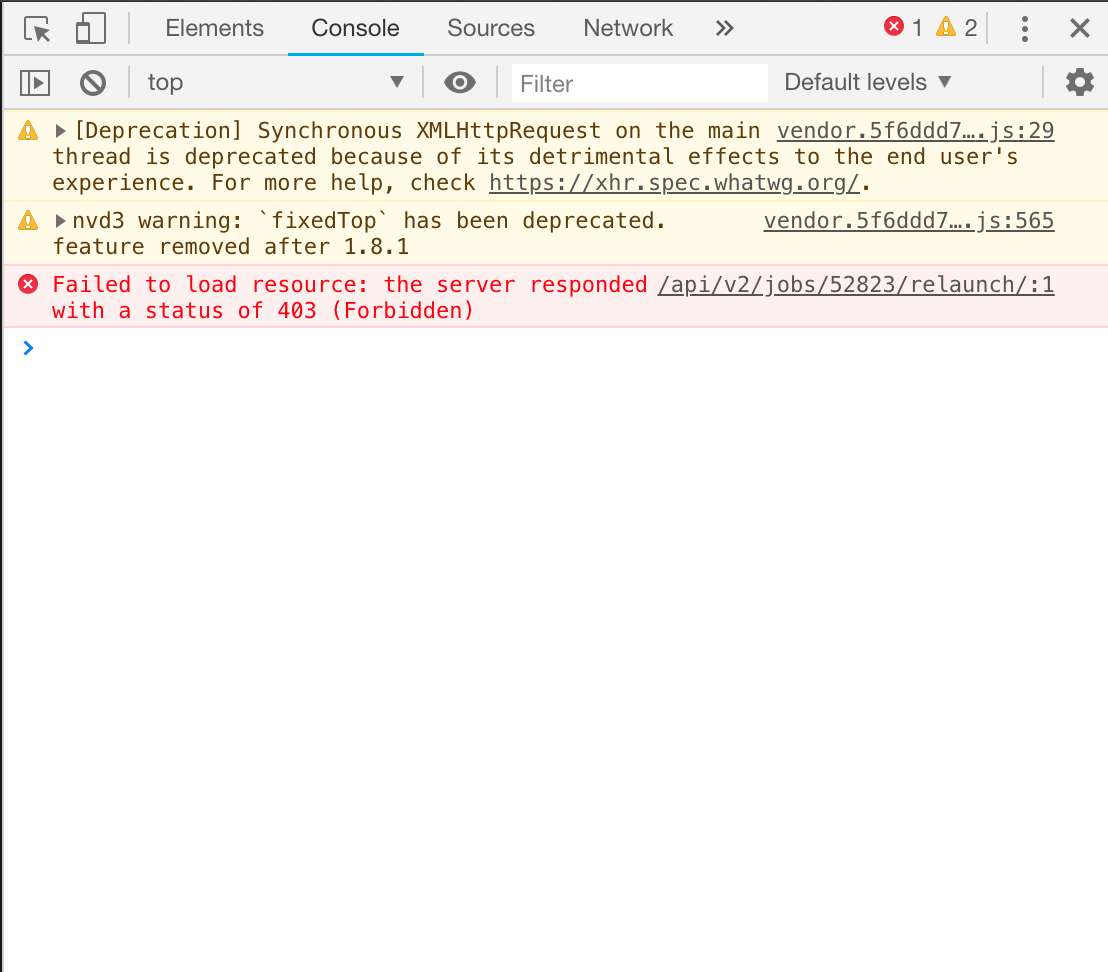
When you encounter this failure, do you see the HTTP 403 for /api/v2/jobs/N/relaunch/ in the Network console tab? Can you share with me the request and response that's being sent when you see this failure? I want to confirm that a CSRF token is _actually_ being sent (I'm curious if it's _missing_ vs _incorrect/expired_).
ryanpetrello
on 20 Feb 2019
It will help to know the logical path taken by the middleware that makes it reject the token.
Can you add prints or use epdb inside django.middleware.csrf.CsrfViewMiddleware and post the results here ?
@ryanpetrello that should tell if it's missing or incorrect or expired or else.
jpic
on 21 Feb 2019
To debug this, I recommend you add import epdb; epdb.serve() in the csrf
middleware source code. This will cause a breakpoint allowing to debug
remotely. In another session inside the container, import epdb;
epdb.connect() from a Python shell, then just step over each line of code
to discover the exact logical path that drove the csrf middleware to reject
the request. Note that you will have to install the epdb module in your
runtime environment.
Another solution for debugging is of course to "instrumentalise" (add a
bunch of prints) the csrf middleware code. Please post your results here.
jpic
on 23 Feb 2019
Note the faq on django docs: https://docs.djangoproject.com/en/2.1/ref/csrf/#why-might-a-user-encounter-a-csrf-validation-failure-after-logging-in
jpic
on 27 Feb 2019
This worked for me:
On chrome, I cleared site data in Dev console -> Application and re logged in.
Now CSRF issue fixed.
 AkhilJalagam
on 29 Sep 2020
AkhilJalagam
on 29 Sep 2020
Related issues
 IshwarKanse
·
3Comments
IshwarKanse
·
3Comments
 astraios
·
3Comments
astraios
·
3Comments
 worsco
·
3Comments
worsco
·
3Comments
 pebbledavec
·
3Comments
pebbledavec
·
3Comments
 marshmalien
·
3Comments
marshmalien
·
3Comments