Awx: LDAP Authentication UI Configuration - Broken
ISSUE TYPE
- Bug Report
COMPONENT NAME
- UI
SUMMARY
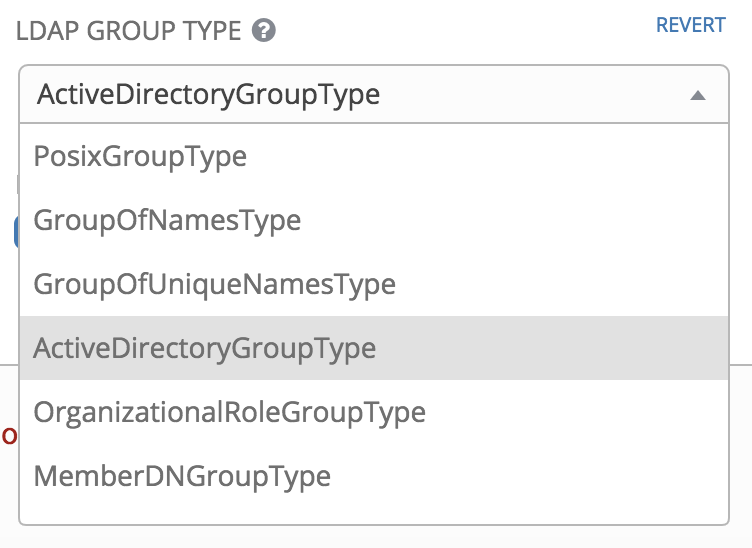
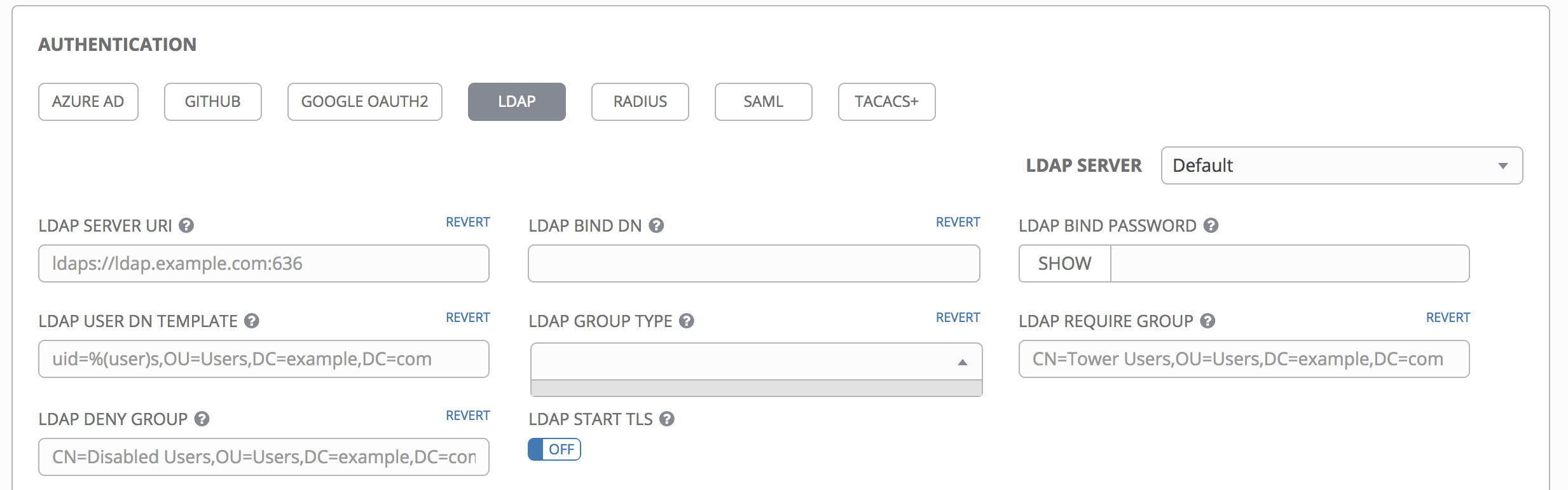
The configuration in UI for LDAP authentication is broken, LDAP GROUP TYPE options are not displayed, tested with Chrome and FIrefox, also tested with current AWX official image and with AWX image build.
ENVIRONMENT
- AWX version: 2.1.0
- AWX install method: docker on linux
- Ansible version: 2.7.1
- Operating System: RHEL7
- Web Browser: Chrome
STEPS TO REPRODUCE
Install a fresh (clone the current repo) Ansible AWX 2.1.0 (use official image), after install
- login as admin
- go to settings -> authentication -> LDAP
- select the drop down for LDAP GROUP TYPE
EXPECTED RESULTS
ACTUAL RESULTS
ADDITIONAL INFORMATION
 ryan012880
All 10 comments
Until this gets fixed, you can work around this by adding the required LDAP group type into the psql database by hand eg:
insert into conf_setting (created, modified, key, value) VALUES (NOW(), NOW(), 'AUTH_LDAP_GROUP_TYPE', '"ActiveDirectoryGroupType"');
 unreality
on 5 Nov 2018
unreality
on 5 Nov 2018
@unreality tnx, confirmed the above works
ryan012880
on 6 Nov 2018
Until this gets fixed, you can work around this by adding the required LDAP group type into the psql database by hand eg:
insert into conf_setting (created, modified, key, value) VALUES (NOW(), NOW(), 'AUTH_LDAP_GROUP_TYPE', '"ActiveDirectoryGroupType"');
Below for those who need a little help (Assumes defaults) ...
docker ps … get container ID of postgres
docker exec -i -t “Container ID from above” /bin/sh
sql -U awx (Connect to Postgres database)
\l (List of Databases)
\c awx (Change to AWX database)
TABLE conf_setting; (View table contents)
INSERT INTO conf_setting (id, created, modified, key, value) VALUES (next ID No, NOW(), NOW(), 'AUTH_LDAP_GROUP_TYPE', ‘”GroupOfNamesType”’);
TABLE conf_setting; (View table contents)
E.G. ...
id | 27
created | 2018-11-14 11:38:36.613155+00
modified | 2018-11-14 11:38:36.613155+00
key | AUTH_LDAP_GROUP_TYPE
value | "GroupOfNamesType"
user_id |
\q
 kw-c
on 14 Nov 2018
kw-c
on 14 Nov 2018
did a fresh install (using image build) and drop down still not showing. thanks
ryan012880
on 17 Nov 2018
did a fresh install (using image build) and drop down still not showing. thanks
Sorry my bad forgot to cleanup, this is working for me. Thanks
ryan012880
on 17 Nov 2018
@ryan012880 Hello Ryan .. do you mean it works for you by only re-installing AWX so you didn't need to apply the workaround ?
 ssaammoo
on 28 Nov 2018
ssaammoo
on 28 Nov 2018
in my case the DB row is added, but it is still not working:
20 | 2018-11-28 07:37:12.842487+00 | 2018-11-28 07:37:12.842487+00 | AUTH_LDAP_GROUP_TYPE | "ActiveDirectoryGroupType"
I restarted then all dockers but still the field is empty
ssaammoo
on 28 Nov 2018
in my case the DB row is added, but it is still not working:
20 | 2018-11-28 07:37:12.842487+00 | 2018-11-28 07:37:12.842487+00 | AUTH_LDAP_GROUP_TYPE | "ActiveDirectoryGroupType"
I restarted then all dockers but still the field is empty
@ssaammoo if you are using the official container image yes that would still be empty but AD authentication should work using the workaround. you don't need the workaround if you use the latest merge and build the awx containers yourself. tnx
ryan012880
on 28 Nov 2018
Thanks a lot ... it is working now with the workaround =)
ssaammoo
on 28 Nov 2018
Until this gets fixed, you can work around this by adding the required LDAP group type into the psql database by hand eg:
insert into conf_setting (created, modified, key, value) VALUES (NOW(), NOW(), 'AUTH_LDAP_GROUP_TYPE', '"ActiveDirectoryGroupType"');Below for those who need a little help (Assumes defaults) ...
docker ps … get container ID of postgres
docker exec -i -t “Container ID from above” /bin/sh
sql -U awx (Connect to Postgres database)
\l (List of Databases)
\c awx (Change to AWX database)
TABLE conf_setting; (View table contents)
INSERT INTO conf_setting (id, created, modified, key, value) VALUES (next ID No, NOW(), NOW(), 'AUTH_LDAP_GROUP_TYPE', ‘”GroupOfNamesType”’);
TABLE conf_setting; (View table contents)
E.G. ...
id | 27
created | 2018-11-14 11:38:36.613155+00
modified | 2018-11-14 11:38:36.613155+00
key | AUTH_LDAP_GROUP_TYPE
value | "GroupOfNamesType"
user_id |\q
minor typo:
psql -U awx (Connect to Postgres database)
and the following example from @worked for me, the example in your post did not:
INSERT INTO conf_setting (id, created, modified, key, value) VALUES (next ID No, NOW(), NOW(), 'AUTH_LDAP_GROUP_TYPE', ‘”GroupOfNamesType”’);
ERROR:  syntax error at or near "ID"
LINE 1: ... (id, created, modified, key, value) VALUES (next ID No, NOW...
 FleischKarussel
on 29 Nov 2018
FleischKarussel
on 29 Nov 2018
Related issues
 mwiora
·
3Comments
mwiora
·
3Comments
 FloThinksPi
·
3Comments
FloThinksPi
·
3Comments
 gamuniz
·
3Comments
gamuniz
·
3Comments
 astraios
·
3Comments
astraios
·
3Comments
 kakkotetsu
·
3Comments
kakkotetsu
·
3Comments
Most helpful comment
Until this gets fixed, you can work around this by adding the required LDAP group type into the psql database by hand eg:
insert into conf_setting (created, modified, key, value) VALUES (NOW(), NOW(), 'AUTH_LDAP_GROUP_TYPE', '"ActiveDirectoryGroupType"');