Awx: New outh2 token which generating from /api/o/token cannot apply new expiry seconds
ISSUE TYPE
- Bug Report
COMPONENT NAME
- API
SUMMARY
New outh2 token which generating from /api/o/token cannot apply new expiry seconds setting
ENVIRONMENT
- AWX version: 3.3.1 (latest version which released on 25/Oct/2018)
- AWX install method: Linux (Centos 7)
- Ansible version: 2.7.1
- Operating System: Windows 10
Web Browser: Chrome
Authentication setting (From api/v2/settings/):
{
"SESSION_COOKIE_AGE": 1800,
"SESSIONS_PER_USER": -1,
"AUTH_BASIC_ENABLED": true,
"OAUTH2_PROVIDER": {
"ACCESS_TOKEN_EXPIRE_SECONDS": 86400,
"AUTHORIZATION_CODE_EXPIRE_SECONDS": 1800
},
"ALLOW_OAUTH2_FOR_EXTERNAL_USERS": false,
"AUTHENTICATION_BACKENDS": [
"awx.sso.backends.TACACSPlusBackend",
"django.contrib.auth.backends.ModelBackend"
],
"SOCIAL_AUTH_ORGANIZATION_MAP": null,
"SOCIAL_AUTH_TEAM_MAP": null,
"SOCIAL_AUTH_USER_FIELDS": null
}
STEPS TO REPRODUCE
- Create application and copy client id and client secret.
- Request new OAuth2 token by postman / curl with login credential (normal user), client id and secret
- A token will be generated if API call successful
EXPECTED RESULTS
New OAuth2 token should be expired after 1 day
ACTUAL RESULTS
New OAuth2 token still remain the old setting as default one, which will expire after 1000 YEARS!
ADDITIONAL INFORMATION
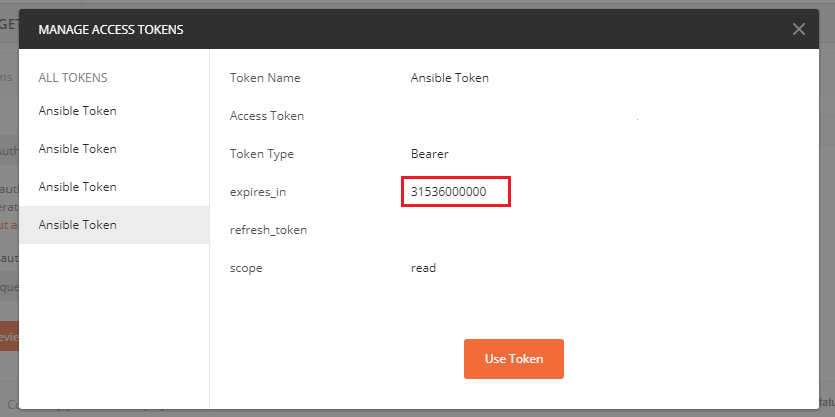
 noname1314
All 9 comments
@noname1314 good find. I tested this out and the ACCESS_TOKEN_EXPIRE_SECONDS setting change is picked up when creating a token at api/v2/tokens, but not when doing a curl/postman to api/o/tokens.
This is because that setting is not automatically updated in django-oauth-toolkit. One work-workaround here is adding the following setting to settings.py, then restarting awx services.
OAUTH2_PROVIDER = {'ACCESS_TOKEN_EXPIRE_SECONDS': 86400,
                   'AUTHORIZATION_CODE_EXPIRE_SECONDS': 600}
I am looking in to making sure this setting gets applied as expected.
 rooftopcellist
on 31 Oct 2018
rooftopcellist
on 31 Oct 2018
@noname1314 good find. I tested this out and the
ACCESS_TOKEN_EXPIRE_SECONDSsetting change is picked up when creating a token atapi/v2/tokens, but not when doing a curl/postman toapi/o/tokens.This is because that setting is not automatically updated in django-oauth-toolkit. One work-workaround here is adding the following setting to
settings.py, then restarting awx services.OAUTH2_PROVIDER = {'ACCESS_TOKEN_EXPIRE_SECONDS': 86400, 'AUTHORIZATION_CODE_EXPIRE_SECONDS': 600}I am looking in to making sure this setting gets applied as expected.
@rooftopcellist Work-around workable. If possible, please align the authorization token setting into GUI setting instead of setting.py / API setting.
noname1314
on 1 Nov 2018
@noname1314 good find. I tested this out and the
ACCESS_TOKEN_EXPIRE_SECONDSsetting change is picked up when creating a token atapi/v2/tokens, but not when doing a curl/postman toapi/o/tokens.This is because that setting is not automatically updated in django-oauth-toolkit. One work-workaround here is adding the following setting to
settings.py, then restarting awx services.OAUTH2_PROVIDER = {'ACCESS_TOKEN_EXPIRE_SECONDS': 86400, 'AUTHORIZATION_CODE_EXPIRE_SECONDS': 600}I am looking in to making sure this setting gets applied as expected.
in wchich settings.py should we add those lines? i still have same problem.
as i understand api/v2/tokens and api/o/token/ are different tokens with different purposes.
 daczka92
on 8 Nov 2018
daczka92
on 8 Nov 2018
@noname1314 good find. I tested this out and the
ACCESS_TOKEN_EXPIRE_SECONDSsetting change is picked up when creating a token atapi/v2/tokens, but not when doing a curl/postman toapi/o/tokens.
This is because that setting is not automatically updated in django-oauth-toolkit. One work-workaround here is adding the following setting tosettings.py, then restarting awx services.OAUTH2_PROVIDER = {'ACCESS_TOKEN_EXPIRE_SECONDS': 86400, 'AUTHORIZATION_CODE_EXPIRE_SECONDS': 600}I am looking in to making sure this setting gets applied as expected.
in wchich settings.py should we add those lines? i still have same problem.
as i understand api/v2/tokens and api/o/token/ are different tokens with different purposes.
/etc/tower/settings.py and please restart ansible tower service by ansible-tower-service restart
noname1314
on 8 Nov 2018
This is still problem for us.
Can anyone fix it?
 mbzieba
on 29 Jul 2019
mbzieba
on 29 Jul 2019
related to #4865
 rebeccahhh
on 1 Oct 2019
rebeccahhh
on 1 Oct 2019
There is a fix for this downstream, and the changes will make its way to awx devel in the near future.
 fosterseth
on 15 Oct 2019
fosterseth
on 15 Oct 2019
The test cases covered in https://github.com/ansible/awx/issues/4710#issuecomment-540759480 apply to this as well, so this is ready to close.
Please reach out of fixes are not working for you.
 kdelee
on 22 Oct 2019
kdelee
on 22 Oct 2019
Refresh Tokens do not expire for us.
Using AWX v10.0.0
https://x.x.x.x/api/v2/settings/all/
"OAUTH2_PROVIDER": {
        "ACCESS_TOKEN_EXPIRE_SECONDS": 10,
        "REFRESH_TOKEN_EXPIRE_SECONDS": 10,
        "AUTHORIZATION_CODE_EXPIRE_SECONDS": 600
    },


md5-6058ad957ad9b0affb83881b75cf0a83


OAUTH2_PROVIDER = {'ACCESS_TOKEN_EXPIRE_SECONDS': 10,
                    'REFRESH_TOKEN_EXPIRE_SECONDS': 10,
                   'AUTHORIZATION_CODE_EXPIRE_SECONDS': 600}
and restarting the container.
 sdwru
on 7 Apr 2020
sdwru
on 7 Apr 2020
Related issues
 kakkotetsu
·
3Comments
kakkotetsu
·
3Comments
 mwiora
·
3Comments
mwiora
·
3Comments
 FloThinksPi
·
3Comments
FloThinksPi
·
3Comments
 astraios
·
3Comments
astraios
·
3Comments
 icsm2017
·
4Comments
icsm2017
·
4Comments