Awx: Dashboard Graph no longer tracks individual job status on hover-over
ISSUE TYPE
- Bug Report
COMPONENT NAME
- UI
SUMMARY
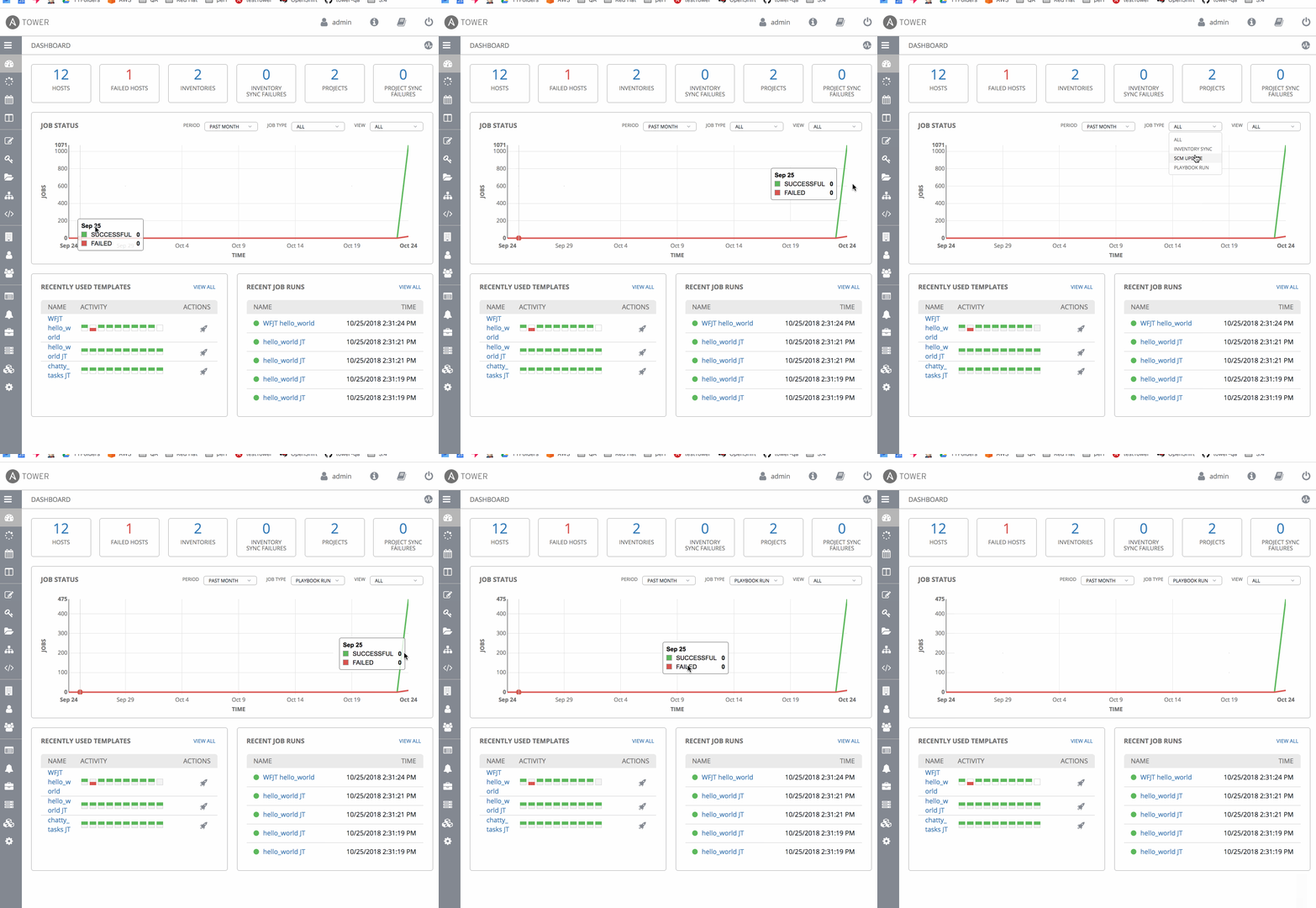
Dashboard Graph no longer tracks individual job status on hover-over
ENVIRONMENT
- AWX version: 3.4.0
STEPS TO REPRODUCE
- Navigate to the Dashboard and hover-over the graph
Note: the individual job status for a job is not represented. The actual chart is otherwise accurate.
EXPECTED RESULTS
Hover-over to on the Dashboard Graph should highlight the job result history as a time-series.
ACTUAL RESULTS
Hover-over action seemingly only tracks the first value on the x-axis.
ADDITIONAL INFORMATION
 unlikelyzero
All 9 comments
I've rebuild container with #2631 merge but didn't fixed this issue, hover-over to on the Dashboard Graph still doesn't highlight the job result history as a time-series.
 ryan012880
on 9 Nov 2018
ryan012880
on 9 Nov 2018
@ryan012880 very strange indeed! What happens after you rebuild the UI?
 kialam
on 9 Nov 2018
kialam
on 9 Nov 2018
@kialam same behaviour as before only tracks the first value on the x-axis and indicator doesn't move.
ryan012880
on 9 Nov 2018
@ryan012880 I am having trouble reproducing on devel with the #2631 merge. Do you mind posting what your job status chart directive file looks like? awx/ui/client/src/home/dashboard/graphs/job-status/job-status-graph.directive.js
kialam
on 9 Nov 2018
/*************************************************
 * Copyright (c) 2015 Ansible, Inc.
 *
 * All Rights Reserved
 *************************************************/

 export default
    [   '$window',
        'adjustGraphSize',
        'templateUrl',
        'i18n',
        'moment',
        'jobStatusGraphData',
        JobStatusGraph
    ];

function JobStatusGraph($window, adjustGraphSize, templateUrl, i18n, moment, graphDataService) {
            return {
                restrict: 'E',
                scope: {
                    data: '='
                },
                templateUrl: templateUrl('home/dashboard/graphs/job-status/job_status_graph'),
                link: link
            };

            function link(scope, element) {
                var job_type,
                    job_status_chart = nv.models.lineChart();

                scope.period="month";
                scope.jobType="all";
                scope.status="both";

                scope.$watchCollection('data', function(value) {
                    if (value) {
                        createGraph(scope.period, scope.jobType, value, scope.status);
                    }
                });

                function recreateGraph(period, jobType, status) {
                    graphDataService.get(period, jobType, status)
                        .then(function(data) {
                            scope.data = data;
                            scope.period = period;
                            scope.jobType = jobType;
                            scope.status = Object.is(status, undefined) ? scope.status : status;
                        });
                }

                scope.$on('jobStatusChange', function(event, status){
                    recreateGraph(scope.period, scope.jobType, status);
                });

                function createGraph(period, jobtype, data, status){
                    scope.period = period;
                    scope.jobType = jobtype;
                    scope.status = status;

                    var timeFormat, graphData = [
                        {   "color": "#5CB85C",
                            "key": i18n._("SUCCESSFUL"),
                            "values": data.jobs.successful
                        },
                        {   "key" : i18n._("FAILED") ,
                            "color" : "#D9534F",
                            "values": data.jobs.failed
                        }
                    ];

                    graphData = _.reject(graphData, function(num){
                        if(status!== undefined && status === num.key.toLowerCase()){
                            return num;
                        }
                    });

                    if(period === "day") {
                        timeFormat="H:mm";
                    }
                    else {
                        timeFormat = "MMM D";
                    }
                    graphData.map(function(series) {
                        series.values = series.values.map(function(d) {
                            return {
                                x: d[0],
                                y: d[1]
                            };
                        });
                        return series;
                    });

                    job_status_chart
                    .useInteractiveGuideline(true)  //We want nice looking tooltips and a guideline!
                    .showLegend(false)       //Show the legend, allowing users to turn on/off line series.
                    .showYAxis(true)        //Show the y-axis
                    .showXAxis(true)        //Show the x-axis
                    .margin({ right: 32 });

                    job_status_chart.interactiveLayer.tooltip.fixedTop(-10); //distance from the top of the chart to tooltip
                    job_status_chart.interactiveLayer.tooltip.distance(-1); //distance from interactive line to tooltip

                    job_status_chart.xAxis
                    .axisLabel(i18n._("TIME"))//.showMaxMin(true)
                    .tickFormat(function(d) {
                        if (d) {
                            const tickDate = new Date(Number(d + '000'));
                            return moment(tickDate).format(timeFormat);
                        }
                        else {
                            return '';
                        }
                    });

                    job_status_chart.yAxis     //Chart y-axis settings
                    .axisLabel(i18n._('JOBS'))
                    .tickFormat(d3.format('.f'));

                    d3.select(element.find('svg')[0])
                    .datum(graphData)
                    .call(job_status_chart)
                    .style({
                        "font-family": 'Open Sans',
                        "font-style": "normal",
                        "font-weight":400,
                        "src": "url(/static/assets/OpenSans-Regular.ttf)"
                    });

                    // when the Period drop down filter is used, create a new graph based on the
                    $('.n').off('click').on("click", function(){
                        period = this.getAttribute("id");

                        $('#period-dropdown')
                            .replaceWith(`
                                <a id="period-dropdown" class="DashboardGraphs-filterDropdownText DashboardGraphs-filterDropdownItems--period" role="button"
                                   data-toggle="dropdown" data-target="#" href="/page.html">
                                    <span>${this.text}</span>
                                    <i class="fa fa-angle-down DashboardGraphs-filterIcon"></i>
                                </a>`);

                        scope.$parent.isFailed = true;
                        scope.$parent.isSuccessful = true;
                        recreateGraph(period, job_type);
                    });

                    //On click, update with new data
                    $('.m').off('click').on("click", function(){
                        job_type = this.getAttribute("id");

                        $('#type-dropdown')
                            .replaceWith(`
                                <a id="type-dropdown" class="DashboardGraphs-filterDropdownText DashboardGraphs-filterDropdownItems--jobType" role="button"
                                   data-toggle="dropdown" data-target="#" href="/page.html">
                                    <span>${this.text}</span>
                                    <i class="fa fa-angle-down DashboardGraphs-filterIcon"></i>
                                </a>`);

                        scope.$parent.isFailed = true;
                        scope.$parent.isSuccessful = true;
                        recreateGraph(period, job_type);
                    });

                    $('.o').off('click').on('click', function() {
                        var job_status = this.getAttribute('id');

                        $('#status-dropdown')
                            .replaceWith(`
                                <a id="status-dropdown" class="DashboardGraphs-filterDropdownText DashboardGraphs-filterDropdownItems--status" role="button"
                                   data-toggle="dropdown" data-target="#" href="/page.html">
                                    <span>${this.text}</span>
                                    <i class="fa fa-angle-down DashboardGraphs-filterIcon"></i>
                                </a>`);

                        scope.$broadcast("jobStatusChange", job_status);
                    });

                    adjustGraphSize(job_status_chart, element);
                }

                function onResize() {
                    adjustGraphSize(job_status_chart, element);

                }

                angular.element($window).on('resize', onResize);
                $(".DashboardGraphs-graph--jobStatusGraph").resize(onResize);

                element.on('$destroy', function() {
                    angular.element($window).off('resize', onResize);
                    $(".DashboardGraphs-graph--jobStatusGraph").removeResize(onResize);
                });

                if (scope.removeGraphDataReady) {
                    scope.removeGraphDataReady();
                }

            }
        }
This seems to be working fine for me on devel. @ryan012880 We haven't built a new latest container image in a few days but we will soon - you should see these fixes show up then!
 jakemcdermott
on 9 Nov 2018
jakemcdermott
on 9 Nov 2018
@ryan012880 After pushing new images and deploying, I can also confirm that I am still seeing this bug once it is deployed in the wild. Interesting to say the least! We will take another look!
jakemcdermott
on 9 Nov 2018
@jakemcdermott @kialam today I tried rebuilding a new container image with the latest merge and I don't see this issue anymore. But this time I did a make clean before the installation. Thanks
ryan012880
on 17 Nov 2018
@ryan012880 After pushing new images and deploying, I can also confirm that I am still seeing this bug once it is deployed in the wild. Interesting to say the least! We will take another look!
That will be awesome if official images is updating for this. Still stucked in the image building locally. Thanks a lot
ansible/awx_web
Last pushed: 13 days ago
https://hub.docker.com/r/ansible/awx_web/
 tinohean
on 23 Nov 2018
tinohean
on 23 Nov 2018
Related issues
 marshmalien
·
3Comments
marshmalien
·
3Comments
 astraios
·
3Comments
astraios
·
3Comments
 agaffney
·
3Comments
agaffney
·
3Comments
 IshwarKanse
·
3Comments
IshwarKanse
·
3Comments
 Gui13
·
3Comments
Gui13
·
3Comments