Awx: UI-Project-SCM Credentials: no credentials have been created
ISSUE TYPE
- Bug Report
COMPONENT NAME
- UI
SUMMARY
After add credentials cant add them to project for SCM.
When tap to lens in popup window i see NO CREDENTIALS HAVE BEEN CREATED
ENVIRONMENT
- AWX version: 2.0.1
- AWX install method: docker on linux
- Ansible version: 2.7.0
- Operating System: CentOS Linux release 7.5.1804 (Core)
- Web Browser: Google Chrome Version 68.0.3440.84
STEPS TO REPRODUCE
All steps you may make under Admin
- Create Organization
- Create project for created Org with SCM Type Git and ssh url (also trying https, nothing changes)
- Create credential with ssh keys with type Machine
- Go to organization and try add credential for project - click to lens
EXPECTED RESULTS
You give popup window without any credentials
ACTUAL RESULTS
You give popup window with existing credentials
ADDITIONAL INFORMATION
Credentials that was created i can see in job template.
 mobilesfinks
All 17 comments
Found type: Source Control
mobilesfinks
on 22 Oct 2018
Found type: Source Control
@mobilesfinks Could you please elaborate on what you did to fix this ? :)
 vegardtorvund
on 14 Nov 2019
vegardtorvund
on 14 Nov 2019
@vegardtorvund I assume what he ended up doing was to create a credential with the type Source Control and use an email/password combination. This is what I've had to do but imo this bug should still be open. If there is support for github personal access tokens they should be able to be used to access repos.
 nerratt
on 19 Nov 2019
nerratt
on 19 Nov 2019
Yes, ended up using username/password. I agree that this should be open until we are able to use tokens.
vegardtorvund
on 20 Nov 2019
I encounter the same problem.
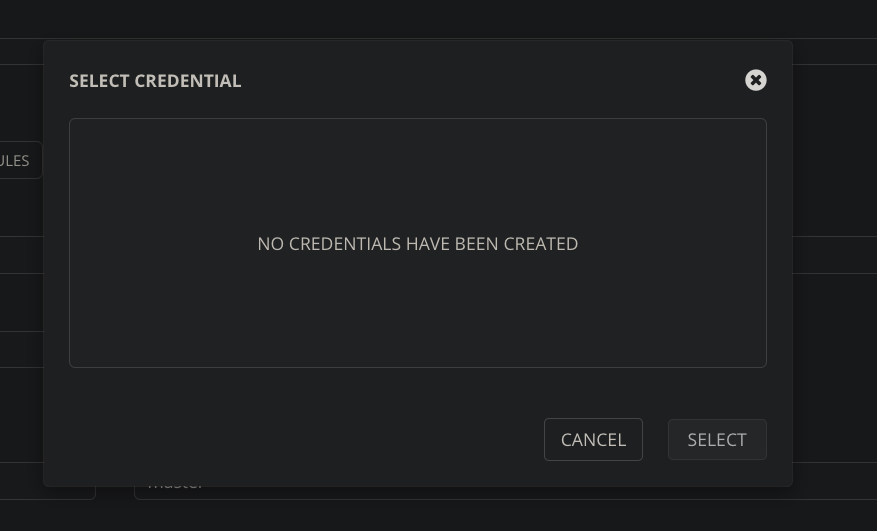
even though I already added git token credentials.
 daniel-farina
on 22 Jan 2020
daniel-farina
on 22 Jan 2020
same issue with added git token credentials
 ohobby
on 1 Feb 2020
ohobby
on 1 Feb 2020
Stuck here too while trying to figure out how to use Azure Devops git repo.
AWX 9.1.0.0
 telefax
on 8 Feb 2020
telefax
on 8 Feb 2020
Same Problem. Trying to patch with the API however getting error kind must be "scm"
"kind": "github_token",
"cloud": false,
"kubernetes": false
}
When I look at the json detialing my saved credentials it's kind is github_token so this is the conflict..
 rawstorage
on 12 Feb 2020
rawstorage
on 12 Feb 2020
even though I already added git token credentials.
You added a git _hub_ token credential so that AWX can talk to _github_, the service, for things like webhooks. That is not the same thing as a generic scm credential for granting an automation system read access for your _git repository_.
If there is support for github personal access tokens they should be able to be used to access repos.
No, not really. SCM credentials for projects, like the one you might make for _git_, need to work for generically _any_ git repository. The primary ways of providing a remote access credential to a git repo is username/password authentication and SSH transport.
As some have mentioned above, you can use your _github_ personal access token in the password field of the SCM credential. I do not recommend this, though, as such tokens can't be restricted to specific repositories. You are better off creating a "deploy key" in github for that specific repo and providing that key when creating the SCM credential.
 jakemcdermott
on 12 Feb 2020
jakemcdermott
on 12 Feb 2020
adding a source control credential using a deploy key for the repo is the best way to solve this.
here's a doc on generating and adding a deploy key to a git repo - https://developer.github.com/v3/guides/managing-deploy-keys/#deploy-keys
 mjallday
on 21 Feb 2020
mjallday
on 21 Feb 2020
Thanks I'll try this soon
Sent from mobile device. Please excuse typos, autocorrect hates me.
From: Marshall Jones notifications@github.com
Sent: Friday, February 21, 2020 6:52:04 PM
To: ansible/awx awx@noreply.github.com
Cc: Martin, Paul Paule.Martin@dell.com; Comment comment@noreply.github.com
Subject: Re: [ansible/awx] UI-Project-SCM Credentials: no credentials have been created (#2495)
[EXTERNAL EMAIL]
adding a source control credential using a deploy key for the repo is the best way to solve this.
here's a doc on generating and adding a deploy key to a git repo - https://developer.github.com/v3/guides/managing-deploy-keys/#deploy-keys
—
You are receiving this because you commented.
Reply to this email directly, view it on GitHubhttps://github.com/ansible/awx/issues/2495?email_source=notifications&email_token=AF7FWPLYQ37XHM6PT7KCX5DREAPFJA5CNFSM4F6DUY4KYY3PNVWWK3TUL52HS4DFVREXG43VMVBW63LNMVXHJKTDN5WW2ZLOORPWSZGOEMTWTLY#issuecomment-589785519, or unsubscribehttps://github.com/notifications/unsubscribe-auth/AF7FWPO5IXV5ROBGJEAK2LLREAPFJANCNFSM4F6DUY4A.
rawstorage
on 21 Feb 2020
Ran into this also. Pretty unclear to the average user on first configuration that there is a difference between GitHub/GitLab/Source Control when creating credentials.
 bandwiches
on 1 May 2020
bandwiches
on 1 May 2020
Agree with bandwiches. Once you know how to use it it is obvious. For new users though this workflow is a fail - more guidance needed. At the very least a link from the 'Select Credential' model to the create new credential page, possibly with the correct credential type already selected?
 jonnymccullagh
on 26 May 2020
jonnymccullagh
on 26 May 2020
Has this been addressed? Why can I not use gitlab tokens for the project SCM auth? I guess I will have to do the Source Control option but this needs to probably be more clear its not an valid option for project SCM types.
 btotharye
on 16 Jun 2020
btotharye
on 16 Jun 2020
Has this been addressed? Why can I not use gitlab tokens for the project SCM auth? I guess I will have to do the Source Control option but this needs to probably be more clear its not an valid option for project SCM types.
Closed Oct 19, 2018.
I highly doubt this will be addressed since documentation is the lowest priority in IT.
bandwiches
on 19 Jun 2020
just to give a hint, the problem seems to be the credentials type that you created is not part of the scm settings, when opening the credentials pop up the credentials_type requested is 2 while in reality you created a token with type=13 which is not going to be visible in the scm settings for your project.
To create an SSH key authentication, you have to create a Source Control credential type and then it will be showing in the credentials popup in the project scm settings. I hope this helps someone.
 waheedi
on 7 Jul 2020
waheedi
on 7 Jul 2020
So I had a similar problem and you should be using the credential type as Source Control . If you have 2fA enabled then in the password field you can mention the github Personal Access Token (PAT) and it works.
 AkshayAdsul
on 18 Nov 2020
AkshayAdsul
on 18 Nov 2020
Related issues
 artmakh
·
3Comments
artmakh
·
3Comments
 gamuniz
·
3Comments
gamuniz
·
3Comments
 worsco
·
3Comments
worsco
·
3Comments
 cs35-owncloud
·
3Comments
cs35-owncloud
·
3Comments
 FloThinksPi
·
3Comments
FloThinksPi
·
3Comments
Most helpful comment
Yes, ended up using username/password. I agree that this should be open until we are able to use tokens.