Awx: Web Service not working due to missing instance for the host
ISSUE TYPE
- Bug Report
COMPONENT NAME
- UI
SUMMARY
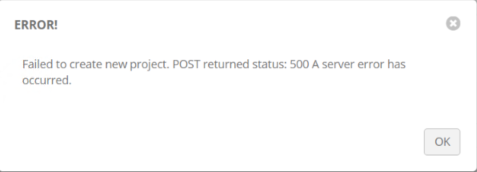
After installation of AWX on a new server and migrating the date from an old AWX version to the newest. The Migration process fails with Creating a new Project. I have tried to connect the new project manually but I'm getting an error on the UI. "Failed to create new project. POST returned status: 500 A server error has occurred." This is a new installation on a completely different server than the older version.
ENVIRONMENT
- AWX version: 2.0.1
- AWX install method: docker on linux
- Ansible version: 2.7.0
- Operating System: CentOS Linux release 7.5.1804 (Core)
- Web Browser: Google Chrome
STEPS TO REPRODUCE
Create new project on the UI and fill in all the necessary information then click Add.
EXPECTED RESULTS
Create a new project with a connection to a GITLAB Server.
ACTUAL RESULTS
"Failed to create new project. POST returned status: 500 A server error has occurred."
 cbermudez82
All 28 comments
It would be super helpful if you could get us the logs from the web container... otherwise we don't have enough information to help you.
 matburt
on 19 Oct 2018
matburt
on 19 Oct 2018
It would be super helpful if you could get us the logs from the web container... otherwise we don't have enough information to help you.
Matburt,
do you specifically know what logs would help out from the web container? messages, nginx, etc... I can get them pulled and uploaded.
cbermudez82
on 19 Oct 2018
The actual docker console logs for the container will contain the error.
matburt
on 22 Oct 2018
Here is the docker log file for the Web container.
docker-logs-awx-web.log
cbermudez82
on 22 Oct 2018
I don't see any exceptions in this log... there are also no 500 errors reported in the response history. Make sure you trigger the error before capturing the logs for the container.
matburt
on 23 Oct 2018
docker-awx-web-10-23-2018.log
Matthew,
I appreciate the help with this. I did generate the error before capturing the last log but I've done it again and I've attached a screenshot of the error also. I was looking through the log and it doesn't seem like is in the log file what so ever. Would be log in the awx_task container instead?
cbermudez82
on 23 Oct 2018
I am observing the same, however there are exceptions in my log
awx_web.log
2018-11-09 10:55:09,081 ERROR    django.request Internal Server Error: /api/v2/projects/
Traceback (most recent call last):
  File "/var/lib/awx/venv/awx/lib/python2.7/site-packages/django/core/handlers/exception.py", line 41, in inner
    response = get_response(request)
  File "/usr/lib/python2.7/site-packages/awx/wsgi.py", line 71, in _legacy_get_response
    return super(AWXWSGIHandler, self)._legacy_get_response(request)
  File "/var/lib/awx/venv/awx/lib/python2.7/site-packages/django/core/handlers/base.py", line 249, in _legacy_get_response
    response = self._get_response(request)
  File "/var/lib/awx/venv/awx/lib/python2.7/site-packages/django/core/handlers/base.py", line 187, in _get_response
    response = self.process_exception_by_middleware(e, request)
  File "/var/lib/awx/venv/awx/lib/python2.7/site-packages/django/core/handlers/base.py", line 185, in _get_response
    response = wrapped_callback(request, *callback_args, **callback_kwargs)
  File "/var/lib/awx/venv/awx/lib/python2.7/site-packages/django/utils/decorators.py", line 185, in inner
    return func(*args, **kwargs)
  File "/var/lib/awx/venv/awx/lib/python2.7/site-packages/django/views/decorators/csrf.py", line 58, in wrapped_view
    return view_func(*args, **kwargs)
  File "/var/lib/awx/venv/awx/lib/python2.7/site-packages/django/views/generic/base.py", line 68, in view
    return self.dispatch(request, *args, **kwargs)
  File "/usr/lib/python2.7/site-packages/awx/api/generics.py", line 328, in dispatch
    return super(APIView, self).dispatch(request, *args, **kwargs)
  File "/var/lib/awx/venv/awx/lib/python2.7/site-packages/rest_framework/views.py", line 494, in dispatch
    response = self.handle_exception(exc)
  File "/var/lib/awx/venv/awx/lib/python2.7/site-packages/rest_framework/views.py", line 454, in handle_exception
    self.raise_uncaught_exception(exc)
  File "/var/lib/awx/venv/awx/lib/python2.7/site-packages/rest_framework/views.py", line 491, in dispatch
    response = handler(request, *args, **kwargs)
  File "/var/lib/awx/venv/awx/lib/python2.7/site-packages/rest_framework/generics.py", line 244, in post
    return self.create(request, *args, **kwargs)
  File "/var/lib/awx/venv/awx/lib/python2.7/site-packages/rest_framework/mixins.py", line 21, in create
    self.perform_create(serializer)
  File "/var/lib/awx/venv/awx/lib/python2.7/site-packages/rest_framework/mixins.py", line 26, in perform_create
    serializer.save()
  File "/var/lib/awx/venv/awx/lib/python2.7/site-packages/rest_framework/serializers.py", line 214, in save
    self.instance = self.create(validated_data)
  File "/var/lib/awx/venv/awx/lib/python2.7/site-packages/rest_framework/serializers.py", line 917, in create
    instance = ModelClass.objects.create(**validated_data)
  File "/var/lib/awx/venv/awx/lib/python2.7/site-packages/django/db/models/manager.py", line 85, in manager_method
    return getattr(self.get_queryset(), name)(*args, **kwargs)
  File "/var/lib/awx/venv/awx/lib/python2.7/site-packages/django/db/models/query.py", line 394, in create
    obj.save(force_insert=True, using=self.db)
  File "/usr/lib/python2.7/site-packages/awx/main/models/projects.py", line 365, in save
    self.update()
  File "/usr/lib/python2.7/site-packages/awx/main/models/unified_jobs.py", line 301, in update
    unified_job = self.create_unified_job()
  File "/usr/lib/python2.7/site-packages/awx/main/models/unified_jobs.py", line 364, in create_unified_job
    unified_job.save()
  File "/usr/lib/python2.7/site-packages/awx/main/models/unified_jobs.py", line 815, in save
    result = super(UnifiedJob, self).save(*args, **kwargs)
  File "/var/lib/awx/venv/awx/lib/python2.7/site-packages/polymorphic/models.py", line 83, in save
    return super(PolymorphicModel, self).save(*args, **kwargs)
  File "/usr/lib/python2.7/site-packages/awx/main/models/base.py", line 198, in save
    super(PasswordFieldsModel, self).save(*args, **kwargs)
  File "/usr/lib/python2.7/site-packages/awx/main/models/base.py", line 316, in save
    super(PrimordialModel, self).save(*args, **kwargs)
  File "/usr/lib/python2.7/site-packages/awx/main/models/base.py", line 164, in save
    super(CreatedModifiedModel, self).save(*args, **kwargs)
  File "/var/lib/awx/venv/awx/lib/python2.7/site-packages/django/db/models/base.py", line 808, in save
    force_update=force_update, update_fields=update_fields)
  File "/var/lib/awx/venv/awx/lib/python2.7/site-packages/django/db/models/base.py", line 848, in save_base
    update_fields=update_fields, raw=raw, using=using,
  File "/var/lib/awx/venv/awx/lib/python2.7/site-packages/django/dispatch/dispatcher.py", line 193, in send
    for receiver in self._live_receivers(sender)
  File "/usr/lib/python2.7/site-packages/awx/main/models/ha.py", line 338, in on_job_create
    instance=Instance.objects.me(),
  File "/usr/lib/python2.7/site-packages/awx/main/managers.py", line 88, in me
    raise RuntimeError("No instance found with the current cluster host id")
RuntimeError: No instance found with the current cluster host id
 tigtigtigtig
on 9 Nov 2018
tigtigtigtig
on 9 Nov 2018
(edited above comment to in-line the traceback)
 wenottingham
on 9 Nov 2018
wenottingham
on 9 Nov 2018
I am unable to reproduce this in a fresh install of 2.1.0. Is anyone able to provide any more details about how to recreate this error?
 shanemcd
on 9 Nov 2018
shanemcd
on 9 Nov 2018
Actually, I just noticed that this issue says 2.0.1. Has anyone seen this on the latest release (2.1.0)?
shanemcd
on 9 Nov 2018
Appears like the answer is yes: https://github.com/ansible/awx/issues/2650
shanemcd
on 9 Nov 2018
I'm still having trouble reproducing this. Can you show me the full api response (including response headers) of going to http://awxhost/api/v2/instances/
matburt
on 9 Nov 2018
Here is the webpage output from the api instance:
GET /api/v2/instances/
HTTP 200 OK
Allow: GET, HEAD, OPTIONS
Content-Type: application/json
Vary: Accept
X-API-Node: awx
X-API-Time: 0.028s
{
"count": 1,
"next": null,
"previous": null,
"results": [
{
"id": 1,
"type": "instance",
"url": "/api/v2/instances/1/",
"related": {
"jobs": "/api/v2/instances/1/jobs/",
"instance_groups": "/api/v2/instances/1/instance_groups/"
},
"uuid": "00000000-0000-0000-0000-000000000000",
"hostname": "awx_task",
"created": "2018-10-22T18:44:06.097323Z",
"modified": "2018-10-22T18:44:06.097370Z",
"capacity_adjustment": "1.00",
"version": "",
"capacity": 0,
"consumed_capacity": 0,
"percent_capacity_remaining": 0.0,
"jobs_running": 0,
"jobs_total": 0,
"cpu": 0,
"memory": 0,
"cpu_capacity": 0,
"mem_capacity": 0,
"enabled": true,
"managed_by_policy": true
}
]
}
cbermudez82
on 9 Nov 2018
I just tested with the dockerhub version 1 and it exhibits the same behaviour. This were the exact steps taken:
- checkout awx and awx-task git repository from github
- edit
installer/inventory:
- Change values of
awx_web_hostnameandawx_task_hostnametoawxhost.domain
- Change values of
- run
ansible-playbook -i inventory install.yml - wait for database migrations
- create credential Type "Source Control". Organisation: Default, Username: empty, Password: empty, Passphrase empty. Pasted RSA private key into "SCM Private Key".
- create project source control type git, git ssh url in the form of
[email protected]:/path.gitbranch master, credential as just created - Click save => HTTP 500 Error
tigtigtigtig
on 12 Nov 2018
The awx_task container is producing errors also:
2018-11-15 15:02:46,629 INFO spawned: 'dispatcher' with pid 11359
2018-11-15 15:02:47,632 INFO success: dispatcher entered RUNNING state, process has stayed up for > than 1 seconds (startsecs)
Traceback (most recent call last):
  File "/usr/bin/awx-manage", line 9, in <module>
    load_entry_point('awx==2.1.0', 'console_scripts', 'awx-manage')()
  File "/usr/lib/python2.7/site-packages/awx/__init__.py", line 108, in manage
    execute_from_command_line(sys.argv)
  File "/var/lib/awx/venv/awx/lib/python2.7/site-packages/django/core/management/__init__.py", line 364, in execute_from_command_line
    utility.execute()
  File "/var/lib/awx/venv/awx/lib/python2.7/site-packages/django/core/management/__init__.py", line 356, in execute
    self.fetch_command(subcommand).run_from_argv(self.argv)
  File "/var/lib/awx/venv/awx/lib/python2.7/site-packages/django/core/management/base.py", line 283, in run_from_argv
    self.execute(*args, **cmd_options)
  File "/var/lib/awx/venv/awx/lib/python2.7/site-packages/django/core/management/base.py", line 330, in execute
    output = self.handle(*args, **options)
  File "/usr/lib/python2.7/site-packages/awx/main/management/commands/run_dispatcher.py", line 100, in handle
    reaper.reap()
  File "/usr/lib/python2.7/site-packages/awx/main/dispatch/reaper.py", line 33, in reap
    me = instance or Instance.objects.me()
  File "/usr/lib/python2.7/site-packages/awx/main/managers.py", line 88, in me
    raise RuntimeError("No instance found with the current cluster host id")
RuntimeError: No instance found with the current cluster host id
2018-11-15 15:02:48,786 INFO exited: dispatcher (exit status 1; not expected)
hi,
I have the same issue.
no one resolve it ?
 blueyes666
on 21 Nov 2018
blueyes666
on 21 Nov 2018
Hi,
I have the same issue with both self built and docker hub images.
My inventory file:
localhost ansible_connection=local ansible_python_interpreter="/usr/bin/env python"

[all:vars]
# Common Docker parameters
awx_task_hostname=awx-task.example.com
awx_web_hostname=awxweb.example.com
host_port=80

# Docker Compose Install
docker_compose_dir=/var/lib/awx

# Set pg_hostname if you have an external postgres server, otherwise
# a new postgres service will be created
pg_hostname=pgdb.example.com
pg_username=awx
pg_password=goodpassword
pg_database=awx
pg_port=5432

# This will create or update a default admin (superuser) account in AWX, if not provided
# then these default values are used
admin_user=admin
admin_password=goodpassword

# Whether or not to create preload data for demonstration purposes
create_preload_data=True

# AWX Secret key
# It's *very* important that this stay the same between upgrades or you will lose the ability to decrypt
# your credentials
secret_key=goodsecret

# AWX project data folder. If you need access to the location where AWX stores the projects
# it manages from the docker host, you can set this to turn it into a volume for the container.
project_data_dir=/var/lib/awx/projects
 MarvinLind
on 10 Jan 2019
MarvinLind
on 10 Jan 2019
Any update? I had the same issue when installing on Kubernetes, AWX version 2.1.2
 karen-nguyen
on 17 Jan 2019
karen-nguyen
on 17 Jan 2019
We faced the same issue on Openshift, and we were able to reproduce it when we recreated the awx deployment
The version of awx used is 2.1.2.
The log entries from the container would be
2019-01-16 11:00:50,296 INFO success: dispatcher entered RUNNING state, process has stayed up for > than 1 seconds (startsecs)
Traceback (most recent call last):
  File "/usr/bin/awx-manage", line 9, in <module>
    load_entry_point('awx==2.1.2.0', 'console_scripts', 'awx-manage')()
  File "/usr/lib/python2.7/site-packages/awx/__init__.py", line 150, in manage
    execute_from_command_line(sys.argv)
  File "/var/lib/awx/venv/awx/lib/python2.7/site-packages/django/core/management/__init__.py", line 364, in execute_from_command_line
    utility.execute()
  File "/var/lib/awx/venv/awx/lib/python2.7/site-packages/django/core/management/__init__.py", line 356, in execute
    self.fetch_command(subcommand).run_from_argv(self.argv)
  File "/var/lib/awx/venv/awx/lib/python2.7/site-packages/django/core/management/base.py", line 283, in run_from_argv
    self.execute(*args, **cmd_options)
  File "/var/lib/awx/venv/awx/lib/python2.7/site-packages/django/core/management/base.py", line 330, in execute
    output = self.handle(*args, **options)
  File "/usr/lib/python2.7/site-packages/awx/main/management/commands/run_dispatcher.py", line 100, in handle
    reaper.reap()
  File "/usr/lib/python2.7/site-packages/awx/main/dispatch/reaper.py", line 36, in reap
    me = instance or Instance.objects.me()
  File "/usr/lib/python2.7/site-packages/awx/main/managers.py", line 88, in me
    raise RuntimeError("No instance found with the current cluster host id")
RuntimeError: No instance found with the current cluster host id
2019-01-16 11:00:51,237 INFO exited: dispatcher (exit status 1; not expected)
2019-01-16 11:00:52,240 INFO spawned: 'dispatcher' with pid 3540
I found the code is using the table awx.main_instance for the datastore, and coincidentally the table was empty.
awx=# select * from main_instance;
 id | uuid | hostname | primary | created | modified
----+------+----------+---------+---------+----------
(0 rows)
After running the command awx-manager provision_instance --hostname $HOSTNAME on the pod running awx, the table was populated this way
awx=# select * from main_instance;
-[ RECORD 1 ]-------+-------------------------------------
id                  | 1
uuid                | 00000000-0000-0000-0000-000000000000
hostname            | awx-ops-0
created             | 2019-01-17 12:30:10.496076+00
modified            | 2019-01-17 12:30:10.496117+00
capacity            | 0
version             |
last_isolated_check |
capacity_adjustment | 1.00
cpu                 | 0
memory              | 0
cpu_capacity        | 0
mem_capacity        | 0
enabled             | t
managed_by_policy   | t
(1 row)
After that action the error in the Web UI disappeared.
I did not found any clue why this action was not performed on the installation though.
 bmillemathias
on 17 Jan 2019
bmillemathias
on 17 Jan 2019
Thanks @bmillemathias ! I followed your steps and problems resolved as well. The command is actually
awx-manage provision_instance --hostname $HOSTNAME
karen-nguyen
on 17 Jan 2019
The command is actually
awx-manage provision_instance --hostname $HOSTNAME
Indeed
@cbermudez82 Could you replace the title with something more relevant to the problem like "_Web Service not working due to missing instance for the host_"
bmillemathias
on 17 Jan 2019
Thanks @bmillemathias ! I followed your steps and problems resolved as well. The command is actually
awx-manage provision_instance --hostname $HOSTNAMEYes
@cbermudez82 Could you replace the title with something more relevant to the problem like "_Web Service not working due to missing instance for the host_"
I have changed the name of this issue to reflect Web Service. I will try this solution and see if it works sometime this week. Thanks for the help!
cbermudez82
on 17 Jan 2019
Thanks @bmillemathias ! I followed your steps and problems resolved as well. The command is actually
awx-manage provision_instance --hostname $HOSTNAME
Has anyone else tried this and proceeded with your task @bmillemathias ? I found out that even though response code 500 disappeared, the projects/jobs were still hanging afterwards with response code 504, awx_task gave "Connection refused" until I added it to the "tower" instance group. After that, awx_task stopped reporting error, but the jobs still don't work...
karen-nguyen
on 18 Jan 2019
I found the root cause of the problem lies between the file awx/installer/roles/image_build/files/launch_awx_task.sh and the template /installer/roles/kubernetes/templates/deployment.yml.j2 used for the kubernetes installation.
When the launcher is called, it checks if the variable $AWX_SKIP_MIGRATION is empty to perform the schema migration
https://github.com/ansible/awx/blob/2e6a7205e79fb72fc48659fbb089fd7219ecbc4c/installer/roles/image_build/files/launch_awx_task.sh#L12-L16 however the value of $AWX_SKIP_MIGRATION is set to 1 in the kubernetes installer https://github.com/ansible/awx/blob/5f01c3f5a8d1b41c6f59a64a0a1ff62169484013/installer/roles/kubernetes/templates/deployment.yml.j2#L197-L199
so as the database is not migrated, the state of the schema seems inconsistent hence the following database related commands in the file launch_awx_task.sh are failing https://github.com/ansible/awx/blob/2e6a7205e79fb72fc48659fbb089fd7219ecbc4c/installer/roles/image_build/files/launch_awx_task.sh#L25-L26
the value 1 for $AWX_SKIP_MIGRATION was set in commit https://github.com/ansible/awx/commit/2b9954c373cc8bd203bfb8cae0e71fe561a564a1. Setting this value to 0 fixes the problem for me.
Perhaps that should be reviewed by someone who has more knowledge than I do on that.
Hope this helps.
bmillemathias
on 22 Jan 2019
Anybody still encountering this issue on the latest AWX (4.0.0)?
 ryanpetrello
on 26 Apr 2019
ryanpetrello
on 26 Apr 2019
@ryanpetrello I believe https://github.com/ansible/awx/issues/3959 might be related. Seeing it on 4.0.0 and latest commit as well.
 alekc
on 11 Jun 2019
alekc
on 11 Jun 2019
If anyone is still encountering this issue, I suspect this might be the underlying cause:
https://github.com/ansible/awx/issues/4294#issuecomment-535912978
ryanpetrello
on 27 Sep 2019
Duplicate of https://github.com/ansible/awx/issues/4294
ryanpetrello
on 27 Sep 2019
Related issues
 worsco
·
3Comments
worsco
·
3Comments
 IshwarKanse
·
3Comments
IshwarKanse
·
3Comments
 icsm2017
·
4Comments
icsm2017
·
4Comments
 mwiora
·
3Comments
mwiora
·
3Comments
 cs35-owncloud
·
3Comments
cs35-owncloud
·
3Comments
Most helpful comment
I found the root cause of the problem lies between the file
awx/installer/roles/image_build/files/launch_awx_task.shand the template/installer/roles/kubernetes/templates/deployment.yml.j2used for the kubernetes installation.When the launcher is called, it checks if the variable
$AWX_SKIP_MIGRATIONis empty to perform the schema migrationhttps://github.com/ansible/awx/blob/2e6a7205e79fb72fc48659fbb089fd7219ecbc4c/installer/roles/image_build/files/launch_awx_task.sh#L12-L16 however the value of
$AWX_SKIP_MIGRATIONis set to 1 in the kubernetes installer https://github.com/ansible/awx/blob/5f01c3f5a8d1b41c6f59a64a0a1ff62169484013/installer/roles/kubernetes/templates/deployment.yml.j2#L197-L199so as the database is not migrated, the state of the schema seems inconsistent hence the following database related commands in the file
launch_awx_task.share failing https://github.com/ansible/awx/blob/2e6a7205e79fb72fc48659fbb089fd7219ecbc4c/installer/roles/image_build/files/launch_awx_task.sh#L25-L26the value 1 for
$AWX_SKIP_MIGRATIONwas set in commit https://github.com/ansible/awx/commit/2b9954c373cc8bd203bfb8cae0e71fe561a564a1. Setting this value to 0 fixes the problem for me.Perhaps that should be reviewed by someone who has more knowledge than I do on that.
Hope this helps.