awx uses wrong host from group (host ordering is inconsistent)
ISSUE TYPE
- Bug Report
COMPONENT NAME
- UI
SUMMARY
AWX changes sequence of hosts in group (inventory sourced from project) so when I run job template it runs on wrong host.
ENVIRONMENT
- AWX version: 1.0.7
- AWX install method: docker on linux
- Ansible version: 2.0.0.2
- Operating System: ubuntu 16.04
STEPS TO REPRODUCE
- Add inventory from source - sourced from project.
- Add job template with playbook which should run on specific host from group (e.g. node01,node02,node03 are in docker group and in your playbook use docker[0] as host,which should point to node01).
EXPECTED RESULTS
Playbook runs on node01.
ACTUAL RESULTS
Playbook runs on node03.
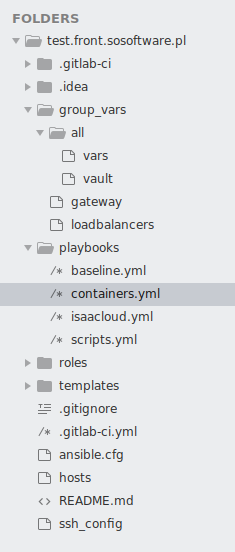
Project structure:
 agatahochor
All 20 comments
In my reply in the mailing list, I might have misunderstood what you were describing.
Add job template with playbook which should run on specific host from group (e.g. node01,node02,node03 are in docker group and in your playbook use docker[0] as host,which should point to node01).
I think you are saying that these hostnames (node01, etc.) and group "docker" are in containers.yml, which has already been imported into your inventory.
Could you give me the structure of this inventory file you're using? Just the host/group structure should be all I need, but I want to be sure I test a YAML inventory formatted the same way you did.
 AlanCoding
on 12 Sep 2018
AlanCoding
on 12 Sep 2018
No, these hostnames and groups are only in hosts file. In my playbook I just map my tasks to specific host, in this case it's docker[0].
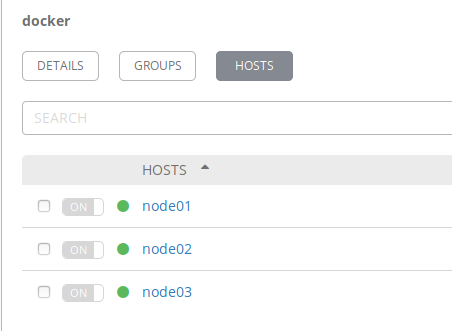
My hosts file looks like this:
node01 ansible_host=(some fqdn)
node02 ansible_host=(some fqdn)
node03 ansible_host=(some fqdn)[docker]
node0[1:3][gateway]
node01
And here's screen of how it looks in awx inventory:
agatahochor
on 13 Sep 2018
I've confirmed the reported behavior, in that Ansible core will preserve ordering of hosts in script output, but this is not being maintained as the script is generated.
The fix would be minor but I want to hold off until changes to script generation in https://github.com/ansible/awx/pull/2174 land.
AlanCoding
on 14 Sep 2018
ansible-inventory seems to use the python sorted()
AlanCoding
on 13 Nov 2018
Hello, I confirm this this problem is still on AWX 3.0.0 .
Order of hosts for project sourced inventories is not preserved.
e.g. GROUP[0] is not the same in ansible 2.7.x and awx 3.0.0
This issue can break some playbooks, that depend on the order of hosts in a group.
Is there an active PR for this ?
 basos9
on 5 Feb 2019
basos9
on 5 Feb 2019
No, this issues needs development. Some users may have experienced some regressions due to the python3 upgrade as well, which makes dictionary key ordering less predictable.
AlanCoding
on 5 Feb 2019
Can confirm. This is breaking some playbooks.
 manzarek123
on 26 Feb 2019
manzarek123
on 26 Feb 2019
+1 for this, royally screwed my Friday :(
 Wicaeed
on 6 Apr 2019
Wicaeed
on 6 Apr 2019
+1 for this too
 nuriel77
on 17 Jun 2019
nuriel77
on 17 Jun 2019
Have been able to work around this problem by providing a custom strategy plugin.
Copied the default strategy file lib/ansible/plugins/strategy/linear.py to
the playbook's directory filename plugins/strategy/hosts_sorted.py (or mount the file from the host to the container's ansible strategy plugins directory)
(venv) [root@server myplaybook]# ansible-doc -t strategy -l
debug        Executes tasks in interactive debug session
free         Executes tasks without waiting for all hosts
host_pinned  Executes tasks on each host without interruption
hosts_sorted Executes hosts in sorted order   # <- Ansible sees it
linear       Executes tasks in a linear fashion
In the new hosts_order.py edit documentation.
Then under the def run(self, iterator, play_context): added iterator._play.order = 'sorted'
i.e.:
...
    def run(self, iterator, play_context):
        iterator._play.order = 'sorted'
...
In the playbook make sure to load the new strategy plugin:
---
- hosts: all
  gather_facts: False
  strategy: hosts_sorted
...etc...
Of course this worked in my scenario where the inventory had to be sorted.
nuriel77
on 28 Jun 2019
We have the same issue as well. Is there some workaround?
We can't order the hosts in our playbook with the "order" module . It will be nice if AWX order the hosts on creating time. Ordering from the first host until the last host that has been created on the AWX Web interface.
We are bypassing this sorting methode with the sort filter that we apply on the variable: groups['{{ awx_hostname }}']
'{{ awx_hostname }}' -> variable for our groupname
- hosts: "{{ awx_hostname }}"
tasks:
- debug:
var: "groups['{{ awx_hostname }}'] | sort "
- debug:
Is there some better solution or fix ?
Running on the latest version of Ansible: Ansible 2.8.2
AWX-Version: 6.1.0
 MrAlci
on 18 Sep 2019
MrAlci
on 18 Sep 2019
Any updates on this?
Also another fix for playbooks that you run seperate plays for the first and other servers (like build something on first server and restart and only restart on other servers) is to create two addition groups like the example
hosts
[WEBSERVERS]
node1
node2

[WEBSEVERS_FIRST]
node1

[WEBSERVERS_OHTERS]
node2
Then modify playbook.yml
from
- name: "Deploy to first sever"
  hosts: WEBSERVERS[0]
  tasks: ....

- name: "Deploy to other servers"
  hosts: WEBSERVERS[1:]
  tasks: ....
to
- name: "Deploy to first sever"
  hosts: WEBSERVERS_FIRST[0]
  tasks: ....

- name: "Deploy to other servers"
  hosts: WEBSERVERS_OTHERS
  tasks: ....
Hi @AlanCoding, this bug is really painful and as you mentioned it would be an easy fix, can we bump the priority here? It seems the issue you were blocked by previously has been resolved. Thanks for your consideration. :)
 jrgoldfinemiddleton
on 28 Jan 2020
jrgoldfinemiddleton
on 28 Jan 2020
+1, this issue is causing inconsistency between runs. It's been around for a while, would appreciate fixing it if it is indeed an easy fix.
 lwierzch
on 29 Jan 2020
lwierzch
on 29 Jan 2020
I've applied a fix for now (using awx version 4.0.0), as we're having troubles with this issue too, and it seems to work for us.
If I am not mistaken, what is happening is that _create_update_group_hosts function in "/var/lib/awx/venv/awx/lib64/python3.6/site-packages/awx/main/management/commands/inventory_import.py" adds items to be committed to the db self._batch_add_m2m(...).
You will notice that there's a loop, e.g.:
for offset2 in range(0, len(all_instance_ids), self._batch_size):
wherein items are added to the batch. Once the loop is done, the same function self._batch_add_m2m(...) is called, this time with the flush=True.
I suppose that this doesn't guarantee the order in which the items are committed to the DB.
What I have done is add flush=True each time the self._batch_add_m2m(...) is called in the loop.
In theory, not so efficient code wise, but this seems to guarantee the order.
Long story short:
line 860 and 869 added the flush=True:
self._batch_add_m2m(db_group.hosts, db_host, flush=True) # flush to fix order
I am not getting any group order inconsistencies after this. Have applied the fix on a file on the host and mount it into the container to overwrite the original file.
nuriel77
on 29 Jan 2020
+1 for fixing this. some of the roles I use utilize groupname[0] to select for running cluster commands. run_once will not work due to cluster commands needing to be run on the same node.
 chriswortman
on 29 Jan 2020
chriswortman
on 29 Jan 2020
@nuriel77 I've implemented your fix in version 9.0.1 as well. I had to completely purge the AWX inventory and recreate it for the fix to apply.
Playbook we're running in AWX to check how each group is ordered:
---

- name: Print order of hosts in each host group
  hosts: all
  gather_facts: no

  tasks:
    - name: Print order of hosts in each host group in the inventory
      block:
        - name: Print all host groups
          debug:
            msg: "{{ groups }}"
      delegate_to: localhost
      run_once: yes
This is a truly terrible bug. I'm so disappointed that it has been around 1.5 years with no fix. Predictable ordering of inventory hosts is one of the features advertised for Ansible.
jrgoldfinemiddleton
on 7 Feb 2020
+1 for fixing this
I use serial: 1, and the playbook relies on executing order
 jyj1993126
on 11 Feb 2020
jyj1993126
on 11 Feb 2020
Is there any update on this issue? With @nuriel77's fix I thought we had resolved the issue, but I have found that's not so.
In our case, we have a Git repository that the Project uses. Our Inventory Sources are INI files inside the Git repository. We have seen that when the Project cannot be updated from Git for whatever reason, sometimes the hosts become reordered again once the Project is next updated. Again, the way we're confirming the host ordering is with a playbook like the one in https://github.com/ansible/awx/issues/2240#issuecomment-583158293 above.
Any insights or comments would be most appreciated in terms of what is going on here and how we could resolve the issue.
jrgoldfinemiddleton
on 18 Jun 2020
Hi, same issue, I see that the dictionary generated by awx is wrong but I don't understand the logic. It's not even sorted, seems random. We use inventory and reverse_inventory.
What we have in inventory :
VL069713
VL069712
VL069714
VL069715
VL069716
VL069717
VL069718
VL069719
VL069720
VL069916
VL069917
What we have in AWX inventory, in the tmp file:
"group1": {
"hosts": [
"VL069917",
"VL069712",
"VL069713",
"VL069714",
"VL069715",
"VL069716",
"VL069717",
"VL069718",
"VL069719",
"VL069720",
"VL069916"
]
Ansible version 14.1, ansible version 2.9.11
 Seb0042
on 12 Nov 2020
Seb0042
on 12 Nov 2020
Related issues
 mwiora
·
3Comments
mwiora
·
3Comments
 astraios
·
3Comments
astraios
·
3Comments
 IshwarKanse
·
3Comments
IshwarKanse
·
3Comments
 artmakh
·
3Comments
artmakh
·
3Comments
 augabet
·
3Comments
augabet
·
3Comments
Most helpful comment
I've applied a fix for now (using awx version 4.0.0), as we're having troubles with this issue too, and it seems to work for us.
If I am not mistaken, what is happening is that
_create_update_group_hostsfunction in"/var/lib/awx/venv/awx/lib64/python3.6/site-packages/awx/main/management/commands/inventory_import.py"adds items to be committed to the dbself._batch_add_m2m(...).You will notice that there's a loop, e.g.:
for offset2 in range(0, len(all_instance_ids), self._batch_size):wherein items are added to the batch. Once the loop is done, the same function
self._batch_add_m2m(...)is called, this time with theflush=True.I suppose that this doesn't guarantee the order in which the items are committed to the DB.
What I have done is add
flush=Trueeach time theself._batch_add_m2m(...)is called in the loop.In theory, not so efficient code wise, but this seems to guarantee the order.
Long story short:
line 860 and 869 added the
flush=True:I am not getting any group order inconsistencies after this. Have applied the fix on a file on the host and mount it into the container to overwrite the original file.