ISSUE TYPE
- Bug Report
COMPONENT NAME
- UI
SUMMARY
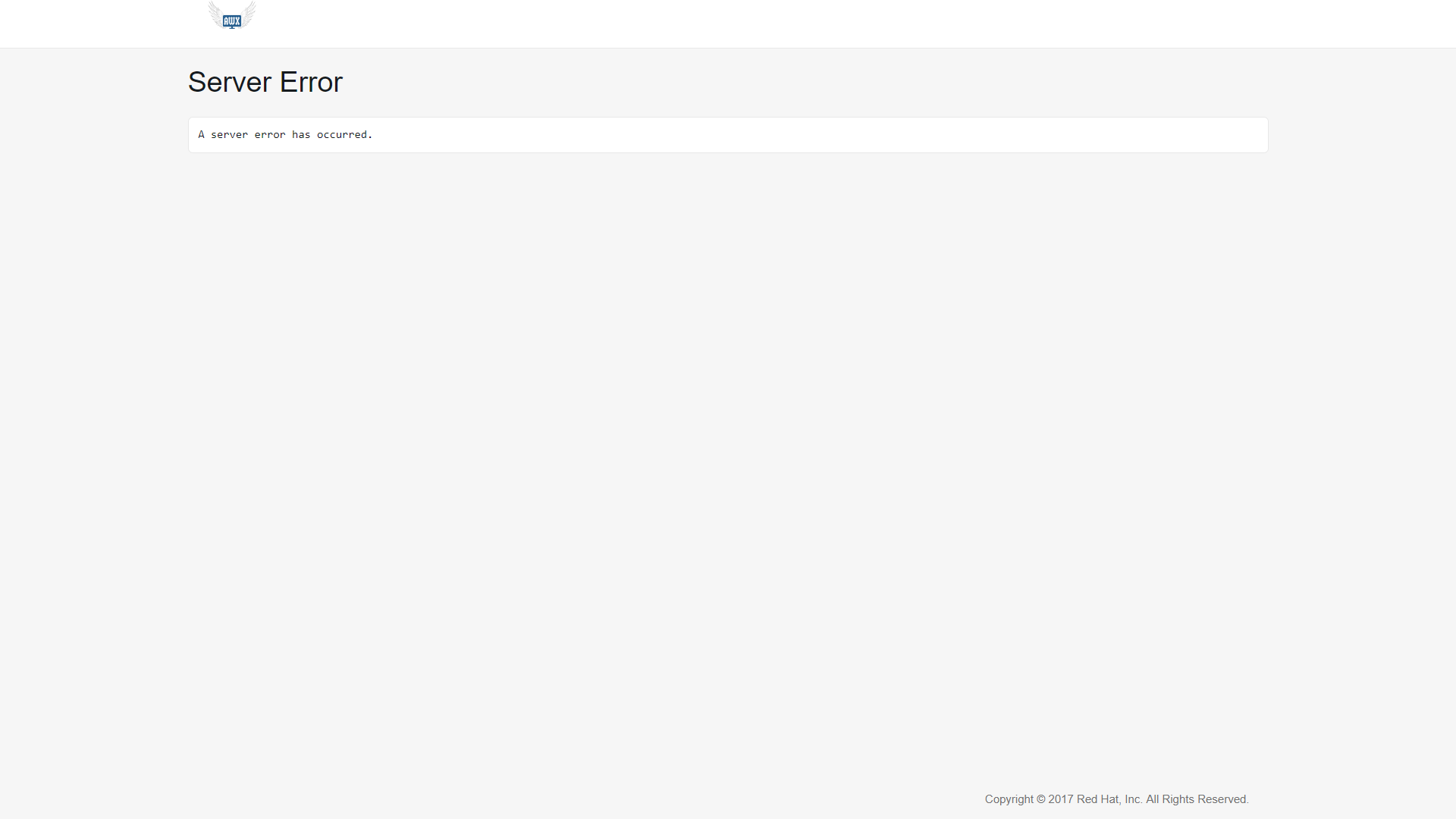
Hi, I am new to AWX and Ansible so I don't have a lot of experience with it. When I try to log in to my AWX server via browser I get a Server error without any explanation of what is causing the error and I can't log in even though it worked fine for a few weeks. This has happened to me a few times, I've solved it by reinstalling the server but in the future I don't want to do that once a month. There doesn't seem to be anything I did for the server to crash. Twice it was after a longer period of not using it. Once after a month and again today after two weeks. Does anyone have the same problem?
ENVIRONMENT
- AWX version: Latest
- AWX install method: docker
- Ansible version: 2.6.1
- Operating System: Centos 7.5.1804
- Web Browser: Chrome, Mozilla Firefox
STEPS TO REPRODUCE
EXPECTED RESULTS
ACTUAL RESULTS
ADDITIONAL INFORMATION
 davidchlup
All 11 comments
We'd need the logs from the server side to properly diagnose this.
 wenottingham
on 6 Aug 2018
wenottingham
on 6 Aug 2018
awx_ logs from the server:
2018-08-06 08:39:19,822 ERROR    django.request Internal Server Error: /
Traceback (most recent call last):
  File "/var/lib/awx/venv/awx/lib/python2.7/site-packages/django/core/handlers/exception.py", line 41, in inner
    response = get_response(request)
  File "/usr/lib/python2.7/site-packages/awx/wsgi.py", line 65, in _legacy_get_response
    return super(AWXWSGIHandler, self)._legacy_get_response(request)
  File "/var/lib/awx/venv/awx/lib/python2.7/site-packages/django/core/handlers/base.py", line 244, in _legacy_get_response
    response = middleware_method(request)
  File "/usr/lib/python2.7/site-packages/awx/main/middleware.py", line 195, in process_request
    executor = MigrationExecutor(connection)
  File "/var/lib/awx/venv/awx/lib/python2.7/site-packages/django/db/migrations/executor.py", line 20, in __init__
    self.loader = MigrationLoader(self.connection)
  File "/var/lib/awx/venv/awx/lib/python2.7/site-packages/django/db/migrations/loader.py", line 52, in __init__
    self.build_graph()
  File "/var/lib/awx/venv/awx/lib/python2.7/site-packages/django/db/migrations/loader.py", line 209, in build_graph
    self.applied_migrations = recorder.applied_migrations()
  File "/var/lib/awx/venv/awx/lib/python2.7/site-packages/django/db/migrations/recorder.py", line 65, in applied_migrations
    self.ensure_schema()
  File "/var/lib/awx/venv/awx/lib/python2.7/site-packages/django/db/migrations/recorder.py", line 52, in ensure_schema
    if self.Migration._meta.db_table in self.connection.introspection.table_names(self.connection.cursor()):
  File "/var/lib/awx/venv/awx/lib/python2.7/site-packages/django/db/backends/base/base.py", line 254, in cursor
    return self._cursor()
  File "/var/lib/awx/venv/awx/lib/python2.7/site-packages/django/db/backends/base/base.py", line 229, in _cursor
    self.ensure_connection()
  File "/var/lib/awx/venv/awx/lib/python2.7/site-packages/django/db/backends/base/base.py", line 213, in ensure_connection
    self.connect()
  File "/var/lib/awx/venv/awx/lib/python2.7/site-packages/django/db/utils.py", line 94, in __exit__
    six.reraise(dj_exc_type, dj_exc_value, traceback)
  File "/var/lib/awx/venv/awx/lib/python2.7/site-packages/django/db/backends/base/base.py", line 213, in ensure_connection
    self.connect()
  File "/var/lib/awx/venv/awx/lib/python2.7/site-packages/django/db/backends/base/base.py", line 189, in connect
    self.connection = self.get_new_connection(conn_params)
  File "/var/lib/awx/venv/awx/lib/python2.7/site-packages/django/db/backends/postgresql/base.py", line 176, in get_new_connection
    connection = Database.connect(**conn_params)
  File "/var/lib/awx/venv/awx/lib/python2.7/site-packages/psycopg2/__init__.py", line 130, in connect
    conn = _connect(dsn, connection_factory=connection_factory, **kwasync)
OperationalError: FATAL:  could not open file "base/16384/2601": No such file or directory
2018-08-06 08:39:19,822 ERROR    django.request Internal Server Error: /
Traceback (most recent call last):
  File "/var/lib/awx/venv/awx/lib/python2.7/site-packages/django/core/handlers/exception.py", line 41, in inner
    response = get_response(request)
  File "/usr/lib/python2.7/site-packages/awx/wsgi.py", line 65, in _legacy_get_response
    return super(AWXWSGIHandler, self)._legacy_get_response(request)
  File "/var/lib/awx/venv/awx/lib/python2.7/site-packages/django/core/handlers/base.py", line 244, in _legacy_get_response
    response = middleware_method(request)
  File "/usr/lib/python2.7/site-packages/awx/main/middleware.py", line 195, in process_request
    executor = MigrationExecutor(connection)
  File "/var/lib/awx/venv/awx/lib/python2.7/site-packages/django/db/migrations/executor.py", line 20, in __init__
    self.loader = MigrationLoader(self.connection)
  File "/var/lib/awx/venv/awx/lib/python2.7/site-packages/django/db/migrations/loader.py", line 52, in __init__
    self.build_graph()
  File "/var/lib/awx/venv/awx/lib/python2.7/site-packages/django/db/migrations/loader.py", line 209, in build_graph
    self.applied_migrations = recorder.applied_migrations()
  File "/var/lib/awx/venv/awx/lib/python2.7/site-packages/django/db/migrations/recorder.py", line 65, in applied_migrations
    self.ensure_schema()
  File "/var/lib/awx/venv/awx/lib/python2.7/site-packages/django/db/migrations/recorder.py", line 52, in ensure_schema
    if self.Migration._meta.db_table in self.connection.introspection.table_names(self.connection.cursor()):
  File "/var/lib/awx/venv/awx/lib/python2.7/site-packages/django/db/backends/base/base.py", line 254, in cursor
    return self._cursor()
  File "/var/lib/awx/venv/awx/lib/python2.7/site-packages/django/db/backends/base/base.py", line 229, in _cursor
    self.ensure_connection()
  File "/var/lib/awx/venv/awx/lib/python2.7/site-packages/django/db/backends/base/base.py", line 213, in ensure_connection
    self.connect()
  File "/var/lib/awx/venv/awx/lib/python2.7/site-packages/django/db/utils.py", line 94, in __exit__
    six.reraise(dj_exc_type, dj_exc_value, traceback)
  File "/var/lib/awx/venv/awx/lib/python2.7/site-packages/django/db/backends/base/base.py", line 213, in ensure_connection
    self.connect()
  File "/var/lib/awx/venv/awx/lib/python2.7/site-packages/django/db/backends/base/base.py", line 189, in connect
    self.connection = self.get_new_connection(conn_params)
  File "/var/lib/awx/venv/awx/lib/python2.7/site-packages/django/db/backends/postgresql/base.py", line 176, in get_new_connection
    connection = Database.connect(**conn_params)
  File "/var/lib/awx/venv/awx/lib/python2.7/site-packages/psycopg2/__init__.py", line 130, in connect
    conn = _connect(dsn, connection_factory=connection_factory, **kwasync)
OperationalError: FATAL:  could not open file "base/16384/2601": No such file or directory
192.168.112.114 - - [06/Aug/2018:08:39:19 +0000] "GET / HTTP/1.1" 500 3765 "-" "Mozilla/5.0 (Windows NT 10.0; Win64; x64; rv:57.0) Gecko/20100101 Firefox/57.0"
2018-08-06 08:39:19,861 WARNING  awx.conf.settings Database settings are not available, using defaults, logged from:
  File "/var/lib/awx/venv/awx/lib/python2.7/site-packages/django/core/handlers/wsgi.py", line 157, in __call__
    response = self.get_response(request)
  File "/var/lib/awx/venv/awx/lib/python2.7/site-packages/django/core/handlers/base.py", line 131, in get_response
    response = middleware_method(request, response)
  File "/usr/lib/python2.7/site-packages/awx/main/middleware.py", line 54, in process_response
    perf_logger.info('api response times', extra=dict(python_objects=dict(request=request, response=response)))
  File "/usr/lib64/python2.7/logging/__init__.py", line 1149, in info
    self._log(INFO, msg, args, **kwargs)
  File "/usr/lib64/python2.7/logging/__init__.py", line 1268, in _log
    self.handle(record)
  File "/usr/lib64/python2.7/logging/__init__.py", line 1278, in handle
    self.callHandlers(record)
  File "/usr/lib64/python2.7/logging/__init__.py", line 1318, in callHandlers
    hdlr.handle(record)
  File "/usr/lib64/python2.7/logging/__init__.py", line 745, in handle
    rv = self.filter(record)
  File "/usr/lib64/python2.7/logging/__init__.py", line 608, in filter
    if not f.filter(record):
  File "/usr/lib/python2.7/site-packages/awx/main/utils/filters.py", line 90, in filter
    if not self.enabled_flag:
  File "/usr/lib/python2.7/site-packages/awx/main/utils/filters.py", line 37, in __get__
    return getattr(settings, self.setting_name, None)
  File "/usr/lib/python2.7/site-packages/awx/conf/settings.py", line 489, in __getattr_without_cache__
    return getattr(self._wrapped, name)
  File "/usr/lib/python2.7/site-packages/awx/conf/settings.py", line 402, in __getattr__
    value = self._get_local(name)
  File "/usr/lib64/python2.7/contextlib.py", line 35, in __exit__
    self.gen.throw(type, value, traceback)
  File "/usr/lib/python2.7/site-packages/awx/conf/settings.py", line 75, in _log_database_error
    traceback.print_stack(file=sio)
[pid: 27|app: 0|req: 977/2604] 192.168.112.114 () {40 vars in 633 bytes} [Mon Aug  6 08:39:19 2018] GET / => generated 3765 bytes in 50 msecs (HTTP/1.1 500) 5 headers in 180 bytes (1 switches on core 0)
192.168.112.114 - - [06/Aug/2018:08:39:20 +0000] "GET /static/rest_framework/css/bootstrap.min.css HTTP/1.1" 200 121200 "http://192.168.150.193/" "Mozilla/5.0 (Windows NT 10.0; Win64; x64; rv:57.0) Gecko/20100101 Firefox/57.0"
192.168.112.114 - - [06/Aug/2018:08:39:20 +0000] "GET /static/api/api.css?v=1.0.6.28 HTTP/1.1" 200 7490 "http://192.168.150.193/" "Mozilla/5.0 (Windows NT 10.0; Win64; x64; rv:57.0) Gecko/20100101 Firefox/57.0"
192.168.112.114 - - [06/Aug/2018:08:39:20 +0000] "GET /static/rest_framework/css/prettify.css HTTP/1.1" 200 817 "http://192.168.150.193/" "Mozilla/5.0 (Windows NT 10.0; Win64; x64; rv:57.0) Gecko/20100101 Firefox/57.0"
192.168.112.114 - - [06/Aug/2018:08:39:20 +0000] "GET /static/rest_framework/css/default.css HTTP/1.1" 200 1131 "http://192.168.150.193/" "Mozilla/5.0 (Windows NT 10.0; Win64; x64; rv:57.0) Gecko/20100101 Firefox/57.0"
192.168.112.114 - - [06/Aug/2018:08:39:20 +0000] "GET /static/rest_framework/js/ajax-form.js HTTP/1.1" 200 3597 "http://192.168.150.193/" "Mozilla/5.0 (Windows NT 10.0; Win64; x64; rv:57.0) Gecko/20100101 Firefox/57.0"
192.168.112.114 - - [06/Aug/2018:08:39:20 +0000] "GET /static/rest_framework/js/csrf.js HTTP/1.1" 200 1735 "http://192.168.150.193/" "Mozilla/5.0 (Windows NT 10.0; Win64; x64; rv:57.0) Gecko/20100101 Firefox/57.0"
192.168.112.114 - - [06/Aug/2018:08:39:20 +0000] "GET /static/rest_framework/js/jquery-1.12.4.min.js HTTP/1.1" 200 97163 "http://192.168.150.193/" "Mozilla/5.0 (Windows NT 10.0; Win64; x64; rv:57.0) Gecko/20100101 Firefox/57.0"
192.168.112.114 - - [06/Aug/2018:08:39:20 +0000] "GET /static/rest_framework/js/bootstrap.min.js HTTP/1.1" 200 37045 "http://192.168.150.193/" "Mozilla/5.0 (Windows NT 10.0; Win64; x64; rv:57.0) Gecko/20100101 Firefox/57.0"
192.168.112.114 - - [06/Aug/2018:08:39:20 +0000] "GET /static/rest_framework/js/prettify-min.js HTTP/1.1" 200 13632 "http://192.168.150.193/" "Mozilla/5.0 (Windows NT 10.0; Win64; x64; rv:57.0) Gecko/20100101 Firefox/57.0"
192.168.112.114 - - [06/Aug/2018:08:39:20 +0000] "GET /static/rest_framework/js/default.js HTTP/1.1" 200 1262 "http://192.168.150.193/" "Mozilla/5.0 (Windows NT 10.0; Win64; x64; rv:57.0) Gecko/20100101 Firefox/57.0"
192.168.112.114 - - [06/Aug/2018:08:39:20 +0000] "GET /static/api/api.js?v=1.0.6.28 HTTP/1.1" 200 3145 "http://192.168.150.193/" "Mozilla/5.0 (Windows NT 10.0; Win64; x64; rv:57.0) Gecko/20100101 Firefox/57.0"
192.168.112.114 - - [06/Aug/2018:08:39:20 +0000] "GET /static/assets/logo-header.svg HTTP/1.1" 200 38676 "http://192.168.150.193/" "Mozilla/5.0 (Windows NT 10.0; Win64; x64; rv:57.0) Gecko/20100101 Firefox/57.0"
192.168.112.114 - - [06/Aug/2018:08:39:20 +0000] "GET /static/assets/favicon.ico?v=1.0.6.28 HTTP/1.1" 200 15086 "-" "Mozilla/5.0 (Windows NT 10.0; Win64; x64; rv:57.0) Gecko/20100101 Firefox/57.0"
RESULT 2
OKREADY
RESULT 2
OKREADY
RESULT 2
OKREADY
RESULT 2
OKREADY
RESULT 2
OKREADY
RESULT 2
OKREADY
RESULT 2
OKREADY
RESULT 2
OKREADY
RESULT 2
OKREADY
RESULT 2
OKREADY
RESULT 2
OKREADY
RESULT 2
OKREADY
RESULT 2
OKREADY
RESULT 2
OKREADY
RESULT 2
OKREADY
RESULT 2
OKREADY
RESULT 2
OKREADY
RESULT 2
OKREADY
RESULT 2
OKREADY
RESULT 2
OKREADY
RESULT 2
OKREADY
RESULT 2
OKREADY
davidchlup
on 13 Aug 2018
Hello, TheSentinelD.
Thanks for filing this issue. The behavior you've described and logs you've provided almost always indicate errors due to attempting to update between incompatible versions of AWX.
Although there are no _supported_ migration paths for updating between awx versions, there are some community-driven approaches that work well for some: https://github.com/ansible/awx/issues/1745#issuecomment-414352959
I'm going to close this issue as resolved - if you'd like more information be sure to check out our documentation on migrations, visit our community mailing list, or stop by our IRC channel.
 jakemcdermott
on 21 Aug 2018
jakemcdermott
on 21 Aug 2018
Hi, I have one more question. Does AWX update on its own? Can it even do that? I'm asking because you've said that the error is due to updating but I didn't try to update it.
Thank you
davidchlup
on 10 Sep 2018
Mostly it won't, unless your server try fetch latest images from
dockerhub. If the deployment is based on Kubernetes, then there will be a
higher chance for auto upgrade after restarting Kubernete services
On Mon 10 Sep, 2018, 5:51 PM TheSentinelD, notifications@github.com wrote:
Hi, I have one more question. Does AWX update on its own? Can it even do
that? I'm asking because you've said that the error is due to updating but
I didn't try to update it.Thank you
—
You are receiving this because you are subscribed to this thread.
Reply to this email directly, view it on GitHub
https://github.com/ansible/awx/issues/2140#issuecomment-419893181, or mute
the thread
https://github.com/notifications/unsubscribe-auth/AcCOQ1d75Q2-CkfNU2l7r39o7NGU9WNKks5uZllHgaJpZM4VwADY
.
 sujiar37
on 10 Sep 2018
sujiar37
on 10 Sep 2018
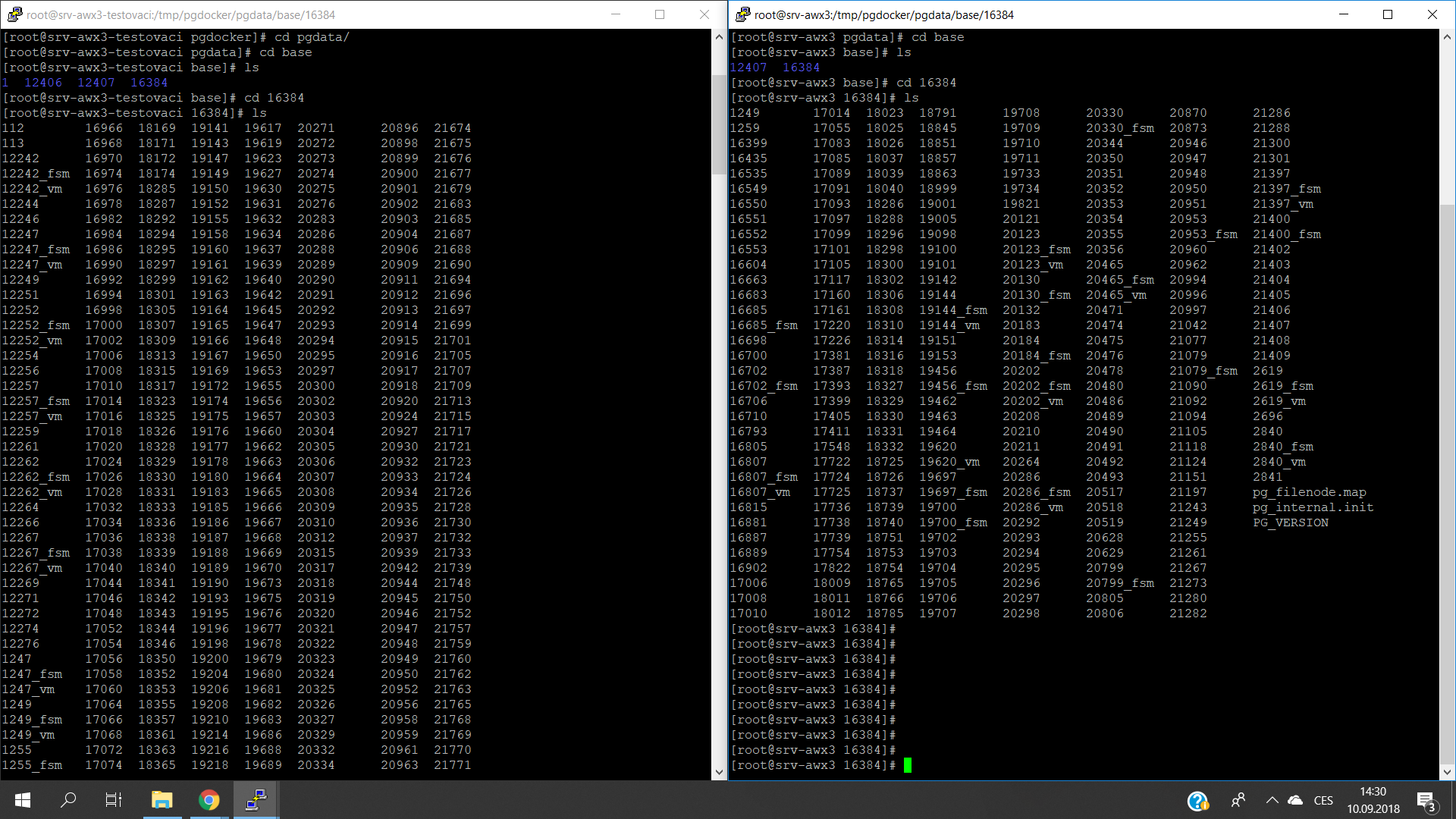
And one more actually. I've been digging a little bit and i've noticed something weird. I have more than one server on which I have AWX for testing purposes. In my postgres and awx_task logs I repeatedly get
FATAL: could not open file "base/16384/2601": No such file or directory
When I looked in /tmp/pgdocker/pgdata/base I've found out that more than this file disappeared. Actually a whole bunch. In pgdata/base two directories are missing and in base/16384 is only about a quarter files left. Could you please explain to me what is going on? My knowledge on this is limited and I've been stuck on this issue for quite some time. I'm adding printscreen where on the left is a freshly installed AWX and on the right AWX with server error.
Thanks for any help
davidchlup
on 10 Sep 2018
Please go through install.yml file of AWX which mentioned pg database path
as /tmp. So files and folders inside this directory gonna delete after few
days and probably returns internal server error if AWX keep running at /tmp
You can change that path and avoid these kind of errors. Also please note
that these questions are already discussed here & Google groups. So it's
nice to dounle search here before commenting
On Mon 10 Sep, 2018, 6:13 PM TheSentinelD, notifications@github.com wrote:
And one more actually. I've been digging a little bit and i've noticed
something weird. I have more than one server on which I have AWX for
testing purposes. In my postgres and awx_task logs I repeatedly get
FATAL: could not open file "base/16384/2601": No such file or directory
When I looked in /tmp/pgdocker/pgdata/base I've found out that more than
this file disappeared. Actually a whole bunch. In pgdata/base two
directories are missing and in base/16384 is only about a quarter files
left. Could you please explain to me what is going on? My knowledge on this
is limited and I've been stuck on this issue for quite some time. I'm
adding printscreen where on the left is a freshly installed AWX and on the
right AWX with server error.
Thanks for any help
[image: 2018-09-10]
https://user-images.githubusercontent.com/40761819/45297596-31848600-b506-11e8-9526-72be190cc5d9.png—
You are receiving this because you commented.
Reply to this email directly, view it on GitHub
https://github.com/ansible/awx/issues/2140#issuecomment-419898932, or mute
the thread
https://github.com/notifications/unsubscribe-auth/AcCOQxMtwFGL5W-FkY2uVYR3kABCILG2ks5uZl50gaJpZM4VwADY
.
sujiar37
on 10 Sep 2018
The same here. AWX stopped working after weekend. It installed with default settings.
[2018-09-17 09:43:54,381: INFO/Beat] Scheduler: Sending due task task_manager (awx.main.scheduler.tasks.run_task_manager)
[2018-09-17 09:43:54,387: DEBUG/Beat] awx.main.scheduler.tasks.run_task_manager sent. id->5265ba6d-e2bf-4e19-87fc-08fbf27a11e5
[2018-09-17 09:43:54,387: DEBUG/Beat] beat: Waking up in 19.99 seconds.
[2018-09-17 09:43:54,389: INFO/MainProcess] Received task: awx.main.scheduler.tasks.run_task_manager[5265ba6d-e2bf-4e19-87fc-08fbf27a11e5] expires:[2018-09-17 09:44:14.386768+00:00]
[2018-09-17 09:43:54,389: DEBUG/MainProcess] TaskPool: Apply <function _fast_trace_task at 0x7f671a336320> (args:(u'awx.main.scheduler.tasks.run_task_manager', u'5265ba6d-e2bf-4e19-87fc-08fbf27a11e5', [], {}, {u'utc': True, u'is_eager': False, u'chord': None, u'group': None, u'args': [], u'retries': 0, u'delivery_info': {u'priority': 0, u'redelivered': False, u'routing_key': u'awx_private_queue', u'exchange': u'awx_private_queue'}, u'expires': u'2018-09-17T09:44:14.386768+00:00', u'hostname': 'celery@awx', u'task': u'awx.main.scheduler.tasks.run_task_manager', u'callbacks': None, u'correlation_id': u'5265ba6d-e2bf-4e19-87fc-08fbf27a11e5', u'errbacks': None, u'timelimit': [None, None], u'taskset': None, u'kwargs': {}, u'eta': None, u'reply_to': u'db238517-220b-3192-9fe2-2788e1effaa1', u'id': u'5265ba6d-e2bf-4e19-87fc-08fbf27a11e5', u'headers': {}}) kwargs:{})
[2018-09-17 09:43:54,391: DEBUG/MainProcess] Task accepted: awx.main.scheduler.tasks.run_task_manager[5265ba6d-e2bf-4e19-87fc-08fbf27a11e5] pid:252
[2018-09-17 09:43:54,411: CRITICAL/MainProcess] Task awx.main.scheduler.tasks.run_task_manager[5265ba6d-e2bf-4e19-87fc-08fbf27a11e5] INTERNAL ERROR: OperationalError('FATAL:  could not open file "base/16384/2601": No such file or directory\n',)
Traceback (most recent call last):
  File "/var/lib/awx/venv/awx/lib/python2.7/site-packages/celery/app/trace.py", line 235, in trace_task
    request=task_request,
  File "/var/lib/awx/venv/awx/lib/python2.7/site-packages/celery/backends/base.py", line 271, in store_result
    request=request, **kwargs)
  File "/var/lib/awx/venv/awx/lib/python2.7/site-packages/djcelery/backends/database.py", line 33, in _store_result
    traceback=traceback, children=self.current_task_children(request),
  File "/var/lib/awx/venv/awx/lib/python2.7/site-packages/djcelery/managers.py", line 45, in _inner
    return fun(*args, **kwargs)
  File "/var/lib/awx/venv/awx/lib/python2.7/site-packages/djcelery/managers.py", line 184, in store_result
    'meta': {'children': children}})
  File "/var/lib/awx/venv/awx/lib/python2.7/site-packages/djcelery/managers.py", line 90, in update_or_create
    return get_queryset(self).update_or_create(**kwargs)
  File "/var/lib/awx/venv/awx/lib/python2.7/site-packages/djcelery/managers.py", line 73, in update_or_create
    obj, created = self.get_or_create(**kwargs)
  File "/var/lib/awx/venv/awx/lib/python2.7/site-packages/django/db/models/query.py", line 464, in get_or_create
    return self.get(**lookup), False
  File "/var/lib/awx/venv/awx/lib/python2.7/site-packages/django/db/models/query.py", line 374, in get
    num = len(clone)
  File "/var/lib/awx/venv/awx/lib/python2.7/site-packages/django/db/models/query.py", line 232, in __len__
    self._fetch_all()
  File "/var/lib/awx/venv/awx/lib/python2.7/site-packages/django/db/models/query.py", line 1118, in _fetch_all
    self._result_cache = list(self._iterable_class(self))
  File "/var/lib/awx/venv/awx/lib/python2.7/site-packages/django/db/models/query.py", line 53, in __iter__
    results = compiler.execute_sql(chunked_fetch=self.chunked_fetch)
  File "/var/lib/awx/venv/awx/lib/python2.7/site-packages/django/db/models/sql/compiler.py", line 887, in execute_sql
    cursor = self.connection.cursor()
  File "/var/lib/awx/venv/awx/lib/python2.7/site-packages/django/db/backends/base/base.py", line 254, in cursor
    return self._cursor()
  File "/var/lib/awx/venv/awx/lib/python2.7/site-packages/django/db/backends/base/base.py", line 229, in _cursor
    self.ensure_connection()
  File "/var/lib/awx/venv/awx/lib/python2.7/site-packages/django/db/backends/base/base.py", line 213, in ensure_connection
    self.connect()
  File "/var/lib/awx/venv/awx/lib/python2.7/site-packages/django/db/utils.py", line 94, in __exit__
    six.reraise(dj_exc_type, dj_exc_value, traceback)
  File "/var/lib/awx/venv/awx/lib/python2.7/site-packages/django/db/backends/base/base.py", line 213, in ensure_connection
    self.connect()
  File "/var/lib/awx/venv/awx/lib/python2.7/site-packages/django/db/backends/base/base.py", line 189, in connect
    self.connection = self.get_new_connection(conn_params)
  File "/var/lib/awx/venv/awx/lib/python2.7/site-packages/django/db/backends/postgresql/base.py", line 176, in get_new_connection
    connection = Database.connect(**conn_params)
  File "/var/lib/awx/venv/awx/lib/python2.7/site-packages/psycopg2/__init__.py", line 130, in connect
    conn = _connect(dsn, connection_factory=connection_factory, **kwasync)
OperationalError: FATAL:  could not open file "base/16384/2601": No such file or directory

RESULT 2
OKREADY
 DrPreobrazhensky
on 17 Sep 2018
DrPreobrazhensky
on 17 Sep 2018
Hi, you're getting the same error I am.
OperationalError: FATAL: could not open file "base/16384/2601": No such file or directory
Your database is by default located in /tmp/pgdocker which is (probably) causing it since /tmp files are periodically deleted. It's the kind of thing you'll find out after second or third reinstall. :)
Reinstall your AWX and before installing, change in your install.yml file database file from /tmp/pgdocker to something else. I've changed it to /srv/pgdocker. So far it works for me.
Good luck
Edit: Btw, the file it cannot find is in /tmp/pgdocker/pgdata/base/16384/2601. But there are a lot more files in pgdata that are missing.
davidchlup
on 17 Sep 2018
Please go through install.yml file of AWX which mentioned pg database path as /tmp. So files and folders inside this directory gonna delete after few days and probably returns internal server error if AWX keep running at /tmp You can change that path and avoid these kind of errors. Also please note that these questions are already discussed here & Google groups. So it's nice to dounle search here before commenting
OK but why is the default path for the postgresql volume set to /tmp, it's going to catch out a lot of new adopters (including us) and is not mention in the installation docs that this should be changed if doing anything more than a quick test.
BTW The file you need to change is installer/inventory.
 JamesUoM
on 5 Oct 2018
JamesUoM
on 5 Oct 2018
Hi, you're getting the same error I am.
OperationalError: FATAL: could not open file "base/16384/2601": No such file or directory
Your database is by default located in /tmp/pgdocker which is (probably) causing it since /tmp files are periodically deleted. It's the kind of thing you'll find out after second or third reinstall. :)
Reinstall your AWX and before installing, change in your install.yml file database file from /tmp/pgdocker to something else. I've changed it to /srv/pgdocker. So far it works for me.
Good luckEdit: Btw, the file it cannot find is in /tmp/pgdocker/pgdata/base/16384/2601. But there are a lot more files in pgdata that are missing.
You're right, it missing certain files in direcory pgdata/base/
 cundi
on 26 Mar 2019
cundi
on 26 Mar 2019
Related issues
 agaffney
·
3Comments
agaffney
·
3Comments
 marshmalien
·
3Comments
marshmalien
·
3Comments
 gamuniz
·
3Comments
gamuniz
·
3Comments
 shortsteps
·
3Comments
shortsteps
·
3Comments
 kakkotetsu
·
3Comments
kakkotetsu
·
3Comments
Most helpful comment
OK but why is the default path for the postgresql volume set to /tmp, it's going to catch out a lot of new adopters (including us) and is not mention in the installation docs that this should be changed if doing anything more than a quick test.
BTW The file you need to change is installer/inventory.