ISSUE TYPE
- Bug Report
- Documentation
COMPONENT NAME
- API
SUMMARY
Running a POST /api/v2/authtoken returns {"detail":"The requested resource could not be found."}
Either the documentation is wrong at http://docs.ansible.com/ansible-tower/latest/html/towerapi/auth_token.html or their is something wrong with the api.
ENVIRONMENT
- AWX version: 1.0.6.8
- AWX install method: docker on linux
- Ansible version: 2.5.2
- Operating System: CentOS 7
- Web Browser: Chromium
STEPS TO REPRODUCE
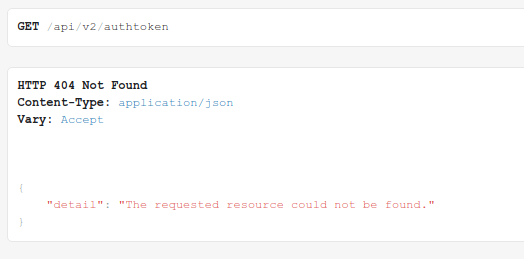
Either ran a GET or POST request to /api/v2/authtoken and it fails and come back with the following:
EXPECTED RESULTS
It should return something similar to the below:
{
    "token": "8f17825cf08a7efea124f2638f3896f6637f8745",
    "expires": "2013-09-05T21:46:35.729Z"
}
ACTUAL RESULTS
{"detail":"The requested resource could not be found."}
ADDITIONAL INFORMATION
 adambirds
All 5 comments
@adambirds the documentation you've referenced is for Ansible Tower 3.2. In newer versions of awx, we've replaced the auth token implementation with OAuth2 tokens. Take a peek at this documentation for an explanation on how to generate OAuth2 tokens:
https://github.com/ansible/awx/blob/devel/docs/auth/oauth.md
 ryanpetrello
on 4 Jun 2018
ryanpetrello
on 4 Jun 2018
{"detail":"Authentication credentials were not provided. To establish a login session, visit /api/login/."}
 rafis
on 5 Nov 2019
rafis
on 5 Nov 2019
Any one get past this? Encountering {"detail":"Authentication credentials were not provided. To establish a login session, visit /api/login/."}
Even after following @ryanpetrello method
 gespinoza22
on 27 Mar 2020
gespinoza22
on 27 Mar 2020
Hi,
Don't know if you're still stuck on this but I've just started using the API.
The posts to /api/v2/applications/ and /api/v2/tokens/ using basic auth, obviously the user has to have rights on the box. I used our admin account. The second post gives you the tokens then you use those as bearer tokens in subsequent requests.
The ID for organisation can be picked from the URL when browsing them, here the application ID is 3.
https://awx.test.co.uk/#/applications/3?application_search=page_size:10;order_by:name
 mark1973ryan
on 24 Jul 2020
mark1973ryan
on 24 Jul 2020
so did you end up using the http://10.190.101.31/api/v2/auth for 3.7 version and were you able login and receive tokens?
 sarvanivadali
on 5 Aug 2020
sarvanivadali
on 5 Aug 2020
Related issues
 grahamn-gr
·
3Comments
grahamn-gr
·
3Comments
 beenje
·
3Comments
beenje
·
3Comments
 pebbledavec
·
3Comments
pebbledavec
·
3Comments
 IMOKURI
·
3Comments
IMOKURI
·
3Comments
 icsm2017
·
4Comments
icsm2017
·
4Comments
Most helpful comment
@adambirds the documentation you've referenced is for Ansible Tower 3.2. In newer versions of awx, we've replaced the auth token implementation with OAuth2 tokens. Take a peek at this documentation for an explanation on how to generate OAuth2 tokens:
https://github.com/ansible/awx/blob/devel/docs/auth/oauth.md