ISSUE TYPE
- Bug Report
COMPONENT NAME
- LDAP Integration
SUMMARY
I enter all of my LDAP settings in the configure awx section. I then try saving the settings and they just don't save, if I navigate away to another section and come back the settings are gone.
ENVIRONMENT
- AWX version: 1.0.6.8
- AWX install method: docker on linux
- Ansible version: 2.5.2
- Operating System: Ubuntu 18.04
- Web Browser: Chromium v66.0.3359.181 x64 bit
STEPS TO REPRODUCE
I enter all of my LDAP settings in the configure awx section. I then try saving the settings and they just don't save, if I navigate away to another section and come back the settings are gone.
EXPECTED RESULTS
LDAP Settings should save.
ACTUAL RESULTS
LDAP Settings don't save.
 adambirds
All 28 comments
I believe this may be similar to the issues in #1877 and #1855 but my issues seem slightly different.
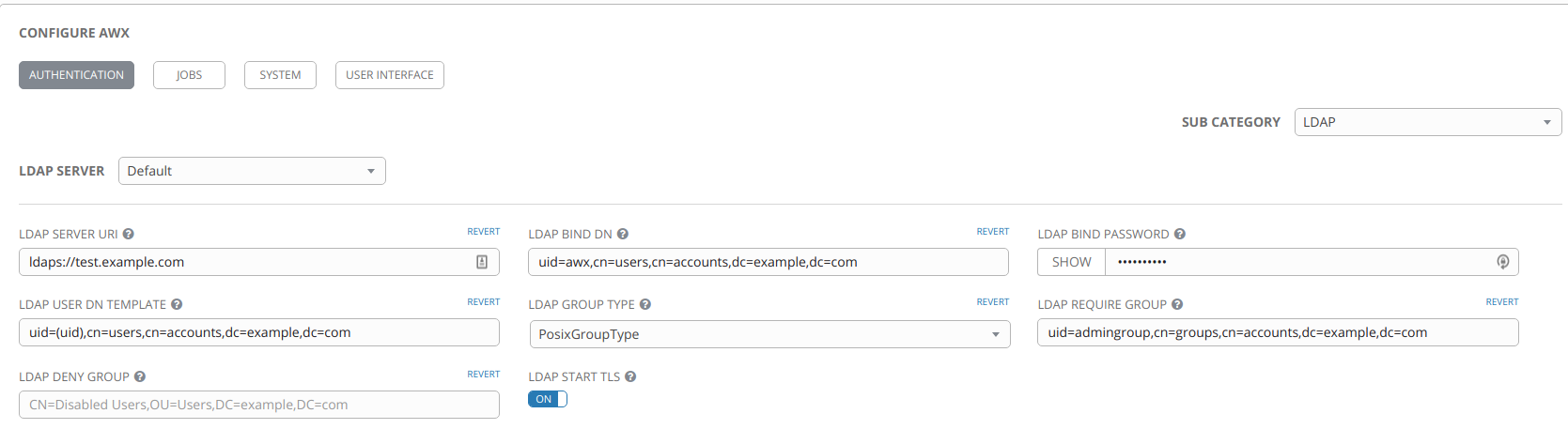
Below are my settings, with domains changed for privacy:
I have also tried setting the below, but that has no effect either:

adambirds
on 26 May 2018
You can find the version from the 'About' link in the lower right of the interface.
 wenottingham
on 29 May 2018
wenottingham
on 29 May 2018
I have the same issue. When saving this error shows up in the web console :
TypeError: Cannot read property 'AUTH_LDAP_SERVER_URI' of undefined
    at app.9f28d3aa1bf241aae5cf.js:42
    at app.9f28d3aa1bf241aae5cf.js:42
    at processQueue (vendor.8ddedf36ca3fae56dcba.js:583)
    at vendor.8ddedf36ca3fae56dcba.js:583
    at Scope.$digest (vendor.8ddedf36ca3fae56dcba.js:583)
    at Scope.$apply (vendor.8ddedf36ca3fae56dcba.js:583)
    at done (vendor.8ddedf36ca3fae56dcba.js:583)
    at completeRequest (vendor.8ddedf36ca3fae56dcba.js:583)
    at XMLHttpRequest.xhr.onload (vendor.8ddedf36ca3fae56dcba.js:583) "Possibly unhandled rejection: {}"
awx version : 1.0.6.12
 maxverro
on 31 May 2018
maxverro
on 31 May 2018
@wenottingham apologies for the delay, missed my notification, my AWX version is AWX 1.0.6.8
adambirds
on 31 May 2018
@adambirds I pushed a fix to improve the error handling, improve the UX around saving the LDAP form here: https://github.com/ansible/awx/commit/7610c660cb8171c4bd04d426289432dfe77f544b. I'm wondering if you have this commit? I believe this would have landed in the 1.6 range so I believe you should have it.
Have you tried clearing your cache to make sure you're not working w/ some stale code?
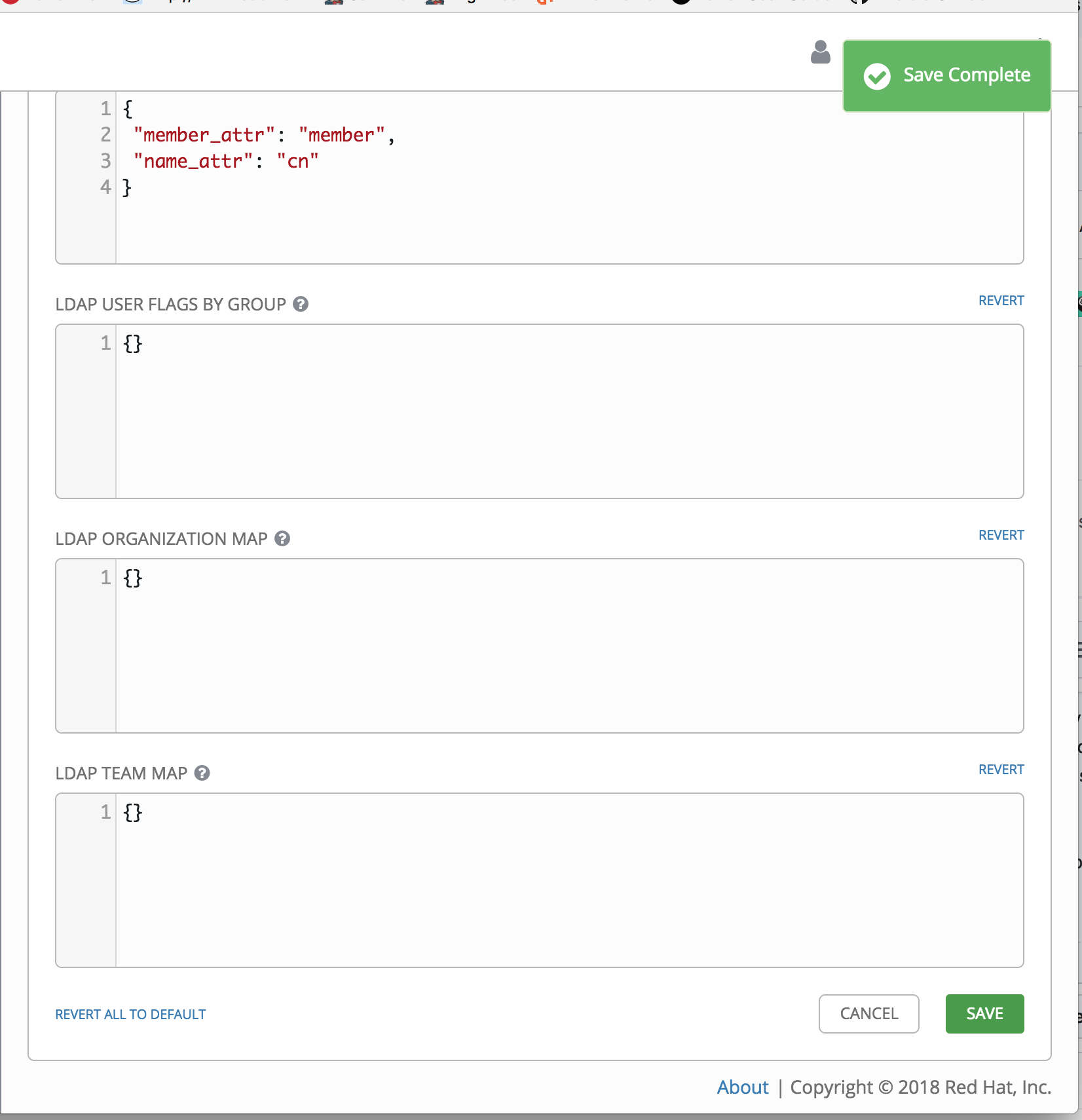
One improvement I made was to add a successful save notification. Can you confirm that you are (or aren't) seeing this:
 jaredevantabor
on 8 Jun 2018
jaredevantabor
on 8 Jun 2018
@jaredevantabor can you explain which cache you want me to clear and how to update.
I can also confirm that I don't receive that pop-up.
adambirds
on 8 Jun 2018
@adambirds my apologies, the browser cache. If you're using Chrome, you can do that by going to the Advanced Settings within Settings, and click Clear browsing data.
I forget off the top of my head how to do this for Firefox but it's very similar. Find settings and clear browser data/cache.
You could also quickly try loading the UI in Chrome's Incognito mode
jaredevantabor
on 8 Jun 2018
@jaredevantabor unfortunately that hasn't resolved it and still don't get the popup, this seems to be the same across several browsers as well.
adambirds
on 8 Jun 2018
My workaround was to leave the default ldap server unconfigured and configure the optional ldap1 server. It saved the config and worked.
 orgito
on 9 Jun 2018
orgito
on 9 Jun 2018
This workaround didn't work for me.
adambirds
on 9 Jun 2018
I've just installed 1.0.6.15 with a fresh DB, went to the LDAP section and couldn't make it save at all and I'm also not getting any feedback. Popup says "saving...", disappears and when I change to some other menu and back all my settings are gone.
The log of the awx_web container tells about a 400 trying to access https://myawxdomain/api/v2/settings/all/ so I tried again with opened browser console to find out it failed because of Invalid key(s): "member_attr". which was already in the form by default, I just didn't touch it yet.
{
 "member_attr": "member",
 "name_attr": "cn"
}
So I'm wondering
- why is the default broken?
- why am I not getting any feedback that saving failed?
- wouldn't the reason for failure be useful info for the user? :)
 tumbl3w33d
on 11 Jun 2018
tumbl3w33d
on 11 Jun 2018
@tumbl3w33d which log file was that in. I'll see if I get the same error code on mine. Presumably I will.
adambirds
on 11 Jun 2018
I just watched the output of docker logs for the awx_task container. Not sure which file it actually is. I should add, it's much easier to open F12 (your browser's console) and look at the network tab when you hit "save". The response contains the actual error.
In the mentioned container log it showed
2018-06-11 14:33:47,537 WARNING  awx.conf.settings The current value "{u'member_attr': u'member', u'name_attr': u'cn'}" for setting "AUTH_LDAP_GROUP_TYPE_PARAMS" is invalid.
Traceback (most recent call last):
  File "/usr/lib/python2.7/site-packages/awx/conf/settings.py", line 382, in _get_local
    return field.run_validation(value)
  File "/var/lib/awx/venv/awx/lib/python2.7/site-packages/rest_framework/fields.py", line 523, in run_validation
    value = self.to_internal_value(data)
  File "/usr/lib/python2.7/site-packages/awx/sso/fields.py", line 424, in to_internal_value
    self.fail('invalid_keys', invalid_keys=keys_display)
  File "/var/lib/awx/venv/awx/lib/python2.7/site-packages/rest_framework/fields.py", line 585, in fail
    raise ValidationError(message_string, code=key)
ValidationError: [u'Invalid key(s): "member_attr".']
Once I removed that entry from the form my other settings went through. I entered everything one by one and hit save after each input, making sure I get return code 200 in the browser console. It all worked out fine then an I got my LDAP setup running.
tumbl3w33d
on 11 Jun 2018
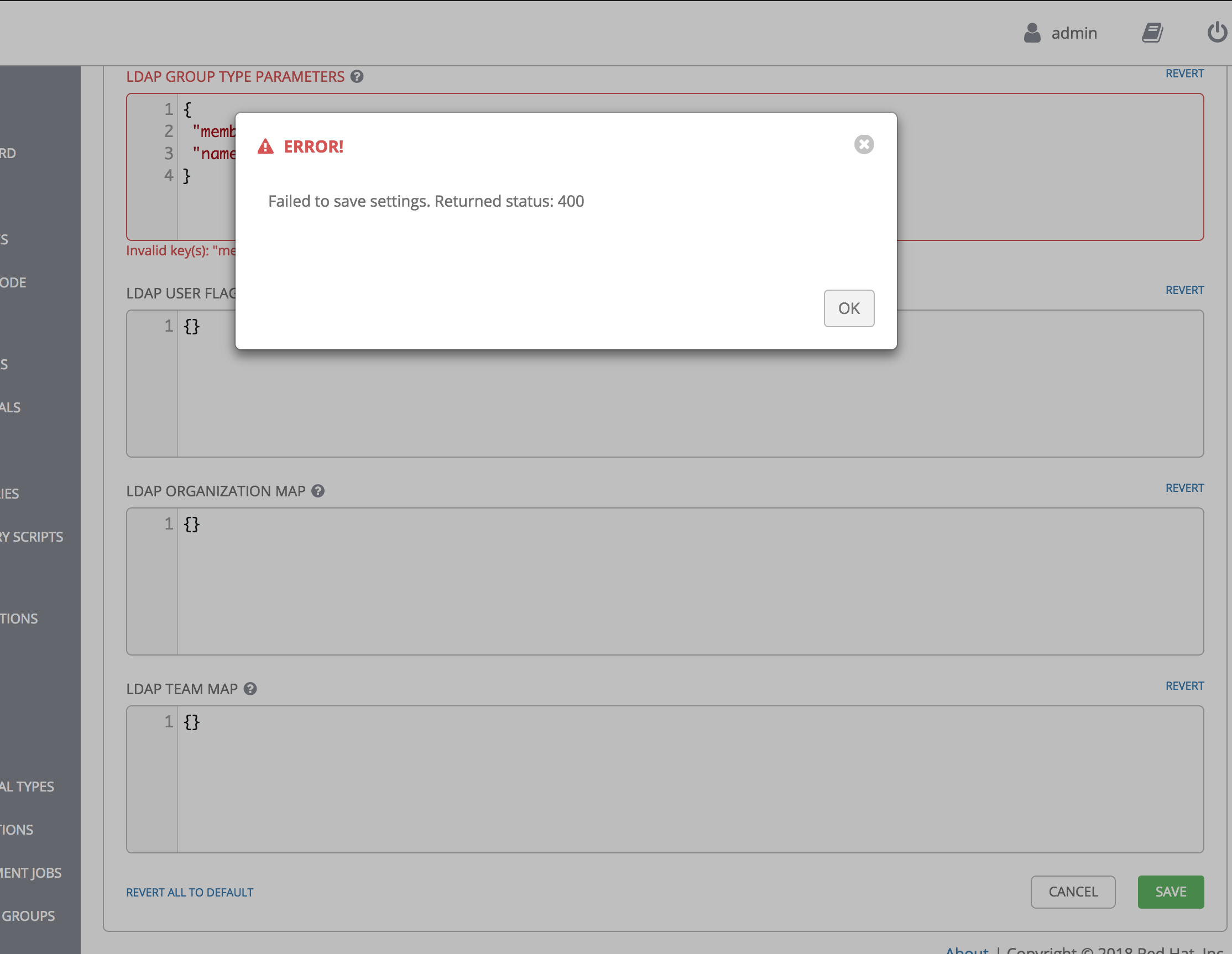
@tumbl3w33d thanks for that valuable feedback. The commit I mentioned above was meant to improve the error handling on the LDAP form, so that failed saves wouldn't fail silently. The fact that you aren't seeing this is concerning to me. I'll circle back on this to double check the steps you've outlined. This is what I would expect for you to see. Notice that we should show a warning message in addition to highlighting the field in red on the form.
jaredevantabor
on 11 Jun 2018
In case it might be a browser issue - I'm running Firefox ESR 52.8.0 (64bit) on an up-to-date CentOS7 workstation. The only plugin installed in the FF is uBlock origin.
tumbl3w33d
on 11 Jun 2018
I just checked for your commit 7610c66 and I don't seem to have it.
# git log -1
commit 4fe7c9ea427f5b00cd89a6a1583a7bf9c5eb9a61
Merge: a45ccfdc7 64b612921
Author: Yunfan Zhang <[email protected]>
Date:   Mon Jun 4 16:42:44 2018 -0400
and I'm on devel.
tumbl3w33d
on 11 Jun 2018
Ah. You know what...my commit hasn't landed in AWX yet. Apologies. I'll circle back and let you know when it has. This should hopefully make this UX much better. @tumbl3w33d @adambirds
jaredevantabor
on 11 Jun 2018
For folks who are still having this issue, removing the default LDAP GROUP TYPE PARAMETERS allowed me to successfully save LDAP settings.
 jariley
on 13 Jun 2018
jariley
on 13 Jun 2018
Hi @jaredevantabor, do you have an ETA of when we can expect your commit to land in AWX please? This is one of the bugs that stops us from upgrading from 1.0.4.x. Thanks
 grahamneville
on 2 Jul 2018
grahamneville
on 2 Jul 2018
We had similar issue saving some ldap option. We managed to change/save thru towet-cli/awx-cli.
 hemskgren
on 3 Jul 2018
hemskgren
on 3 Jul 2018
Hi @jaredevantabor . I see there was a big merge in to the devel branch, is 7610c66 included, if not do you know when we could see it arrive?
grahamneville
on 13 Aug 2018
Hey @grahamneville, we're currently working on cutting a new release of awx (which will include
https://github.com/ansible/awx/commit/7610c660cb8171c4bd04d426289432dfe77f544b).
 ryanpetrello
on 13 Aug 2018
ryanpetrello
on 13 Aug 2018
Cool, @ryanpetrello. Will this release have a docker tag of 1.0.7.0? How will I know which release it will be in?
grahamneville
on 13 Aug 2018
@grahamneville @adambirds @hemskgren, we've just released 1.0.7, which you can try out here: https://github.com/ansible/awx/releases/tag/1.0.7
Let us know if you're still seeing issues after installing the latest awx - thanks!
ryanpetrello
on 13 Aug 2018
@grahamneville
https://hub.docker.com/r/ansible/awx_web/tags/
https://hub.docker.com/r/ansible/awx_task/tags/
ryanpetrello
on 13 Aug 2018
The commit 7610c66 improve the user interface and user experience. It is fine, but but it does not solve the problem. We can not save LDAP settings when AUTH_LDAP_GROUP_TYPE_PARAMS is defined with a member_attr field. If AUTH_LDAP_GROUP_TYPE_PARAMS is set to {} all works fine.
I still have this issue in AWX version 3.0.1.0.
 fredgate
on 15 Mar 2019
fredgate
on 15 Mar 2019
The same issue still exists in AWX version 4.0.0.0 !
Is there a chance that this issue get solved within next time?
 wagnewal
on 12 Apr 2019
wagnewal
on 12 Apr 2019
By try and error I found out the error only happens if I select "...ActiveDirectoryGroupType" as LDAP GROUP TYPE.
I finally used "NestedMemberDNGroupType" against MS-AD and found out this works for me.
wagnewal
on 12 Apr 2019
Related issues
 agaffney
·
3Comments
agaffney
·
3Comments
 icsm2017
·
4Comments
icsm2017
·
4Comments
 gamuniz
·
3Comments
gamuniz
·
3Comments
 grahamn-gr
·
3Comments
grahamn-gr
·
3Comments
 astraios
·
3Comments
astraios
·
3Comments