Awx: 1.0.4 - 1.0.5 upgrade killed my workers & errors db upgrade Key (username)=(admin) already exists.
ISSUE TYPE
- Bug Report
- Feature Idea
- Documentation
COMPONENT NAME
- UI
- Installer
SUMMARY
Upgraded 1.0.4 to 1.0.5
No jobs were running.
Now I have an instance group but it has no instances.
Jobs all hang waiting to execute
https://awx.xxx.xxx.com/api/v2/ping/
{
    "instance_groups": [
        {
            "instances": [],
            "capacity": 0,
            "name": "tower"
        }
    ],
    "instances": [
        {
            "node": "awx",
            "heartbeat": "2018-03-29T18:52:23.186782Z",
            "version": "1.0.5.0",
            "capacity": 139
        }
    ],
    "ha": false,
    "version": "1.0.5.0",
    "active_node": "awx"
}
[root@awx awx]# awx-manage list_instances
hostname: awx; created: 2017-12-15 00:07:15.709424+00:00; heartbeat: 2018-03-29 17:44:18.927692+00:00; capacity: 139
Instance Group: tower; created: 2017-12-15 00:07:19.046229+00:00; capacity: 0; members: []
I go in GUI and add instance to instance group & things look good.
[root@awx awx]# awx-manage list_instances
hostname: awx; created: 2017-12-15 00:07:15.709424+00:00; heartbeat: 2018-03-29 18:28:20.328153+00:00; capacity: 139
Instance Group: tower; created: 2017-12-15 00:07:19.046229+00:00; capacity: 139; members: [u'awx']
but jobs still don't run.
I cleanup jobs & cancel any jobs left in the queue hanging.
I bounce the containers.
I kick off a new job. It hangs like normal.
I go to cmd line & we are back to instance havingb no members
[root@awx awx]# awx-manage list_instances
hostname: awx; created: 2017-12-15 00:07:15.709424+00:00; heartbeat: 2018-03-29 18:57:23.664549+00:00; capacity: 139
Instance Group: tower; created: 2017-12-15 00:07:19.046229+00:00; capacity: 0; members: []
So I keep looking and find in startup logs:
task_1       | Operations to perform:
task_1       |   Apply all migrations: auth, conf, contenttypes, djcelery, main, oauth2_provider, sessions, sites, social_django, sso, taggit
task_1       | Running migrations:
task_1       |   No migrations to apply.
task_1       |   Your models have changes that are not yet reflected in a migration, and so won't be applied.
task_1       |   Run 'manage.py makemigrations' to make new migrations, and then re-run 'manage.py migrate' to apply them.
task_1       | Traceback (most recent call last):
task_1       |   File "/usr/bin/awx-manage", line 9, in <module>
task_1       |     load_entry_point('awx==1.0.5.0', 'console_scripts', 'awx-manage')()
task_1       |   File "/usr/lib/python2.7/site-packages/awx/__init__.py", line 109, in manage
task_1       |     execute_from_command_line(sys.argv)
task_1       |   File "/var/lib/awx/venv/awx/lib/python2.7/site-packages/django/core/management/__init__.py", line 364, in execute_from_command_line
task_1       |     utility.execute()
task_1       |   File "/var/lib/awx/venv/awx/lib/python2.7/site-packages/django/core/management/__init__.py", line 356, in execute
task_1       |     self.fetch_command(subcommand).run_from_argv(self.argv)
task_1       |   File "/var/lib/awx/venv/awx/lib/python2.7/site-packages/django/core/management/base.py", line 283, in run_from_argv
task_1       |     self.execute(*args, **cmd_options)
task_1       |   File "/var/lib/awx/venv/awx/lib/python2.7/site-packages/django/core/management/base.py", line 330, in execute
task_1       |     output = self.handle(*args, **options)
task_1       |   File "/var/lib/awx/venv/awx/lib/python2.7/site-packages/django/core/management/commands/shell.py", line 101, in handle
task_1       |     exec(sys.stdin.read())
task_1       |   File "<string>", line 1, in <module>
task_1       |   File "/var/lib/awx/venv/awx/lib/python2.7/site-packages/django/contrib/auth/models.py", line 170, in create_superuser
task_1       |     return self._create_user(username, email, password, **extra_fields)
task_1       |   File "/var/lib/awx/venv/awx/lib/python2.7/site-packages/django/contrib/auth/models.py", line 153, in _create_user
task_1       |     user.save(using=self._db)
task_1       |   File "/var/lib/awx/venv/awx/lib/python2.7/site-packages/django/contrib/auth/base_user.py", line 80, in save
task_1       |     super(AbstractBaseUser, self).save(*args, **kwargs)
task_1       |   File "/var/lib/awx/venv/awx/lib/python2.7/site-packages/django/db/models/base.py", line 808, in save
task_1       |     force_update=force_update, update_fields=update_fields)
task_1       |   File "/var/lib/awx/venv/awx/lib/python2.7/site-packages/django/db/models/base.py", line 838, in save_base
task_1       |     updated = self._save_table(raw, cls, force_insert, force_update, using, update_fields)
task_1       |   File "/var/lib/awx/venv/awx/lib/python2.7/site-packages/django/db/models/base.py", line 924, in _save_table
task_1       |     result = self._do_insert(cls._base_manager, using, fields, update_pk, raw)
task_1       |   File "/var/lib/awx/venv/awx/lib/python2.7/site-packages/django/db/models/base.py", line 963, in _do_insert
task_1       |     using=using, raw=raw)
task_1       |   File "/var/lib/awx/venv/awx/lib/python2.7/site-packages/django/db/models/manager.py", line 85, in manager_method
task_1       |     return getattr(self.get_queryset(), name)(*args, **kwargs)
task_1       |   File "/var/lib/awx/venv/awx/lib/python2.7/site-packages/django/db/models/query.py", line 1076, in _insert
task_1       |     return query.get_compiler(using=using).execute_sql(return_id)
task_1       |   File "/var/lib/awx/venv/awx/lib/python2.7/site-packages/django/db/models/sql/compiler.py", line 1112, in execute_sql
task_1       |     cursor.execute(sql, params)
task_1       |   File "/var/lib/awx/venv/awx/lib/python2.7/site-packages/django/db/backends/utils.py", line 64, in execute
task_1       |     return self.cursor.execute(sql, params)
task_1       |   File "/var/lib/awx/venv/awx/lib/python2.7/site-packages/django/db/utils.py", line 94, in __exit__
task_1       |     six.reraise(dj_exc_type, dj_exc_value, traceback)
task_1       |   File "/var/lib/awx/venv/awx/lib/python2.7/site-packages/django/db/backends/utils.py", line 64, in execute
task_1       |     return self.cursor.execute(sql, params)
task_1       | django.db.utils.IntegrityError: duplicate key value violates unique constraint "auth_user_username_key"
task_1       | DETAIL:  Key (username)=(admin) already exists.
task_1       |
task_1       | Instance already registered awx
task_1       | Instance Group already registered tower`
Of course I already have an admin. I am upgrading.
ENVIRONMENT
- AWX version: 1.0.5
- AWX install method: docker on linux
- Ansible version: 2.5.0
- Operating System: ubuntu
- Web Browser: any
STEPS TO REPRODUCE
upgrade w/o empty db
EXPECTED RESULTS
see above
ACTUAL RESULTS
see above
ADDITIONAL INFORMATION
 greenscar
All 8 comments
In general we don't support major version upgrades, you'll likely need to redeploy.
 matburt
on 29 Mar 2018
matburt
on 29 Mar 2018
If this was a major version upgrade, why did the 3rd digit in the version change?
major.minor.off_cycle.emergency is standard version numbering.
If this was major, it should have gone to 2.x
greenscar
on 30 Mar 2018
In general we don't support major version upgrades, you'll likely need to redeploy.
Shall we agree that the documentation is dangerously incomplete then?
https://github.com/ansible/awx/blob/devel/INSTALL.md#maintenance-using-docker-compose
Among the possible operations, you may:
- Stop AWX : docker-compose stop
- Upgrade AWX : docker-compose pull && docker-compose up --force-recreate
 s19n
on 11 Apr 2018
s19n
on 11 Apr 2018
Never Endig Story , The Missing Update paths. Is towercli already working for data Export Import ?
 FloThinksPi
on 11 Apr 2018
FloThinksPi
on 11 Apr 2018
@FloThinksPi There's a fork in development to add the necessary features to towercli that's working pretty well. I used it to migrate from 1.0.2 to 1.0.4.
https://github.com/john-westcott-iv/tower-cli
I'm not sure how much of his work has been merged into the main tower-cli repo, but you can install it from his fork and use that until it is.
pip install -U git+https://github.com/john-westcott-iv/tower-cli.git
 johnjeffers
on 11 Apr 2018
johnjeffers
on 11 Apr 2018
@johnjeffers Thanks, good to know. I also looked at it a while ago and tested it. Unfortunally the System settings, credentials are not included as well as job statistics. This is systematic due to limitations of the REST API.
In General it is a great idea to use the static API for this, but it does not catch all Data wich one would keep on Update because there are technical limitations of the REST API, wich of course make sense as nobody should be able to extract credentials via REST API etc.
So this feature would make everyones life easier, but will not solve the update problematics like a PSQL update script would do by rearanging the DB to fit the new structure.
I think they want us to buy tower :sweat_smile: or DIY
FloThinksPi
on 13 Apr 2018
Well it is kinda sad to see AWX being managed with the same "We don't really care if you found a bug, we are going to close it" mentality Ansible was handled 4 years back. The Ansible group could learn a few things from Red Hat regarding how to manage tool releases.
greenscar
on 19 Apr 2018
Solution:
1) GOTO ..../#/instance_groups
I see INSTANCES 0 && UNAVAILABLE

2) Click INSTANCES
3) Click the + on the top right to add an INSTANCE
4) Select task & SAVE
CRITICAL: Now where you see your task & RUNNING JOBS 0, you still see UNAVAILABLE.
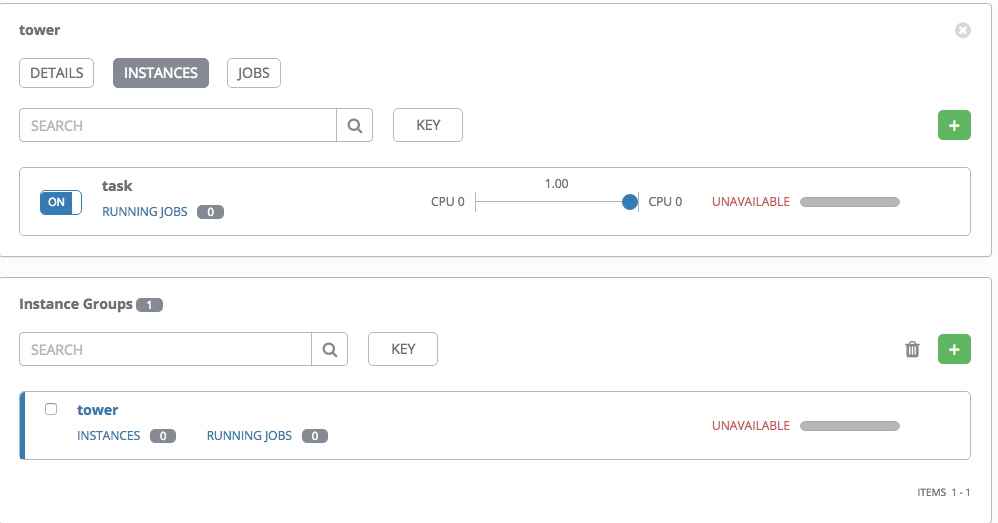
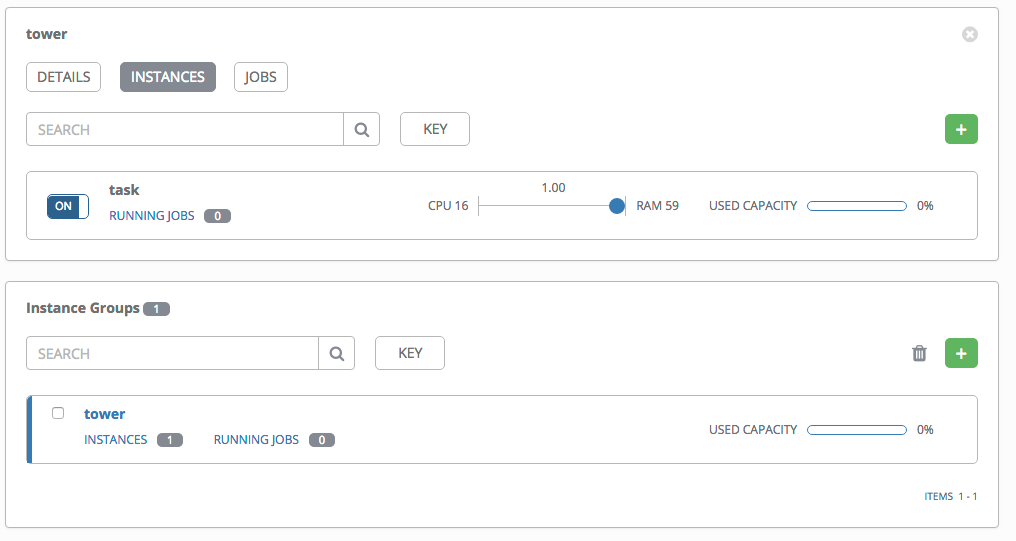
5) You must turn the task OFF then ON by clicking the button to the left of task
Now you will see available capacity
greenscar
on 27 Apr 2018
Related issues
 beenje
·
3Comments
beenje
·
3Comments
 agaffney
·
3Comments
agaffney
·
3Comments
 IshwarKanse
·
3Comments
IshwarKanse
·
3Comments
 astraios
·
3Comments
astraios
·
3Comments
 IMOKURI
·
3Comments
IMOKURI
·
3Comments
Most helpful comment
Solution:



1) GOTO ..../#/instance_groups
I see INSTANCES 0 && UNAVAILABLE
2) Click INSTANCES
3) Click the + on the top right to add an INSTANCE
4) Select task & SAVE
CRITICAL: Now where you see your task & RUNNING JOBS 0, you still see UNAVAILABLE.
5) You must turn the task OFF then ON by clicking the button to the left of task
Now you will see available capacity