Awx: AWX doesn't appear to be updating roles based on requirements.yml
ISSUE TYPE
- Bug Report
COMPONENT NAME
- UI
SUMMARY
AWX never seems to recognize our custom requirements.yml no matter where we place it.
ENVIRONMENT
- AWX version: 1.0.4.70
- AWX install method: docker on linux
- Ansible version: 2.4.3.0
- Operating System: RHEL 7
- Web Browser: Firefox and Chrome
STEPS TO REPRODUCE
Place a requirements.yml file in
EXPECTED RESULTS
When running Inventory update as a result of a Job Template run, I expected that it would try to run ansible-galaxy against the requirements file.
ACTUAL RESULTS
TASK [detect requirements.yml] *************************************************
skipping: [localhost]
TASK [fetch galaxy roles from requirements.yml] ********************************
skipping: [localhost]
ADDITIONAL INFORMATION
I added a debug statement to our installed project_update.yml, in every case, the debug statement showed that scm_full_checkout was false. I tried each of the following:
- just updating the project
- just updating the project with a full delete
- update the project by running a job template
- update the project after a full project delete by running a job template
In all cases, scm_full_checkout was False which I believe is responsible for the "skipping" messages we see.
I see the condition in yml defined like this:
when: scm_full_checkout|bool
Is scm_full_checkout not being defined in the invocation of this playbook? I haven't looked deeper into the code to see where it's being invoked.
Along these lines, two other thoughts related to this:
- The ansible-galaxy call assumes that roles exists at the project root, but if you have a playbook that's not at the project root, how do you get ansible to recognize both your roles and the ones installed by galaxy?
- Overriding the yml was the only way I could see this output. It would have been nice to add a "log verbose" option to the UI so that it invokes with -v or -vv
 seafoodbuffet
All 18 comments
This is known and expected behavior.
Because of clusters, we have a two-stage SCM process.
The 'update' job, which updates the revision for the configured branch. This runs once, on whatever node it gets assigned to. It is done manually, or triggered by update-on-launch
The 'checkout' or 'run' job, which actually checks out the SCM before running the job. This happens on whatever node the playbook is assigned to run on , and runs for every job.
The role checkout happens as part of the second of these. You can see the results by clicking on the link under 'Project' from a job details screen.
 wenottingham
on 14 Mar 2018
wenottingham
on 14 Mar 2018
For 'roles outside of the root directory', see https://github.com/ansible/awx/issues/106
wenottingham
on 14 Mar 2018
Hey we face the same issue here, what are needed steps to install the requirements then?
When ever we launch a template it will fail since the dependencies are not installed :(
 hwmrocker
on 18 Apr 2018
hwmrocker
on 18 Apr 2018
Same issue.
The "[git-repo]/roles/requirements.yml" is configured but roles are never downloaded and installed.
If ansible-galaxy is executed manually, it works. So, the issue seems to come from AWX which does not find/load the file requirements.yml.
 adubreuiltk
on 18 Apr 2018
adubreuiltk
on 18 Apr 2018
Once we moved the requirements.yml to /roles/requirements.yml it has worked for us. You just need to be actually running a job, not merely updating from SCM in order for ansible-galaxy to run.
seafoodbuffet
on 18 Apr 2018
We did it several time, but it does not work...
adubreuiltk
on 18 Apr 2018
Any updates on this even I am facing the same issue
 kvmkrishna9
on 10 May 2018
kvmkrishna9
on 10 May 2018
Same here. This used to work for me but appears to have been broken in a recent release. I have my requirements.yml in my roles/ folder too.
 derek-miller
on 14 May 2018
derek-miller
on 14 May 2018
Using AWX 1.0.5.32 I am seeing the same issue. The requirements.yml is in the roles directory. Seeing the following in the SCM update run by the playbook
 TASK [detect requirements.yml] *************************************************
 skipping: [localhost]
Update :
I realized after checking with
    - name: run ansible galaxy
      hosts: localhost
      tasks:
        - command : ansible-galaxy install -r ./roles/requirements.yml
          delegate_to : localhost
I had a typo in the playbook :(
confirmed it was working
 gomker
on 15 May 2018
gomker
on 15 May 2018
I'm facing the same issue. No way to get stuff fetched. All works fine outside of AWX, but it just skips the tasks in project stdout listing.
$ tree roles/
roles/
└── requirements.yml
If I do it in Fedora 28 using ansible-galaxy install -r roles/requirements.yml, it works fine In AWX I run into this weird error message, which's meaning can not be solved via gui:

Such job output of ID 83 is nowhere to be found in GUI.
And the project refresh just skips all requirements. So they never get pulled:
TASK [detect requirements.yml] ************************************************* | 10:07:15
-- | --
  | 57 | skipping: [localhost] |
  | 58 |   |
  | 59 | TASK [fetch galaxy roles from requirements.yml] ******************************** | 10:07:15
  | 60 | skipping: [localhost] |
  | 61 |   |
  | 62 | TASK [fetch galaxy roles from requirements.yml (forced update)] **************** | 10:07:15
  | 63 | skipping: [localhost]
Adding to this, there is also another bug, the original job run failed, but doesn't show the error in screenshot until you get out of job and come back into that pane. Really hard to debug what the heck goes wrong here.
How to get past this?
I instaled AWX into F28 as containers using latest from github with prebuilt images two nights ago.
 ikke-t
on 5 Jul 2018
ikke-t
on 5 Jul 2018
Commenting on this from @wenottingham :
You can see the results by clicking on the link under 'Project' from a job details screen.
No, I can not see. That link takes you to project definition, not any job outputs. Or what am I doing wrong?
ikke-t
on 5 Jul 2018
The link is via the status icon.
wenottingham
on 9 Jul 2018
Thanks, that shows the error output, I didn't find it out myself. This is the error, doesn't really tell why it fails. Like said, the same command works from command line:
"\u001b[1;35m [WARNING]: - packages was NOT installed successfully: - command git clone\u001b[0m\n\u001b[1;35mssh://freenas.mynet/mnt/raid/me/git/ansible-role-packages.git packages\u001b[0m\n\u001b[1;35mfailed in directory /tmp/tmpUuq6AH (rc=128)\u001b[0m\n\u001b[1;35m\u001b[0m\n\u001b[0;31mERROR! - you can use --ignore-errors to skip failed roles and finish processing the list.\u001b[0m"
beef being, it fails to do this from requirements file:
git clone ssh://nas.domain/path/ansible-role-packages.git packages
So likely awx doesn't setup right ssh-key while doing requirements.yml file.
ikke-t
on 9 Jul 2018
What key were you expecting to use? Is it the same one as the project itself?
wenottingham
on 9 Jul 2018
yes, the very same. I have ansible-playbooks.git and ansible-role-packages.git in very same nas.mynet:/path/git/ directory. Some error in here, not passing the key to ansible-galaxy: https://github.com/ansible/awx/blob/devel/awx/playbooks/project_update.yml#L141
ikke-t
on 9 Jul 2018
Perhaps this discussion should be in the new issue I opened, as this one is closed already.
ikke-t
on 9 Jul 2018
Hello,
My requirements.yml file contains a github repo which needs username and password and my awx job fails. Please let me know if there is any way to enter or hardcode the github details to avoid the error.
 sravs1993
on 11 Sep 2018
sravs1993
on 11 Sep 2018
I have a similar kind of issue. In my case I have updated the roles in my case install_pswindows_psmodule. I updated this role and zipped it up into a tar ball into a web server for consumption by AWX.
But in the logs I saw that it saw that the role was already installed and did not need to be updated.
The ansible galaxy command is:
"ansible-galaxy install -r requirements.yml -p /var/lib/awx/projects/_27__install_playbooks/roles/",
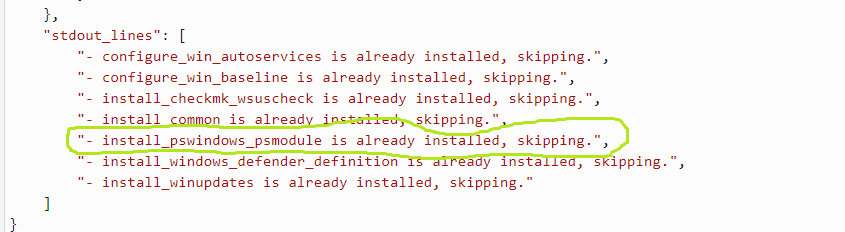
Is this something that I can fix?
 weiyentan
on 17 Nov 2018
weiyentan
on 17 Nov 2018
Related issues
 kakkotetsu
·
3Comments
kakkotetsu
·
3Comments
 IMOKURI
·
3Comments
IMOKURI
·
3Comments
 beenje
·
3Comments
beenje
·
3Comments
 artmakh
·
3Comments
artmakh
·
3Comments
 pebbledavec
·
3Comments
pebbledavec
·
3Comments
Most helpful comment
Hey we face the same issue here, what are needed steps to install the requirements then?
When ever we launch a template it will fail since the dependencies are not installed :(