Awx: Unable to Run Python3 Inventory Scripts
ISSUE TYPE
- Bug Report
COMPONENT NAME
- API
- UI
- Installer
SUMMARY
ENVIRONMENT
- AWX version: 1.0.2.372
- AWX install method: docker on linux
- Ansible version: 2.4.3.0
- Operating System: RHEL 7
- Web Browser: Chrome
python3.6 installed from epel repo
STEPS TO REPRODUCE
Create a new custom inventory script with python3 as the source and attempt to run the script.
EXPECTED RESULTS
Script runs and produces output valid out.
ACTUAL RESULTS
2018-03-05 20:50:10,300 INFO     awx.main.commands.inventory_import Updating inventory 5: Should Fail
2018-03-05 20:50:10,314 INFO     awx.main.commands.inventory_import Reading Ansible inventory source: /tmp/awx_inventory_U9Lsxk/tmpSSnZpu
Traceback (most recent call last):
  File "/usr/bin/awx-manage", line 9, in <module>
    load_entry_point('awx==1.0.2.372', 'console_scripts', 'awx-manage')()
  File "/usr/lib/python2.7/site-packages/awx/__init__.py", line 109, in manage
    execute_from_command_line(sys.argv)
  File "/var/lib/awx/venv/awx/lib/python2.7/site-packages/django/core/management/__init__.py", line 364, in execute_from_command_line
    utility.execute()
  File "/var/lib/awx/venv/awx/lib/python2.7/site-packages/django/core/management/__init__.py", line 356, in execute
    self.fetch_command(subcommand).run_from_argv(self.argv)
  File "/var/lib/awx/venv/awx/lib/python2.7/site-packages/django/core/management/base.py", line 283, in run_from_argv
    self.execute(*args, **cmd_options)
  File "/var/lib/awx/venv/awx/lib/python2.7/site-packages/django/core/management/base.py", line 330, in execute
    output = self.handle(*args, **options)
  File "/usr/lib/python2.7/site-packages/awx/main/management/commands/inventory_import.py", line 993, in handle
    self.is_custom)
  File "/usr/lib/python2.7/site-packages/awx/main/management/commands/inventory_import.py", line 242, in load_inventory_source
    is_custom=is_custom).load()
  File "/usr/lib/python2.7/site-packages/awx/main/management/commands/inventory_import.py", line 177, in load
    data = self.command_to_json(base_args + ['--list'])
  File "/usr/lib/python2.7/site-packages/awx/main/management/commands/inventory_import.py", line 160, in command_to_json
    self.method, proc.returncode, stdout, stderr))
RuntimeError: ansible-inventory failed (rc=4) with stdout:

stderr:
ERROR! Could not parse inventory source /tmp/awx_inventory_U9Lsxk/tmpSSnZpu with available plugins:
Plugin script failed: Inventory script (/tmp/awx_inventory_U9Lsxk/tmpSSnZpu) had an execution error: Traceback (most recent call last):
  File "/tmp/awx_inventory_U9Lsxk/tmpSSnZpu", line 3, in <module>
    import json
  File "/usr/lib64/python3.6/json/__init__.py", line 106, in <module>
    from .decoder import JSONDecoder, JSONDecodeError
  File "/usr/lib64/python3.6/json/decoder.py", line 3, in <module>
    import re
  File "/usr/lib64/python3.6/re.py", line 142, in <module>
    class RegexFlag(enum.IntFlag):
AttributeError: module 'enum' has no attribute 'IntFlag'
ADDITIONAL INFORMATION
Doing a bit of googling it looks like the above error is a result of python pointing to the wrong enum.py library, however running the script manually inside the awx_task container functions normally so I expect AWX is doing something on the backend that is causing it to fail
Script used to produce the output above:
#!/usr/bin/python36
import sys
import json
print(json.dumps({sys.version}))
 badstreff
All 9 comments
We're not quite there on supporting python3... at the moment you'll need to run Tower with python2
 matburt
on 5 Mar 2018
matburt
on 5 Mar 2018
@matburt It's my understanding that for the inventory script it should't matter right? I should be able to use an inventory script written in python3 right?
badstreff
on 5 Mar 2018
possibly, we just don't support it quite yet so you are on your own
matburt
on 6 Mar 2018
@BadStreff I hit that as well, unsetting PYTHONPATH (in a wrapper script) worked for me.
 gnosek
on 17 Sep 2018
gnosek
on 17 Sep 2018
@badstreff I hit that as well, unsetting PYTHONPATH (in a wrapper script) worked for me.
pls show working example
 yuratux
on 18 Apr 2019
yuratux
on 18 Apr 2019
@yuratux
Just ran into this issue myself and found this issue through google, taking what gnosek said I worked around it by doing the following in the inventory scripts:
#!/usr/bin/bash
cat << EOF > /tmp/myscript.py
#!/usr/bin/env python3
<Insert your python 3 inventory code here>
EOF
chmod 0500 /tmp/myscript.py
unset PYTHONPATH
/tmp/myscript.py "$@"
rm -f /tmp/myscript.py
It's not pretty but it worked, all it does is:
- Call bash to write the python 3 script at /tmp/myscript.py
- Sets the permissions on the script
- Unsets the PYTHONPATH env variable
- Executes the script passing whatever argument was passed by tower
- Removes the script once complete
I did need to install python3 and all the libraries I was using inside the container as well
There's possibly a prettier way to do this but this was just for testing purposes so edit as you see fit.
 Deeack
on 24 Apr 2019
Deeack
on 24 Apr 2019
@AlanCoding I'm able to reproduce this still on the latest awx (4.0.0):
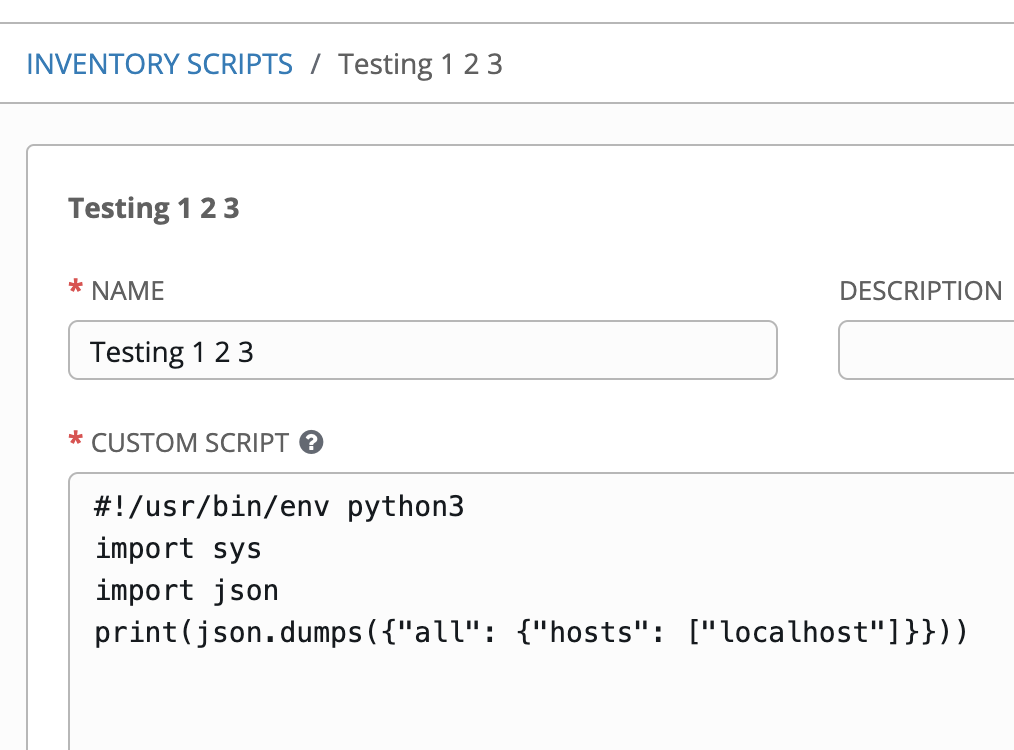
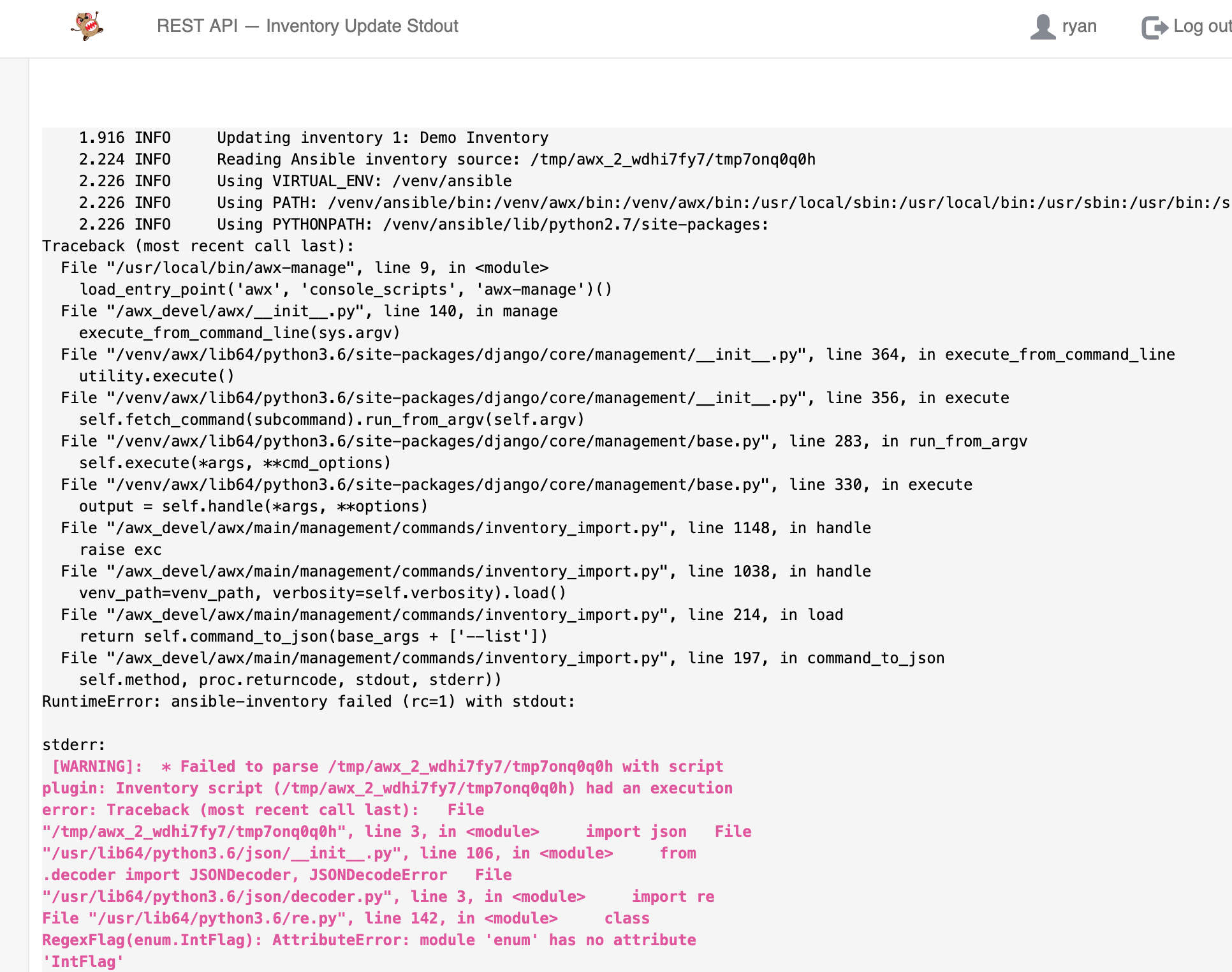
 ryanpetrello
on 24 Apr 2019
ryanpetrello
on 24 Apr 2019
@Deeack @badstreff so the issue here is that any time awx runs an inventory update, we activate the ansible virtualenv that comes preinstalled with awx (because it comes with a variety of dependencies to support various cloud providers, like EC2 and GCE). In most environments, this virtualenv defaults to being a Python2 virtualenv.
In _your_ example, you're explicitly using python3, but the virtualenv awx activates (/var/lib/ansible/venv) is a python2 virtualenv. The py2 virtualenv in question also generally has enum34 installed, leading to the error/scenario described at this link:
https://bitbucket.org/stoneleaf/enum34/pull-requests/7/setuppy-dont-shadow-builtin-enum-package/diff
If you want to run python3 inventory scripts, you'll need to create a new custom virtualenv (https://github.com/ansible/awx/blob/devel/docs/custom_virtualenvs.md) that uses Python3 (optionally, you can install any additional Python dependencies you may want or need for your custom inventory script):
~ python3 -m venv /var/lib/awx/venv/py3-inventory
~ /venv/py3-inventory/bin/pip install ansible psutil
When I do this, the inventory script works for me:
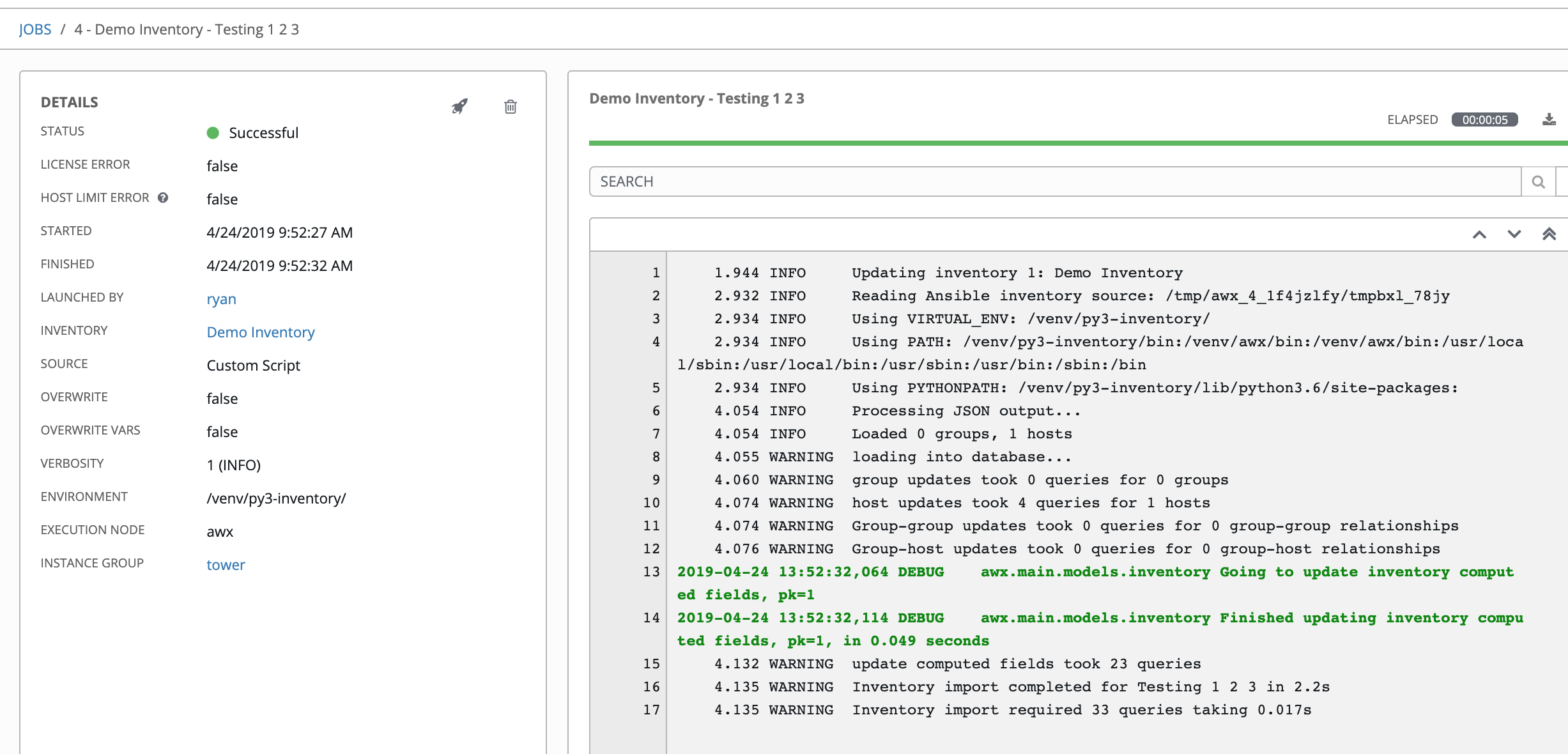
ryanpetrello
on 24 Apr 2019
I hit the same issue and I did not need to wrap the script - I simply added this at the top :)
#!/usr/bin/env python
 rmahroua
on 7 Sep 2019
rmahroua
on 7 Sep 2019
Related issues
 grahamn-gr
·
3Comments
grahamn-gr
·
3Comments
 kakkotetsu
·
3Comments
kakkotetsu
·
3Comments
 astraios
·
3Comments
astraios
·
3Comments
 gamuniz
·
3Comments
gamuniz
·
3Comments
 mwiora
·
3Comments
mwiora
·
3Comments
Most helpful comment
@Deeack @badstreff so the issue here is that any time awx runs an inventory update, we activate the ansible virtualenv that comes preinstalled with awx (because it comes with a variety of dependencies to support various cloud providers, like EC2 and GCE). In most environments, this virtualenv defaults to being a Python2 virtualenv.
In _your_ example, you're explicitly using python3, but the virtualenv awx activates (
/var/lib/ansible/venv) is a python2 virtualenv. The py2 virtualenv in question also generally hasenum34installed, leading to the error/scenario described at this link:https://bitbucket.org/stoneleaf/enum34/pull-requests/7/setuppy-dont-shadow-builtin-enum-package/diff
If you want to run python3 inventory scripts, you'll need to create a new custom virtualenv (https://github.com/ansible/awx/blob/devel/docs/custom_virtualenvs.md) that uses Python3 (optionally, you can install any additional Python dependencies you may want or need for your custom inventory script):
When I do this, the inventory script works for me: