Awx: playbooks only work with IP but not with dns
ISSUE TYPE
- Bug Report
COMPONENT NAME
- UI
SUMMARY
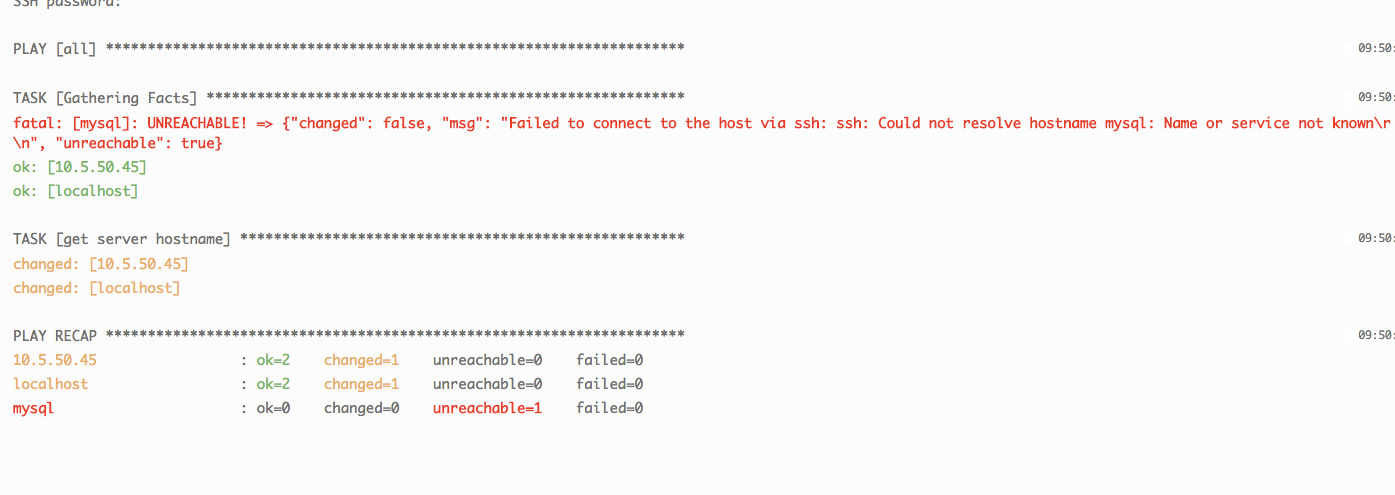
Hello, a bit new to Ansible/AWX but I managed to set it up with the documentation provided (docker-composer) and for the most part it works however playbooks only work if the host uses IP, if I use DNS record it fails. It's odd 'cause the actual server Ansible/AWX (inside Ubuntu command line) can ping those hosts just fine. This is the output I get on the playbook:
msg": "Failed to connect to the host via ssh: ssh: Could not resolve hostname mysql: Name or service not known\r\n",
"unreachable": true,
"changed": false
I should mention that the /awx/installer/inventory file has both my domain and dns servers' ips in the file. Again my Ansible/AWX server can ping via DNS, it's AWX docker container that can't ping them.
ENVIRONMENT
- AWX version: 1.0.2.84
- AWX install method: docker on linux
- Ansible version: 2.4.2.0
- Operating System: Ubuntu 16.04
- Web Browser:Chrome
STEPS TO REPRODUCE
Again, IP works fine, the docker containers can ping the hosts but with DNS records they cannot
EXPECTED RESULTS
I'd like to be able to use DNS records
ACTUAL RESULTS
For some reason I can't figure this out, is there any other file I need to make this change to?
ADDITIONAL INFORMATION
 anthonydelarosa
All 12 comments
The installer inventory file is only for the installer to use - it is not used in any way by AWX or awx job templates. If you need to add a host by its DNS name you'll need to do so after AWX is installed via its REST API or GUI.
If you have any questions please drop us a line on the AWX mailing list or drop by our irc channel.
 jakemcdermott
on 2 Feb 2018
jakemcdermott
on 2 Feb 2018
@jakemcdermott hey thanks for getting back to me so quickly, well I tried looking for help on the mailing list but this old ticket still has no solution so not sure how those google groups are being monitored: https://groups.google.com/forum/#!searchin/awx-project/DNS%7Csort:date/awx-project/AKGt9BJY36Y/HcklrMCsAQAJ
In the API I only see an Authentication Setting but that seems to be more with the way the API will authenticate against, is that also the the "dns" configuration? Sorry just a bit confused.
anthonydelarosa
on 2 Feb 2018
can someone please re-open this? the ticket was not resolved
anthonydelarosa
on 6 Feb 2018
I'm also seeing this behavior. I'm not modifying the install.yml at all. Hosts are reachable via ping from the server by fqdn, however, they are not reachable from AWX, unil modifying them to be just IP addresses.
 lintonam
on 22 Jan 2019
lintonam
on 22 Jan 2019
The issue is due to Ansible targets not present in /etc/hosts of "awx_task" docker container. As awx is installed within the containers, it cannot see the /etc/host of the host OS.
You can install AWX again with alternate DNS server entries or do the following :-
-- Check awx containers from your base OS
docker ps
--Login to the "awx_task" container and add all your ansible targets in the /etc/host
docker exec -u 0 -it awx_task bash
you can also automate this to run after docker services start post reboot (old school)
 paramunix
on 20 Mar 2019
paramunix
on 20 Mar 2019
I faced this problem too. I need to fetch some data from remote Consul in my local ansible script:
- hosts: local
  connection: local
What is strange, consul_kv and command: curl is not working from ansible until adding ip record in /etc/hosts on the local machine. But curl from bash is working fine. It doesn't have any sense.
Please, reopen the issue, a bug is still here.
MacOS 10.14.5, homebrewed ansible-2.8.1_1.mojave.bottle.tar.gz
UPD:
Ok, dns cache clearing helped me
dscacheutil -flushcache
sudo killall -HUP mDNSResponder
 a0s
on 9 Jul 2019
a0s
on 9 Jul 2019
The issue is due to Ansible targets not present in /etc/hosts of "awx_task" docker container. As awx is installed within the containers, it cannot see the /etc/host of the host OS.
You can install AWX again with alternate DNS server entries or do the following :--- Check awx containers from your base OS
docker ps--Login to the "awx_task" container and add all your ansible targets in the /etc/host
docker exec -u 0 -it awx_task bashyou can also automate this to run after docker services start post reboot (old school)
Thanks for this tip. I was struggling with this for a couple of days with intermittent roles failing, etc.
 jpurcell3
on 24 Apr 2020
jpurcell3
on 24 Apr 2020
Other related stuff to ponder
- smart inventories
- Base OS as DNS etc.
paramunix
on 24 Apr 2020
@jpurcell3 I'm currently experiencing this issue. I'm a bit confused regarding the answer you said helped you. Did you have to re-install awx with the proper DNS config in the install inventory? Any help would be greatly appreciated.
 krisvoegele
on 27 Aug 2020
krisvoegele
on 27 Aug 2020
Hi krisvoegele, the issue is that the Linux VM and the AWX are using different local /etc/hosts files, as paramunix described in his post. AWX is a docker container and it does not have visibility into the Linux VM /etc/hosts file, so if you don't set a valid, accessible DNS server you get the name resolution errors that you are seeing. The resolution is to use the docker commands that paramunix included in the post and update the /etc/hosts file in the docker environment. Once you update that file, you can validate connectivity with ping utility, than drop out the AWX interface and verify that your playbooks are working.
jpurcell3
on 27 Aug 2020
@jpurcell3 thanks for the response! As far as I'm aware the /etc/hosts file is for hostname to IP mapping which is not practical when you have ~300 hosts. What's more is the VM's /etc/hosts file does not specify any hostname to IP mappings, however, hostname resolution works (VM checks hosts file then if there is no match, performs DNS query) . Currently, the container (awx_task) is able to ping the hosts via hostname but cannot resolve them via host
krisvoegele
on 27 Aug 2020
What is the purpose of this line in the inventory file?
awx_alternate_dns_servers="10.1.1.1,10.1.1.2,10.1.1.3"
Is this not supposed to populate the /etc/resolv.conf with the nameserver values? The line:
awx_container_search_domains=example.com,example2.com,example3.com
populates into the resolv.conf file.
 Hemindahl
on 12 Nov 2020
Hemindahl
on 12 Nov 2020
Related issues
 IMOKURI
·
3Comments
IMOKURI
·
3Comments
 marshmalien
·
3Comments
marshmalien
·
3Comments
 FloThinksPi
·
3Comments
FloThinksPi
·
3Comments
 beenje
·
3Comments
beenje
·
3Comments
 artmakh
·
3Comments
artmakh
·
3Comments
Most helpful comment
can someone please re-open this? the ticket was not resolved