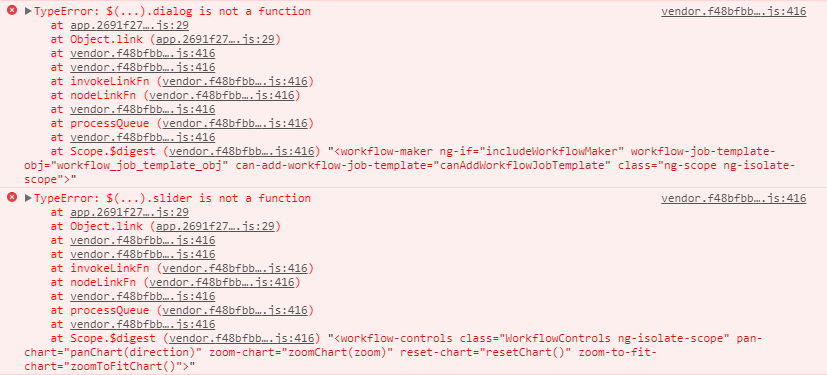
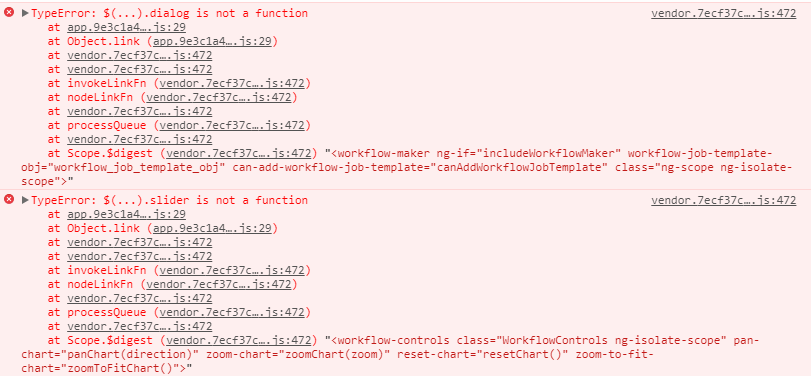
Awx: TypeError when clicking Workflow Editor button
ISSUE TYPE
- Bug Report
COMPONENT NAME
- UI
SUMMARY
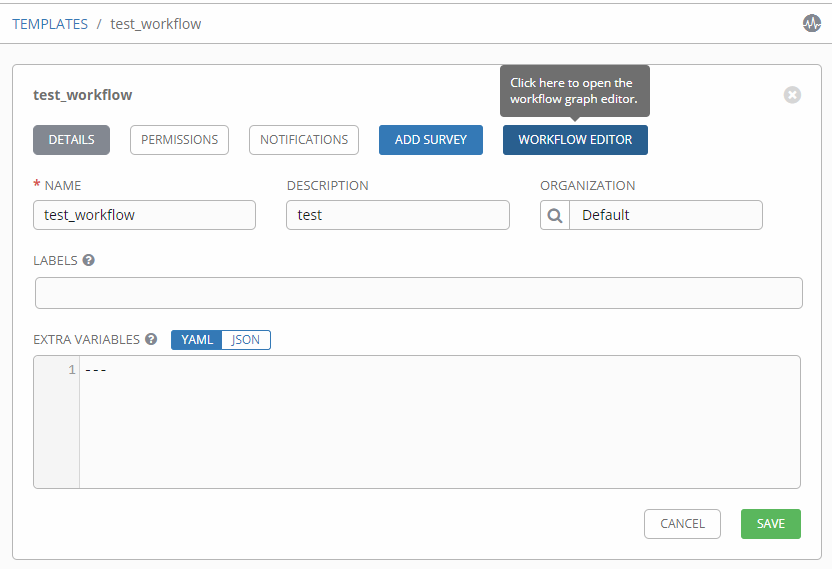
Workflow Editor will not popup when clicking "WORKFLOW EDITOR" button...
ENVIRONMENT
- AWX version: 1.0.2.303
- AWX install method: docker on linux
- Ansible version: 2.4.1.0
- Operating System: WIN10
- Web Browser: Chrome 62.0.3202.94 64bit
STEPS TO REPRODUCE
- create a workflow template and save
- click "WORKFLOW EDITOR" button
- nothing will show
EXPECTED RESULTS
workflow editor page should show after clicking "WORKFLOW EDITOR" button
ACTUAL RESULTS
Nothing would happen after clicking "WORKFLOW EDITOR" button
ADDITIONAL INFORMATION
 ElliotGo
All 14 comments
Was just about to post this same error.
Seems to be from 1.0.2.301 onwards, can confirm the error doesn't appear in 1.0.2.298.
Browsers:
- Firefox ESR 52.5.1 (64-bit)
- Google Chrome Version 63.0.3239.84 (Official Build) (64-bit)
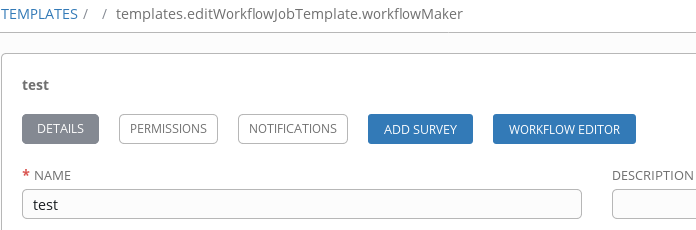
After clicking "Workflow Editor" button the path at the top changes to "templates.editWorkflowJobTemplate.workflowMaker"
 tvigers
on 28 Dec 2017
tvigers
on 28 Dec 2017
I receiving same as you @tvigers on a new AWX install
Browsers:
safari 11.0.2 (13604.4.7.1.3
Chrome Version 63.0.3239.84
MacOS 10.13.2
 madeinoz67
on 28 Dec 2017
madeinoz67
on 28 Dec 2017
The issue comes from how jquery-ui is imported.
v1.12 needs requires of every different components one by one.
as a quick fix, you can add:
require('jquery-ui/ui/widgets/dialog');
require('jquery-ui/ui/widgets/slider');
require('jquery-ui/ui/widgets/spinner');
right after the require('jquery-ui') in awx/ui/client/src/vendor.js and rebuild the frontend
 exippy
on 2 Jan 2018
exippy
on 2 Jan 2018
 wenottingham
on 2 Jan 2018
wenottingham
on 2 Jan 2018
872 should address this - closing
 mabashian
on 2 Jan 2018
mabashian
on 2 Jan 2018
@mabashian
Same issue still exists in AWX 1.0.2.307, can you please take a look?
ElliotGo
on 3 Jan 2018
Update 1.0.2.307 doesn't fix this for me either
 mkempster22
on 3 Jan 2018
mkempster22
on 3 Jan 2018
As per the others, 1.0.2.307 seems to still has this issue.
Edit:
Using the docker option to pull from source, I was able to get this working. The reported version is AWX 1.0.2.301
To pursue this option, I simply commended out two lines in my inventory.yml in my install directory:
dockerhub_base=ansible
dokcerhub_version=latest
Afterwards, I stopped and removed my docker containers:
docker stop $(docker ps -a -q)
docker rm $(docker ps -a -q)
docker rmi $(docker ps -a -q)
Finally, I ran the playbook from the install directory again:
ansible-playbook -i inventory install.yml
After several minutes, AWX was made available. Please note: in my testing, I was able to retain projects, job templates, etc...
 steaksauce-
on 3 Jan 2018
steaksauce-
on 3 Jan 2018
I reverted back to 301 and couldn't seem to get it working. I can get it to work by going to 289 though
mkempster22
on 4 Jan 2018
I didn't revert back to 301. I used the option to build the docker containers instead of pull. With that being said, the _reported_ version is 301 (which seems odd). Regardless, this method worked for me.
Also, the dockerhub images were updated yesterday. May be worth trying again
steaksauce-
on 4 Jan 2018
Ah yes I see what you mean, That's weird that it reports as .301 in the end as my upgrade process includes deleting all containers, maybe commenting out those lines causes it to not pull the latest version?
mkempster22
on 4 Jan 2018
A general glance at some of the output looked like it was pulling from Github.. With that being said, it may not have been the latest branch.
steaksauce-
on 4 Jan 2018
I'm at 1.0.2.303, here you are my tests.
- Revert to 1.0.2.289, survey and workflow buttons work
- Upgrade to 1.0.2.293, survey and workflow buttons work
- Upgrade to 1.0.2.298, survey and workflow buttons work
- Upgrade to 1.0.2.301, exposed issues (survey and workflow buttons doesn't work)
- (1.0.2.303, exposed issues)
- (1.0.2.307, exposed issues, tested by @ElliotGo, @steaksauce- and @mkempster22)
- (1.0.2.315, exposed issues, tested by @lucasreed in #872)
- Upgrade to 1.0.2.319 (the latest at the time of writing), exposed issues
Hoping to help other people, here you are the steps to upgrade/downgrade dockerhub version/tag. This is what I mean when I say "revert to" or "upgrade to".
- Toggle to OFF all my schedules (I had some troubles with timestamps etc leaving them to ON).
- Backed up postgres (just to be sure):
docker exec postgres pg_dump -U postgres -F t awx > /tmp/awx_backup_1.0.2.303_20180104.sql - Removed all containers and images (however you can remove only awx_*):
docker rm -f $(docker ps -a -q)
docker rmi imagesID
- Modified awx-1.0.2/installer/inventory:
#dockerhub_version=latest
dockerhub_version=1.0.2.289 #or whatever version/tag you need
- Run the playbook:
ansible-playbook -i inventory install.yml - From inside awx_task container,
awx-manage showmigrationsshows everything went fine - No restore needed, postgres_data_dir was persistent so awx retained all my jobs, projects, ...
 shortsteps
on 5 Jan 2018
shortsteps
on 5 Jan 2018
can confirm this is fixed in 1.0.2.327 version of docker image for me
madeinoz67
on 8 Jan 2018
Related issues
 artmakh
·
3Comments
artmakh
·
3Comments
 Gui13
·
3Comments
Gui13
·
3Comments
 augabet
·
3Comments
augabet
·
3Comments
 icsm2017
·
4Comments
icsm2017
·
4Comments
 IMOKURI
·
3Comments
IMOKURI
·
3Comments
Most helpful comment
Was just about to post this same error.
Seems to be from 1.0.2.301 onwards, can confirm the error doesn't appear in 1.0.2.298.
Browsers:
After clicking "Workflow Editor" button the path at the top changes to "templates.editWorkflowJobTemplate.workflowMaker"
