Awx: CWE-352: Cross-Site Request Forgery (CSRF)
ISSUE TYPE
- Bug Report
- Security report ?
COMPONENT NAME
- UI
- API
SUMMARY
Hi all, I made a vulnerability assessment and this vulnerability apeared (CWE-352) I searched in issues and I found nothing about that or an issue type related to security.
I tryed the same vulnerability test on all versions available until today (last 1.0.1.290) and all versions have this vulnerability, more details about the vulnerability can be found in links below:
https://www.owasp.org/index.php/Cross-Site_Request_Forgery_(CSRF)
http://cwe.mitre.org/data/definitions/352.html
http://en.wikipedia.org/wiki/Cross-site_request_forgery
http://www.cgisecurity.com/csrf-faq.html
ENVIRONMENT
- AWX version: 1.0.1.290
- AWX install method: docker on linux
- Ansible version: 1.0.1.290
- Operating System: RHEL7
STEPS TO REPRODUCE
Start a scan test on burp or webinspect
I'll be happy to help you guys with that
EXPECTED RESULTS
Vulnerability test on burp complete successfull without any CRITICAL, HIGH or MEDIUM vulnerability
ACTUAL RESULTS
This CWE-352 is a HIGH vulnerability, think about that the AWX server access with administrator credentials all servers.
 lucaslan
All 9 comments
Sorry, need details as to the actual vulnerability here.
 wenottingham
on 7 Dec 2017
wenottingham
on 7 Dec 2017
Description
CSRF is an attack that tricks the victim into submitting a malicious request. It inherits the identity and privileges of the victim to perform an undesired function on the victim's behalf. For most sites, browser requests automatically include any credentials associated with the site, such as the user's session cookie, IP address, Windows domain credentials, and so forth. Therefore, if the user is currently authenticated to the site, the site will have no way to distinguish between the forged request sent by the victim and a legitimate request sent by the victim.
CSRF attacks target functionality that causes a state change on the server, such as changing the victim's email address or password, or purchasing something. Forcing the victim to retrieve data doesn't benefit an attacker because the attacker doesn't receive the response, the victim does. As such, CSRF attacks target state-changing requests.
It's sometimes possible to store the CSRF attack on the vulnerable site itself. Such vulnerabilities are called "stored CSRF flaws". This can be accomplished by simply storing an IMG or IFRAME tag in a field that accepts HTML, or by a more complex cross-site scripting attack. If the attack can store a CSRF attack in the site, the severity of the attack is amplified. In particular, the likelihood is increased because the victim is more likely to view the page containing the attack than some random page on the Internet. The likelihood is also increased because the victim is sure to be authenticated to the site already.
## Examples
How does the attack work?
There are numerous ways in which an end user can be tricked into loading information from or submitting information to a web application. In order to execute an attack, we must first understand how to generate a valid malicious request for our victim to execute. Let us consider the following example: Alice wishes to transfer $100 to Bob using the bank.com web application that is vulnerable to CSRF. Maria, an attacker, wants to trick Alice into sending the money to her instead. The attack will comprise the following steps:
building an exploit URL or script
tricking Alice into executing the action with social engineering
_GET scenario_
If the application was designed to primarily use GET requests to transfer parameters and execute actions, the money transfer operation might be reduced to a request like:
GET http://bank.com/transfer.do?acct=BOB&amount=100 HTTP/1.1
Maria now decides to exploit this web application vulnerability using Alice as her victim. Maria first constructs the following exploit URL which will transfer $100,000 from Alice's account to her account. She takes the original command URL and replaces the beneficiary name with herself, raising the transfer amount significantly at the same time:
http://bank.com/transfer.do?acct=MARIA&amount=100000
The social engineering aspect of the attack tricks Alice into loading this URL when she's logged into the bank application. This is usually done with one of the following techniques:
sending an unsolicited email with HTML content
planting an exploit URL or script on pages that are likely to be visited by the victim while they are also doing online banking
The exploit URL can be disguised as an ordinary link, encouraging the victim to click it:
<a href="http://bank.com/transfer.do?acct=MARIA&amount=100000">View my Pictures!</a>
Or as a 0x0 fake image:

<img src="http://bank.com/transfer.do?acct=MARIA&amount=100000" width="0" height="0" border="0">
If this image tag were included in the email, Alice wouldn't see anything. However, the browser will still submit the request to bank.com without any visual indication that the transfer has taken place.
A real life example of CSRF attack on an application using GET was a uTorrent exploit from 2008 that was used on a mass scale to download malware.
_POST scenario_
The only difference between GET and POST attacks is how the attack is being executed by the victim. Let's assume the bank now uses POST and the vulnerable request looks like this:
POST http://bank.com/transfer.do HTTP/1.1
acct=BOB&amount=100
Such a request cannot be delivered using standard A or IMG tags, but can be delivered using a FORM tag:
<form action="http://bank.com/transfer.do" method="POST">
<input type="hidden" name="acct" value="MARIA"/>
<input type="hidden" name="amount" value="100000"/>
<input type="submit" value="View my pictures"/>
</form>
This form will require the user to click on the submit button, but this can be also executed automatically using JavaScript:
<body onload="document.forms[0].submit()">
<form...
Other HTTP methods
Modern web application APIs frequently use other HTTP methods, such as PUT or DELETE. Let's assume the vulnerable bank uses PUT that takes a JSON block as an argument:
PUT http://bank.com/transfer.do HTTP/1.1

{ "acct":"BOB", "amount":100 }
Such requests can be executed with JavaScript embedded into an exploit page:
<script>
function put() {
    var x = new XMLHttpRequest();
    x.open("PUT","http://bank.com/transfer.do",true);
    x.setRequestHeader("Content-Type", "application/json");
    x.send(JSON.stringify({"acct":"BOB", "amount":100}));
}
</script>
<body onload="put()">
Fortunately, this request will not be executed by modern web browsers thanks to same-origin policy restrictions. This restriction is enabled by default unless the target web site explicitly opens up cross-origin requests from the attacker's (or everyone's) origin by using CORS with the following header:
Access-Control-Allow-Origin: *
lucaslan
on 7 Dec 2017
Sorry, I wasn't clear.
What endpoint in AWX do you think has the issue, and why?
As you note, modern web browsers do not execute these requests due to the same-origin policy - since we do not set a CORS header, AWX will never have these requests sent to it.
What we've seen in the past is test suites that raise an issue merely due to the lack of the Access-Control-Allow-Origin header, without actually considering the context of how browsers behave in the absence of it.
wenottingham
on 7 Dec 2017
@wenottingham I just have this output:
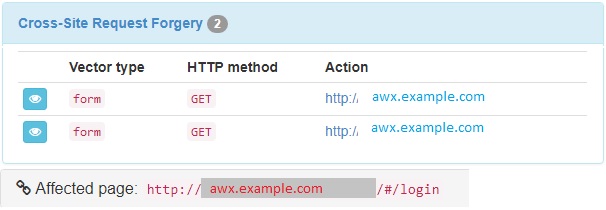
apparently the login page
lucaslan
on 7 Dec 2017
We'd need to see the details of what it thinks you can do on the login page, given that your screenshot isn't actually showing the HTTP GET API request.
wenottingham
on 7 Dec 2017
hi @wenottingham
I have this result clicking on the "eye" I hope it helps
In form with inputs keep_amount granularity_keep_amount keep_unit granularity_keep_unit using GET at http://awx.example.com/ pointing to http://awx.example.com/ .
<form name="prompt_for_days_facts_form" id="prompt_for_days_facts_form" class="MgmtCards-promptText ng-pristine ng-invalid ng-invalid-required">
  <div style="padding-bottom:15px;">
    <span translate="">
      For facts collected older than the time period specified, save one fact scan (snapshot) per time window (frequency). For example, facts older than 30 days are purged, while one weekly fact scan is kept.
    </span>
    <br>
    </br>
    <br>
    </br>
    <span translate="">
      CAUTION: Setting both numerical variables to "0" will delete all facts.
    </span>
    <br>
    </br>
    <br>
    </br>
  </div>
  <div class="form-group">
    <label for="description">
      <span class="label-text" translate="">
        Select a time period after which to remove old facts
      </span>
    </label>
    <div class="row">
      <div class="col-xs-6">
        <input type="integer" id="keep_amount" name="keep_amount" ng-model="keep_amount" ng-required="true" class="form-control Form-textInput MgmtCards-card--promptElements ng-pristine ng-untouched ng-empty ng-invalid ng-invalid-required" min="0" max="9999" integer="" required="required">
        </input>
      </div>
      <div class="col-xs-6">
        <select id="keep_unit" name="keep_unit" ng-model="keep_unit" ng-options="type.label for type in keep_unit_choices track by type.value" ng-required="true" class="form-control ng-pristine ng-untouched ng-empty ng-invalid ng-invalid-required" required="required">
          <option value="?" selected="selected">

          </option>
        </select>
      </div>
    </div>
    <div class="error ng-hide" ng-show="prompt_for_days_facts_form.keep_amount.$dirty && (prompt_for_days_facts_form.keep_amount.$error.number || prompt_for_days_facts_form.keep_amount.$error.integer ||\n                        prompt_for_days_facts_form.keep_amount.$error.required ||\n                        prompt_for_days_facts_form.keep_amount.$error.min ||\n                        prompt_for_days_facts_form.keep_amount.$error.max)" translate="">
      Please enter an integer
      <span ng-show="prompt_for_days_facts_form.keep_amount.$dirty && prompt_for_days_facts_form.keep_amount.$error.min" class="ng-scope ng-hide">
        that is not negative
      </span>
      <span ng-show="prompt_for_days_facts_form.keep_amount.$dirty && prompt_for_days_facts_form.keep_amount.$error.max" class="ng-scope ng-hide">
        that is lower than 9999
      </span>
      .
    </div>
  </div>
  <div class="form-group ">
    <label for="description">
      <span class="label-text" translate="">
        Select a frequency for snapshot retention
      </span>
    </label>
    <div class="row">
      <div class="col-xs-6">
        <input type="integer" id="granularity_keep_amount" name="granularity_keep_amount" ng-model="granularity_keep_amount" ng-required="true" class="form-control Form-textInput MgmtCards-card--promptElements ng-pristine ng-untouched ng-empty ng-invalid ng-invalid-required" min="0" max="9999" integer="" required="required">
        </input>
      </div>
      <div class="col-xs-6">
        <select id="granularity_keep_unit" name="granularity_keep_unit" ng-model="granularity_keep_unit" ng-options="type.label for type in granularity_keep_unit_choices track by type.value" ng-required="true" class="form-control ng-pristine ng-untouched ng-empty ng-invalid ng-invalid-required" required="required">
          <option value="?" selected="selected">

          </option>
        </select>
      </div>
    </div>
    <div class="error ng-hide" ng-show="prompt_for_days_facts_form.granularity_keep_amount.$dirty && (prompt_for_days_facts_form.granularity_keep_amount.$error.number || prompt_for_days_facts_form.granularity_keep_amount.$error.integer ||\n                        prompt_for_days_facts_form.granularity_keep_amount.$error.required ||\n                        prompt_for_days_facts_form.granularity_keep_amount.$error.min ||\n                        prompt_for_days_facts_form.granularity_keep_amount.$error.max)" translate="">
      Please enter an integer
      <span ng-show="prompt_for_days_facts_form.granularity_keep_amount.$dirty && prompt_for_days_facts_form.granularity_keep_amount.$error.min" class="ng-scope ng-hide">
        that is not negative
      </span>
      <span ng-show="prompt_for_days_facts_form.granularity_keep_amount.$dirty && prompt_for_days_facts_form.granularity_keep_amount.$error.max" class="ng-scope ng-hide">
        that is lower than 9999
      </span>
      .
    </div>
  </div>
</form>
And this:
In form with inputs login_username login_password using GET at http://awx.example.com/ pointing to http://awx.example.com/ .
<form id="login-form" name="loginForm" class="form-horizontal ng-pristine ng-invalid ng-invalid-required" autocomplete="off" novalidate="">
  <div class="form-group LoginModal-formGroup">
    <label class="LoginModal-label\n                            col-md-12" translate="">
      USERNAME
    </label>
    <div class="col-md-12">
      <input type="text" name="login_username" class="form-control LoginModal-field ng-pristine ng-empty ng-invalid ng-invalid-required ng-touched" ng-model="login_username" id="login-username" autocomplete="off" required="">
      </input>
      <div class="error ng-hide" ng-show="loginForm.login_username.$dirty &&\n                                loginForm.login_username.$error.required" translate="">
        Please enter a username.
      </div>
      <div class="error api-error ng-binding" ng-bind="usernameError">

      </div>
    </div>
  </div>
  <div class="form-group LoginModal-formGroup">
    <label class="LoginModal-label\n                            col-md-12" translate="">
      PASSWORD
    </label>
    <div class="col-md-12">
      <input type="password" name="login_password" id="login-password" class="form-control LoginModal-field ng-pristine ng-untouched ng-empty ng-invalid ng-invalid-required" ng-model="login_password" required="" autocomplete="off">
      </input>
      <div class="error ng-hide" ng-show="loginForm.login_password.$dirty\n                                &&\n                                loginForm.login_password.$error.required" translate="">
        Please enter a password.
      </div>
      <div class="error api-error ng-binding" ng-bind="passwordError">

      </div>
    </div>
  </div>
</form>
I really don't see any issues here - notably, neither of those forms are processed on that page, nor is any processing done via a GET. I'd be inclined to say it s a false positive from a tool that's attempting to naively parse the HTML looking for CSRF token usage.
wenottingham
on 8 Dec 2017
Closing this out - if you or the tool is more able to show an actual exploitable vulnerability, please reopen.
wenottingham
on 8 Dec 2017
Hello @wenottingham I have some news I think it might be useful
HTTP request:
Raw HTTP request used to retrieve the page.
GET / HTTP/1.1
Host: awx.example.com
Accept-Encoding: gzip, deflate
User-Agent: Arachni/v1.5.1
Accept: text/html,application/xhtml+xml,application/xml;q=0.9,*/*;q=0.8
Accept-Language: en-US,*
HTTP response
Raw HTTP response used as the page basis. (Binary bodies will not be displayed.)
HTTP/1.1 200 OK
Server: nginx/1.12.2
Date: Mon, 11 Dec 2017 19:20:40 GMT
Content-Type: text/html; charset=utf-8
Content-Length: 11268
Connection: keep-alive
Vary: Accept-Language, Cookie
Content-Language: en
Strict-Transport-Security: max-age=15768000
X-Frame-Options: DENY
<script src="http://javascript.browser.arachni/polyfills.js"></script> <!-- Injected by Arachni::Browser::Javascript -->
<script src="http://javascript.browser.arachni/taint_tracer.js"></script> <!-- Injected by Arachni::Browser::Javascript -->
<script src="http://javascript.browser.arachni/dom_monitor.js"></script> <!-- Injected by Arachni::Browser::Javascript -->
<script>
/* arachni_js_namespace_initialize_start */ _arachni_js_namespaceTaintTracer.initialize({}) /* arachni_js_namespace_initialize_stop */
window._arachni_js_namespace = true;
/* arachni_js_namespace_code_start */ /* arachni_js_namespace_code_stop */
</script> <!-- Injected by Arachni::Browser::Javascript -->
<!DOCTYPE html>
<html>
<head>
<meta charset="utf-8">
<meta http-equiv="X-UA-Compatible" content="IE=edge" />
<meta name="viewport" content="width=device-width, initial-scale=1.0" />
<link rel="shortcut icon" href="/static/assets/favicon.ico?v=1.0.1.240" />
<script>
// Injected by Arachni::Browser::Javascript
_arachni_js_namespaceTaintTracer.update_tracers();
_arachni_js_namespaceDOMMonitor.update_trackers();
var $basePath = '/static/'</script>
<script type="text/javascript">_arachni_js_namespaceTaintTracer.update_tracers();_arachni_js_namespaceDOMMonitor.update_trackers();</script> <!-- Injected by Arachni::Browser::Javascript -->
<link href="/static/css/vendor.de7dd9b7b75a5ad9b8e5.css" rel="stylesheet" />
<link href="/static/css/app.26612aa730614b7b6215.css" rel="stylesheet" />
<script src="/static/js/vendor.de7dd9b7b75a5ad9b8e5.js">
// Injected by Arachni::Browser::Javascript
_arachni_js_namespaceTaintTracer.update_tracers();
_arachni_js_namespaceDOMMonitor.update_trackers();
</script>
<script type="text/javascript">_arachni_js_namespaceTaintTracer.update_tracers();_arachni_js_namespaceDOMMonitor.update_trackers();</script> <!-- Injected by Arachni::Browser::Javascript -->
<script src="/static/js/app.26612aa730614b7b6215.js">
// Injected by Arachni::Browser::Javascript
_arachni_js_namespaceTaintTracer.update_tracers();
_arachni_js_namespaceDOMMonitor.update_trackers();
</script>
<script type="text/javascript">_arachni_js_namespaceTaintTracer.update_tracers();_arachni_js_namespaceDOMMonitor.update_trackers();</script> <!-- Injected by Arachni::Browser::Javascript -->
</head>
<body data-user-agent="">
<at-layout>
<bread-crumb></bread-crumb>
<toast></toast>
<div class="container-fluid" id="content-container">
<div class="row">
<div class="col-lg-12" ui-view>
</div>
</div>
<!-- Password Dialog -->
<div id="password-modal" style="display: none;"></div>
<div id="idle-modal" style="display:none" translate>Your session will expire in <span id="remaining_seconds" class="IdleModal-remainingSeconds">60</span> seconds, would you like to continue?</div>
<stream-detail-modal></stream-detail-modal>
<!-- Confirmation Dialog -->
<div id="prompt-modal" class="modal fade">
<div class="modal-dialog">
<div class="Modal-content modal-content">
<div class="Modal-header">
<div class="Modal-title" id="prompt-header">
<span ng-bind="promptHeader"></span>
<span class="Modal-titleResourceName" ng-bind="promptResourceName"></span>
</div>
<div class="Modal-exitHolder">
<button class="close Modal-exit" data-target="#prompt-modal" data-dismiss="modal" aria-hidden="true"><i class="fa fa-times-circle"></i></button>
</div>
</div>
<div class="Modal-body" ng-bind-html="promptBody" id="prompt-body">
</div>
<div class="Modal-footer">
<a href="#" data-target="#prompt-modal" data-dismiss="modal" id="prompt_cancel_btn" class="btn Modal-defaultButton Modal-footerButton" translate>CANCEL</a>
<a href="" ng-hide="hideActionButton" ng-class="promptActionBtnClass" ng-click="promptAction()" id="prompt_action_btn" class="btn Modal-footerButton" ng-bind="promptActionText"></a>
</div>
</div>
<!-- modal-content -->
</div>
<!-- modal-dialog -->
</div>
<!-- modal -->
<!-- Alerts/error handling dialogs -->
<div id="alert-modal" class="modal fade">
<div class="modal-dialog">
<div class="modal-content">
<div class="modal-header">
<button type="button" class="close" ng-hide="disableButtons" data-target="#alert-modal" data-dismiss="modal" class="modal" aria-hidden="true"><i class="fa fa-times-circle"></i></button>
<h3 id="alertHeader" ng-bind="alertHeader"></h3>
</div>
<div class="modal-body">
<div id="alert-modal-msg" class="alert" ng-bind-html="alertBody"></div>
</div>
<div class="modal-footer">
<a href="#" ng-hide="disableButtons" data-target="#form-modal" data-dismiss="modal" id="alert_ok_btn" class="btn btn-default" translate>OK</a>
</div>
</div>
<!-- modal-content -->
</div>
<!-- modal-dialog -->
</div>
<!-- modal -->
<div id="alert-modal2" class="modal fade">
<div class="modal-dialog">
<div class="modal-content">
<div class="modal-header">
<button type="button" class="close" data-target="#alert-modal2" data-dismiss="modal" ng-hide="disableButtons2" aria-hidden="true">×</button>
<h3 id="alertHeader2" ng-bind="alertHeader2"></h3>
</div>
<div class="modal-body">
<div id="alert2-modal-msg" class="alert" ng-bind-html="alertBody2"></div>
</div>
<div class="modal-footer">
<a href="#" ng-hide="disableButtons2" data-target="#form-modal2" data-dismiss="modal" id="alert2_ok_btn" class="btn btn-primary">OK</a>
</div>
</div>
<!-- modal-content -->
</div>
<!-- modal-dialog -->
</div>
<!-- modal -->
<div id="login-modal-dialog" style="display: none;"></div>
<div id="help-modal-dialog" style="display: none;"></div>
<div id="prompt-for-days" style="display:none">
<form name="prompt_for_days_form" id="prompt_for_days_form" class="MgmtCards-promptText">
<span translate>Set how many days of data should be retained.</span>
<br>
<input type="integer" id="days_to_keep" name="days_to_keep" ng-model="days_to_keep" ng-required="true" class="form-control Form-textInput" min=0 max=9999 style="margin-top:10px;" integer>
<div class="error" ng-show="prompt_for_days_form.days_to_keep.$dirty && (prompt_for_days_form.days_to_keep.$error.number || prompt_for_days_form.days_to_keep.$error.integer ||
prompt_for_days_form.days_to_keep.$error.required ||
prompt_for_days_form.days_to_keep.$error.min ||
prompt_for_days_form.days_to_keep.$error.max)" translate>Please enter an integer<span ng-show="prompt_for_days_form.days_to_keep.$dirty && prompt_for_days_form.days_to_keep.$error.min"> that is not negative</span><span ng-show="prompt_for_days_form.days_to_keep.$dirty && prompt_for_days_form.days_to_keep.$error.max"> that is lower than 9999</span>.</div>
</form>
</div>
<div id="prompt-for-days-facts" style="display:none">
<form name="prompt_for_days_facts_form" id="prompt_for_days_facts_form" class="MgmtCards-promptText">
<div style="padding-bottom:15px;"><span translate>For facts collected older than the time period specified, save one fact scan (snapshot) per time window (frequency). For example, facts older than 30 days are purged, while one weekly fact scan is kept.</span>
<br>
<br>
<span translate>CAUTION: Setting both numerical variables to "0" will delete all facts.</span>
<br>
<br>
</div>
<div class="form-group">
<label for="description">
<span class="label-text" translate>Select a time period after which to remove old facts</span>
</label>
<div class="row">
<div class="col-xs-6">
<input type="integer" id="keep_amount" name="keep_amount" ng-model="keep_amount" ng-required="true" class="form-control Form-textInput MgmtCards-card--promptElements" min=0 max=9999 integer></input>
</div>
<div class="col-xs-6">
<select id="keep_unit" name="keep_unit" ng-model="keep_unit" ng-options="type.label for type in keep_unit_choices track by type.value" ng-required="true" class="form-control"></select>
</div>
</div>
<div class="error" ng-show="prompt_for_days_facts_form.keep_amount.$dirty && (prompt_for_days_facts_form.keep_amount.$error.number || prompt_for_days_facts_form.keep_amount.$error.integer ||
prompt_for_days_facts_form.keep_amount.$error.required ||
prompt_for_days_facts_form.keep_amount.$error.min ||
prompt_for_days_facts_form.keep_amount.$error.max)" translate>Please enter an integer<span ng-show="prompt_for_days_facts_form.keep_amount.$dirty && prompt_for_days_facts_form.keep_amount.$error.min"> that is not negative</span><span ng-show="prompt_for_days_facts_form.keep_amount.$dirty && prompt_for_days_facts_form.keep_amount.$error.max"> that is lower than 9999</span>.</div>
</div>
<div class="form-group ">
<label for="description">
<span class="label-text" translate>Select a frequency for snapshot retention</span>
</label>
<div class="row">
<div class="col-xs-6">
<input type="integer" id="granularity_keep_amount" name="granularity_keep_amount" ng-model="granularity_keep_amount" ng-required="true" class="form-control Form-textInput MgmtCards-card--promptElements" min=0 max=9999 integer></input>
</div>
<div class="col-xs-6">
<select id="granularity_keep_unit" name="granularity_keep_unit" ng-model="granularity_keep_unit" ng-options="type.label for type in granularity_keep_unit_choices track by type.value" ng-required="true" class="form-control"></select>
</div>
</div>
<div class="error" ng-show="prompt_for_days_facts_form.granularity_keep_amount.$dirty && (prompt_for_days_facts_form.granularity_keep_amount.$error.number || prompt_for_days_facts_form.granularity_keep_amount.$error.integer ||
prompt_for_days_facts_form.granularity_keep_amount.$error.required ||
prompt_for_days_facts_form.granularity_keep_amount.$error.min ||
prompt_for_days_facts_form.granularity_keep_amount.$error.max)" translate>Please enter an integer<span ng-show="prompt_for_days_facts_form.granularity_keep_amount.$dirty && prompt_for_days_facts_form.granularity_keep_amount.$error.min"> that is not negative</span><span ng-show="prompt_for_days_facts_form.granularity_keep_amount.$dirty && prompt_for_days_facts_form.granularity_keep_amount.$error.max"> that is lower than 9999</span>.</div>
</div>
</form>
</div>
<div class="overlay"></div>
<div class="spinny"><i class="fa fa-cog fa-spin fa-2x"></i>
<p translate>working...</p>
</div>
</div>
</at-layout>
</body>
</html>
Browser-evaluated body
This is the browser-evaluated body, as a result of the listed transitions.
<html><head><style type="text/css">@charset "UTF-8";[ng\:cloak],[ng-cloak],[data-ng-cloak],[x-ng-cloak],.ng-cloak,.x-ng-cloak,.ng-hide:not(.ng-hide-animate){display:none !important;}ng\:form{display:block;}.ng-animate-shim{visibility:hidden;}.ng-anchor{position:absolute;}</style><script src="http://javascript.browser.arachni/polyfills.js"></script> <!-- Injected by Arachni::Browser::Javascript -->
<script src="http://javascript.browser.arachni/taint_tracer.js"></script> <!-- Injected by Arachni::Browser::Javascript -->
<script src="http://javascript.browser.arachni/dom_monitor.js"></script> <!-- Injected by Arachni::Browser::Javascript -->
<script>
/* arachni_js_namespace_initialize_start */ _arachni_js_namespaceTaintTracer.initialize({}) /* arachni_js_namespace_initialize_stop */
window._arachni_js_namespace = true;
/* arachni_js_namespace_code_start */ /* arachni_js_namespace_code_stop */
</script> <!-- Injected by Arachni::Browser::Javascript -->
<meta charset="utf-8">
<meta http-equiv="X-UA-Compatible" content="IE=edge">
<meta name="viewport" content="width=device-width, initial-scale=1.0">
<link rel="shortcut icon" href="/static/assets/favicon.ico?v=1.0.1.240">
<script>
// Injected by Arachni::Browser::Javascript
_arachni_js_namespaceTaintTracer.update_tracers();
_arachni_js_namespaceDOMMonitor.update_trackers();
var $basePath = '/static/'</script>
<script type="text/javascript">_arachni_js_namespaceTaintTracer.update_tracers();_arachni_js_namespaceDOMMonitor.update_trackers();</script> <!-- Injected by Arachni::Browser::Javascript -->
<link href="/static/css/vendor.de7dd9b7b75a5ad9b8e5.css" rel="stylesheet">
<link href="/static/css/app.26612aa730614b7b6215.css" rel="stylesheet">
<script src="/static/js/vendor.de7dd9b7b75a5ad9b8e5.js">
// Injected by Arachni::Browser::Javascript
_arachni_js_namespaceTaintTracer.update_tracers();
_arachni_js_namespaceDOMMonitor.update_trackers();
</script>
<script type="text/javascript">_arachni_js_namespaceTaintTracer.update_tracers();_arachni_js_namespaceDOMMonitor.update_trackers();</script> <!-- Injected by Arachni::Browser::Javascript -->
<script src="/static/js/app.26612aa730614b7b6215.js">
// Injected by Arachni::Browser::Javascript
_arachni_js_namespaceTaintTracer.update_tracers();
_arachni_js_namespaceDOMMonitor.update_trackers();
</script>
<script type="text/javascript">_arachni_js_namespaceTaintTracer.update_tracers();_arachni_js_namespaceDOMMonitor.update_trackers();</script> <!-- Injected by Arachni::Browser::Javascript -->
<title>Ansible AWX </title></head>
<body data-user-agent="" class="ng-scope" data-arachni-id="1093784467">
<div class="at-Layout ng-isolate-scope">
<div class="at-Layout-topNav">
<div class="at-Layout-topNavItem--logo at-Layout-topNavItem ng-isolate-scope is-loggedOut" ng-class="{'is-loggedOut': !layoutVm.isLoggedIn}" ng-show="!isHidden" ng-transclude="" is-shown="missingLicense">
<a href="/#/" class="ng-scope">
<img ng-src="/static/assets/logo-header.svg" src="/static/assets/logo-header.svg">
</a>
</div>
<div class="at-Layout-topNavRightAligner"></div>
<div class="at-Layout-topNavItem--user at-Layout-topNavItem ng-isolate-scope ng-hide is-loggedOut" ng-class="{'is-loggedOut': !layoutVm.isLoggedIn}" ng-show="!isHidden" ng-transclude="">
<a ng-href="/#/users/" class="ng-scope" href="/#/users/">
<i class="fa fa-user" alt="Logged in as ">
</i>
<span class="ng-binding"></span>
</a>
</div>
<div class="at-Layout-topNavItem ng-isolate-scope ng-hide is-loggedOut" ng-class="{'is-loggedOut': !layoutVm.isLoggedIn}" ng-show="!isHidden" ng-transclude="">
<a href="http://docs.ansible.com/ansible-tower/" target="_blank" class="ng-scope">
<i class="fa fa-book" alt="View Documentation"></i>
</a>
</div>
<!-- ngIf: $parent.layoutVm.socketState &&
$parent.layoutVm.socketState !== 'ok' -->
<div class="at-Layout-topNavItem ng-isolate-scope is-loggedOut" ng-class="{'is-loggedOut': !layoutVm.isLoggedIn}" ng-show="!isHidden" ng-transclude="" is-shown="missingLicense">
<a href="/#/logout" is-always-shown="license" class="ng-scope">
<i class="fa fa-power-off" alt="Logout"></i>
</a>
</div>
</div>
<div class="at-Layout-side ng-isolate-scope ng-hide" ng-class="{'at-Layout-side--expanded': vm.isExpanded && layoutVm.isLoggedIn}" ng-show="layoutVm.isLoggedIn && !layoutVm.licenseIsMissing">
<div class="at-Layout-sideNavItem at-Layout-sideNavToggle ng-hide" ng-click="vm.toggleExpansion()" ng-show="layoutVm.isLoggedIn && !layoutVm.licenseIsMissing">
<i class="fa fa-bars"></i>
</div>
<ng-transclude>
<at-side-nav-item icon-class="fa-tachometer" route="dashboard" name="DASHBOARD" class="ng-scope ng-isolate-scope"><div class="at-Layout-sideNavItem ng-hide" ng-click="vm.go()" ng-class="{'is-active': vm.isRoute}" ng-show="(!systemAdminOnly || layoutVm.isSuperUser) && layoutVm.isLoggedIn &&
!layoutVm.licenseIsMissing">
<!-- ngIf: !navVm.isExpanded --><div ng-show="popover.text" class="at-Popover ng-scope ng-isolate-scope at-Popover--inline" ng-class="{ 'at-Popover--inline': popover.inline }" state="vm.tooltip" ng-if="!navVm.isExpanded">
<div class="at-Popover-icon at-Popover-icon--defaultCursor" ng-class="{ 'at-Popover-icon--defaultCursor': popover.on === 'mouseenter' && !popover.click }">
<i class="fa fa-tachometer"></i>
</div>
<div class="at-Popover-container">
<div class="at-Popover-arrow">
<!-- ngIf: popover.position === 'right' --><div ng-if="popover.position === 'right'" class="fa fa-caret-left fa-2x ng-scope"></div><!-- end ngIf: popover.position === 'right' -->
<!-- ngIf: popover.position === 'top' -->
</div>
<div class="at-Popover-content">
<!-- ngIf: popover.title -->
<!-- ngIf: popover.text --><p ng-if="popover.text" class="at-Popover-text ng-binding ng-scope">Dashboard</p><!-- end ngIf: popover.text -->
</div>
</div>
</div><!-- end ngIf: !navVm.isExpanded -->
<i class="fa fa-tachometer ng-hide" ng-show="navVm.isExpanded"></i>
<span class="at-Layout-sideNavItemName ng-binding ng-hide" ng-show="navVm.isExpanded">
Dashboard
</span>
</div>
</at-side-nav-item>
<at-side-nav-item icon-class="fa-spinner" route="jobs" name="JOBS" class="ng-scope ng-isolate-scope"><div class="at-Layout-sideNavItem ng-hide" ng-click="vm.go()" ng-class="{'is-active': vm.isRoute}" ng-show="(!systemAdminOnly || layoutVm.isSuperUser) && layoutVm.isLoggedIn &&
!layoutVm.licenseIsMissing">
<!-- ngIf: !navVm.isExpanded --><div ng-show="popover.text" class="at-Popover ng-scope ng-isolate-scope at-Popover--inline" ng-class="{ 'at-Popover--inline': popover.inline }" state="vm.tooltip" ng-if="!navVm.isExpanded">
<div class="at-Popover-icon at-Popover-icon--defaultCursor" ng-class="{ 'at-Popover-icon--defaultCursor': popover.on === 'mouseenter' && !popover.click }">
<i class="fa fa-spinner"></i>
</div>
<div class="at-Popover-container">
<div class="at-Popover-arrow">
<!-- ngIf: popover.position === 'right' --><div ng-if="popover.position === 'right'" class="fa fa-caret-left fa-2x ng-scope"></div><!-- end ngIf: popover.position === 'right' -->
<!-- ngIf: popover.position === 'top' -->
</div>
<div class="at-Popover-content">
<!-- ngIf: popover.title -->
<!-- ngIf: popover.text --><p ng-if="popover.text" class="at-Popover-text ng-binding ng-scope">Jobs</p><!-- end ngIf: popover.text -->
</div>
</div>
</div><!-- end ngIf: !navVm.isExpanded -->
<i class="fa fa-spinner ng-hide" ng-show="navVm.isExpanded"></i>
<span class="at-Layout-sideNavItemName ng-binding ng-hide" ng-show="navVm.isExpanded">
Jobs
</span>
</div>
</at-side-nav-item>
<at-side-nav-item icon-class="fa-calendar" route="jobs.schedules" name="SCHEDULES" class="ng-scope ng-isolate-scope"><div class="at-Layout-sideNavItem ng-hide" ng-click="vm.go()" ng-class="{'is-active': vm.isRoute}" ng-show="(!systemAdminOnly || layoutVm.isSuperUser) && layoutVm.isLoggedIn &&
!layoutVm.licenseIsMissing">
<!-- ngIf: !navVm.isExpanded --><div ng-show="popover.text" class="at-Popover ng-scope ng-isolate-scope at-Popover--inline" ng-class="{ 'at-Popover--inline': popover.inline }" state="vm.tooltip" ng-if="!navVm.isExpanded">
<div class="at-Popover-icon at-Popover-icon--defaultCursor" ng-class="{ 'at-Popover-icon--defaultCursor': popover.on === 'mouseenter' && !popover.click }">
<i class="fa fa-calendar"></i>
</div>
<div class="at-Popover-container">
<div class="at-Popover-arrow">
<!-- ngIf: popover.position === 'right' --><div ng-if="popover.position === 'right'" class="fa fa-caret-left fa-2x ng-scope"></div><!-- end ngIf: popover.position === 'right' -->
<!-- ngIf: popover.position === 'top' -->
</div>
<div class="at-Popover-content">
<!-- ngIf: popover.title -->
<!-- ngIf: popover.text --><p ng-if="popover.text" class="at-Popover-text ng-binding ng-scope">Schedules</p><!-- end ngIf: popover.text -->
</div>
</div>
</div><!-- end ngIf: !navVm.isExpanded -->
<i class="fa fa-calendar ng-hide" ng-show="navVm.isExpanded"></i>
<span class="at-Layout-sideNavItemName ng-binding ng-hide" ng-show="navVm.isExpanded">
Schedules
</span>
</div>
</at-side-nav-item>
<at-side-nav-item icon-class="fa-columns" route="portalMode.myJobs" name="PORTAL_MODE" class="ng-scope ng-isolate-scope"><div class="at-Layout-sideNavItem ng-hide" ng-click="vm.go()" ng-class="{'is-active': vm.isRoute}" ng-show="(!systemAdminOnly || layoutVm.isSuperUser) && layoutVm.isLoggedIn &&
!layoutVm.licenseIsMissing">
<!-- ngIf: !navVm.isExpanded --><div ng-show="popover.text" class="at-Popover ng-scope ng-isolate-scope at-Popover--inline" ng-class="{ 'at-Popover--inline': popover.inline }" state="vm.tooltip" ng-if="!navVm.isExpanded">
<div class="at-Popover-icon at-Popover-icon--defaultCursor" ng-class="{ 'at-Popover-icon--defaultCursor': popover.on === 'mouseenter' && !popover.click }">
<i class="fa fa-columns"></i>
</div>
<div class="at-Popover-container">
<div class="at-Popover-arrow">
<!-- ngIf: popover.position === 'right' --><div ng-if="popover.position === 'right'" class="fa fa-caret-left fa-2x ng-scope"></div><!-- end ngIf: popover.position === 'right' -->
<!-- ngIf: popover.position === 'top' -->
</div>
<div class="at-Popover-content">
<!-- ngIf: popover.title -->
<!-- ngIf: popover.text --><p ng-if="popover.text" class="at-Popover-text ng-binding ng-scope">Portal Mode</p><!-- end ngIf: popover.text -->
</div>
</div>
</div><!-- end ngIf: !navVm.isExpanded -->
<i class="fa fa-columns ng-hide" ng-show="navVm.isExpanded"></i>
<span class="at-Layout-sideNavItemName ng-binding ng-hide" ng-show="navVm.isExpanded">
Portal Mode
</span>
</div>
</at-side-nav-item>
<div class="at-Layout-sideNavSpacer ng-scope"></div>
<at-side-nav-item icon-class="fa-folder-open" route="projects" name="PROJECTS" class="ng-scope ng-isolate-scope"><div class="at-Layout-sideNavItem ng-hide" ng-click="vm.go()" ng-class="{'is-active': vm.isRoute}" ng-show="(!systemAdminOnly || layoutVm.isSuperUser) && layoutVm.isLoggedIn &&
!layoutVm.licenseIsMissing">
<!-- ngIf: !navVm.isExpanded --><div ng-show="popover.text" class="at-Popover ng-scope ng-isolate-scope at-Popover--inline" ng-class="{ 'at-Popover--inline': popover.inline }" state="vm.tooltip" ng-if="!navVm.isExpanded">
<div class="at-Popover-icon at-Popover-icon--defaultCursor" ng-class="{ 'at-Popover-icon--defaultCursor': popover.on === 'mouseenter' && !popover.click }">
<i class="fa fa-folder-open"></i>
</div>
<div class="at-Popover-container">
<div class="at-Popover-arrow">
<!-- ngIf: popover.position === 'right' --><div ng-if="popover.position === 'right'" class="fa fa-caret-left fa-2x ng-scope"></div><!-- end ngIf: popover.position === 'right' -->
<!-- ngIf: popover.position === 'top' -->
</div>
<div class="at-Popover-content">
<!-- ngIf: popover.title -->
<!-- ngIf: popover.text --><p ng-if="popover.text" class="at-Popover-text ng-binding ng-scope">Projects</p><!-- end ngIf: popover.text -->
</div>
</div>
</div><!-- end ngIf: !navVm.isExpanded -->
<i class="fa fa-folder-open ng-hide" ng-show="navVm.isExpanded"></i>
<span class="at-Layout-sideNavItemName ng-binding ng-hide" ng-show="navVm.isExpanded">
Projects
</span>
</div>
</at-side-nav-item>
<at-side-nav-item icon-class="fa-key" route="credentials" name="CREDENTIALS" class="ng-scope ng-isolate-scope"><div class="at-Layout-sideNavItem ng-hide" ng-click="vm.go()" ng-class="{'is-active': vm.isRoute}" ng-show="(!systemAdminOnly || layoutVm.isSuperUser) && layoutVm.isLoggedIn &&
!layoutVm.licenseIsMissing">
<!-- ngIf: !navVm.isExpanded --><div ng-show="popover.text" class="at-Popover ng-scope ng-isolate-scope at-Popover--inline" ng-class="{ 'at-Popover--inline': popover.inline }" state="vm.tooltip" ng-if="!navVm.isExpanded">
<div class="at-Popover-icon at-Popover-icon--defaultCursor" ng-class="{ 'at-Popover-icon--defaultCursor': popover.on === 'mouseenter' && !popover.click }">
<i class="fa fa-key"></i>
</div>
<div class="at-Popover-container">
<div class="at-Popover-arrow">
<!-- ngIf: popover.position === 'right' --><div ng-if="popover.position === 'right'" class="fa fa-caret-left fa-2x ng-scope"></div><!-- end ngIf: popover.position === 'right' -->
<!-- ngIf: popover.position === 'top' -->
</div>
<div class="at-Popover-content">
<!-- ngIf: popover.title -->
<!-- ngIf: popover.text --><p ng-if="popover.text" class="at-Popover-text ng-binding ng-scope">Credentials</p><!-- end ngIf: popover.text -->
</div>
</div>
</div><!-- end ngIf: !navVm.isExpanded -->
<i class="fa fa-key ng-hide" ng-show="navVm.isExpanded"></i>
<span class="at-Layout-sideNavItemName ng-binding ng-hide" ng-show="navVm.isExpanded">
Credentials
</span>
</div>
</at-side-nav-item>
<at-side-nav-item icon-class="fa-list-alt" route="credentialTypes" name="CREDENTIAL_TYPES" system-admin-only="true" class="ng-scope ng-isolate-scope"><div class="at-Layout-sideNavItem ng-hide" ng-click="vm.go()" ng-class="{'is-active': vm.isRoute}" ng-show="(!systemAdminOnly || layoutVm.isSuperUser) && layoutVm.isLoggedIn &&
!layoutVm.licenseIsMissing">
<!-- ngIf: !navVm.isExpanded --><div ng-show="popover.text" class="at-Popover ng-scope ng-isolate-scope at-Popover--inline" ng-class="{ 'at-Popover--inline': popover.inline }" state="vm.tooltip" ng-if="!navVm.isExpanded">
<div class="at-Popover-icon at-Popover-icon--defaultCursor" ng-class="{ 'at-Popover-icon--defaultCursor': popover.on === 'mouseenter' && !popover.click }">
<i class="fa fa-list-alt"></i>
</div>
<div class="at-Popover-container">
<div class="at-Popover-arrow">
<!-- ngIf: popover.position === 'right' --><div ng-if="popover.position === 'right'" class="fa fa-caret-left fa-2x ng-scope"></div><!-- end ngIf: popover.position === 'right' -->
<!-- ngIf: popover.position === 'top' -->
</div>
<div class="at-Popover-content">
<!-- ngIf: popover.title -->
<!-- ngIf: popover.text --><p ng-if="popover.text" class="at-Popover-text ng-binding ng-scope">Credential Types</p><!-- end ngIf: popover.text -->
</div>
</div>
</div><!-- end ngIf: !navVm.isExpanded -->
<i class="fa fa-list-alt ng-hide" ng-show="navVm.isExpanded"></i>
<span class="at-Layout-sideNavItemName ng-binding ng-hide" ng-show="navVm.isExpanded">
Credential Types
</span>
</div>
</at-side-nav-item>
<at-side-nav-item icon-class="fa-sitemap" route="inventories" name="INVENTORIES" class="ng-scope ng-isolate-scope"><div class="at-Layout-sideNavItem ng-hide" ng-click="vm.go()" ng-class="{'is-active': vm.isRoute}" ng-show="(!systemAdminOnly || layoutVm.isSuperUser) && layoutVm.isLoggedIn &&
!layoutVm.licenseIsMissing">
<!-- ngIf: !navVm.isExpanded --><div ng-show="popover.text" class="at-Popover ng-scope ng-isolate-scope at-Popover--inline" ng-class="{ 'at-Popover--inline': popover.inline }" state="vm.tooltip" ng-if="!navVm.isExpanded">
<div class="at-Popover-icon at-Popover-icon--defaultCursor" ng-class="{ 'at-Popover-icon--defaultCursor': popover.on === 'mouseenter' && !popover.click }">
<i class="fa fa-sitemap"></i>
</div>
<div class="at-Popover-container">
<div class="at-Popover-arrow">
<!-- ngIf: popover.position === 'right' --><div ng-if="popover.position === 'right'" class="fa fa-caret-left fa-2x ng-scope"></div><!-- end ngIf: popover.position === 'right' -->
<!-- ngIf: popover.position === 'top' -->
</div>
<div class="at-Popover-content">
<!-- ngIf: popover.title -->
<!-- ngIf: popover.text --><p ng-if="popover.text" class="at-Popover-text ng-binding ng-scope">Inventories</p><!-- end ngIf: popover.text -->
</div>
</div>
</div><!-- end ngIf: !navVm.isExpanded -->
<i class="fa fa-sitemap ng-hide" ng-show="navVm.isExpanded"></i>
<span class="at-Layout-sideNavItemName ng-binding ng-hide" ng-show="navVm.isExpanded">
Inventories
</span>
</div>
</at-side-nav-item>
<at-side-nav-item icon-class="fa-pencil-square-o" route="templates" name="TEMPLATES" class="ng-scope ng-isolate-scope"><div class="at-Layout-sideNavItem ng-hide" ng-click="vm.go()" ng-class="{'is-active': vm.isRoute}" ng-show="(!systemAdminOnly || layoutVm.isSuperUser) && layoutVm.isLoggedIn &&
!layoutVm.licenseIsMissing">
<!-- ngIf: !navVm.isExpanded --><div ng-show="popover.text" class="at-Popover ng-scope ng-isolate-scope at-Popover--inline" ng-class="{ 'at-Popover--inline': popover.inline }" state="vm.tooltip" ng-if="!navVm.isExpanded">
<div class="at-Popover-icon at-Popover-icon--defaultCursor" ng-class="{ 'at-Popover-icon--defaultCursor': popover.on === 'mouseenter' && !popover.click }">
<i class="fa fa-pencil-square-o"></i>
</div>
<div class="at-Popover-container">
<div class="at-Popover-arrow">
<!-- ngIf: popover.position === 'right' --><div ng-if="popover.position === 'right'" class="fa fa-caret-left fa-2x ng-scope"></div><!-- end ngIf: popover.position === 'right' -->
<!-- ngIf: popover.position === 'top' -->
</div>
<div class="at-Popover-content">
<!-- ngIf: popover.title -->
<!-- ngIf: popover.text --><p ng-if="popover.text" class="at-Popover-text ng-binding ng-scope">Templates</p><!-- end ngIf: popover.text -->
</div>
</div>
</div><!-- end ngIf: !navVm.isExpanded -->
<i class="fa fa-pencil-square-o ng-hide" ng-show="navVm.isExpanded"></i>
<span class="at-Layout-sideNavItemName ng-binding ng-hide" ng-show="navVm.isExpanded">
Templates
</span>
</div>
</at-side-nav-item>
<div class="at-Layout-sideNavSpacer ng-scope"></div>
<at-side-nav-item icon-class="fa-building" route="organizations" name="ORGANIZATIONS" class="ng-scope ng-isolate-scope"><div class="at-Layout-sideNavItem ng-hide" ng-click="vm.go()" ng-class="{'is-active': vm.isRoute}" ng-show="(!systemAdminOnly || layoutVm.isSuperUser) && layoutVm.isLoggedIn &&
!layoutVm.licenseIsMissing">
<!-- ngIf: !navVm.isExpanded --><div ng-show="popover.text" class="at-Popover ng-scope ng-isolate-scope at-Popover--inline" ng-class="{ 'at-Popover--inline': popover.inline }" state="vm.tooltip" ng-if="!navVm.isExpanded">
<div class="at-Popover-icon at-Popover-icon--defaultCursor" ng-class="{ 'at-Popover-icon--defaultCursor': popover.on === 'mouseenter' && !popover.click }">
<i class="fa fa-building"></i>
</div>
<div class="at-Popover-container">
<div class="at-Popover-arrow">
<!-- ngIf: popover.position === 'right' --><div ng-if="popover.position === 'right'" class="fa fa-caret-left fa-2x ng-scope"></div><!-- end ngIf: popover.position === 'right' -->
<!-- ngIf: popover.position === 'top' -->
</div>
<div class="at-Popover-content">
<!-- ngIf: popover.title -->
<!-- ngIf: popover.text --><p ng-if="popover.text" class="at-Popover-text ng-binding ng-scope">Organizations</p><!-- end ngIf: popover.text -->
</div>
</div>
</div><!-- end ngIf: !navVm.isExpanded -->
<i class="fa fa-building ng-hide" ng-show="navVm.isExpanded"></i>
<span class="at-Layout-sideNavItemName ng-binding ng-hide" ng-show="navVm.isExpanded">
Organizations
</span>
</div>
</at-side-nav-item>
<at-side-nav-item icon-class="fa-user" route="users" name="USERS" class="ng-scope ng-isolate-scope"><div class="at-Layout-sideNavItem ng-hide" ng-click="vm.go()" ng-class="{'is-active': vm.isRoute}" ng-show="(!systemAdminOnly || layoutVm.isSuperUser) && layoutVm.isLoggedIn &&
!layoutVm.licenseIsMissing">
<!-- ngIf: !navVm.isExpanded --><div ng-show="popover.text" class="at-Popover ng-scope ng-isolate-scope at-Popover--inline" ng-class="{ 'at-Popover--inline': popover.inline }" state="vm.tooltip" ng-if="!navVm.isExpanded">
<div class="at-Popover-icon at-Popover-icon--defaultCursor" ng-class="{ 'at-Popover-icon--defaultCursor': popover.on === 'mouseenter' && !popover.click }">
<i class="fa fa-user"></i>
</div>
<div class="at-Popover-container">
<div class="at-Popover-arrow">
<!-- ngIf: popover.position === 'right' --><div ng-if="popover.position === 'right'" class="fa fa-caret-left fa-2x ng-scope"></div><!-- end ngIf: popover.position === 'right' -->
<!-- ngIf: popover.position === 'top' -->
</div>
<div class="at-Popover-content">
<!-- ngIf: popover.title -->
<!-- ngIf: popover.text --><p ng-if="popover.text" class="at-Popover-text ng-binding ng-scope">Users</p><!-- end ngIf: popover.text -->
</div>
</div>
</div><!-- end ngIf: !navVm.isExpanded -->
<i class="fa fa-user ng-hide" ng-show="navVm.isExpanded"></i>
<span class="at-Layout-sideNavItemName ng-binding ng-hide" ng-show="navVm.isExpanded">
Users
</span>
</div>
</at-side-nav-item>
<at-side-nav-item icon-class="fa-users" route="teams" name="TEAMS" class="ng-scope ng-isolate-scope"><div class="at-Layout-sideNavItem ng-hide" ng-click="vm.go()" ng-class="{'is-active': vm.isRoute}" ng-show="(!systemAdminOnly || layoutVm.isSuperUser) && layoutVm.isLoggedIn &&
!layoutVm.licenseIsMissing">
<!-- ngIf: !navVm.isExpanded --><div ng-show="popover.text" class="at-Popover ng-scope ng-isolate-scope at-Popover--inline" ng-class="{ 'at-Popover--inline': popover.inline }" state="vm.tooltip" ng-if="!navVm.isExpanded">
<div class="at-Popover-icon at-Popover-icon--defaultCursor" ng-class="{ 'at-Popover-icon--defaultCursor': popover.on === 'mouseenter' && !popover.click }">
<i class="fa fa-users"></i>
</div>
<div class="at-Popover-container">
<div class="at-Popover-arrow">
<!-- ngIf: popover.position === 'right' --><div ng-if="popover.position === 'right'" class="fa fa-caret-left fa-2x ng-scope"></div><!-- end ngIf: popover.position === 'right' -->
<!-- ngIf: popover.position === 'top' -->
</div>
<div class="at-Popover-content">
<!-- ngIf: popover.title -->
<!-- ngIf: popover.text --><p ng-if="popover.text" class="at-Popover-text ng-binding ng-scope">Teams</p><!-- end ngIf: popover.text -->
</div>
</div>
</div><!-- end ngIf: !navVm.isExpanded -->
<i class="fa fa-users ng-hide" ng-show="navVm.isExpanded"></i>
<span class="at-Layout-sideNavItemName ng-binding ng-hide" ng-show="navVm.isExpanded">
Teams
</span>
</div>
</at-side-nav-item>
<div class="at-Layout-sideNavSpacer ng-scope"></div>
<at-side-nav-item icon-class="fa-code" route="inventoryScripts" name="INVENTORY_SCRIPTS" class="ng-scope ng-isolate-scope"><div class="at-Layout-sideNavItem ng-hide" ng-click="vm.go()" ng-class="{'is-active': vm.isRoute}" ng-show="(!systemAdminOnly || layoutVm.isSuperUser) && layoutVm.isLoggedIn &&
!layoutVm.licenseIsMissing">
<!-- ngIf: !navVm.isExpanded --><div ng-show="popover.text" class="at-Popover ng-scope ng-isolate-scope at-Popover--inline" ng-class="{ 'at-Popover--inline': popover.inline }" state="vm.tooltip" ng-if="!navVm.isExpanded">
<div class="at-Popover-icon at-Popover-icon--defaultCursor" ng-class="{ 'at-Popover-icon--defaultCursor': popover.on === 'mouseenter' && !popover.click }">
<i class="fa fa-code"></i>
</div>
<div class="at-Popover-container">
<div class="at-Popover-arrow">
<!-- ngIf: popover.position === 'right' --><div ng-if="popover.position === 'right'" class="fa fa-caret-left fa-2x ng-scope"></div><!-- end ngIf: popover.position === 'right' -->
<!-- ngIf: popover.position === 'top' -->
</div>
<div class="at-Popover-content">
<!-- ngIf: popover.title -->
<!-- ngIf: popover.text --><p ng-if="popover.text" class="at-Popover-text ng-binding ng-scope">Inventory Scripts</p><!-- end ngIf: popover.text -->
</div>
</div>
</div><!-- end ngIf: !navVm.isExpanded -->
<i class="fa fa-code ng-hide" ng-show="navVm.isExpanded"></i>
<span class="at-Layout-sideNavItemName ng-binding ng-hide" ng-show="navVm.isExpanded">
Inventory Scripts
</span>
</div>
</at-side-nav-item>
<at-side-nav-item icon-class="fa-bell" route="notifications" name="NOTIFICATIONS" system-admin-only="true" class="ng-scope ng-isolate-scope"><div class="at-Layout-sideNavItem ng-hide" ng-click="vm.go()" ng-class="{'is-active': vm.isRoute}" ng-show="(!systemAdminOnly || layoutVm.isSuperUser) && layoutVm.isLoggedIn &&
!layoutVm.licenseIsMissing">
<!-- ngIf: !navVm.isExpanded --><div ng-show="popover.text" class="at-Popover ng-scope ng-isolate-scope at-Popover--inline" ng-class="{ 'at-Popover--inline': popover.inline }" state="vm.tooltip" ng-if="!navVm.isExpanded">
<div class="at-Popover-icon at-Popover-icon--defaultCursor" ng-class="{ 'at-Popover-icon--defaultCursor': popover.on === 'mouseenter' && !popover.click }">
<i class="fa fa-bell"></i>
</div>
<div class="at-Popover-container">
<div class="at-Popover-arrow">
<!-- ngIf: popover.position === 'right' --><div ng-if="popover.position === 'right'" class="fa fa-caret-left fa-2x ng-scope"></div><!-- end ngIf: popover.position === 'right' -->
<!-- ngIf: popover.position === 'top' -->
</div>
<div class="at-Popover-content">
<!-- ngIf: popover.title -->
<!-- ngIf: popover.text --><p ng-if="popover.text" class="at-Popover-text ng-binding ng-scope">Notifications</p><!-- end ngIf: popover.text -->
</div>
</div>
</div><!-- end ngIf: !navVm.isExpanded -->
<i class="fa fa-bell ng-hide" ng-show="navVm.isExpanded"></i>
<span class="at-Layout-sideNavItemName ng-binding ng-hide" ng-show="navVm.isExpanded">
Notifications
</span>
</div>
</at-side-nav-item>
<at-side-nav-item icon-class="fa-wrench" route="managementJobsList" name="MANAGEMENT_JOBS" system-admin-only="true" class="ng-scope ng-isolate-scope"><div class="at-Layout-sideNavItem ng-hide" ng-click="vm.go()" ng-class="{'is-active': vm.isRoute}" ng-show="(!systemAdminOnly || layoutVm.isSuperUser) && layoutVm.isLoggedIn &&
!layoutVm.licenseIsMissing">
<!-- ngIf: !navVm.isExpanded --><div ng-show="popover.text" class="at-Popover ng-scope ng-isolate-scope at-Popover--inline" ng-class="{ 'at-Popover--inline': popover.inline }" state="vm.tooltip" ng-if="!navVm.isExpanded">
<div class="at-Popover-icon at-Popover-icon--defaultCursor" ng-class="{ 'at-Popover-icon--defaultCursor': popover.on === 'mouseenter' && !popover.click }">
<i class="fa fa-wrench"></i>
</div>
<div class="at-Popover-container">
<div class="at-Popover-arrow">
<!-- ngIf: popover.position === 'right' --><div ng-if="popover.position === 'right'" class="fa fa-caret-left fa-2x ng-scope"></div><!-- end ngIf: popover.position === 'right' -->
<!-- ngIf: popover.position === 'top' -->
</div>
<div class="at-Popover-content">
<!-- ngIf: popover.title -->
<!-- ngIf: popover.text --><p ng-if="popover.text" class="at-Popover-text ng-binding ng-scope">Management Jobs</p><!-- end ngIf: popover.text -->
</div>
</div>
</div><!-- end ngIf: !navVm.isExpanded -->
<i class="fa fa-wrench ng-hide" ng-show="navVm.isExpanded"></i>
<span class="at-Layout-sideNavItemName ng-binding ng-hide" ng-show="navVm.isExpanded">
Management Jobs
</span>
</div>
</at-side-nav-item>
<at-side-nav-item icon-class="fa-server" route="instanceGroups" name="INSTANCE_GROUPS" system-admin-only="true" class="ng-scope ng-isolate-scope"><div class="at-Layout-sideNavItem ng-hide" ng-click="vm.go()" ng-class="{'is-active': vm.isRoute}" ng-show="(!systemAdminOnly || layoutVm.isSuperUser) && layoutVm.isLoggedIn &&
!layoutVm.licenseIsMissing">
<!-- ngIf: !navVm.isExpanded --><div ng-show="popover.text" class="at-Popover ng-scope ng-isolate-scope at-Popover--inline" ng-class="{ 'at-Popover--inline': popover.inline }" state="vm.tooltip" ng-if="!navVm.isExpanded">
<div class="at-Popover-icon at-Popover-icon--defaultCursor" ng-class="{ 'at-Popover-icon--defaultCursor': popover.on === 'mouseenter' && !popover.click }">
<i class="fa fa-server"></i>
</div>
<div class="at-Popover-container">
<div class="at-Popover-arrow">
<!-- ngIf: popover.position === 'right' --><div ng-if="popover.position === 'right'" class="fa fa-caret-left fa-2x ng-scope"></div><!-- end ngIf: popover.position === 'right' -->
<!-- ngIf: popover.position === 'top' -->
</div>
<div class="at-Popover-content">
<!-- ngIf: popover.title -->
<!-- ngIf: popover.text --><p ng-if="popover.text" class="at-Popover-text ng-binding ng-scope">Instance Groups</p><!-- end ngIf: popover.text -->
</div>
</div>
</div><!-- end ngIf: !navVm.isExpanded -->
<i class="fa fa-server ng-hide" ng-show="navVm.isExpanded"></i>
<span class="at-Layout-sideNavItemName ng-binding ng-hide" ng-show="navVm.isExpanded">
Instance Groups
</span>
</div>
</at-side-nav-item>
<div class="at-Layout-sideNavSpacer ng-scope"></div>
<at-side-nav-item icon-class="fa-cog" route="configuration" name="SETTINGS" system-admin-only="true" class="ng-scope ng-isolate-scope"><div class="at-Layout-sideNavItem ng-hide" ng-click="vm.go()" ng-class="{'is-active': vm.isRoute}" ng-show="(!systemAdminOnly || layoutVm.isSuperUser) && layoutVm.isLoggedIn &&
!layoutVm.licenseIsMissing">
<!-- ngIf: !navVm.isExpanded --><div ng-show="popover.text" class="at-Popover ng-scope ng-isolate-scope at-Popover--inline" ng-class="{ 'at-Popover--inline': popover.inline }" state="vm.tooltip" ng-if="!navVm.isExpanded">
<div class="at-Popover-icon at-Popover-icon--defaultCursor" ng-class="{ 'at-Popover-icon--defaultCursor': popover.on === 'mouseenter' && !popover.click }">
<i class="fa fa-cog"></i>
</div>
<div class="at-Popover-container">
<div class="at-Popover-arrow">
<!-- ngIf: popover.position === 'right' --><div ng-if="popover.position === 'right'" class="fa fa-caret-left fa-2x ng-scope"></div><!-- end ngIf: popover.position === 'right' -->
<!-- ngIf: popover.position === 'top' -->
</div>
<div class="at-Popover-content">
<!-- ngIf: popover.title -->
<!-- ngIf: popover.text --><p ng-if="popover.text" class="at-Popover-text ng-binding ng-scope">Settings</p><!-- end ngIf: popover.text -->
</div>
</div>
</div><!-- end ngIf: !navVm.isExpanded -->
<i class="fa fa-cog ng-hide" ng-show="navVm.isExpanded"></i>
<span class="at-Layout-sideNavItemName ng-binding ng-hide" ng-show="navVm.isExpanded">
Settings
</span>
</div>
</at-side-nav-item>
</ng-transclude>
</div>
<div class="at-Layout-main">
<div class="at-Layout-content">
<ng-transclude>
<bread-crumb class="ng-scope"><script src="http://javascript.browser.arachni/polyfills.js"></script> <!-- Injected by Arachni::Browser::Javascript -->
<script src="http://javascript.browser.arachni/taint_tracer.js"></script> <!-- Injected by Arachni::Browser::Javascript -->
<script src="http://javascript.browser.arachni/dom_monitor.js"></script> <!-- Injected by Arachni::Browser::Javascript -->
<script>
/* arachni_js_namespace_initialize_start */ _arachni_js_namespaceTaintTracer.initialize({}) /* arachni_js_namespace_initialize_stop */
window._arachni_js_namespace = true;
/* arachni_js_namespace_code_start */ /* arachni_js_namespace_code_stop */
</script> <!-- Injected by Arachni::Browser::Javascript -->
<div id="bread_crumb" class="BreadCrumb is-loggedOut" ng-class="{'is-loggedOut' : !current_user || !current_user.username}">
<div ng-hide="licenseMissing" ncy-breadcrumb=""></div>
<div class="BreadCrumb-menuLinkHolder">
<!-- ngIf: (socketStatus === 'error' && showRefreshButton) || alwaysShowRefreshButton -->
<!-- ngIf: showActivityStreamButton -->
</div>
<div id="bread_crumb_width_checker" style="visibility:hidden"></div>
</div>
</bread-crumb>
<div class="ng-toast ng-toast--right ng-toast--top ng-toast--animate-slide"><ul class="ng-toast__list"><!-- ngRepeat: message in messages --></ul></div>
<div class="container-fluid ng-scope" id="content-container">
<div class="row">
<!-- uiView: --><div class="col-lg-12 ng-scope" ui-view=""><script src="http://javascript.browser.arachni/polyfills.js" class="ng-scope"></script> <!-- Injected by Arachni::Browser::Javascript -->
<script src="http://javascript.browser.arachni/taint_tracer.js" class="ng-scope"></script> <!-- Injected by Arachni::Browser::Javascript -->
<script src="http://javascript.browser.arachni/dom_monitor.js" class="ng-scope"></script> <!-- Injected by Arachni::Browser::Javascript -->
<script class="ng-scope">
/* arachni_js_namespace_initialize_start */ _arachni_js_namespaceTaintTracer.initialize({}) /* arachni_js_namespace_initialize_stop */
window._arachni_js_namespace = true;
/* arachni_js_namespace_code_start */ /* arachni_js_namespace_code_stop */
</script> <!-- Injected by Arachni::Browser::Javascript -->
<!-- uiView: --><div ui-view="" class="ng-scope">
<login-modal class="ng-scope"><script src="http://javascript.browser.arachni/polyfills.js"></script> <!-- Injected by Arachni::Browser::Javascript -->
<script src="http://javascript.browser.arachni/taint_tracer.js"></script> <!-- Injected by Arachni::Browser::Javascript -->
<script src="http://javascript.browser.arachni/dom_monitor.js"></script> <!-- Injected by Arachni::Browser::Javascript -->
<script>
/* arachni_js_namespace_initialize_start */ _arachni_js_namespaceTaintTracer.initialize({}) /* arachni_js_namespace_initialize_stop */
window._arachni_js_namespace = true;
/* arachni_js_namespace_code_start */ /* arachni_js_namespace_code_stop */
</script> <!-- Injected by Arachni::Browser::Javascript -->
<div id="login-modal" class="LoginModal">
<div class="LoginModal-backDrop is-loggedOut" ng-class="{'is-loggedOut' : !current_user || !current_user.username}"></div>
<div class="LoginModal-dialog">
<div class="LoginModal-content is-loggedOut" ng-class="{'is-loggedOut' : !current_user || !current_user.username}">
<div class="LoginModal-header">
<!-- ngIf: !customLogoPresent --><img id="login_modal_image" class="LoginModal-logoImage ng-scope LoginModal-logoImage--notCustom" ng-if="!customLogoPresent" ng-class="{'LoginModal-logoImage--notCustom': !customLogoPresent}" ng-src="/static/assets/logo-login.svg" src="/static/assets/logo-login.svg"><!-- end ngIf: !customLogoPresent -->
<!-- ngIf: customLogoPresent -->
</div>
<div class="LoginModal-body">
<div class="LoginModal-alert" ng-show="!sessionExpired && !sessionLimitExpired && !attemptFailed && !thirdPartyAttemptFailed" translate="">Welcome to Ansible AWX! Please sign in.</div>
<div class="LoginModal-alert LoginModal-alert--error ng-hide" ng-show="sessionExpired">
<i class="LoginModal-alertIcon fa fa-exclamation-triangle"></i>
<div class="LoginModal-alertText" translate="">Your session timed out due to inactivity. Please sign in.</div>
</div>
<div class="LoginModal-alert LoginModal-alert--error ng-hide" ng-show="sessionLimitExpired">
<i class="LoginModal-alertIcon fa fa-exclamation-triangle"></i>
<div class="LoginModal-alertText" translate="">Maximum per-user sessions reached. Please sign in.</div>
</div>
<div class="LoginModal-alert LoginModal-alert--error ng-hide" ng-show="attemptFailed">
<i class="LoginModal-alertIcon fa fa-exclamation-triangle"></i>
<div class="LoginModal-alertText" translate="">Invalid username and/or password. Please try again.</div>
</div>
<div class="LoginModal-alert LoginModal-alert--error ng-hide" ng-show="thirdPartyAttemptFailed">
<i class="LoginModal-alertIcon fa fa-exclamation-triangle"></i>
<div class="LoginModal-alertText ng-binding">
</div>
</div>
<form id="login-form" name="loginForm" class="form-horizontal ng-pristine ng-invalid ng-invalid-required" autocomplete="off" novalidate="">
<div class="form-group LoginModal-formGroup">
<label class="LoginModal-label
col-md-12" translate="">USERNAME</label>
<div class="col-md-12">
<input type="text" name="login_username" class="form-control LoginModal-field ng-pristine ng-untouched ng-empty ng-invalid ng-invalid-required" ng-model="login_username" id="login-username" autocomplete="off" required="">
<div class="error ng-hide" ng-show="loginForm.login_username.$dirty &&
loginForm.login_username.$error.required" translate="">Please enter a username.</div>
<div class="error api-error ng-binding" ng-bind="usernameError"></div>
</div>
</div>
<div class="form-group LoginModal-formGroup">
<label class="LoginModal-label
col-md-12" translate="">PASSWORD</label>
<div class="col-md-12">
<input type="password" name="login_password" id="login-password" class="form-control LoginModal-field ng-pristine ng-untouched ng-empty ng-invalid ng-invalid-required" ng-model="login_password" required="" autocomplete="off">
<div class="error ng-hide" ng-show="loginForm.login_password.$dirty
&&
loginForm.login_password.$error.required" translate="">Please enter a password.</div>
<div class="error api-error ng-binding" ng-bind="passwordError"></div>
</div>
</div>
</form>
<!-- ngIf: customLoginInfoPresent -->
</div>
<div class="LoginModal-footer">
<div class="LoginModal-footerBlock">
<third-party-sign-on class="ng-scope"><script src="http://javascript.browser.arachni/polyfills.js"></script> <!-- Injected by Arachni::Browser::Javascript -->
<script src="http://javascript.browser.arachni/taint_tracer.js"></script> <!-- Injected by Arachni::Browser::Javascript -->
<script src="http://javascript.browser.arachni/dom_monitor.js"></script> <!-- Injected by Arachni::Browser::Javascript -->
<script>
/* arachni_js_namespace_initialize_start */ _arachni_js_namespaceTaintTracer.initialize({}) /* arachni_js_namespace_initialize_stop */
window._arachni_js_namespace = true;
/* arachni_js_namespace_code_start */ /* arachni_js_namespace_code_stop */
</script> <!-- Injected by Arachni::Browser::Javascript -->
<!-- ngIf: thirdPartyLoginSupported --><div class="ThirdPartySignOn ng-scope" ng-if="thirdPartyLoginSupported">
<div class="ThirdPartySignOn-label" translate="">SIGN IN WITH</div>
<!-- ngRepeat: item in loginItems --><div ng-repeat="item in loginItems" class="ThirdPartySignOn-item ng-scope">
<button type="button" class="ThirdPartySignOn-button" ng-class="item.button" data-placement="top" ng-attr-aw-tool-tip="{{ item.tooltip }}" ng-click="goTo(item.link)" data-original-title="" title="" aw-tool-tip="Sign in with Azure AD" data-arachni-id="1744395438">
<i class="fa ThirdPartySignOn-icon ThirdPartySignOn-icon--fontCustom icon-microsoft" ng-class="item.icon"></i>
</button>
</div><!-- end ngRepeat: item in loginItems --><div ng-repeat="item in loginItems" class="ThirdPartySignOn-item ng-scope">
<button type="button" class="ThirdPartySignOn-button" ng-class="item.button" data-placement="top" ng-attr-aw-tool-tip="{{ item.tooltip }}" ng-click="goTo(item.link)" data-original-title="" title="" aw-tool-tip="Sign in with Google" data-arachni-id="-279465781">
<i class="fa ThirdPartySignOn-icon ThirdPartySignOn-icon--fontCustom icon-google" ng-class="item.icon"></i>
</button>
</div><!-- end ngRepeat: item in loginItems --><div ng-repeat="item in loginItems" class="ThirdPartySignOn-item ng-scope">
<button type="button" class="ThirdPartySignOn-button" ng-class="item.button" data-placement="top" ng-attr-aw-tool-tip="{{ item.tooltip }}" ng-click="goTo(item.link)" data-original-title="" title="" aw-tool-tip="Sign in with GitHub" data-arachni-id="1416477782">
<i class="fa ThirdPartySignOn-icon fa-github ThirdPartySignOn-icon--gitHub" ng-class="item.icon"></i>
</button>
</div><!-- end ngRepeat: item in loginItems --><div ng-repeat="item in loginItems" class="ThirdPartySignOn-item ng-scope">
<button type="button" class="ThirdPartySignOn-button" ng-class="item.button" data-placement="top" ng-attr-aw-tool-tip="{{ item.tooltip }}" ng-click="goTo(item.link)" data-original-title="" title="" aw-tool-tip="Sign in with GitHub Organizations" data-arachni-id="1416477782">
<i class="fa ThirdPartySignOn-icon fa-github ThirdPartySignOn-icon--gitHub" ng-class="item.icon"></i>
</button>
</div><!-- end ngRepeat: item in loginItems --><div ng-repeat="item in loginItems" class="ThirdPartySignOn-item ng-scope">
<button type="button" class="ThirdPartySignOn-button" ng-class="item.button" data-placement="top" ng-attr-aw-tool-tip="{{ item.tooltip }}" ng-click="goTo(item.link)" data-original-title="" title="" aw-tool-tip="Sign in with GitHub Teams" data-arachni-id="1416477782">
<i class="fa ThirdPartySignOn-icon fa-github ThirdPartySignOn-icon--gitHub" ng-class="item.icon"></i>
</button>
</div><!-- end ngRepeat: item in loginItems -->
</div><!-- end ngIf: thirdPartyLoginSupported -->
</third-party-sign-on>
</div>
<div class="LoginModal-footerBlock
LoginModal-footerBlock--submit">
<button ng-click="systemLogin(login_username, login_password)" id="login-button" class="btn LoginModal-signInButton" translate="">SIGN IN</button>
</div>
</div>
</div>
</div>
</div>
</login-modal>
</div>
</div>
</div>
<!-- Password Dialog -->
<div id="password-modal" style="display: none;"></div>
<div id="idle-modal" style="display:none" translate="">Your session will expire in <span id="remaining_seconds" class="IdleModal-remainingSeconds ng-scope">60</span> seconds, would you like to continue?</div>
<stream-detail-modal class="ng-scope"></stream-detail-modal>
<!-- Confirmation Dialog -->
<div id="prompt-modal" class="modal fade">
<div class="modal-dialog">
<div class="Modal-content modal-content">
<div class="Modal-header">
<div class="Modal-title" id="prompt-header">
<span ng-bind="promptHeader" class="ng-binding"></span>
<span class="Modal-titleResourceName ng-binding" ng-bind="promptResourceName"></span>
</div>
<div class="Modal-exitHolder">
<button class="close Modal-exit" data-target="#prompt-modal" data-dismiss="modal" aria-hidden="true"><i class="fa fa-times-circle"></i></button>
</div>
</div>
<div class="Modal-body ng-binding" ng-bind-html="promptBody" id="prompt-body"></div>
<div class="Modal-footer">
<a href="#" data-target="#prompt-modal" data-dismiss="modal" id="prompt_cancel_btn" class="btn Modal-defaultButton Modal-footerButton" translate="">CANCEL</a>
<a href="" ng-hide="hideActionButton" ng-class="promptActionBtnClass" ng-click="promptAction()" id="prompt_action_btn" class="btn Modal-footerButton ng-binding" ng-bind="promptActionText"></a>
</div>
</div>
<!-- modal-content -->
</div>
<!-- modal-dialog -->
</div>
<!-- modal -->
<!-- Alerts/error handling dialogs -->
<div id="alert-modal" class="modal fade">
<div class="modal-dialog">
<div class="modal-content">
<div class="modal-header">
<button type="button" class="close" ng-hide="disableButtons" data-target="#alert-modal" data-dismiss="modal" aria-hidden="true"><i class="fa fa-times-circle"></i></button>
<h3 id="alertHeader" ng-bind="alertHeader" class="ng-binding"></h3>
</div>
<div class="modal-body">
<div id="alert-modal-msg" class="alert ng-binding" ng-bind-html="alertBody"></div>
</div>
<div class="modal-footer">
<a href="#" ng-hide="disableButtons" data-target="#form-modal" data-dismiss="modal" id="alert_ok_btn" class="btn btn-default" translate="">OK</a>
</div>
</div>
<!-- modal-content -->
</div>
<!-- modal-dialog -->
</div>
<!-- modal -->
<div id="alert-modal2" class="modal fade">
<div class="modal-dialog">
<div class="modal-content">
<div class="modal-header">
<button type="button" class="close" data-target="#alert-modal2" data-dismiss="modal" ng-hide="disableButtons2" aria-hidden="true">×</button>
<h3 id="alertHeader2" ng-bind="alertHeader2" class="ng-binding"></h3>
</div>
<div class="modal-body">
<div id="alert2-modal-msg" class="alert ng-binding" ng-bind-html="alertBody2"></div>
</div>
<div class="modal-footer">
<a href="#" ng-hide="disableButtons2" data-target="#form-modal2" data-dismiss="modal" id="alert2_ok_btn" class="btn btn-primary">OK</a>
</div>
</div>
<!-- modal-content -->
</div>
<!-- modal-dialog -->
</div>
<!-- modal -->
<div id="login-modal-dialog" style="display: none;"></div>
<div id="help-modal-dialog" style="display: none;"></div>
<div id="prompt-for-days" style="display:none">
<form name="prompt_for_days_form" id="prompt_for_days_form" class="MgmtCards-promptText ng-pristine ng-invalid ng-invalid-required">
<span translate="">Set how many days of data should be retained.</span>
<br>
<input type="integer" id="days_to_keep" name="days_to_keep" ng-model="days_to_keep" ng-required="true" class="form-control Form-textInput ng-pristine ng-untouched ng-empty ng-invalid ng-invalid-required" min="0" max="9999" style="margin-top:10px;" integer="" required="required">
<div class="error ng-hide" ng-show="prompt_for_days_form.days_to_keep.$dirty && (prompt_for_days_form.days_to_keep.$error.number || prompt_for_days_form.days_to_keep.$error.integer ||
prompt_for_days_form.days_to_keep.$error.required ||
prompt_for_days_form.days_to_keep.$error.min ||
prompt_for_days_form.days_to_keep.$error.max)" translate="">Please enter an integer<span ng-show="prompt_for_days_form.days_to_keep.$dirty && prompt_for_days_form.days_to_keep.$error.min" class="ng-scope ng-hide"> that is not negative</span><span ng-show="prompt_for_days_form.days_to_keep.$dirty && prompt_for_days_form.days_to_keep.$error.max" class="ng-scope ng-hide"> that is lower than 9999</span>.</div>
</form>
</div>
<div id="prompt-for-days-facts" style="display:none">
<form name="prompt_for_days_facts_form" id="prompt_for_days_facts_form" class="MgmtCards-promptText ng-pristine ng-invalid ng-invalid-required">
<div style="padding-bottom:15px;"><span translate="">For facts collected older than the time period specified, save one fact scan (snapshot) per time window (frequency). For example, facts older than 30 days are purged, while one weekly fact scan is kept.</span>
<br>
<br>
<span translate="">CAUTION: Setting both numerical variables to "0" will delete all facts.</span>
<br>
<br>
</div>
<div class="form-group">
<label for="description">
<span class="label-text" translate="">Select a time period after which to remove old facts</span>
</label>
<div class="row">
<div class="col-xs-6">
<input type="integer" id="keep_amount" name="keep_amount" ng-model="keep_amount" ng-required="true" class="form-control Form-textInput MgmtCards-card--promptElements ng-pristine ng-untouched ng-empty ng-invalid ng-invalid-required" min="0" max="9999" integer="" required="required">
</div>
<div class="col-xs-6">
<select id="keep_unit" name="keep_unit" ng-model="keep_unit" ng-options="type.label for type in keep_unit_choices track by type.value" ng-required="true" class="form-control ng-pristine ng-untouched ng-empty ng-invalid ng-invalid-required" required="required"><option value="?" selected="selected"></option></select>
</div>
</div>
<div class="error ng-hide" ng-show="prompt_for_days_facts_form.keep_amount.$dirty && (prompt_for_days_facts_form.keep_amount.$error.number || prompt_for_days_facts_form.keep_amount.$error.integer ||
prompt_for_days_facts_form.keep_amount.$error.required ||
prompt_for_days_facts_form.keep_amount.$error.min ||
prompt_for_days_facts_form.keep_amount.$error.max)" translate="">Please enter an integer<span ng-show="prompt_for_days_facts_form.keep_amount.$dirty && prompt_for_days_facts_form.keep_amount.$error.min" class="ng-scope ng-hide"> that is not negative</span><span ng-show="prompt_for_days_facts_form.keep_amount.$dirty && prompt_for_days_facts_form.keep_amount.$error.max" class="ng-scope ng-hide"> that is lower than 9999</span>.</div>
</div>
<div class="form-group ">
<label for="description">
<span class="label-text" translate="">Select a frequency for snapshot retention</span>
</label>
<div class="row">
<div class="col-xs-6">
<input type="integer" id="granularity_keep_amount" name="granularity_keep_amount" ng-model="granularity_keep_amount" ng-required="true" class="form-control Form-textInput MgmtCards-card--promptElements ng-pristine ng-untouched ng-empty ng-invalid ng-invalid-required" min="0" max="9999" integer="" required="required">
</div>
<div class="col-xs-6">
<select id="granularity_keep_unit" name="granularity_keep_unit" ng-model="granularity_keep_unit" ng-options="type.label for type in granularity_keep_unit_choices track by type.value" ng-required="true" class="form-control ng-pristine ng-untouched ng-empty ng-invalid ng-invalid-required" required="required"><option value="?" selected="selected"></option></select>
</div>
</div>
<div class="error ng-hide" ng-show="prompt_for_days_facts_form.granularity_keep_amount.$dirty && (prompt_for_days_facts_form.granularity_keep_amount.$error.number || prompt_for_days_facts_form.granularity_keep_amount.$error.integer ||
prompt_for_days_facts_form.granularity_keep_amount.$error.required ||
prompt_for_days_facts_form.granularity_keep_amount.$error.min ||
prompt_for_days_facts_form.granularity_keep_amount.$error.max)" translate="">Please enter an integer<span ng-show="prompt_for_days_facts_form.granularity_keep_amount.$dirty && prompt_for_days_facts_form.granularity_keep_amount.$error.min" class="ng-scope ng-hide"> that is not negative</span><span ng-show="prompt_for_days_facts_form.granularity_keep_amount.$dirty && prompt_for_days_facts_form.granularity_keep_amount.$error.max" class="ng-scope ng-hide"> that is lower than 9999</span>.</div>
</div>
</form>
</div>
<div class="overlay"></div>
<div class="spinny"><i class="fa fa-cog fa-spin fa-2x"></i>
<p translate="">working...</p>
</div>
</div>
</ng-transclude>
</div>
<div class="at-Layout-footer ng-binding ng-hide" ng-show="vm.isLoggedIn">
<a ui-sref="about" class="ng-binding" href="#/about">About </a>|
Copyright © 2017 Red Hat, Inc.
</div>
</div>
</div>
</body></html>
HTTP response body
This is the original HTTP response body.
<script src="http://javascript.browser.arachni/polyfills.js"></script> <!-- Injected by Arachni::Browser::Javascript -->
<script src="http://javascript.browser.arachni/taint_tracer.js"></script> <!-- Injected by Arachni::Browser::Javascript -->
<script src="http://javascript.browser.arachni/dom_monitor.js"></script> <!-- Injected by Arachni::Browser::Javascript -->
<script>
/* arachni_js_namespace_initialize_start */ _arachni_js_namespaceTaintTracer.initialize({}) /* arachni_js_namespace_initialize_stop */
window._arachni_js_namespace = true;
/* arachni_js_namespace_code_start */ /* arachni_js_namespace_code_stop */
</script> <!-- Injected by Arachni::Browser::Javascript -->
<!DOCTYPE html>
<html>
<head>
<meta charset="utf-8">
<meta http-equiv="X-UA-Compatible" content="IE=edge" />
<meta name="viewport" content="width=device-width, initial-scale=1.0" />
<link rel="shortcut icon" href="/static/assets/favicon.ico?v=1.0.1.240" />
<script>
// Injected by Arachni::Browser::Javascript
_arachni_js_namespaceTaintTracer.update_tracers();
_arachni_js_namespaceDOMMonitor.update_trackers();
var $basePath = '/static/'</script>
<script type="text/javascript">_arachni_js_namespaceTaintTracer.update_tracers();_arachni_js_namespaceDOMMonitor.update_trackers();</script> <!-- Injected by Arachni::Browser::Javascript -->
<link href="/static/css/vendor.de7dd9b7b75a5ad9b8e5.css" rel="stylesheet" />
<link href="/static/css/app.26612aa730614b7b6215.css" rel="stylesheet" />
<script src="/static/js/vendor.de7dd9b7b75a5ad9b8e5.js">
// Injected by Arachni::Browser::Javascript
_arachni_js_namespaceTaintTracer.update_tracers();
_arachni_js_namespaceDOMMonitor.update_trackers();
</script>
<script type="text/javascript">_arachni_js_namespaceTaintTracer.update_tracers();_arachni_js_namespaceDOMMonitor.update_trackers();</script> <!-- Injected by Arachni::Browser::Javascript -->
<script src="/static/js/app.26612aa730614b7b6215.js">
// Injected by Arachni::Browser::Javascript
_arachni_js_namespaceTaintTracer.update_tracers();
_arachni_js_namespaceDOMMonitor.update_trackers();
</script>
<script type="text/javascript">_arachni_js_namespaceTaintTracer.update_tracers();_arachni_js_namespaceDOMMonitor.update_trackers();</script> <!-- Injected by Arachni::Browser::Javascript -->
</head>
<body data-user-agent="">
<at-layout>
<bread-crumb></bread-crumb>
<toast></toast>
<div class="container-fluid" id="content-container">
<div class="row">
<div class="col-lg-12" ui-view>
</div>
</div>
<!-- Password Dialog -->
<div id="password-modal" style="display: none;"></div>
<div id="idle-modal" style="display:none" translate>Your session will expire in <span id="remaining_seconds" class="IdleModal-remainingSeconds">60</span> seconds, would you like to continue?</div>
<stream-detail-modal></stream-detail-modal>
<!-- Confirmation Dialog -->
<div id="prompt-modal" class="modal fade">
<div class="modal-dialog">
<div class="Modal-content modal-content">
<div class="Modal-header">
<div class="Modal-title" id="prompt-header">
<span ng-bind="promptHeader"></span>
<span class="Modal-titleResourceName" ng-bind="promptResourceName"></span>
</div>
<div class="Modal-exitHolder">
<button class="close Modal-exit" data-target="#prompt-modal" data-dismiss="modal" aria-hidden="true"><i class="fa fa-times-circle"></i></button>
</div>
</div>
<div class="Modal-body" ng-bind-html="promptBody" id="prompt-body">
</div>
<div class="Modal-footer">
<a href="#" data-target="#prompt-modal" data-dismiss="modal" id="prompt_cancel_btn" class="btn Modal-defaultButton Modal-footerButton" translate>CANCEL</a>
<a href="" ng-hide="hideActionButton" ng-class="promptActionBtnClass" ng-click="promptAction()" id="prompt_action_btn" class="btn Modal-footerButton" ng-bind="promptActionText"></a>
</div>
</div>
<!-- modal-content -->
</div>
<!-- modal-dialog -->
</div>
<!-- modal -->
<!-- Alerts/error handling dialogs -->
<div id="alert-modal" class="modal fade">
<div class="modal-dialog">
<div class="modal-content">
<div class="modal-header">
<button type="button" class="close" ng-hide="disableButtons" data-target="#alert-modal" data-dismiss="modal" class="modal" aria-hidden="true"><i class="fa fa-times-circle"></i></button>
<h3 id="alertHeader" ng-bind="alertHeader"></h3>
</div>
<div class="modal-body">
<div id="alert-modal-msg" class="alert" ng-bind-html="alertBody"></div>
</div>
<div class="modal-footer">
<a href="#" ng-hide="disableButtons" data-target="#form-modal" data-dismiss="modal" id="alert_ok_btn" class="btn btn-default" translate>OK</a>
</div>
</div>
<!-- modal-content -->
</div>
<!-- modal-dialog -->
</div>
<!-- modal -->
<div id="alert-modal2" class="modal fade">
<div class="modal-dialog">
<div class="modal-content">
<div class="modal-header">
<button type="button" class="close" data-target="#alert-modal2" data-dismiss="modal" ng-hide="disableButtons2" aria-hidden="true">×</button>
<h3 id="alertHeader2" ng-bind="alertHeader2"></h3>
</div>
<div class="modal-body">
<div id="alert2-modal-msg" class="alert" ng-bind-html="alertBody2"></div>
</div>
<div class="modal-footer">
<a href="#" ng-hide="disableButtons2" data-target="#form-modal2" data-dismiss="modal" id="alert2_ok_btn" class="btn btn-primary">OK</a>
</div>
</div>
<!-- modal-content -->
</div>
<!-- modal-dialog -->
</div>
<!-- modal -->
<div id="login-modal-dialog" style="display: none;"></div>
<div id="help-modal-dialog" style="display: none;"></div>
<div id="prompt-for-days" style="display:none">
<form name="prompt_for_days_form" id="prompt_for_days_form" class="MgmtCards-promptText">
<span translate>Set how many days of data should be retained.</span>
<br>
<input type="integer" id="days_to_keep" name="days_to_keep" ng-model="days_to_keep" ng-required="true" class="form-control Form-textInput" min=0 max=9999 style="margin-top:10px;" integer>
<div class="error" ng-show="prompt_for_days_form.days_to_keep.$dirty && (prompt_for_days_form.days_to_keep.$error.number || prompt_for_days_form.days_to_keep.$error.integer ||
prompt_for_days_form.days_to_keep.$error.required ||
prompt_for_days_form.days_to_keep.$error.min ||
prompt_for_days_form.days_to_keep.$error.max)" translate>Please enter an integer<span ng-show="prompt_for_days_form.days_to_keep.$dirty && prompt_for_days_form.days_to_keep.$error.min"> that is not negative</span><span ng-show="prompt_for_days_form.days_to_keep.$dirty && prompt_for_days_form.days_to_keep.$error.max"> that is lower than 9999</span>.</div>
</form>
</div>
<div id="prompt-for-days-facts" style="display:none">
<form name="prompt_for_days_facts_form" id="prompt_for_days_facts_form" class="MgmtCards-promptText">
<div style="padding-bottom:15px;"><span translate>For facts collected older than the time period specified, save one fact scan (snapshot) per time window (frequency). For example, facts older than 30 days are purged, while one weekly fact scan is kept.</span>
<br>
<br>
<span translate>CAUTION: Setting both numerical variables to "0" will delete all facts.</span>
<br>
<br>
</div>
<div class="form-group">
<label for="description">
<span class="label-text" translate>Select a time period after which to remove old facts</span>
</label>
<div class="row">
<div class="col-xs-6">
<input type="integer" id="keep_amount" name="keep_amount" ng-model="keep_amount" ng-required="true" class="form-control Form-textInput MgmtCards-card--promptElements" min=0 max=9999 integer></input>
</div>
<div class="col-xs-6">
<select id="keep_unit" name="keep_unit" ng-model="keep_unit" ng-options="type.label for type in keep_unit_choices track by type.value" ng-required="true" class="form-control"></select>
</div>
</div>
<div class="error" ng-show="prompt_for_days_facts_form.keep_amount.$dirty && (prompt_for_days_facts_form.keep_amount.$error.number || prompt_for_days_facts_form.keep_amount.$error.integer ||
prompt_for_days_facts_form.keep_amount.$error.required ||
prompt_for_days_facts_form.keep_amount.$error.min ||
prompt_for_days_facts_form.keep_amount.$error.max)" translate>Please enter an integer<span ng-show="prompt_for_days_facts_form.keep_amount.$dirty && prompt_for_days_facts_form.keep_amount.$error.min"> that is not negative</span><span ng-show="prompt_for_days_facts_form.keep_amount.$dirty && prompt_for_days_facts_form.keep_amount.$error.max"> that is lower than 9999</span>.</div>
</div>
<div class="form-group ">
<label for="description">
<span class="label-text" translate>Select a frequency for snapshot retention</span>
</label>
<div class="row">
<div class="col-xs-6">
<input type="integer" id="granularity_keep_amount" name="granularity_keep_amount" ng-model="granularity_keep_amount" ng-required="true" class="form-control Form-textInput MgmtCards-card--promptElements" min=0 max=9999 integer></input>
</div>
<div class="col-xs-6">
<select id="granularity_keep_unit" name="granularity_keep_unit" ng-model="granularity_keep_unit" ng-options="type.label for type in granularity_keep_unit_choices track by type.value" ng-required="true" class="form-control"></select>
</div>
</div>
<div class="error" ng-show="prompt_for_days_facts_form.granularity_keep_amount.$dirty && (prompt_for_days_facts_form.granularity_keep_amount.$error.number || prompt_for_days_facts_form.granularity_keep_amount.$error.integer ||
prompt_for_days_facts_form.granularity_keep_amount.$error.required ||
prompt_for_days_facts_form.granularity_keep_amount.$error.min ||
prompt_for_days_facts_form.granularity_keep_amount.$error.max)" translate>Please enter an integer<span ng-show="prompt_for_days_facts_form.granularity_keep_amount.$dirty && prompt_for_days_facts_form.granularity_keep_amount.$error.min"> that is not negative</span><span ng-show="prompt_for_days_facts_form.granularity_keep_amount.$dirty && prompt_for_days_facts_form.granularity_keep_amount.$error.max"> that is lower than 9999</span>.</div>
</div>
</form>
</div>
<div class="overlay"></div>
<div class="spinny"><i class="fa fa-cog fa-spin fa-2x"></i>
<p translate>working...</p>
</div>
</div>
</at-layout>
</body>
</html>
Related issues
 darkaxl
·
3Comments
darkaxl
·
3Comments
 worsco
·
3Comments
worsco
·
3Comments
 gamuniz
·
3Comments
gamuniz
·
3Comments
 pebbledavec
·
3Comments
pebbledavec
·
3Comments
 Gui13
·
3Comments
Gui13
·
3Comments
Most helpful comment
Sorry, I wasn't clear.
What endpoint in AWX do you think has the issue, and why?
As you note, modern web browsers do not execute these requests due to the same-origin policy - since we do not set a CORS header, AWX will never have these requests sent to it.
What we've seen in the past is test suites that raise an issue merely due to the lack of the
Access-Control-Allow-Originheader, without actually considering the context of how browsers behave in the absence of it.