Awx: Web UI not working when running AWX behind reverse proxy on a subdomain
ISSUE TYPE
- Bug Report
COMPONENT NAME
- UI
SUMMARY
When running AWX behind a reverse proxy on a subdomain, the UI is broken due to wrong URL in links to static assets. The API is working okay.
ENVIRONMENT
- AWX version: 1.0.1.81
- AWX install method: docker on linux
- Ansible version: 2.4.0.0
- Operating System: Linux 4.9.0-3-amd64 #1 SMP Debian 4.9.30-2+deb9u2 (2017-06-26) x86_64 GNU/Linux
- Web Browser: Chrome Version 62.0.3202.75
STEPS TO REPRODUCE
Set up a reverse proxy in front of awx using a subdomain, example settings for nginx:
    location /awx/ {
        proxy_set_header X-Real-IP  $remote_addr;
        proxy_set_header X-Forwarded-For $proxy_add_x_forwarded_for;
        proxy_http_version 1.1;
        proxy_pass_request_headers on;
        proxy_set_header Connection "keep-alive";
        proxy_pass http://localhost:9080/;
    }
Settings in AWX:
Base URL: https://random-server.org/awx
Remote host headers: HTTP_X_FORWARDED_FOR, REMOTE_ADDR, REMOTE_HOST
EXPECTED RESULTS
The web UI should be working when run from a subdomain
ACTUAL RESULTS
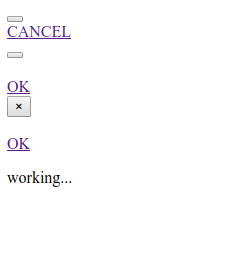
The web UI loads only partially, see attached screenshot
It looks like none of the URLs for static assets respect the subdomain part of the URL, for example:
<script src="/static/rest_framework/js/jquery-1.11.3.min.js"></script>
After running awx-manage print_settings in the web container:
...
MEDIA_URL                                = '/media/'
TOWER_URL_BASE                  = u'https://random-server.org/awx'
INTERNAL_API_URL                  = 'http://awxweb:8052'
...
STATIC_URL                               = '/static/'
LOGIN_URL                                = '/accounts/login/'
...
ADDITIONAL INFORMATION
Screenshot of the broken UI:
 kralewitz
All 13 comments
I use awx with reverse proxy and I haven't experienced the problem you have, all assets loads (images etc, no 404 errors)
My config:
...
      location / {
        proxy_pass http://1.2.3.4:8052/;
        proxy_http_version 1.1;
        proxy_set_header   Host               $host;
        proxy_set_header   X-Real-IP          $remote_addr;
        proxy_set_header   X-Forwarded-For    $proxy_add_x_forwarded_for;
        proxy_set_header   X-Forwarded-Proto  $scheme;
        proxy_set_header   Upgrade            $http_upgrade;
        proxy_set_header   Connection         "upgrade";
      }

...
Offtopic but notice the Upgrade and Connection headers. You will need these for websocket to work.
I use the image versions: 1.0.1.203
awx-manage print_settings:
TOWER_URL_BASE                           = u'https://towerhost'
INTERNAL_API_URL                         = 'http://awxweb:8052'
(but I don't see these addresses from the browser!)
In fact I use cloudflare CDN in addition to my reverse proxy (so it is 2 reverse proxy before awx_web)
 DBLaci
on 15 Nov 2017
DBLaci
on 15 Nov 2017
I also can't reproduce this on a basic reverse proxy configuration.
 matburt
on 15 Nov 2017
matburt
on 15 Nov 2017
Sorry, looks like I got subdomain and subpath mixed up.
When using a separate domain and running awx from it's root (like awx.mydomain.com/), everything works fine. But when I try to run it on a subpath, the static assets break (base URL is mydomain.com/awx/).
Could you please try to reproduce that?
kralewitz
on 16 Nov 2017
I'd be skeptical that would work without some more modifications to our internal routing/web server configuration.
matburt
on 27 Nov 2017
Reproduced the same issue by setting up AWX behind reverse proxy in IIS and can confirm UI is broken
 ykisialevich
on 29 Mar 2018
ykisialevich
on 29 Mar 2018
Same issue here.
upstream nas-20-awx {
                   server 10.91.87.11:80;
    }

    server {
           server_name nas-20-awx
           listen 80;
           access_log /var/log/nginx/access_nas-20-awx.log vhost;
        error_log /var/log/nginx/error_nas-20-awx.log;
    location / {
          proxy_pass       http://nas-20-awx;
         proxy_http_version 1.1;
        proxy_buffering off;
        proxy_set_header X-Real-IP  $remote_addr;
        proxy_set_header Host $host;
        proxy_set_header X-Forwarded-For $remote_addr;
        proxy_set_header Upgrade $http_upgrade;
        proxy_set_header Connection "upgrade";
        }
    }
 chuegel
on 11 Jul 2018
chuegel
on 11 Jul 2018
how should i do this using apache?
 lemmy04
on 14 Sep 2018
lemmy04
on 14 Sep 2018
Same here running it on / works perfectly but on /awx the ui is broken :(
 Numblesix
on 12 Oct 2018
Numblesix
on 12 Oct 2018
proxy_pass http://nas-20-awx;
Same here running it on / works perfectly but on /awx the ui is broken :(
The problem in both cases is that your proxy_pass have no / at the end.
It loads http://localhost:8080static in background and because of that you get an error.
 Geartwo
on 21 Mar 2019
Geartwo
on 21 Mar 2019
Hi same problem with sub-domain
I have many application behind nginx so I can't access my awx, have to tunnel.
# locations.conf
...
location /awx/ {
        proxy_pass http://awx/;
        proxy_http_version 1.1;
        proxy_set_header   Host               $host;
        proxy_set_header   X-Real-IP          $remote_addr;
        proxy_set_header   X-Forwarded-For    $proxy_add_x_forwarded_for;
        proxy_set_header   X-Forwarded-Proto  $scheme;
        proxy_set_header   Upgrade            $http_upgrade;
        proxy_set_header   Connection         "upgrade";
      }
# upstream.conf
...
upstream awx {
    server 192.168.50.21;
}
Good if you have any workarround
 Climberdav
on 11 Apr 2019
Climberdav
on 11 Apr 2019
Hello,
anybody can help ? for information when I go to the login page, all statics are down :
for exemple I have /static/js/app.bd927cc14dd2d4bf0c9a.js and no /awx/static/js/app.bd927cc14dd2d4bf0c9a.js (and if I put that in my browser it works).
I can't proxy that "static" because I have my main site with "static" too.
I put execpted url in settings.py eg https://myhost/awx/ and restart awx but not working.
thanks
David
Climberdav
on 13 May 2019
Encountered the same issue. Subdomain with nginx reverse proxy, awx in docker proxied by nginx, user/password does not work when trying to login.
 codebard
on 30 May 2019
codebard
on 30 May 2019
@lemmy04
how should i do this using apache?
I adapted this for my Apache reverse proxy based on https://stackoverflow.com/a/34371105
Replace http://localhost:80 with the awx_web backend URL.
RewriteEngine on
RewriteCond %{HTTP:UPGRADE} ^WebSocket$ [NC]
RewriteCond %{HTTP:CONNECTION} Upgrade$ [NC]
RewriteRule .* http://localhost:80%{REQUEST_URI} [P]
 pthall
on 7 Jun 2019
pthall
on 7 Jun 2019
Related issues
 augabet
·
3Comments
augabet
·
3Comments
 worsco
·
3Comments
worsco
·
3Comments
 shortsteps
·
3Comments
shortsteps
·
3Comments
 mwiora
·
3Comments
mwiora
·
3Comments
 pebbledavec
·
3Comments
pebbledavec
·
3Comments
Most helpful comment
Same here running it on / works perfectly but on /awx the ui is broken :(