Awx: How do we add new python modules to AWX?
ISSUE TYPE
Documentation
COMPONENT NAME
Question
SUMMARY
I need to add a new python module to AWX to support a playbook. The Tower documentation indicates the following:
**22.10.1. Modifying the virtualenv
Modifying the virtualenv used by Tower is unsupported and not recommended. Instead, you can add modules to the virtualenv that Tower uses to run Ansible.

To do so, activate the Ansible virtualenv:

. /var/lib/awx/venv/ansible/bin/activate
...and then install whatever you need using pip:

pip install mypackagename**
This does not work for AWX running as a container
ENVIRONMENT
STEPS TO REPRODUCE
[johnf@os-master-d01 src]$ oc rsh awx-2298080469-g1ndh
Defaulting container name to awx-web.

(ansible) sh-4.2$ pip install kafka-python
EXPECTED RESULTS
pip install succeeds
ACTUAL RESULTS
sh-4.2$ . /var/lib/awx/venv/ansible/bin/activate
(ansible) sh-4.2$ pip install kafka-python
Collecting kafka-python
  Using cached kafka_python-1.3.5-py2.py3-none-any.whl
Installing collected packages: kafka-python
Exception:
Traceback (most recent call last):
  File "/var/lib/awx/venv/ansible/lib/python2.7/site-packages/pip/basecommand.py", line 215, in main
    status = self.run(options, args)
  File "/var/lib/awx/venv/ansible/lib/python2.7/site-packages/pip/commands/install.py", line 342, in run
    prefix=options.prefix_path,
  File "/var/lib/awx/venv/ansible/lib/python2.7/site-packages/pip/req/req_set.py", line 784, in install
    **kwargs
  File "/var/lib/awx/venv/ansible/lib/python2.7/site-packages/pip/req/req_install.py", line 851, in install
    self.move_wheel_files(self.source_dir, root=root, prefix=prefix)
  File "/var/lib/awx/venv/ansible/lib/python2.7/site-packages/pip/req/req_install.py", line 1064, in move_wheel_files
    isolated=self.isolated,
  File "/var/lib/awx/venv/ansible/lib/python2.7/site-packages/pip/wheel.py", line 345, in move_wheel_files
    clobber(source, lib_dir, True)
  File "/var/lib/awx/venv/ansible/lib/python2.7/site-packages/pip/wheel.py", line 316, in clobber
    ensure_dir(destdir)
  File "/var/lib/awx/venv/ansible/lib/python2.7/site-packages/pip/utils/__init__.py", line 83, in ensure_dir
    os.makedirs(path)
  File "/var/lib/awx/venv/ansible/lib64/python2.7/os.py", line 157, in makedirs
    mkdir(name, mode)
OSError: [Errno 13] Permission denied: '/var/lib/awx/venv/ansible/lib/python2.7/site-packages/kafka'
(ansible) sh-4.2$ sudo pip install kafka-python
sudo: setresuid() [0, 0, 0] -> [1000160000, -1, -1]: Operation not permitted
sudo: unknown user: root
sudo: unable to initialize policy plugin
ADDITIONAL INFORMATION
 fortinj66
All 10 comments
This has been answered in a few other locations, notably on the mailing list and until we have a more official solution you'll need to customize the image build used for AWX.
 matburt
on 30 Oct 2017
matburt
on 30 Oct 2017
OK... I did look on the mailing list but nothing jumped out at me answer wise...
fortinj66
on 30 Oct 2017
@fortinj66 you may care the take a look at the details of https://github.com/ansible/awx/issues/34 - we've recently added in support to awx for custom Python virtualenvs.
Specifically, the changes in this pull request:
https://github.com/ansible/awx/pull/940/files#diff-015b935452ac22e8799e290bcfa7cb07
 ryanpetrello
on 5 Mar 2018
ryanpetrello
on 5 Mar 2018
@ryanpetrello for those of us who are Python novices, is there any way you might be willing to provide more step-by-step instructions in how to install a custom module using a virtualenv? My colleague @andrew.hadam & I are attempting to get https://github.com/citrix/netscaler-ansible-modules installed into our AWX install.
 jeffbyrnes
on 29 Mar 2019
jeffbyrnes
on 29 Mar 2019
Hey @jeffbyrnes,
We've got some docs for this, including step-by-step instructions and commands to run:
https://github.com/ansible/awx/blob/devel/docs/custom_virtualenvs.md
The approach can vary depending on how you're deploying AWX, but in general if you're using containers, something like this is what you want:
https://github.com/ansible/awx/blob/devel/docs/custom_virtualenvs.md#kubernetes-custom-virtualenvs
This generally means:
- Mounting some volume to a path in your container, (e.g.,
/opt/my-venvs/) where you'll create custom virtualenvs - Actually creating them using
virtualenv(python2) orpython3 -m venv(python3). - Submitting a request to the AWX API to tell it where to look for your custom venvs (
/opt/my-venvs):
HTTP PATCH https://awx.example.org/api/v2/settings/system {'CUSTOM_VENV_PATHS': ["/opt/my-envs/"]}
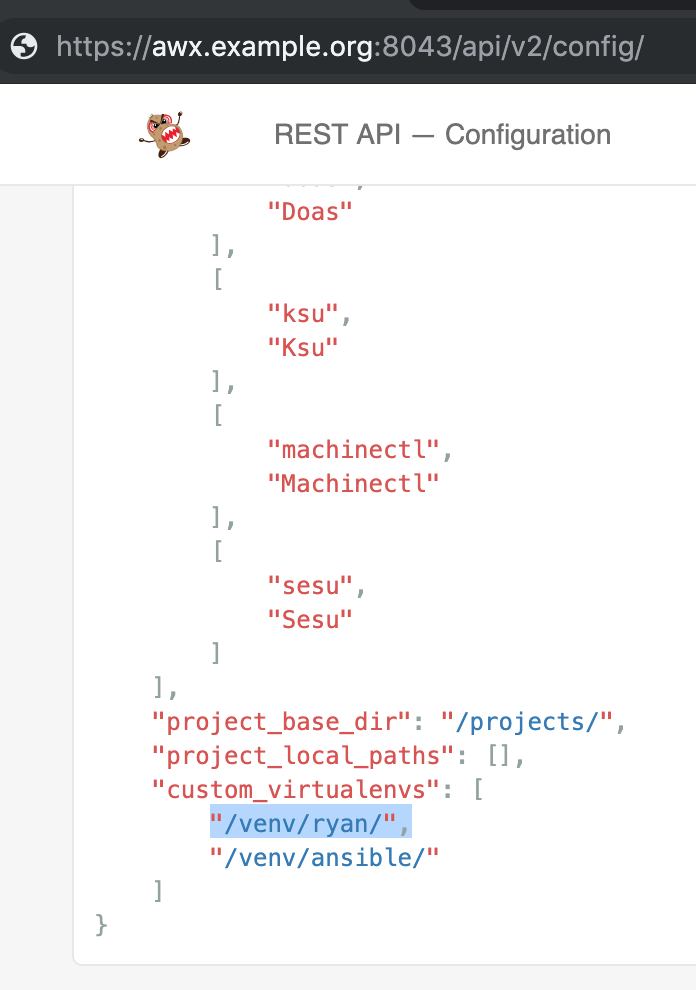
- Visiting this URL to verify that it displays your custom venvs:
HTTP GET https://awx.example.org/api/v2/config/
ryanpetrello
on 29 Mar 2019
@ryanpetrello thanks, that “generally means” bit was really what I needed! I think I may open a PR to make the virtualenv doc more explicit for the next person like me who’s coming along 😄
jeffbyrnes
on 29 Mar 2019
@jeffbyrnes , was just wondering. Is it solved for you guyz. Am facing the same issue while adding the module. Followed the complete documentation provided but could not get it. Could you please help me with step by step process.
Have got 2 files Ansible and AWX inside /var/lib/awx/venv/.
sudo /var/lib/awx/venv/ansible/bin/pip freeze | grep pypsrp
pypsrp==0.4.0
 LKS1302
on 22 Nov 2019
LKS1302
on 22 Nov 2019
@LKS1302 unfortunately, we ended up not using AWX, so I don’t recall how I solved this (or even if I did).
jeffbyrnes
on 22 Nov 2019
@jeffbyrnes , was just wondering. Is it solved for you guyz. Am facing the same issue while adding the module. Followed the complete documentation provided but could not get it. Could you please help me with step by step process.
Have got 2 files Ansible and AWX inside /var/lib/awx/venv/.sudo /var/lib/awx/venv/ansible/bin/pip freeze | grep pypsrp
pypsrp==0.4.0
Did you resolve the issue finally? I met the same issue when running playbook from AWX. It can't find the module from my custom venv, even though I've install the module already...
 vvxxvvxx
on 9 Mar 2020
vvxxvvxx
on 9 Mar 2020
@vvxxvvxx In order to resolve the issue you must install the python modules in the ansible/awx_task container.
login to ansible/awx_task and activate the venv then install the modules in venv.
 automaator
on 3 Apr 2020
automaator
on 3 Apr 2020
Related issues
 IshwarKanse
·
3Comments
IshwarKanse
·
3Comments
 grahamn-gr
·
3Comments
grahamn-gr
·
3Comments
 worsco
·
3Comments
worsco
·
3Comments
 agaffney
·
3Comments
agaffney
·
3Comments
 kakkotetsu
·
3Comments
kakkotetsu
·
3Comments
Most helpful comment
Hey @jeffbyrnes,
We've got some docs for this, including step-by-step instructions and commands to run:
https://github.com/ansible/awx/blob/devel/docs/custom_virtualenvs.md
The approach can vary depending on how you're deploying AWX, but in general if you're using containers, something like this is what you want:
https://github.com/ansible/awx/blob/devel/docs/custom_virtualenvs.md#kubernetes-custom-virtualenvs
This generally means:
/opt/my-venvs/) where you'll create custom virtualenvsvirtualenv(python2) orpython3 -m venv(python3)./opt/my-venvs):HTTP PATCH https://awx.example.org/api/v2/settings/system {'CUSTOM_VENV_PATHS': ["/opt/my-envs/"]}HTTP GET https://awx.example.org/api/v2/config/