Awx: Opening Template, does nothing anymore
ISSUE TYPE
- Bug?
COMPONENT NAME
- UI
SUMMARY
After successfully adding an Inventory Source, and having the hosts from my yaml file imported. Running a previously made Template worked perfectly fine.
Then I went to edit the template, but it won't open the editing dialog boxes. Opening the Template in a new tab just displays a blank area where the editing boxes would be. Below is the error from the console:
TypeError: Cannot read property 'replace' of undefined
    at Object.setUrl (app.ca99bf2fa2fce826d26d.js:403)
    at stateDefinitions.generateTree.resolve.edit.canGetInventory (app.ca99bf2fa2fce826d26d.js:403)
    at invokeResolveFn (vendor.ca99bf2fa2fce826d26d.js:468)
    at processQueue (vendor.ca99bf2fa2fce826d26d.js:436)
    at vendor.ca99bf2fa2fce826d26d.js:436
    at Scope.$eval (vendor.ca99bf2fa2fce826d26d.js:436)
    at Scope.$digest (vendor.ca99bf2fa2fce826d26d.js:436)
    at Scope.$apply (vendor.ca99bf2fa2fce826d26d.js:436)
    at done (vendor.ca99bf2fa2fce826d26d.js:436)
    at completeRequest (vendor.ca99bf2fa2fce826d26d.js:436)
    at XMLHttpRequest.xhr.onload (vendor.ca99bf2fa2fce826d26d.js:436)
Rebooting the server didn't help either. Clearing all browser existence didn't help either.
I'll try deleting the template and recreating it. But This was a new issue that just happened.
UPDATE: I created a new template, and can't recreate the issue
UPDATE 2: All new created templates aren't able to be edited
ENVIRONMENT
- AWX version: ece93c45c9c932cfbfba2b44e217e99a6bb6a752
- Ansible version: 2.4.0.0
- Operating System: Proxmox Ubuntu 16.04 server
- Web Browser: Chrome
 naisanza
All 5 comments
I encountered this issue recently but I assumed it was due to the test data I had loaded into the system. Let me get up to date with devel and see if I can reproduce this.
 gconsidine
on 22 Sep 2017
gconsidine
on 22 Sep 2017
This might be related to the same underlying issue that affected schedules (https://github.com/ansible/awx/issues/164) because I can't reproduce the issue on the branch compared to devel in this PR: https://github.com/ansible/awx/pull/244
If you want to try it, you can check out that branch here -- just be sure to run make ui to fetch the latest UI dependencies and rebuild. @jlmitch5 is reviewing that PR now so maybe he can also verify this issue will be resolved after it gets merged in.
gconsidine
on 22 Sep 2017
@gconsidine So I figured out why it wasn't working, and why you couldn't edit a Job Template after having created it
naisanza
on 23 Sep 2017
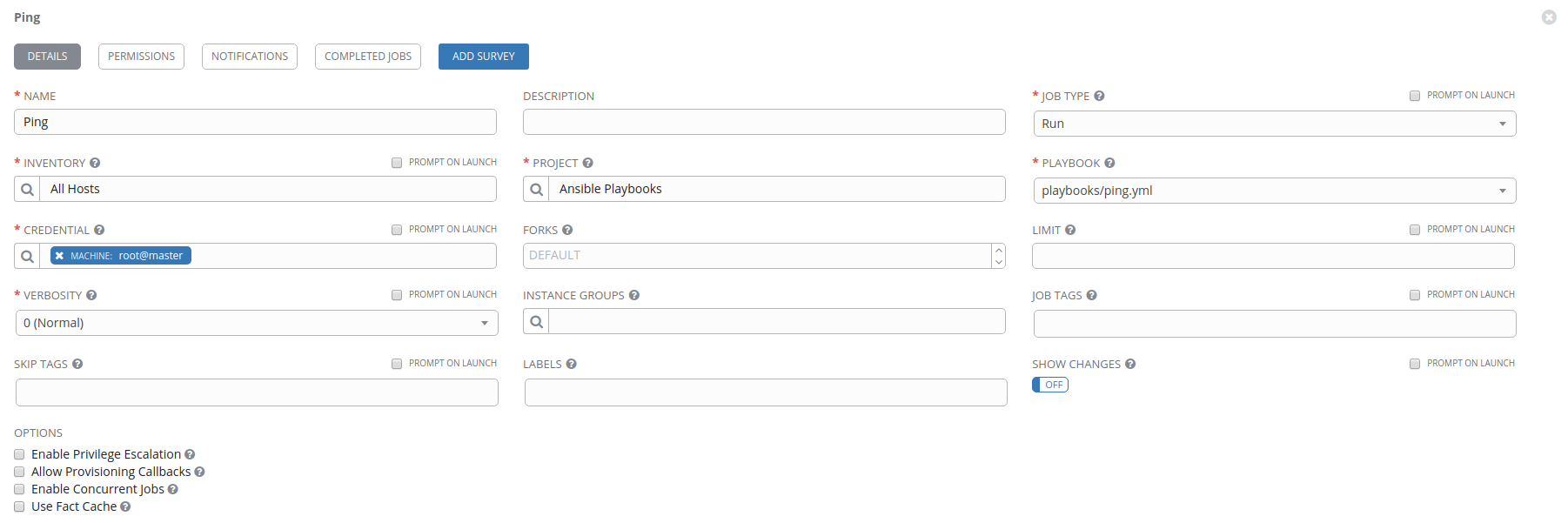
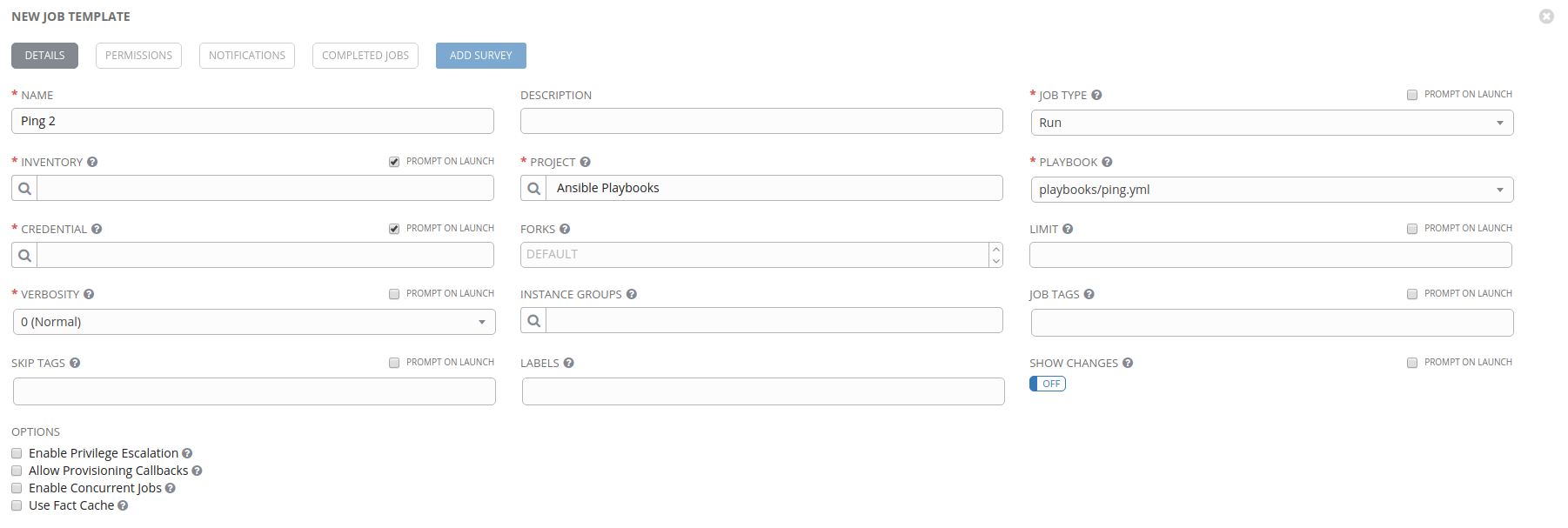
@gconsidine you need to have every asterisk box filled with something
This configuration lets you edit the Job Template afterwards:
This configuration does not, but still lets you save it (although it hangs when you try to save it, but if you refresh the page you'll see it in the Templates list and is still usable):
naisanza
on 23 Sep 2017
I think we've got this one sorted out with the above PRs
 matburt
on 13 Oct 2017
matburt
on 13 Oct 2017
Related issues
 shortsteps
·
3Comments
shortsteps
·
3Comments
 beenje
·
3Comments
beenje
·
3Comments
 mwiora
·
3Comments
mwiora
·
3Comments
 IMOKURI
·
3Comments
IMOKURI
·
3Comments
 artmakh
·
3Comments
artmakh
·
3Comments
Most helpful comment
I think we've got this one sorted out with the above PRs