Awx: Support vault encrypted secrets in the inventory source
ISSUE TYPE
- Bug Report
COMPONENT NAME
- API
SUMMARY
AWX inventory source can't handle Vault encrypted secrets for the simple ini-like inventory ("Sourced from the project" in the UI).
For example, I have an ini-like inventory and a few variables in the group_vars that are encrypted with Ansible Vault (like in this example repo). When I add this inventory source and try to sync it I get the following error:
2017-09-20 11:45:09,104 INFO     awx.main.commands.inventory_import Updating inventory 2: Production
2017-09-20 11:45:09,114 DEBUG    awx.main.commands.inventory_import Using backported ansible-inventory module: /usr/lib/python2.7/site-packages/awx/plugins/ansible_inventory/backport.py
2017-09-20 11:45:09,114 INFO     awx.main.commands.inventory_import Reading Ansible inventory source: /var/lib/awx/projects/_6__myproj/inventory
2017-09-20 11:45:09,114 INFO     awx.main.commands.inventory_import Command: ['/usr/lib/python2.7/site-packages/awx/plugins/ansible_inventory/backport.py', '-i', '/var/lib/awx/projects/_6__myproj/inventory']
Traceback (most recent call last):
  File "/usr/bin/awx-manage", line 9, in <module>
    load_entry_point('awx==1.0.0.487', 'console_scripts', 'awx-manage')()
  File "/usr/lib/python2.7/site-packages/awx/__init__.py", line 107, in manage
    execute_from_command_line(sys.argv)
  File "/var/lib/awx/venv/awx/lib/python2.7/site-packages/django/core/management/__init__.py", line 354, in execute_from_command_line
    utility.execute()
  File "/var/lib/awx/venv/awx/lib/python2.7/site-packages/django/core/management/__init__.py", line 346, in execute
    self.fetch_command(subcommand).run_from_argv(self.argv)
  File "/var/lib/awx/venv/awx/lib/python2.7/site-packages/django/core/management/base.py", line 394, in run_from_argv
    self.execute(*args, **cmd_options)
  File "/var/lib/awx/venv/awx/lib/python2.7/site-packages/django/core/management/base.py", line 445, in execute
    output = self.handle(*args, **options)
  File "/var/lib/awx/venv/awx/lib/python2.7/site-packages/django/core/management/base.py", line 661, in handle
    return self.handle_noargs(**options)
  File "/usr/lib/python2.7/site-packages/awx/main/management/commands/inventory_import.py", line 956, in handle_noargs
    self.is_custom)
  File "/usr/lib/python2.7/site-packages/awx/main/management/commands/inventory_import.py", line 211, in load_inventory_source
    is_custom=is_custom).load()
  File "/usr/lib/python2.7/site-packages/awx/main/management/commands/inventory_import.py", line 180, in load
    data = self.command_to_json(base_args + ['--list'])
  File "/usr/lib/python2.7/site-packages/awx/main/management/commands/inventory_import.py", line 163, in command_to_json
    self.method, proc.returncode, stdout, stderr))
RuntimeError: ansible-inventory backport failed (rc=1) with stdout:

stderr:
ERROR! Decryption failed on /var/lib/awx/projects/_6__myproj/inventory/group_vars/aws/credentials.yml
You can't set Vault credential for the inventory source - trying to add it via UI shows "NO CREDENTIALS HAVE BEEN CREATED" window. Even if you set the Vault credential by typing its name in the input field it's still not used - I get the same error.
ENVIRONMENT
- AWX version: 1.0.0.487
- Ansible version: 2.3.2.0
- Operating System: Debian 8
- Web Browser: Google Chrome 61
ADDITIONAL INFORMATION
I'll gladly help with fixing this if somebody would give me some hints. I've tried to hack the patch by myself but I can't figure out how to pass vault credential from RunInventoryUpdate task to the inventory_import.py management command.
 dzeban
All 104 comments
This is https://github.com/ansible/awx/issues/137. The issue is that the ansible-inventory tool doesn't support prompting... until a variant of that does, we can't do much here.
 wenottingham
on 20 Sep 2017
wenottingham
on 20 Sep 2017
@wenottingham Thanks, it's related! What's good is that ansible-inventory tool understands Vault password files:
$ ~/dev/ansible-inventory-backport/backport.py --list
ERROR! Decryption failed on /home/avd/dev/example-ansible/inventory/group_vars/group1
$ ~/dev/ansible-inventory-backport/backport.py --vault-password-file=.vaultpass --list
{
    "_meta": {
        "hostvars": {
<snip>
}
}
Isn't there a way to generate a vault password file and supply it to the ansible-inventory tool? As I saw in the sources there is a private data dir that is created on the inventory update job run. Maybe we can render vault password file there and pass it to the ansible-inventory?
dzeban
on 20 Sep 2017
Vault passwords are (currently) passed in AWX by prompting via pexpect, not by the commandline... which means that --ask-vault-pass may work.
wenottingham
on 20 Sep 2017
So if that does work, you'd then:
- change the inventory source to allow vault credentials (adjusting UI accordingly if needed)
- pass
--ask-vault-passif the source has one, and pexpect over the password when required (crib off of playbook runs for this)
wenottingham
on 20 Sep 2017
Indeed, --ask-vault-pass could've worked, but when I set ANSIBLE_ASK_VAULT_PASS env var in the inventory source, sync job hangs on the prompt indefinitely:
2017-09-20 17:20:44,725 INFO     awx.main.commands.inventory_import Updating inventory 2: Production
2017-09-20 17:20:44,736 DEBUG    awx.main.commands.inventory_import Using backported ansible-inventory module: /usr/lib/python2.7/site-packages/awx/plugins/ansible_inventory/backport.py
2017-09-20 17:20:44,736 INFO     awx.main.commands.inventory_import Reading Ansible inventory source: /var/lib/awx/projects/_6__myproj/inventory
2017-09-20 17:20:44,736 INFO     awx.main.commands.inventory_import Command: ['/usr/lib/python2.7/site-packages/awx/plugins/ansible_inventory/backport.py', '-i', '/var/lib/awx/projects/_6__myproj/inventory']
Vault password:
I can't find a way to pass the vault password to the prompt. "Credential" field in the UI can't find my vault credential and even if I type its name by hand it's still not passed. I can verify in the API that my inventory source has vault credential
GET /api/v2/inventory_sources/7/
{
    "id": 7,
    "type": "inventory_source",
    ...
    "summary_fields": {
        ...
        "credential": {
            "id": 4,
            "name": "Vault cred",
            "description": "",
            "kind": "vault",
            "cloud": false,
            "credential_type_id": 3
        },
        ...
    },
    ...
    "source_vars": "---\nANSIBLE_ASK_VAULT_PASS: 1",
    "credential": 4,
    ...
}
So I still don't understand how to pass vault password to the inventory source: setting credential for the inventory source doesn't seem to work and asking vault pass hangs on the prompt.
dzeban
on 20 Sep 2017
Sorry, I wasn't clear above in https://github.com/ansible/awx/issues/223#issuecomment-330921091 - this is changes to awx itself that would need to be done in the code.
wenottingham
on 20 Sep 2017
I've checked this with the newest versions (non-backport version of ansible-inventory), here is how it's looking:
2017-09-20 18:04:09,549 INFO     awx.main.commands.inventory_import Updating inventory 2: example inventory
2017-09-20 18:04:09,568 DEBUG    awx.main.commands.inventory_import Using system install of ansible-inventory CLI: /usr/bin/ansible-inventory
2017-09-20 18:04:09,569 INFO     awx.main.commands.inventory_import Reading Ansible inventory source: /var/lib/awx/projects/_6__example/inventory
Traceback (most recent call last):
  File "/usr/bin/awx-manage", line 9, in <module>
    load_entry_point('awx==1.0.0.513', 'console_scripts', 'awx-manage')()
  File "/usr/lib/python2.7/site-packages/awx/__init__.py", line 107, in manage
    execute_from_command_line(sys.argv)
  File "/var/lib/awx/venv/awx/lib/python2.7/site-packages/django/core/management/__init__.py", line 354, in execute_from_command_line
    utility.execute()
  File "/var/lib/awx/venv/awx/lib/python2.7/site-packages/django/core/management/__init__.py", line 346, in execute
    self.fetch_command(subcommand).run_from_argv(self.argv)
  File "/var/lib/awx/venv/awx/lib/python2.7/site-packages/django/core/management/base.py", line 394, in run_from_argv
    self.execute(*args, **cmd_options)
  File "/var/lib/awx/venv/awx/lib/python2.7/site-packages/django/core/management/base.py", line 445, in execute
    output = self.handle(*args, **options)
  File "/var/lib/awx/venv/awx/lib/python2.7/site-packages/django/core/management/base.py", line 661, in handle
    return self.handle_noargs(**options)
  File "/usr/lib/python2.7/site-packages/awx/main/management/commands/inventory_import.py", line 955, in handle_noargs
    self.is_custom)
  File "/usr/lib/python2.7/site-packages/awx/main/management/commands/inventory_import.py", line 210, in load_inventory_source
    is_custom=is_custom).load()
  File "/usr/lib/python2.7/site-packages/awx/main/management/commands/inventory_import.py", line 179, in load
    data = self.command_to_json(base_args + ['--list'])
  File "/usr/lib/python2.7/site-packages/awx/main/management/commands/inventory_import.py", line 163, in command_to_json
    self.method, proc.returncode, stdout, stderr))
RuntimeError: ansible-inventory failed (rc=4) with stdout:

stderr:
ERROR! Attempting to decrypt but no vault secrets found
AWX version: 1.0.0.513
Ansible version: 2.4.0.0
dzeban
on 20 Sep 2017
If you look in tasks.py, you can see some existing cases where we utilize --ask-vault-pass. It will probably be fairly easy to extend this to inventory updates, although we might need a schema change to attach a vault credential (most consistent with existing use).
But even if we do that, we'll need to equip the inventory import command to accept the flag, and then do its own prompting, so it can then go on to pass it to the ansible-inventory invocation.
This is extra complication strictly due to the implementation details. I have wanted to break up the inventory import into 2 parts. First, call ansible-inventory to get the JSON content (using run_pexpect from tasks.py), then send that content into the command to load into database. When I was restructuring the code, I had this end-goal in mind. If we did this first, it would avoid the need to manage a new flag for the inventory import command.
 AlanCoding
on 25 Sep 2017
AlanCoding
on 25 Sep 2017
Does Tower have the feature, to use Ansible Vault?
 naisanza
on 26 Sep 2017
naisanza
on 26 Sep 2017
There are plenty of things in AWX that use vault credentials. It just needs extra work to implement it for SCM inventory sources. This is a good feature request.
AlanCoding
on 26 Sep 2017
according to the documentation : http://docs.ansible.com/ansible/latest/playbooks_vault.html you could potentially add en environment variable, e.g. ANSIBLE_VAULT_PASSWORD_FILE=~/.vault_pass.txt and Ansible will automatically search for the password in that file.
it is not ideal and I guess awx tower should have that feature added.
 mozdzyp
on 26 Sep 2017
mozdzyp
on 26 Sep 2017
I present to all of you - my inventory vars example from which I will demo this new feature.
https://github.com/AlanCoding/Ansible-inventory-file-examples/tree/master/vault
This is going through the --ask-vault-pass mechanism, which is a pattern I will maintain parity with. The rest of the data model / command / task changes seem relatively straightforward to me.
AlanCoding
on 28 Sep 2017
@AlanCoding How about for playbooks that have passwords that I would like to be encrypted.
And how do you pass --ask-vault-pass in AWX?
For example:
  - name: dokuwiki conf
    debconf:
      name: dokuwiki
      question: dokuwiki/wiki/password
      vtype: password
      # change to ansible-vault
      value: passwordtobeencrypted
Or how to use an Ansible Vault encrypted playbook with AWX? Is that even possible?
naisanza
on 30 Sep 2017
You can put encrypted content in your playbook directory. There are several ways to do this, like encrypting your vars file in a role. You can encrypt single variables inside of the YAML, and have Ansible vault decrypt it.
If this encrypted content is inside of the source control that contains your _playbook_, then you would associate the vault credential with your job template. This change is to enable the same thing for the source control that is your inventory source. It would be sensible to use the same vault credential for both, but this is not required.
AlanCoding
on 30 Sep 2017
@AlanCoding I don't think I understand what you mean.
In AWX, when creating a Job Template, the credential used is for accessing the Machine (see below) and not for the Source Control:
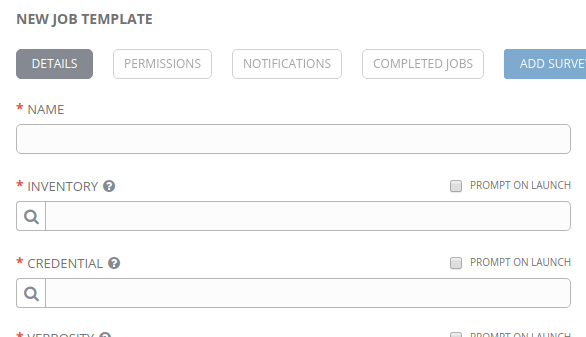
And the SCM Credential used for the Project is used to access the SCM machine, not for accessing Ansible Vault (see below):
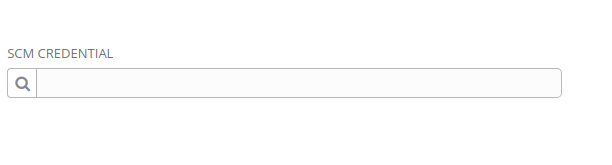
There's only one place under Credentials that let me create a Vault password, but no where in a Job Template to use it:
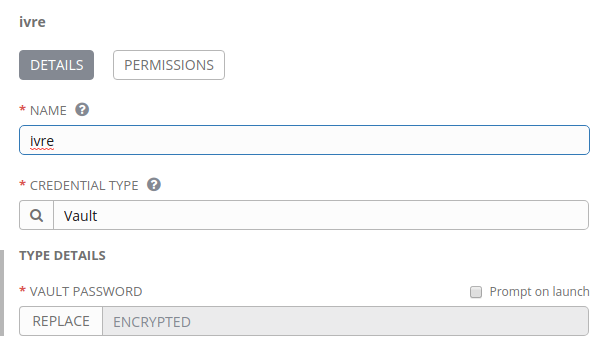
naisanza
on 30 Sep 2017
You can go to /api/v2/job_templates/, and you should see that every job template has a related vault_credential field. The way that the UI handles it is to lump it into the CREDENTIAL selector, and you can select the vault credential in addition to other cloud/machine credentials.

If you add the vault credential (again, in addition to any other credentials you have), then check the API, you should use that the UI set it as the vault_credential related field.
AlanCoding
on 1 Oct 2017
@AlanCoding ah I see. It wasn't intuitive at first
naisanza
on 1 Oct 2017
@AlanCoding going off your example https://github.com/AlanCoding/Ansible-inventory-file-examples/blob/master/vault/file_vars/group_vars/unencrypted
If I wanted to encrypt the password in value: password, is it correct to encrypt a file that contains just password or value: password?
  - name: dokuwiki conf
    debconf:
      name: dokuwiki
      question: dokuwiki/wiki/password
      vtype: password
      value: password
Encrypting password:
root@awx-world0:~# cat unencrypted
password
root@awx-world0:~# ansible-vault encrypt_string unencrypted  --name 'value'
New Vault password:
Confirm New Vault password:
value: !vault |
          $ANSIBLE_VAULT;1.1;AES256
          63383732373761336164313836316666396666383064633339666132633465653561633537303362
          6631666562393966646433626233323162353461363766340a366339666638346536616338653332
          37386431666564376436623566623639316538323336313234636463656536393065363830626431
          3332343634393539650a636363663438643937333638663231636363303334303762353563663535
          3937
Encryption successful
Is this correct? I just put that into the playbook?
```yaml
- name: dokuwiki conf
debconf:
name: dokuwiki
question: dokuwiki/wiki/password
vtype: password
value: !vault |
$ANSIBLE_VAULT;1.1;AES256
63383732373761336164313836316666396666383064633339666132633465653561633537303362
6631666562393966646433626233323162353461363766340a366339666638346536616338653332
37386431666564376436623566623639316538323336313234636463656536393065363830626431
3332343634393539650a636363663438643937333638663231636363303334303762353563663535
3937
naisanza
on 1 Oct 2017
Yes, you are using the correct officially-documented steps for a vaulted value inside of ansible-playbook YAML.
http://docs.ansible.com/ansible/2.4/vault.html#use-encrypt-string-to-create-encrypted-variables-to-embed-in-yaml
Contrary to that, my example did whole-file encryption, which has just a slight syntax marker different.
This should work in tasks or other places, provided you give the vault credential to the job template. Using it in inventory imports is the new thing here. My example was 1 use case, but there are more that would be valuable to check. I'm interested in trying a YAML inventory file and seeing if vaulted single values will be decrypted from that.
AlanCoding
on 1 Oct 2017
Raised issue in Ansible core for use of a single vaulted value inside of YAML inventory file. Have not tried other inventory file types.
AlanCoding
on 1 Oct 2017
not merging right now, as solution will be reformulated to jive with https://github.com/ansible/awx/issues/352
AlanCoding
on 19 Oct 2017
(In my RedHat support case, they recommended I provide my use case here.)
We're in the process of migrating from Tower 2.4.5 to 3.2.1. What I really want is the same exact functionality as Tower 2.4.5's tower-manage inventory_import, since it simply ignored vaulted variables and kept variables at the level at which they were defined. It wasn't integrated into Tower, but it worked well enough.
Now, Tower 3.2.1 fails outright if it can't decrypt vaulted files, and puts all group_vars at the host-level, which is a big step backwards. I know I can pass ANSIBLE_VAULT_PASSWORD_FILE in environment variables of the inventory source, but it imports variables in plaintext, which we obviously don't want.
Using the UI to manually manage our large inventories would be a nightmare (time-consuming, error-prone, no version control, no rollback, etc).
If we use a source from project, we can't have any vaulted files, which means we would need to maintain two versions of each inventory (one without vaulted files used for importing, and one with vaulted files used in job templates).
If we use a custom inventory script, we have to manually parse inventory files, or use external sources which we don't have.
 otdouglasm
on 3 Nov 2017
otdouglasm
on 3 Nov 2017
@otdouglasm so, I could see three different potential behaviors, some of which can coexist:
- "ignore vaulted variables"
- "import vaulted variables (will be in plaintext)"
- "import vaulted variables in a secure vaulted-way"
The first two of these should be relatively practical... the third seems much more complex.
wenottingham
on 3 Nov 2017
@wenottingham I agree, and we currently only have a need for the first behavior, and definitely wouldn't want the second behavior (at least I can't think of any cases at the moment).
I imagine the third behavior might be useful for executing ad-hoc commands on a group of hosts that cannot use the same Machine credentials. By specifying vault credentials on an ad-hoc command, it could select the Machine credentials dynamically if ansible_user/password were imported as vaulted/secured host vars. This would be "nice to have" in environments with several authentication domains, but certainly not a requirement.
otdouglasm
on 3 Nov 2017
Is there any possible work around if you currently have vaulted variables in your sourced inventory?
As of now, I was able to configure the vault_password_file in the _ansible.cfg_ file but it's quite an ugly hack, at least it works for the moment.
 hassek
on 28 Nov 2017
hassek
on 28 Nov 2017
@hassek As you pointed out, there are ways to provide Tower with the vault password so that it can decrypt vaulted variables during synchronization. Another method is to set ANSIBLE_VAULT_PASSWORD_FILE in the inventory source's environment variables.
But the problem with any of these methods is that the decrypted variables will show up in plain text in host vars, which we don't want (otherwise, they wouldn't be encrypted to begin with).
The best workaround in my case is to maintain a separate directory structure which contains no vaulted files.
For example, if you have an inventory source pointing to my_project/inventory_file in this project directory:
my_project/
    group_vars/
        vaulted_file.yml
        unvaulted_file.yml
    inventory_file
Create a new sub-directory, and link ONLY to files that are not vaulted:
my_project/
    group_vars/
        vaulted_file.yml
        unvaulted_file.yml
    inventories/
        group_vars/
            unvaulted_file.yml -> ../../group_vars/unvaulted_file.yml
        inventory_file -> ../inventory_file
    inventory_file
Then point the inventory source to my_project/inventories/inventory_file instead of my_project/inventory_file. Since there are no vaulted files to decrypt, the synchronization will succeed without a vault password.
otdouglasm
on 29 Nov 2017
@otdouglasm I didn't knew about them showing up in plain text on _host_vars_, thanks for pointing that out.
I do own many complex inventories already for production, qa and dev and _links_ have proven to be a bad way to _switch_ between environments (that's why I am so excited about ansible tower supporting them now). But I get the point is to let the inventory sync succeed and then use vaulted files for the playbooks only. I can work with that.
Bests!
hassek
on 1 Dec 2017
So I fixed it so it could decrypt it, accepting it would show up in host_vars and it's decrypting but still not working. Mine every time it hits one of my encrypted values, throws this message in the logs:
ERROR! Unexpected Exception, this is probably a bug: Cannot json serialize SECRETPASS
With SECRETPASS being the decrypted value.
 kkolk
on 6 Dec 2017
kkolk
on 6 Dec 2017
Is there any conclusion or roadmap so far? I need central machine running ansible playbooks till end of January, and I prefer ansible awx, but vault_pass unsupport is a no-go for my use case, so I want to know if I should wait or switch to Jenkins
 HalisCz
on 7 Dec 2017
HalisCz
on 7 Dec 2017
@HalisCz @hassek
You can bypass this issue using a custom inventory script which parse the project inventory file. I use this one https://gist.github.com/sivel/3c0745243787b9899486 For me, this workaround fit my uses.
You can customize the script and use somethin like ANSIBLE_INVENTORY = "/var/lib/awx/projects/YOUR_PROJECT/inventory instead of sys.argv[1]]
 xoxys
on 16 Jan 2018
xoxys
on 16 Jan 2018
@otdouglasm's workaround doesn't work for me but I suspect that's due to using Ansible's _best practice_ of referring to vault encrypted variables from variables 🤦♂️.
What's the actual implementation with the vault_password_file method? I'm presuming that it means I'll have to locally bake the awx docker image with the vault password file included, or is that mistaken?
 iJebus
on 24 Jan 2018
iJebus
on 24 Jan 2018
@AlanCoding just clarifying that this is being blocked by https://github.com/ansible/ansible/issues/31141
Is that accurate?
 lucasreed
on 1 Feb 2018
lucasreed
on 1 Feb 2018
I don't think that issue, or any other open Ansible core issue, is blocking this.
The real issue is that the work done in #328 is obsolete because of what changed in #595. The inventory source doesn't need any model changes on itself, just needs to surface the related credentials, and make a host of supporting API validation changes, and reference the correct vault credential list inside of tasks.py.
I'm not quite sure when enough resources will be available to get this done. Nonetheless, I think we are all agreed that this should be done. A notable change in its scope is that the feature should really support multiple vault credentials from the get-go.
AlanCoding
on 7 Feb 2018
That being said, the 'simple' implementation as described above would lead to vaulted secrets being stored in plaintext in the API after import, which may not be desirable.
wenottingham
on 7 Feb 2018
Now we have the multi-vault & multi-credential blockers out of the way. With the linked PR, I pushed up the _inventory source_ credential to the base model's plural credentials field. Now we have a place to put vault credentials in the model.
@wenottingham in terms of keeping vaulted secrets hidden, we would need to start off with a feature request to do something different with ansible-inventory. I would imagine this as either:
- request for a new option to mark which variables are from vaulted contents, this would allow AWX to _re_-encrypt them with a novel mechanism to encrypt and redact for display the values for those variables in the inventory / group / host
variablesfields - similar to survey password encryption. Even if we got what we needed from Ansible core, this would still be a very heavy feature. - request for a new option to return vaulted contents in their existing vaulted state, this would allow the syncs to proceed without throwing an error. The vault credentials could then be attached to the job template to decrypt.
I really do not like the first option, and while the 2nd option would be fine by me, it might not go over well with Ansible core. I'm positive that the changes there would not be limited to ansible-inventory, and will percolate deeper into their code base.
As a stop-gap, I advocate for a well-documented version of the 'simple' implementation, where all variables on inventory / group / host remain plaintext.
There's still a use-case where this helps security. It would offer a way to move those secrets through source control (which custom credentials won't do) in an encrypted form into AWX.
AlanCoding
on 20 Feb 2018
I don't think the 'simple' implementation can ever be the default. It's a rather obvious information leak. If we want to consider it as an option (and if it's off, as the default, we ignore the vaulted variables without failing), we could.
wenottingham
on 21 Feb 2018
we ignore the vaulted variables without failing
It seems like that would also have to start off as a new request to Ansible core. At a quick glance, I don't see any kind of configurable you can set to pass over the vault errors.
AlanCoding
on 21 Feb 2018
"import vaulted variables in a secure vaulted-way"
@wenottingham believe it or not, this is implemented and actually functional in #1337 now. I had anticipated on first filing a feature request from Ansible core, but then I discovered an easter egg with ansible-inventory --yaml option, that it will return the vaulted values as-is. The other side of it, passing our own inventory structure in a way that can be un-vaulted, was the other side of it, which also works.
This is really the best-case scenario for the implementation of this, because it involves writing no new encryption logic on our part, it just sends the encrypted content from one Ansible command onto the next Ansible command.
However, this comes at a cost. I was able to get the API to accept vault-laden YAML content, but this content is not yet consumable by the UI. There will be a significant testing burden for switching our core operations from JSON to YAML (remember unicode bugs?).
But that's not the most major blocker. It's hard to even understand what was intended by the --yaml option for ansible-inventory, and using this option would expose _all_ inventory updates to its use. It does not just return YAML format instead of JSON. It changes the entire structure of the output to be like the --graph option, listing the apex group parents followed by children, meaning that children are repeated. This exposes us to a scaling problem like in https://github.com/ansible/ansible/issues/36431, but inside of memory. Extremely large outputs are generated for just 15 groups by my examples, and larger inventories would easily OOM this.
So we'll still need action from Ansible core. We need the vault behavior of the --yaml option with the normal output structure.
AlanCoding
on 23 Feb 2018
FYI, the --yaml option is meant to be compatible with the 'yaml' inventory plugin, while the --json one is compatible with the 'script' inventory plugin.
 bcoca
on 23 Feb 2018
bcoca
on 23 Feb 2018
Alright @bcoca I think we're almost synced up on the expectation for ansible-inventory. The behavior I was relying on by using the --yaml flag will probably be counted as a bug by you.
Nonetheless, I still want that behavior, and I filed a PR at https://github.com/ansible/ansible/pull/36862 which adds an option for the behavior I'm looking for (specifically ansible-inventory delaying vault decryption, passing through the encrypted form). It fixes the (previously known) JSON _decryption_ problem, but falls short of fixing the --yaml _failure to decrypt_, but I think I might be able to get that with a little help.
The reason I'm trying to jump into this quickly is because, while the AWX method for temporary handling of vault remains unclear, we will need this vault pass-through feature regardless of what solution we use for that. Our rollout would also be blocked if Ansible core did not have the ansible-inventory vault functionality working by the time that we tried to roll out the AWX feature (that looks like the next development cycle, but Ansible core releases take time too).
I had been getting very confused about the behavior of the vars managers. Here is the important distinction that I missed:
- encrypted file example: https://github.com/AlanCoding/Ansible-inventory-file-examples/blob/master/vault/file_vars/group_vars/raleigh
- encrypted var _inside of_ a file example: https://github.com/AlanCoding/Ansible-inventory-file-examples/blob/master/vault/single_var_file/group_vars/raleigh
The pass-through kind of feature plays just fine with the vars plugin, but a pass-through kind of feature categorically cannot hope to work with the encrypted file example. Just fundamentally, the encryption obfuscates the keys of the variables that it defines, so you wouldn't know where to put the content inside of the namespace.
So we would have to be upfront that, whenever this feature gets working, it can only hope to pass-through single encrypted values, as opposed to encrypted vars files. We could still implement the original feature idea to decrypt any vault contents plaintext, but the aggregate complexity of all this is getting so much that I don't want to deal with that if it can be avoided.
AlanCoding
on 28 Feb 2018
Yes, they are 2 diff features: vaulted files vs vaulted values, the former makes no sense in a 'passthrough' context, the latter does.
So I see ansible-inventory behaving in 1 of 2 ways:
- Offering all the content 'unencrypted', you need to supply the correct vault secrets for this case. This should already work.
- Returning the content it can 'as is' vaulted files are not returned, but vaulted values are returned, still in vaulted form. While issuing warnings on the decryption failures, which currently are fatal errors.
I'm guessing this is attempting to support the use case in which user wants to import everything into tower but wants to keep vaulted things vaulted, but not use/move to tower's own encrypted facilities.
I'm not sure that is going to work with vaulted files, when it comes to vaulted values it probably will require a tower inventory plugin or have tower export a YAML inventory file.
bcoca
on 28 Feb 2018
New attempt, given the feedback from prior approach https://github.com/ansible/ansible/pull/37029
If this is accepted, much more minor changes will be required on the AWX side. The content could be represented in the UI (by introducing a new "magic" string "!vault", similar to how we use "$encrypted$"). AWX would have to inspect each value as it exports its own inventory, and then it could probably return them through a vars plugin for playbook runs.
AlanCoding
on 5 Mar 2018
Just want to make sure the 'vaulted files' versus the vaulted values do not get lost --
For our usecase, 'vaulted files' in the inventory/group_vars/all/ is critical need as we deploy the same application with the same keys to multiple target locations, each target location needing different vaulted key-values (username/password) per inventory/target location. The key is the same, but the 20+ values are different per target location.
In a larger scale deployment, keeping these in a vaulted file per inventory makes way more sense from a usability and maintainability point of view.
 dhartford
on 9 Mar 2018
dhartford
on 9 Mar 2018
@dhartford I'm not sure why your example necessitates the use of "vaulted files" (I will use this term for consistency now) as opposed to vaulted variables. Your project may contain inventory/group_vars/all.yml.
Here, I made an example and will push it to my examples repo
ansible-inventory -i scripts/vault/file_value/foobar.py --list --export --vault-id=alan@scripts/vault/passwords/password
{
    "_meta": {
        "hostvars": {
            "foobar": {}
        }
    },
    "all": {
        "children": [
            "ungrouped"
        ],
        "vars": {
            "should_be_artemis_here": "artemis\n"
        }
    },
    "ungrouped": {
        "hosts": [
            "foobar"
        ]
    }
}
https://github.com/AlanCoding/Ansible-inventory-file-examples/tree/master/scripts/vault/file_value
Support for "vaulted files" _is_ on the chopping block. It would require a lot of technical work and expose secrets while the problem seems completely solvable through vaulted vars.
AlanCoding
on 9 Mar 2018
I am using AWX 1.0.4.97 and I am new to AWX.
I am trying to use AWX to run my playbook that is is fully in an mercurial version repository (playbooks, inventory, roles etc)
I have a vault file ansible/group_vars/all/vault.yml with "$ANSIBLE_VAULT;1.1;AES256"
I configured a vault credential with the password, a machine credential with ssh private key.
When I try to run an template that has the vault and machine credentials I get:
ERROR! Attempting to decrypt but no vault secrets found
I am looking for assistance? Thank you.
 tuxcrafter
on 16 Mar 2018
tuxcrafter
on 16 Mar 2018
I'm going to push this a little too! It would be nice to have this feature running.
I was thinking that a possible workaround could be setting up an inventory script that iterates through the inventory and the variables decripting each one of them and then override the inventory on each project update.
Have anyone attempted anything like this? Would it make any sense?
Regards.
 jesusvazquez
on 9 Apr 2018
jesusvazquez
on 9 Apr 2018
I worked around this issue using some evil trick: I let AWX load all variable files except those that are vaulted, which are moved away in a different directory structure, when syncing inventory, and load the vaulted files in the playbook.
Here's my directory structure:
├── README
├── Vagrantfile
├── ansible.cfg
├── inventory
│   ├── group_vars
│   │   └── all
│   │       └── settings.yml
│   ├── my_inventory
│   ├── vagrant -> ../.vagrant/provisioners/ansible/inventory/vagrant_ansible_inventory
│   └── vault_group_vars
│       └── all
│           └── secrets.yml
├── playbook.yml
├── requirements.txt
├── roles
│   ├── ...
│   └── ...
└── tasks
    ├── late-variables-inclusions.yml
    └── sanity-checks.yml
Task file is loaded in playbook with:
    - import_tasks: "tasks/late-variables-inclusions.yml"
      tags: always
      check_mode: false
      delegate_to: localhost
      become: false
      run_once: true
Task file contains:
- name: Check which encrypted group_vars should be loaded
  stat:
  args:
    path: "inventory/vault_group_vars/{{ item }}"
  register: stat_vault_group_vars
  with_items: "{{ groups | list }}"

- name: Include encrypted group_vars
  include_vars:
  args:
    dir: "{{ playbook_dir ~ '/' ~ item.invocation.module_args.path }}"
  with_items: "{{ stat_vault_group_vars.results }}"
  when: item.stat.exists and item.stat.isdir | default(false)
 bmalynovytch
on 10 Apr 2018
bmalynovytch
on 10 Apr 2018
Assuming I could set 'ANSIBLE_VAULT_PASSWORD_FILE' in the 'Environment Variables' YAML/JSON field for adding inventory sourced from a project, where would AWX be looking for that file? Is the "suggestion" to add your ansible vault password file to your Ansible SCM controlled project, so that the docker image can see that file?
 cpbills
on 12 Apr 2018
cpbills
on 12 Apr 2018
What is the deal here, is the workaround approved I see conflicting posts in this thread?
 runtman
on 30 Apr 2018
runtman
on 30 Apr 2018
Well, the workaround I suggest allows to deal with the fact that AWX can't load encrypted variables when syncing inventory from SCM by removing the variables from the native directories (group_vars / host_vars) and loading them directly at runtime by a set of dedicated tasks, always run even in check mode.
It works perfectly in several projects and is fully compatible with ansible-playbook in CLI.
bmalynovytch
on 30 Apr 2018
But this feature will be implemented on future releases? Is any of the workaround approved as official? This is a really pain when you have to manage more than 100 job templates and a pile of job workflows. This is already implemented on ansible-playbook cli as @bmalynovytch has told and this feature should be a must.
So, is the best way using ANSIBLE_VAULT_PASSWORD_FILE in evironment variables on inventories and place the vault file in tower controller each vault secret file?
 evalero
on 30 Apr 2018
evalero
on 30 Apr 2018
The workaround is not particularly useful for me. I expect ansible awx to work with the same vault file system as ansible-playbook cli command. Please allow the source inventory file to work with encrypted vault files.
tuxcrafter
on 30 Apr 2018
Going back to https://github.com/ansible/awx/issues/223#issuecomment-341763214 - we are investigating ways to do the third of these, but, as mentioned (see discussion) that requires changes in both Ansible and AWX. It land at some point when all of that work is done.
wenottingham
on 30 Apr 2018
As a wrokaround I switched to using playbook group_vars instead of inventory group_vars.
This way no changes needed neither in vars files nor in playbooks.
In case of multiple playbook dirs group_vars dir can be symlinked.
My project structure looks like this now:
├── group_vars
│   ├── all
│   ├── host_group_1
│   └── host_group_2
├── inventory
│   └── hosts
└── playbooks
    ├── group_vars -> ../group_vars
    ├── playbook1.yml
    └── playbook2.yml
 roman8422
on 1 May 2018
roman8422
on 1 May 2018
@roman8422 That is interesting, how would you work with different environments?
└─ $ ▶ tree
.
├── ansible.cfg
├── ansible.cfg.example
├── environments
│   ├── elk
│   │   ├── ec2.ini
│   │   ├── ec2.py
│   │   ├── group_vars
│   │   │   ├── all
│   │   │   ├── elastalert_nodes
│   │   │   │   ├── vars.yml
│   │   │   │   └── vault.yml
│   │   │   ├── elastic_masters
│   │   │   │   ├── vars.yml
│   │   │   │   └── vault.yml
│   │   │   ├── elastic_nodes
│   │   │   │   ├── vars.yml
│   │   │   │   └── vault.yml
│   │   │   ├── elk_balancer
│   │   │   ├── kibana_nodes
│   │   │   │   ├── vars.yml
│   │   │   │   └── vault.yml
│   │   │   ├── logstash_nodes
│   │   │   │   ├── vars.yml
│   │   │   │   └── vault.yml
│   │   │   └── zabbix_servers
│   │   │       ├── vars.yml
│   │   │       └── vault.yml
│   │   ├── hosts
── playbooks
│   ├── common.yml
│   ├── roles -> ../roles/ `Note this was added as a work around of AWX not finding our custom roles`
├── requirements.yml
└── roles
This is how I run this via CLI (It works fine)
ansible-playbook -i environments/elk/ playbooks/common.yml --vault-id ~/.vault.txt -u x -K --check
Note that with https://github.com/ansible/ansible/pull/38759, this will be relatively close to reality.
AlanCoding
on 8 May 2018
@runtman
Using your example, I think following should work:
create elk group in inventory
[elk:children]
elastalert_nodes
elastic_masters
elastic_nodes
elk_balancer
kibana_nodes
logstash_nodes
zabbix_servers
and add one more per environment hierarchy level in group_vars
.
├── ansible.cfg
├── ansible.cfg.example
├── environments
│   ├── elk
│   │   ├── ec2.ini
│   │   ├── ec2.py
│   │   ├── hosts
├── group_vars
│   └── elk
│       ├── all
│       ├── elastalert_nodes
│       │   ├── vars.yml
│       │   └── vault.yml
│       ├── elastic_masters
│       │   ├── vars.yml
│       │   └── vault.yml
│       ├── elastic_nodes
│       │   ├── vars.yml
│       │   └── vault.yml
│       ├── elk_balancer
│       ├── kibana_nodes
│       │   ├── vars.yml
│       │   └── vault.yml
│       ├── logstash_nodes
│       │   ├── vars.yml
│       │   └── vault.yml
│       └── zabbix_servers
│           ├── vars.yml
│           └── vault.yml
│── playbooks
│    ├── common.yml
│    │── roles -> ../roles/ `Note this was added as a work around of AWX not finding our custom roles`
│    │── group_vars -> ../group_vars/
├── requirements.yml
└── roles
If you have for example zabbix_servers group in multiple environments it may be a problem.
I have environments encoded in host and group names so this approach works for me.
roman8422
on 10 May 2018
@AlanCoding given your above comment regarding https://github.com/ansible/ansible/pull/38759, what do you think a timeline for this would be? Is this Ansible 2.6 timeframe + time for AWX integration? Are we talking several months? Just trying to get an idea is all.
 watsonb
on 11 May 2018
watsonb
on 11 May 2018
ansible/ansible#38759 is actually almost 100% of the way to having it there independently. At first I thought that PR was just going to cover the JSON decoder / encoder for purposes of playbook runs. But then it was updated to carry those things through in ansible-inventory.
Really, the only thing I know that's left is testing against the matrix I mentioned in https://github.com/ansible/ansible/pull/37029, we have reason to think that still has a bug or two, but probably doesn't even affect that AWX use case.
You'll have to pull the devel version of Ansible, but this might be fully functional right now.
AlanCoding
on 11 May 2018
Yeah, this is finished. The test I had:
https://github.com/AlanCoding/Ansible-inventory-file-examples/tree/master/vault/single_var_file
Corresponding command:
ansible-inventory -i vault/single_var_file/inventory.ini --list --export
This will actually not decrypt whether you give it the secrets or not. That detail of the implementation never mattered one way or the other. So, testing it in AWX:
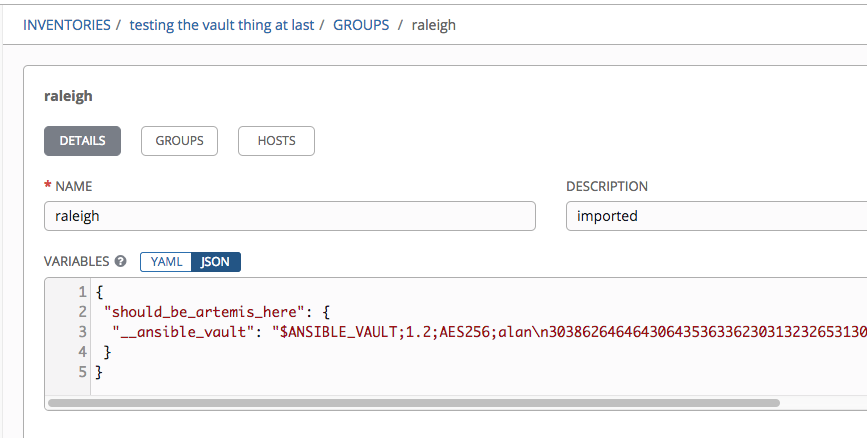
There is some weirdness in the YAML representation, but it may not matter one way or the other.
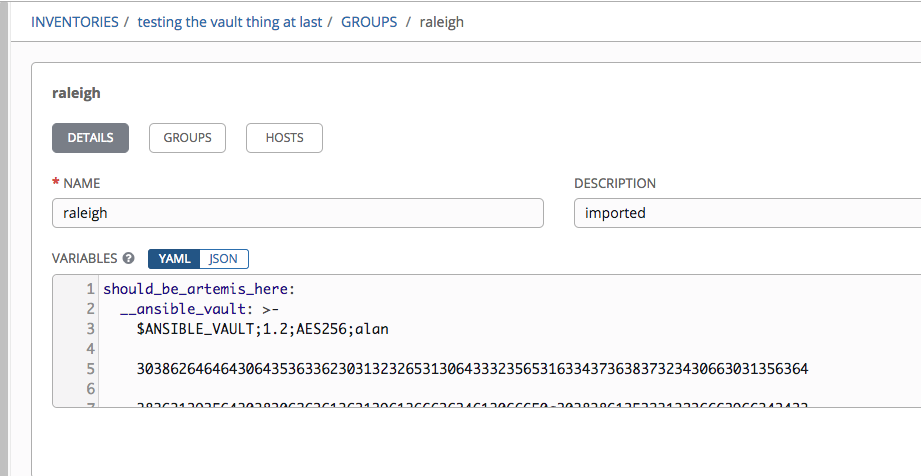
So, create a vault credential id=alan, value=password, and run a job template:
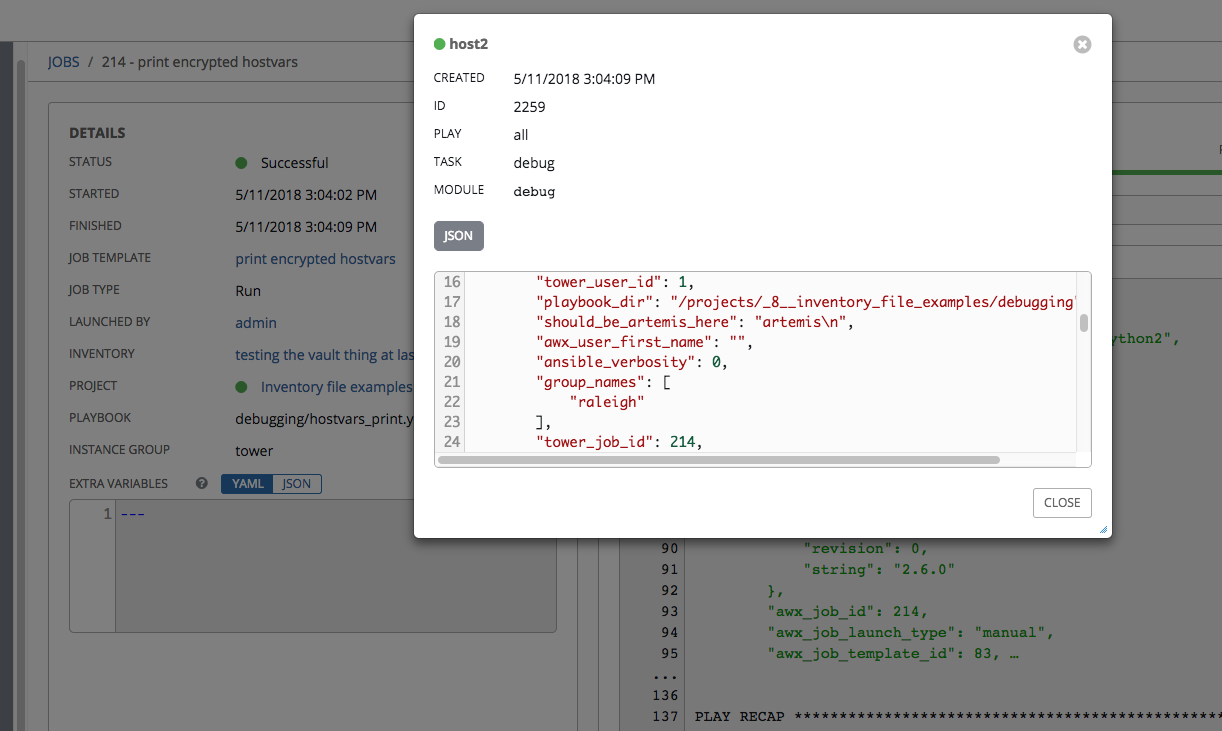
That's the decrypted secret. Yeah, this is done.
AlanCoding
on 11 May 2018
@AlanCoding great to hear. Mind telling me how I'd do that in my AWX docker-based install? I'm familiar with getting "into" the running containers. I assume I'd have to connect to the awx_task container. How do I get AWX to use/recognize the devel version of Ansible?
watsonb
on 11 May 2018
To install Ansible core from source.
pip install git+https://github.com/ansible/ansible
I think that your Dockerfile is in
That does yum -y install ansible, you would have to replace this with the pip install, and then build new images. Of course, then you would need to use those images when you run it. Otherwise, you might be able to shell into the task container and install the development Ansible, but it will disappear the next time the container is re-created.
AlanCoding
on 11 May 2018
I think I'll try activating the existing venv on the task container and running the pip install command to install from source. I really just want to preview the functionality before I go down the image building rabbit hole.
watsonb
on 11 May 2018
Interesting, it did work for the case of a *.yml with mixed plain-text and vaulted vars (e.g. ansible-vault encrypt_string), but did not work when an entire file was vaulted (e.g. ansible-vault create).
watsonb
on 11 May 2018
Yes, that's expected. Further up in this conversation the per-variable encryption vs file encryption was discussed. We can't support the file encryption via this mechanism, because we can't store them in the host / group / inventory variables, because we don't know what keys might be specified.
AlanCoding
on 11 May 2018
Understood. This is a great improvement none-the-less. Shouldn't be too terribly difficult for us to switch from file-based to per-variable.
watsonb
on 11 May 2018
Guys. I have a question about these changes. When will this branch be merged with master branch and when will the Docker images be updated to accept this changes?
I would like to use this changes with master docker images from DockerHub repository.
 abetka
on 3 Jul 2018
abetka
on 3 Jul 2018
Are there any ways to help getting this closer to completion?
 Walther
on 17 Jul 2018
Walther
on 17 Jul 2018
It should work for per-host vars with Ansible 2.6, as far as I know. @AlanCoding can confirm.
wenottingham
on 17 Jul 2018
Yes, that's right. 2.6 is released, if it's not in the task container now, we should rebuild it.
AlanCoding
on 17 Jul 2018
Hi all,
So i was trying to figure out the solution around it and i got a workaround to use..
if we do import inventory using the awx-manage command it asks for vault password and allow us importing the encrypted inventory/data files in system.
/usr/bin/awx-manage inventory_import --inventory-id 2 --overwrite-vars --group-filter ^.+$ --host-filter ^.+$ --exclude-empty-groups --source /var/lib/awx/projects/_1_dummy/hosts -v2
First it prompt for password and will also create a job in AWX and will import inventory in no-time
Regards,
Sandeep
 201sandeep
on 1 Aug 2018
201sandeep
on 1 Aug 2018
Per https://github.com/ansible/awx/issues/223#issuecomment-405677560, closing. This should work now for individually-encrypted variables.
wenottingham
on 1 Aug 2018
Anybody can eleborate how to add vault encrypted passwords per host variable with Ansible Tower/AWX?
 rgruyters
on 29 Aug 2018
rgruyters
on 29 Aug 2018
There are 2 different use-cases people are interested in:
- in https://github.com/ansible/awx/issues/223#issuecomment-388457636 I described pass-through of vault secrets in inventory import
- here, I will give up-to-date instructions for the more simple case of manually pasting encrypted secrets into inventory variables (hostvars)
You have a host, a secret, and a variable name under which that secret will be accessed in hostvars. In this example:
- secret content is "my secr3tz"
- hostvar under which this is accessed is "secret_var_name"
- vault id used is "alan" (you can use vault without ids, Ansible docs)
- the vault password ("password" here) is entered twice manually as the command is ran
You run this command on your own machine with current Ansible 2.6
ansible-vault encrypt_string "my secr3tz" --name=secret_var_name --vault-id=alan@prompt
New vault password (alan):
Confirm vew vault password (alan):
secret_var_name: !vault |
          $ANSIBLE_VAULT;1.2;AES256;alan
          32396563326431623138313563343831653064643736363463343830353562323732356637666161
          3735653531383637353264663462303566656534616539320a356566373335326535633266336438
          65653337643161366636383837316366343339343664666432366633316634333635643936326365
          3037636631323033640a343634343566663433393436666637656338363266666538633633326638
          6665
Encryption successful
Go to the host edit page in the UI, keep the variables box as YAML. Paste this text in the variables box exactly:
secret_var_name:
    __ansible_vault:
Then, copy exactly this subset of text from your previous ansible-vault encrypt_string command after the prior text. One line should have the text __ansible_vault: |, Importantly, there is exactly one space between the : and the |. No line break, just one space.
|
          $ANSIBLE_VAULT;1.2;AES256;alan
          32396563326431623138313563343831653064643736363463343830353562323732356637666161
          3735653531383637353264663462303566656534616539320a356566373335326535633266336438
          65653337643161366636383837316366343339343664666432366633316634333635643936326365
          3037636631323033640a343634343566663433393436666637656338363266666538633633326638
          6665
Click save for the host. If you switch the vars to JSON and back, it will re-format, so maybe don't do that.
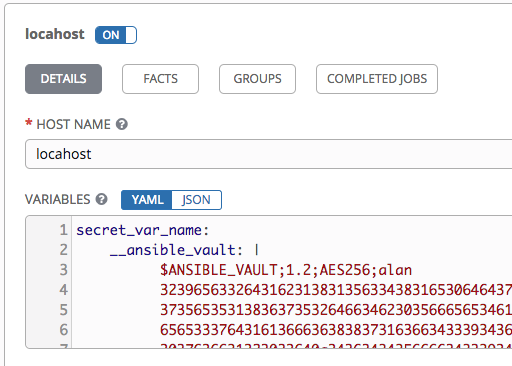
Vault credentials can decrypt it in subsequent playbook runs. In this concrete example, I create a new vault credential with id="alan" and password="password", and attach that to a job template which uses the inventory with the previously mentioned host.
Use any debugging playbook that echos hostvars for proof, which prints plaintext "my secr3tz". When you're making playbooks for others to use, don't echo passwords and use no_log appropriately.
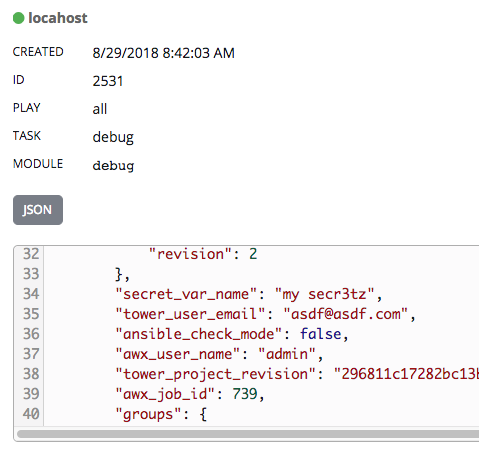
Same can be done for inventory & group variables.
AlanCoding
on 29 Aug 2018
@AlanCoding thanks for clearing this. For the most it is working fine. Although when using it with a filter (e.g.) password_hash() then I get the following error message:
{
    "msg": "Unexpected templating type error occurred on (set user {{ checkpoint_ansible_user }} password-hash {{ checkpoint_ansible_password|password_hash('md5') }}): must be string, not AnsibleVaultEncryptedUnicode"
}
Shall I open a new issue for this? (as I just noticed that this one is closed)
rgruyters
on 30 Aug 2018
My gut reaction is that Ansible core should accept a patch which will string-ify the input to password_hash if it is AnsibleVaultEncryptedUnicode type. There's a chance that they'll tell you that your playbook should stringify it on its own, but that doesn't seem right to me either. My justification is that this looks like an error from the library used to hash, which obviously can't take the Ansible-isms. Anyway, that issue should go in the Ansible core repo:
AlanCoding
on 30 Aug 2018
@AlanCoding I've followed your example here but instead of attempting decryption, AWX is passing {u'__ansible_vault': '$ANSIBLE_VAULT...'}. I'm using the official AWX docker containers, AWX v1.0.7.2 and Ansible 2.6.2. Target hosts are running Ansible 2.6.4. The vars are set in the extra_vars of my job template (though I've attempted to use them in the inventory too). See below for an example.
repo_password:
  __ansible_vault: |
          $ANSIBLE_VAULT;1.1;AES256
          38393534656264396238366333623463663438323937363161326432376532333863306561306465
          ...
When the job template is saved, this is what it ends up looking like in the pre-run confirmation screen:
repo_password:
  __ansible_vault: >
    $ANSIBLE_VAULT;1.1;AES256

    38393534656264396238366333623463663438323937363161326432376532333863306561306465

    ...
 inhumantsar
on 18 Sep 2018
inhumantsar
on 18 Sep 2018
@inhumantsar Thanks for the report. You didn't mention the behavior when you provided a correct vault credential and launched that job template, but my findings are that it is not recognized as vault content, and is not decrypted.
I have filed an enhancement request in Ansible core that would make this work with job templates.
https://github.com/ansible/ansible/issues/45922
The root problem is that AWX automatically converts variables into YAML before passing to ansible-playbook, this is because it wants to use some other (unrelated) YAML constructors internally.
Moving forward, AWX needs a means of specifying unsafe variables and vault encrypted variables in the same file, passed as extra vars. Hypothetically, we could do this with added json/yaml constructors and yaml representers for these objects. This gets complicated.
AlanCoding
on 20 Sep 2018
Here are some different examples and just to clarify. If I want to import my inventory from the SCM with a vault file on the group_vars dir, I have to remove it from my scm and put the output of the vault file in AWX as a variable ?
 rmacian
on 21 Sep 2018
rmacian
on 21 Sep 2018
If I want to import my inventory from the SCM with a vault file on the group_vars dir, I have to remove it from my scm and put the output of the vault file in AWX as a variable ?
Shouldn't be as hard as you're making it.
If you have a group_vars directory that was encrypted via ansible-vault encrypt, then that's whole-file encryption, and you can't import it to AWX. To fix this, however, you don't need to _massively_ refactor. Instead, you can take the variables out of that file you need encrypted, and encrypt them via ansible-vault encrypt_string, and put those in the same, or a same-ish file.
Here's an example of a host_vars file correctly set up:
Same in YAML here, but only this entry out of my example is correct:
If you import the adjacent inventory into AWX, it will save the encrypted content to the host variables in the database, and vault credentials can decrypt it on playbook runs.
In your case, best bet is to pipe the output of ansible-vault encrypt_string directly to group_vars/<your group name>.yml. This needs to replace your whole-file encrypted variables.
AlanCoding
on 21 Sep 2018
The problem with the ansible-vault encrypt_string route is when it comes time to vault key rotation. There should be an ability in AWX to pass a vault ID to the inventory update when sources from a project. Especially when the best practices docs for Ansible mentions using a vars file and a vault file for secrets within your group_vars.
 sudomateo
on 24 Sep 2018
sudomateo
on 24 Sep 2018
Actually, there have been some changes since the last comments in this thread about the possibilities of decrypting whole-file vault secrets. When Ansible core implemented the ability to specify vault in JSON, https://github.com/ansible/ansible/pull/38759, ansible-inventory behavior became:
- whole-file secrets are decrypted with provided passwords, or else errors
- variable-based secrets are never decrypted, even if valid passwords are provided
Although this needs good documentation, I believe this eliminates the confusion about what will and what won't be decrypted when a vault credential is attached to inventory sources. That opens us up to complete API development on this feature to decrypt whole-file secrets.
There are still surmountable technical challenges with doing this, but it is back on the agenda.
AlanCoding
on 25 Sep 2018
Thank you. I've been able to import the inventory using the encrypt string . I can see my vaulted variables but I wonder if I must sync manually my inventory each time I change a value from my vault.yml file or if it can be done automatically
rmacian
on 3 Oct 2018
I wonder if I must sync manually my inventory each time I change a value from my vault.yml file or if it can be done automatically
It needs to be synced each time, yes. For your case, if you set the inventory source to update on project change, and then set the project to update on launch, then it should do a just-in-time update of both the project and the inventory, both of which are necessary.
AlanCoding
on 3 Oct 2018
This might save someone a little heartache.
TL;DR: chmod 755 /usr/bin/ansible-inventory
I had been using my workaround with Tower 3.2.2, which was working nicely. I upgraded to 3.3.0, and the workaround broke with ERROR! Attempting to decrypt but no vault secrets found (when trying to update an inventory sourced from a project).
I found that a fresh installation of Tower contains this message upon inventory update:
2 1.779 DEBUG Using system install of ansible-inventory CLI: /usr/bin/ansible-inventory
but my instance says:
2 1.570 DEBUG Using backported ansible-inventory module: /var/lib/awx/venv/awx/lib/python2.7/site-packages/awx/plugins/ansible_inventory/backport.py
Then I found that /usr/bin/ansible-inventory wasn't executable by awx, so Tower was forced to use the backport. After changing permissions to 755, the workaround began working again.
otdouglasm
on 23 Oct 2018
That opens us up to complete API development on this feature to decrypt whole-file secrets.
There are still surmountable technical challenges with doing this, but it is back on the agenda.
Is there an open issue which tracks progress on this?
 keilr
on 8 Nov 2018
keilr
on 8 Nov 2018
Is there an open issue which tracks progress on this?
@AlanCoding what's the status on this?
keilr
on 25 Jan 2019
There's not an issue on this AFAIK. You can feel free to open one, but I want it to be very clear that its scope is about decrypting _whole-file_ vars that were encrypted by ansible-vault CLI.
There are some architecture changes that will affect implementation of that, positively I hope. For one, our task system is moving to ansible-runner, https://github.com/ansible/awx/pull/3041. I have been having conversations about potentially eventually calling ansible-inventory directly (or direct-ish, via runner) from the dispatcher, as opposed to going through the management command (ping @matburt @chrismeyersfsu).
With some recent simplifications we got by dropping support of Ansible 2.3, I feel this is much more viable now than what it used to be. Once we do this, we will see a lot of benefits by the fact that ansible-inventory CLI call pattern is the same as ansible-playbook for many things, so we can pass passwords the same way. Thus, decryption on import becomes quite easy and maintenance-free. I'm also very excited to pass through the verbosity flag to ansible-inventory: https://github.com/ansible/awx/issues/2105. Removing the layer of the management command will allow these things to be implemented with no dedicated code to make it happen.
AlanCoding
on 25 Jan 2019
I'm hitting the "cannot import inventory because I'm having a group_vars/all/vault fully encrypted", I'll try to use string encryption instead of whole file encryption to fix this but it prompt a question in my mind:
Why group_vars/ is handled by the inventory import instead of the project import?
 JulienPalard
on 5 Mar 2019
JulienPalard
on 5 Mar 2019
@JulienPalard in fact, you could work around this issue by moving your group_vars directory at the same level than your playbook, instead of the inventory.
That way, AWX will wait for the run of the playbook to decrypt those variables at once (and not at the inventory processing phase, at which it doesn't have access to the vault key).
bmalynovytch
on 5 Mar 2019
its location, location, location
they are adjacent to EITHER/BOTH inventory or playbook, so depends on what you are doing, they'll be read or not at that time
bcoca
on 5 Mar 2019
Yes, it worked by moving my inventory in a sub-directory, thanks :)
I'm not a big fan of having to do this just for AWX (I mean, I don't think I'm alone having my inventory at the root of the repo and having fully encrypted vault files, so I think people have the issue, search for it, find this thread, move their inventory, try again, see it works, which is not ideal).
JulienPalard
on 7 Mar 2019
@hassek As you pointed out, there are ways to provide Tower with the vault password so that it can decrypt vaulted variables during synchronization. Another method is to set ANSIBLE_VAULT_PASSWORD_FILE in the inventory source's environment variables.
But the problem with any of these methods is that the decrypted variables will show up in plain text in host vars, which we don't want (otherwise, they wouldn't be encrypted to begin with).
The best workaround in my case is to maintain a separate directory structure which contains no vaulted files.
For example, if you have an inventory source pointing to
my_project/inventory_filein this project directory:my_project/
group_vars/
vaulted_file.yml
unvaulted_file.yml
inventory_file
Create a new sub-directory, and link ONLY to files that are not vaulted:my_project/
group_vars/
vaulted_file.yml
unvaulted_file.yml
inventories/
group_vars/
unvaulted_file.yml -> ../../group_vars/unvaulted_file.yml
inventory_file -> ../inventory_file
inventory_file
Then point the inventory source tomy_project/inventories/inventory_fileinstead ofmy_project/inventory_file. Since there are no vaulted files to decrypt, the synchronization will succeed without a vault password.
These steps worked like a charm.. . Ansible Tower 3.3.1
Now will be testing the playbooks.
 sayantandas
on 30 Mar 2019
sayantandas
on 30 Mar 2019
I'm hitting this issue too. I have one repo with several inventories under the inventory folder...
I'm trying to import my inventory hosts via the Sources -> Source from Project. When I tried to select a credential it says to me that the credentials are empty now is the question which type of credentials do I need to create ?
 jomach
on 21 Jul 2019
jomach
on 21 Jul 2019
Moving the group_vars next to the playbooks is not an option for us since we are using the following structure:
inventory/
   hosts
   group_vars/
       *** VAULT ENCRYPTED FILES INCLUDED ***
   plays/
       play1/
       play2/
       ....
There is no single playbook to move group_vars to since multiple playbooks refer to the group_vars defined in the inventory.
This lacking feature makes usage of AWX/Tower unfeasible for us. (Is there a workaround?)
 Timoses
on 12 Aug 2019
Timoses
on 12 Aug 2019
we have a similar setup if I'm not confusing anything. I solved it by adding on the Source the environment variable: ansible_vault_password_file=/path/to/vaul_password
jomach
on 12 Aug 2019
we have a similar setup if I'm not confusing anything. I solved it by adding on the Source the environment variable: ansible_vault_password_file=/path/to/vaul_password
Thanks, I've used a custom credential type to inject the password file (https://docs.ansible.com/ansible-tower/latest/html/userguide/credential_types.html).
Still, it does not feel like a super great solution.
For one, now the Vault encrypted variables are accessible via the inventory. If I allow a user to "Use" the inventory, they can see the decrypted content of the vault files. Not Great!
Imo, vault encrypted variables and files should NEVER be decrypted in the inventories (only an indication shown that the inventory contains encrypted vault files)!
Then, during execution of a playbook, the vault files/variables are decrypted using a supplied credential (no encrypted data is leaked). Since encrypted data is not needed before execution of ad-hoc or job commands, this approach should be workable.
Further, we currently follow this structure which makes it easy to identify which variables use vault encrypted data:
- Playbooks only use non-encrypted variable names
- variable names can refer to encrypted variables
Example:
my_var: "{{ vault_my_var }}"
where vault_my_var is encrypted in a vault file. This circumvents any surprises of "hidden" encrypted variables. The user knows: This variable refers to encrypted content.
I believe this aspect of Tower/AWX can be improved upon.
Timoses
on 13 Aug 2019
Yes, it worked by moving my inventory in a sub-directory, thanks :)
I'm not a big fan of having to do this just for AWX (I mean, I don't think I'm alone having my inventory at the root of the repo and having fully encrypted vault files, so I think people have the issue, search for it, find this thread, move their inventory, try again, see it works, which is not ideal).
Yes! you are so true! @JulienPalard
This is make no sense at all.
I am just need my group_vars in my inventories directory in the root of project.
Guest what?
Because I have lots of environments in inventories directory that need to separate in multiple group_vars directories!
I do want to mess up those group_vars(es), hosts_vars(es) with my playbooks!
@JulienPalard you are not alone, so true ...
 zx1986
on 14 Oct 2019
zx1986
on 14 Oct 2019
Bump. Any news on this?
The issue was marked as closed but it is definitely not closed...
 Grekkor
on 19 Mar 2020
Grekkor
on 19 Mar 2020
Any roadmap for this fix?
 nickjmv
on 11 Apr 2020
nickjmv
on 11 Apr 2020
I wrote a little summary about an alternative to ansible-vault in combination with running on AWX that might be interesting for some: https://tumbl3w33d.github.io/views/git-crypt-ansible-awx.html
It works for encrypted group_vars, however, what @Timoses wrote about
the Vault encrypted variables are accessible via the inventory
also applies here, of course. Just saying, in case that matters for those trying it out.
 tumbl3w33d
on 13 Apr 2020
tumbl3w33d
on 13 Apr 2020
This issue is 3 years old and still there seems to be something missing. Either documentation or The ability to actually have multiple file encrypted files in AWX.
I have cloned Confluent's Ansible playbook and added a vault file in the variables_handler role and loaded the content with
- name: Include variables_handler vault vars
  include_vars:
    file: vault/vault.yml
    name: vault
This works fine. All variables are prefixed with vault. and I can reference them in plays and so on.
I then wanted to add a vault for each of my three environments and tried to follow the best practices.
I now have the following structure:
playbook.yml
inventories/
|--testing/
    |--hosts.yml
    |--group_vars/
        |--all/
            |--vars.yml
            |--vault.yml
|--produciton/
    |--...
|--staging/
    |--...
When trying to update the inventory in AWX I get ERROR! Attempting to decrypt but no vault secrets found
Am I missing something?
 smedegaard
on 24 Apr 2020
smedegaard
on 24 Apr 2020
You can use vaulted values and files in inventory by doing the following (instructions for docker-based installation, should work elsewhere too):
- Create a
vault_filein theawx_taskcontainer (no comments or anything else, just the vault pass) - In the inventory source within AWX, create an env var
ANSIBLE_VAULT_PASSWORD_FILEand point it tovault_file, like:
ANSIBLE_VAULT_PASSWORD_FILE: "/var/lib/awx/vault_file"
Inventory sync will work with no issues. It's far from ideal, but gets the job done.
 aorfanos
on 20 Aug 2020
aorfanos
on 20 Aug 2020
Related issues
 cs35-owncloud
·
3Comments
cs35-owncloud
·
3Comments
 kakkotetsu
·
3Comments
kakkotetsu
·
3Comments
 pebbledavec
·
3Comments
pebbledavec
·
3Comments
 augabet
·
3Comments
augabet
·
3Comments
 artmakh
·
3Comments
artmakh
·
3Comments
Most helpful comment
Is there any conclusion or roadmap so far? I need central machine running ansible playbooks till end of January, and I prefer ansible awx, but vault_pass unsupport is a no-go for my use case, so I want to know if I should wait or switch to Jenkins