Awx: External AUTH Providers - Can't Save configuration form without changing the dropdown
The external AUTH providers for LDAP, RADIUS, SAML, and TACACS+ all have the Save button grayed out and disabled. I cannot save their config. I know the footer UI is in the way, but if you zoom out you can access the buttons. The other external providers like OAuth2 and Github work just fine.
I didn't think there were any dependencies for those services?
- AWX version: 1.0.0.312
- Ansible version: 2.3.1
- Operating System: RHEL 7
- Web Browser: Chrome and Firefox

 hiddenicon
All 17 comments
only saves if you choose another option from the drop down then it will ask "save changes?" besides that I get it greyed out also.
 jlozadad
on 9 Sep 2017
jlozadad
on 9 Sep 2017
In the awx/sso/backends.py there are checks for those features to be enabled.
if not feature_enabled('ldap'):
In tower, you need a license to active those features. I didn't think that'd be needed for AWX?
hiddenicon
on 9 Sep 2017
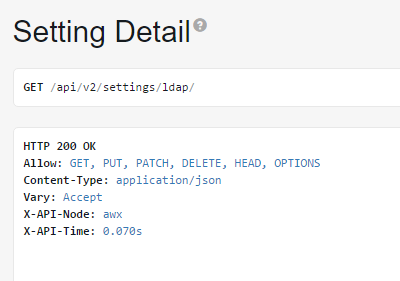
The StubLicense should enable those authentication types. Check to see whether you can save those settings via the API (e.g. /api/v2/settings/radius/).
 cchurch
on 9 Sep 2017
cchurch
on 9 Sep 2017
Yes looks good via the API.
Also, when on the LDAP page, if I fill out the form, and then hit cancel you get the modal popup to confirm discarding the settings. The "Save Changes" button is enabled and green. If I hit "Save Changes" there, it works and settings are saved.
I am having issues with LDAP, most likey the LDAP settings, but where is the LDAP debug/logging now? Is it in the same spot as Tower?
hiddenicon
on 9 Sep 2017
I am seeing this error in the Dev console when I go to the LDAP settings page.

hiddenicon
on 9 Sep 2017
A slightly different but related issue...
If you try to edit a setting (in my case in LDAP) the save button does not get enabled (as expected with the current bug...) However, if you try the workarounds such as hitting cancel or going to a different option you are not prompted with a discard or save changes popup as you are during initial configuration. At this point it seems impossible to update a configuration
 fortinj66
on 12 Sep 2017
fortinj66
on 12 Sep 2017
I've just experienced that same thing. My initial config saved (with the 'work around'), however my LDAP isn't working so I wanted to make changes. I don't get any modal's now or anyway to save it just like you saw.
hiddenicon
on 12 Sep 2017
Here is an error I am seeing in the logs... Not sure if its related:
2017/09/12 18:20:47 [warn] 30#0: *22 upstream server temporarily disabled while connecting to upstream, client: 10.128.2.1, server: _, request: "GET /api/v2/config/ HTTP/1.1", upstream: "uwsgi://[::1]:8050", host: "awx-web-svc-awx.services.os.xxx.xxx", referrer: "https://awx-web-svc-awx.services.os.xxx.xxx/"
--
  | Traceback (most recent call last):
  | File "/usr/bin/ansible", line 43, in <module>
  | import ansible.constants as C
  | File "/usr/lib/python2.7/site-packages/ansible/constants.py", line 202, in <module>
  | DEFAULT_LOCAL_TMP         = get_config(p, DEFAULTS, 'local_tmp',        'ANSIBLE_LOCAL_TEMP',      '~/.ansible/tmp', value_type='tmppath')
  | File "/usr/lib/python2.7/site-packages/ansible/constants.py", line 109, in get_config
  | makedirs_safe(value, 0o700)
  | File "/usr/lib/python2.7/site-packages/ansible/utils/path.py", line 71, in makedirs_safe
  | raise AnsibleError("Unable to create local directories(%s): %s" % (to_native(rpath), to_native(e)))
  | ansible.errors.AnsibleError: Unable to create local directories(/.ansible/tmp): [Errno 13] Permission denied: '/.ansible'
Were those logs in the awx_web container? What path?
hiddenicon
on 12 Sep 2017
Yes, this was from awx_web... Here is an entire log segment
2017/09/12 18:38:27 [warn] 30#0: *56 upstream server temporarily disabled while connecting to upstream, client: 10.128.2.1, server: _, request: "GET /api/v2/config/ HTTP/1.1", upstream: "uwsgi://[::1]:8050", host: "awx-web-svc-awx.services.os.xxx.xxx", referrer: "https://awx-web-svc-awx.services.os.xxx.xxx/"
--
  | Traceback (most recent call last):
  | File "/usr/bin/ansible", line 43, in <module>
  | import ansible.constants as C
  | File "/usr/lib/python2.7/site-packages/ansible/constants.py", line 202, in <module>
  | DEFAULT_LOCAL_TMP         = get_config(p, DEFAULTS, 'local_tmp',        'ANSIBLE_LOCAL_TEMP',      '~/.ansible/tmp', value_type='tmppath')
  | File "/usr/lib/python2.7/site-packages/ansible/constants.py", line 109, in get_config
  | makedirs_safe(value, 0o700)
  | File "/usr/lib/python2.7/site-packages/ansible/utils/path.py", line 71, in makedirs_safe
  | raise AnsibleError("Unable to create local directories(%s): %s" % (to_native(rpath), to_native(e)))
  | ansible.errors.AnsibleError: Unable to create local directories(/.ansible/tmp): [Errno 13] Permission denied: '/.ansible'
Thanks for filing this issue!
I'm in the middle of investigating this and haven't _completely_ figured it out, but I believe enabling the save button should be a simple fix (we're referencing a javascript value to disable the button, that seems to be undefined).
The issue is present downstream (i.e.: Tower), so I'll be fixing it there and it should be picked up when we merge that code back into AWX.
 jlmitch5
on 12 Sep 2017
jlmitch5
on 12 Sep 2017
Thanks for the update and I'll be looking forward for the fix.
hiddenicon
on 12 Sep 2017
@hiddenicon and just a heads up, if this is blocking you, you can most likely get around the disabled button issue by opening up the chrome debugger (just right click and "inspect the element" on the greyed-out save button...make sure you have dev tools enabled).
Then you can delete this disabled key and it should turn green (and be clickable):

jlmitch5
on 12 Sep 2017
yes that workaround works editing it in the DOM. I was able to save changes as well. Now if I can get LDAP working. Do you know where LDAP logs to now? Different than Tower I assume. Sorry for being off-topic.
hiddenicon
on 13 Sep 2017
I saw them in the awx_web container container logs when I had to debug my config.
--John
Sent from my iPhone
On Sep 12, 2017, at 6:44 PM, hiddenicon notifications@github.com wrote:
yes that workaround works editing it in the DOM. I was able to save changes as well. Now if I can get LDAP working. Do you know where LDAP logs to now? Different than Tower I assume. Sorry for being off-topic.
—
You are receiving this because you commented.
Reply to this email directly, view it on GitHub, or mute the thread.
fortinj66
on 13 Sep 2017
@jlmitch5 Any idea when this fix will be available?
Thanks!
--John
UPDATE: This save button seems to be fixed in the latest code. I rebuilt tower and the save button seems to work as the settings are saved and retrievable.
However, I'm not certain that the changes are applied. As a test I created a new organization and a new team in LDAP and changed the LDAP config to show this. The changes save but the new organization and team do not appear in either the team or organization tabs...
UPDATE 2: I guess I didn't wait long enough. Both organization and team appeared after several minutes... This issues seems to be fixed.
fortinj66
on 18 Sep 2017
Excellent, closing.
 matburt
on 19 Sep 2017
matburt
on 19 Sep 2017
Related issues
 augabet
·
3Comments
augabet
·
3Comments
 IMOKURI
·
3Comments
IMOKURI
·
3Comments
 IshwarKanse
·
3Comments
IshwarKanse
·
3Comments
 marshmalien
·
3Comments
marshmalien
·
3Comments
 artmakh
·
3Comments
artmakh
·
3Comments
Most helpful comment
Thanks for the update and I'll be looking forward for the fix.