aws-vault >= 5.1 fails to open keyring on linux
- [x] I am using the latest release of AWS Vault
- [x] I have provided my
.aws/config(redacted if necessary) - [x] I have provided the debug output using
aws-vault --debug(redacted if necessary)
I'm using the secret-service credential provider on ArchLinux. Recent versions of aws-vault fail to unlock the keyring. If I manually unlock the keyring, everything works again as expected.
$ cat ~/.aws/config
[profile test]
$ aws-vault --version
v5.1.0
$ aws-vault --debug exec test
2020/01/29 13:16:09 [keyring] Considering backends: [secret-service kwallet pass file]
2020/01/29 13:16:09 Loading config file /home/user/.aws/config
2020/01/29 13:16:09 Parsing config file /home/user/.aws/config
aws-vault: error: exec: Error getting temporary credentials: profile test: credentials missing


md5-8757c74e1895b7135c0afb9cfca34a4c


$ aws-vault --version
v5.0.1
$ aws-vault --debug exec test
2020/01/29 13:10:25 [keyring] Considering backends: [secret-service kwallet pass file]
2020/01/29 13:10:25 Loading config file /home/user/.aws/config
2020/01/29 13:10:25 Parsing config file /home/user/.aws/config
2020/01/29 13:10:25 Using GetSessionToken for credentials
2020/01/29 13:10:25 Looking for sessions for test
2020/01/29 13:10:25 Looking up all keys in keyring
2020/01/29 13:10:25 Looking up keyring for test
[prompts to open keyring]
It seems that this was introduced by 1c0b58a22cec8ef04f01a20ef861787d72a18bed.
 christophgysin
All 14 comments
Unlocking also works fine using the keyring CLI directly:
$ cmd/keyring/keyring -debug -service awsvault -key test
2020/01/29 13:41:24 [keyring] Considering backends: [secret-service kwallet pass file]
2020/01/29 13:41:24 Getting key "test" in service "awsvault" in backend "secret-service"
[prompts to open keyring]
{"AccessKeyID":"***","SecretAccessKey":"***","SessionToken":"","ProviderName":""}
Please try with the latest release - v5.1.0 is not the latest
 mtibben
on 1 Feb 2020
mtibben
on 1 Feb 2020
Sorry if I wasn't clear. This happens with every version since v5.1.0, including v5.2.0.
christophgysin
on 1 Feb 2020
I'm running into the same issue, I believe. When using commands like aws-vault exec <profile>, it never seems to actually request anything from the key store (in my case gnome-keyring). On the other hand, if I run aws-vault remove <profile>, it correctly tries to open the key store, and after that exec and other commands work. At least as I see it so far.
 imrehg
on 1 Feb 2020
imrehg
on 1 Feb 2020
I'm on macOS, so anyone on Linux feel free to jump in and help here
mtibben
on 3 Feb 2020
Could you create a branch with more debug output? I'm happy to build from source and test to get this fixed.
christophgysin
on 3 Feb 2020
Yay I'm learning go! :)
Couldn't wait and figured out how to run it in gdb. It seems that ck.Keyring.Keys() returns a list of keys, but all their keyNames are the empty string.
And that also seems to be consistent with the keyring CLI tool:
$ keyring -service awsvault -list-keys | wc -l
29
$ keyring -service awsvault -list-keys


...
Also, once the keyring is unlocked, -list-keys works as expected.
And it gets better. If I lock the keyring again, -list-keys still works! Only if kill gnome-keyring-daemon (the provider of org.freedesktop.secrets.service), -list-keys returns empty strings again.
christophgysin
on 3 Feb 2020
I opened an issue upstream to clarify if gnome-keyring's behaviour is intended.
christophgysin
on 5 Feb 2020
Hi
I am having the same issue with v5.1.2. Seems to be sending empty strings.
 moleisking
on 5 Feb 2020
moleisking
on 5 Feb 2020
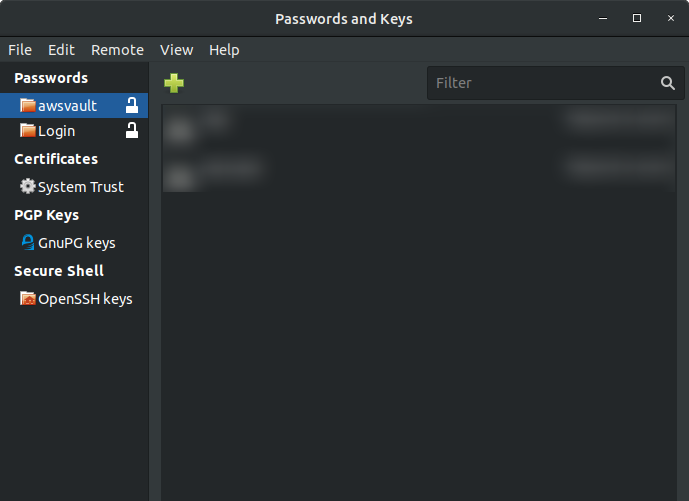
Quick workaround for those on Ubuntu / Gnome (which I think is the same issue): With the Passwords and Keys GUI manually unlocking the awsvault folder fixes this until next restart / shut down.
 adamdodev
on 10 Feb 2020
adamdodev
on 10 Feb 2020
I have a fix, brushing up the tests and will post it shortly.
 pda
on 11 Feb 2020
pda
on 11 Feb 2020
Fixed in v5.2.1
mtibben
on 11 Feb 2020
Nice digging @christophgysin, thanks!
pda
on 11 Feb 2020
Related issues
 ismailyenigul
·
4Comments
ismailyenigul
·
4Comments
 afedulov
·
3Comments
afedulov
·
3Comments
 teeberg
·
5Comments
teeberg
·
5Comments
 shivaman
·
6Comments
shivaman
·
6Comments
 kevinburke
·
5Comments
kevinburke
·
5Comments
Most helpful comment
Fixed in v5.2.1