aws-vault exec → 4 password prompts
On macOS Sierra 10.12.6 (16G1036) I'm currently getting four password prompts from aws-vault 4.1.0 (latest) for the first aws-vault exec $role … of the day:

Also, for subsequent runs within the session TTL, I previously just got a button prompt, but now I get a password prompt:
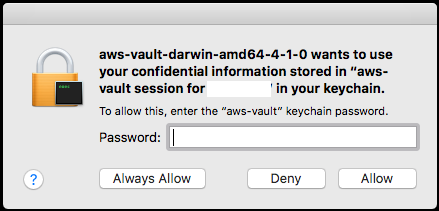
Perhaps some would go away if I clicked Always Allow but I've never done that for aws-vault. I'm accustomed to one or two password prompts for a non-existing-session aws-vault exec.
What are other people seeing/doing?
 pda
pda
All 16 comments
I call this "security through repetitious password prompts".
 lox
on 16 Nov 2017
lox
on 16 Nov 2017
Debug output would help!
lox
on 16 Nov 2017
I get one on the first run..
Then two on the second run, with the always allow.
Then just one for a few hours.
That key chain password is different from,y login key chain
--
Fernando Miguel
On 16 Nov 2017, at 22:57, Paul Annesley notifications@github.com wrote:
I'm currently getting four password prompts from aws-vault 4.1.0 (latest) for the first aws-vault exec $role … of the day:
Also, for subsequent runs within the session TTL, I previously just got a button prompt, but now I get a password prompt:
Perhaps some would go away if I clicked Always Allow but I've never done that for aws-vault. I'm accustomed to one or two password prompts for a non-existing-session aws-vault exec.
What are other people seeing/doing?
—
You are receiving this because you are subscribed to this thread.
Reply to this email directly, view it on GitHub, or mute the thread.
 FernandoMiguel
on 17 Nov 2017
FernandoMiguel
on 17 Nov 2017
I get two, usually, matching the first and second screens in your issue report. I build from tip, though.
 kevinburkeotto
on 17 Nov 2017
kevinburkeotto
on 17 Nov 2017
If you allow access to the aws-vault keychain (which I do), you should get one prompt for a password and then a prompt to access the root credentials. From there a session is created, which should be accessible with just a prompt.
lox
on 17 Nov 2017
@pda do you have a brew installed aws-vault? I have a suspicion that the symlinked aws-vault-> aws-vault-darwin-amd64 may be a factor in the multiple prompts
 mtibben
on 17 Nov 2017
mtibben
on 17 Nov 2017
do you have a brew installed aws-vault?
Nope, I download the signed release from GitHub. I just tested without the symlink (storing the binary as ~/bin/aws-vault) and it made no difference.
pda
on 17 Nov 2017
Here's an annotated debug trace for four password prompts:
pda@paulbookpro ~ ❯ aws-vault --debug exec example-role -- true
2017/11/17 11:29:09 Loading config file /Users/pda/.aws/config
2017/11/17 11:29:09 Parsing config file /Users/pda/.aws/config
2017/11/17 11:29:09 Looking for sessions for example-role / 4h0m0s
aws-vault wants to use your confidential information stored in “aws-vault session for example-role” in your keychain. To allow this, enter the “aws-vault” keychain password.
aws-vault wants to access key “aws-vault session for example-role” in your keychain. To allow this, enter the “aws-vault” keychain password.
2017/11/17 11:29:28 Session is expired
2017/11/17 11:29:28 Looking up keyring for example-root
aws-vault wants to use your confidential information stored in “aws-vault (example-root)” in your keychain. To allow this, enter the “aws-vault” keychain password.
aws-vault wants to access key “aws-vault (example-root)” in your keychain. To allow this, enter the “aws-vault” keychain password.
Enter token for arn:aws:iam::____:mfa/____:
…
The presence of an expired session causes extra prompt(s) compared to straight after clearing sessions.
pda
on 17 Nov 2017
Narrowing this down a little bit…
Previously I'd see two types of keychain prompt triggered by aws-vault; I don't have the exact screenshots/wording, but they were basically:
- aws-vault want access to keychain. Enter password and click Allow.
- aws-vault wants access to keychain. Click Allow.
The second one didn't ask for a password and could be dismissed just by hitting spacebar to click Allow.
Now I'm still seeing two types of prompt:
- aws-vault wants to use your confidential information stored in “aws-vault session for example-role” in your keychain. To allow this, enter the “aws-vault” keychain password.
- aws-vault wants to access key “aws-vault session for example-role” in your keychain. To allow this, enter the “aws-vault” keychain password.
But unlike before they now both require a password. This effectively means twice as many password inputs; up to four if there's an expired session stored in the keychain.
I completely deleted my aws-vault keychain and allowed aws-vault add … to recreate it. Same problem.
Maybe macOS changed something in a 10.12.x point release? I'm on 10.12.6, haven't upgraded to High Sierra yet.
pda
on 17 Nov 2017
I'm having this exact same problem since the upgrade. Just for clarity's sake; if you click "Always allow..", what's left of the security aws-vault offers? Can't any process at that point just invoke aws-vault behind the scenes, and capture its output? I feel like clicking always allow completely defeats the purpose and you might as well just go back to storing plain text. Or not?
 hraban
on 26 Nov 2017
hraban
on 26 Nov 2017
I'm seeing this now too. There appear to be two prompts, one for access to the Keychain and one for access to the Keychain item. This is odd, I don't remember this behaviour before.
lox
on 26 Nov 2017
Furthermore, I can't figure out any way actually set Keychain level access control. It's supposed to be entirely at the Item level: https://developer.apple.com/documentation/security/1392434-seckeychainsetaccess
lox
on 26 Nov 2017
Hmmm. I think I've figured it out. We were checking keychain status on Get and Set, only needed on Set.
lox
on 26 Nov 2017
(So you ended up with 4 prompts, because we check for a session first)
lox
on 26 Nov 2017
Ah hah.
The other thing we discussed @lox was encoding the session expiry somewhere accessible without decryption; perhaps the keychain item name, if it comes that that. That would eliminate the password prompt just to discover a stored session can't be used.
pda
on 30 Nov 2017
Ugh, so even with session's not being fetched, I get 2x dialogs for a single keychain.QueryItem call, in between these two log outputs.
2017/12/06 13:58:25 [keyring] Querying keychain for service="aws-vault", account="buildkite-iam
session (1512541384)", keychain="login.keychain"
2017/12/06 13:58:34 [keyring] Found item "aws-vault session for buildkite-iam"
Related issues
 kevinburke
·
5Comments
kevinburke
·
5Comments
 afedulov
·
3Comments
afedulov
·
3Comments
 teeberg
·
5Comments
teeberg
·
5Comments
 jonscheiding
·
3Comments
jonscheiding
·
3Comments
 iconara
·
6Comments
iconara
·
6Comments
Most helpful comment
I call this "security through repetitious password prompts".