Aws-toolkit-jetbrains: RDS IAM Authentication - forgets user?
Describe the bug
I'm attempting to log in to an AWS RDS database cluster (MySQL variant) using my IAM credentials. I have tested this successfully with the 'mysql' command line to check my access/permissions and parameters are valid.
To reproduce
- Go to Tools -> Windows -> AWS Explorer, chose my profile (not 'default', I have a second profile that uses a 'Role' in AWS to access a sub-account) and I can verify that the expected RDS clusters are listed out correctly.
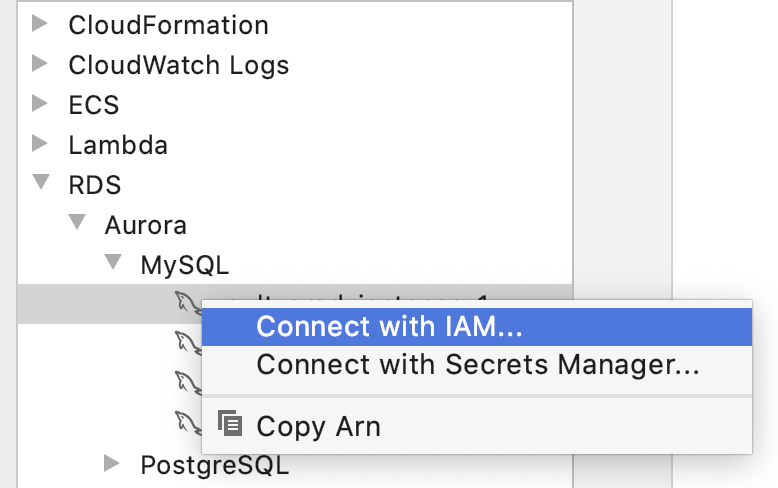
- Right-clicking on the 'Connect with IAM...' option did nothing.
- I then went to the Database window and attempted to add a new data source. Chose 'MySQL' driver.
- Fill in database host, chose 'AWS IAM' authentication, specified my username, selected my 'Credentials' etc.
- Click on 'Test Connection' and it was all OK
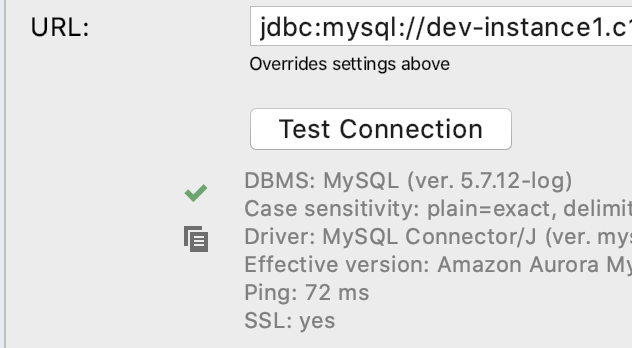
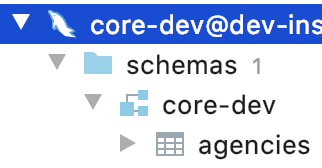
- From the Database window I could then expand out the schemas & database tables
- When I tried to view the contents of any table or run a query to SELECT from a table I then got an error suggesting DataGrip had forgotten how I had authenticated:

Expected behavior
It seems my authentication succeeded but either DataGrip or the driver is losing my details.
Screenshots
Attempting to connect via AWS Explorer context menu (choosing Connect with IAM... does not do anything)
Your Environment
- OS: MacOS 10.15.7
- JetBrains product: DataGrip
- JetBrains product version: 2020.2.3
- AWS Toolkit version: 3.73
Additional context
If I attempt to edit the new connection after it was initially created, all of the AWS Toolkit specific fields (like the authentication method) are no longer displayed.
If I try creating a new connection using the 'Amazon Aurora MySQL' driver the 'Test Connection' option fails with this error:
[08000][-1] Communications link failure with primary. No active connection found for master.
[28000][1045] (conn=6345961) Access denied for user 'REDACTED'@'REDACTED' (using password: YES)
Current charset is UTF-8. If password has been set using other charset, consider using option 'passwordCharacterEncoding'.
 martynfagg
All 16 comments
Right-clicking on the 'Connect with IAM...' option did nothing.
Do you see a blinking red icon in the bottom right?
 abrooksv
on 15 Oct 2020
abrooksv
on 15 Oct 2020
I hadn't spotted that (down side to a big monitor and it appearing on the other side of the screen I guess). This is the stack trace it is reporting:
java.lang.IllegalStateException: node.dbInstance.dbName() must not be null
    at software.aws.toolkits.jetbrains.services.rds.actions.CreateIamDataSourceAction.checkPrerequisites$jetbrains_ultimate(CreateIamDataSourceAction.kt:84)
    at software.aws.toolkits.jetbrains.services.rds.actions.CreateIamDataSourceAction.actionPerformed(CreateIamDataSourceAction.kt:47)
    at software.aws.toolkits.jetbrains.services.rds.actions.CreateIamDataSourceAction.actionPerformed(CreateIamDataSourceAction.kt:45)
    at software.aws.toolkits.jetbrains.core.explorer.actions.SingleExplorerNodeAction.actionPerformed(AbstractActions.kt:57)
    at software.aws.toolkits.jetbrains.core.explorer.actions.ExplorerNodeAction.actionPerformed(AbstractActions.kt:82)
    at com.intellij.openapi.actionSystem.ex.ActionUtil.performActionDumbAware(ActionUtil.java:282)
    at com.intellij.openapi.actionSystem.impl.ActionMenuItem$ActionTransmitter.lambda$actionPerformed$0(ActionMenuItem.java:296)
    at com.intellij.openapi.wm.impl.FocusManagerImpl.runOnOwnContext(FocusManagerImpl.java:281)
    at com.intellij.openapi.wm.impl.IdeFocusManagerImpl.runOnOwnContext(IdeFocusManagerImpl.java:77)
    at com.intellij.openapi.actionSystem.impl.ActionMenuItem$ActionTransmitter.actionPerformed(ActionMenuItem.java:285)
    at java.desktop/javax.swing.AbstractButton.fireActionPerformed(AbstractButton.java:1967)
    at com.intellij.openapi.actionSystem.impl.ActionMenuItem.lambda$fireActionPerformed$0(ActionMenuItem.java:112)
    at com.intellij.openapi.application.TransactionGuardImpl.performUserActivity(TransactionGuardImpl.java:94)
    at com.intellij.openapi.actionSystem.impl.ActionMenuItem.fireActionPerformed(ActionMenuItem.java:112)
    at com.intellij.ui.plaf.beg.BegMenuItemUI.doClick(BegMenuItemUI.java:519)
    at com.intellij.ui.plaf.beg.BegMenuItemUI.access$300(BegMenuItemUI.java:36)
    at com.intellij.ui.plaf.beg.BegMenuItemUI$MyMouseInputHandler.mouseReleased(BegMenuItemUI.java:541)
    at java.desktop/java.awt.Component.processMouseEvent(Component.java:6654)
    at java.desktop/javax.swing.JComponent.processMouseEvent(JComponent.java:3345)
    at java.desktop/java.awt.Component.processEvent(Component.java:6419)
    at java.desktop/java.awt.Container.processEvent(Container.java:2263)
    at java.desktop/java.awt.Component.dispatchEventImpl(Component.java:5029)
    at java.desktop/java.awt.Container.dispatchEventImpl(Container.java:2321)
    at java.desktop/java.awt.Component.dispatchEvent(Component.java:4861)
    at java.desktop/java.awt.LightweightDispatcher.retargetMouseEvent(Container.java:4918)
    at java.desktop/java.awt.LightweightDispatcher.processMouseEvent(Container.java:4547)
    at java.desktop/java.awt.LightweightDispatcher.dispatchEvent(Container.java:4488)
    at java.desktop/java.awt.Container.dispatchEventImpl(Container.java:2307)
    at java.desktop/java.awt.Window.dispatchEventImpl(Window.java:2773)
    at java.desktop/java.awt.Component.dispatchEvent(Component.java:4861)
    at java.desktop/java.awt.EventQueue.dispatchEventImpl(EventQueue.java:778)
    at java.desktop/java.awt.EventQueue$4.run(EventQueue.java:727)
    at java.desktop/java.awt.EventQueue$4.run(EventQueue.java:721)
    at java.base/java.security.AccessController.doPrivileged(Native Method)
    at java.base/java.security.ProtectionDomain$JavaSecurityAccessImpl.doIntersectionPrivilege(ProtectionDomain.java:85)
    at java.base/java.security.ProtectionDomain$JavaSecurityAccessImpl.doIntersectionPrivilege(ProtectionDomain.java:95)
    at java.desktop/java.awt.EventQueue$5.run(EventQueue.java:751)
    at java.desktop/java.awt.EventQueue$5.run(EventQueue.java:749)
    at java.base/java.security.AccessController.doPrivileged(Native Method)
    at java.base/java.security.ProtectionDomain$JavaSecurityAccessImpl.doIntersectionPrivilege(ProtectionDomain.java:85)
    at java.desktop/java.awt.EventQueue.dispatchEvent(EventQueue.java:748)
    at com.intellij.ide.IdeEventQueue.defaultDispatchEvent(IdeEventQueue.java:971)
    at com.intellij.ide.IdeEventQueue.dispatchMouseEvent(IdeEventQueue.java:906)
    at com.intellij.ide.IdeEventQueue._dispatchEvent(IdeEventQueue.java:838)
    at com.intellij.ide.IdeEventQueue.lambda$dispatchEvent$8(IdeEventQueue.java:452)
    at com.intellij.openapi.progress.impl.CoreProgressManager.computePrioritized(CoreProgressManager.java:744)
    at com.intellij.ide.IdeEventQueue.lambda$dispatchEvent$9(IdeEventQueue.java:451)
    at com.intellij.openapi.application.impl.ApplicationImpl.runIntendedWriteActionOnCurrentThread(ApplicationImpl.java:802)
    at com.intellij.ide.IdeEventQueue.dispatchEvent(IdeEventQueue.java:505)
    at java.desktop/java.awt.EventDispatchThread.pumpOneEventForFilters(EventDispatchThread.java:203)
    at java.desktop/java.awt.EventDispatchThread.pumpEventsForFilter(EventDispatchThread.java:124)
    at java.desktop/java.awt.EventDispatchThread.pumpEventsForHierarchy(EventDispatchThread.java:113)
    at java.desktop/java.awt.EventDispatchThread.pumpEvents(EventDispatchThread.java:109)
    at java.desktop/java.awt.EventDispatchThread.pumpEvents(EventDispatchThread.java:101)
    at java.desktop/java.awt.EventDispatchThread.run(EventDispatchThread.java:90)
martynfagg
on 15 Oct 2020
I am seeing this too and it seems like a UI bug. When I initially set up the connection (either using MySQL or MySQL Aurora driver), I can select IAM as the authentication method and it works. However at some point (maybe on disconnect?) those settings get removed and the Authentication Method dropdown is missing completely and only username/password auth is available. I have Aurora Postgres databases that work fine with IAM. Appears to be specific to the MySQL drivers.
Mac OS 10.15.7
DataGrip 2020.2.3
AWS Toolkit 1.19-202
 dseravalli
on 19 Oct 2020
dseravalli
on 19 Oct 2020
Thanks for replicating the issue.
Using the MySQL driver, are you able to SELECT records from a database table using IAM credentials?
martynfagg
on 19 Oct 2020
Just tried and no. What I did:
- Set up a new data source using MySQL driver and IAM authentication. "Test Connection" works. Hit OK
- Run a
SELECT - I get
[28000][1045] Access denied for user ''@'xxx.xxx.xxx.xxx' (using password: NO). - Check data source properties and now IAM Auth is wiped out and no longer available. Cant bring it back without deleting data source and recreating.
dseravalli
on 19 Oct 2020
Thanks Daniel, at least it isn't just me. Hopefully that means it won't be too hard to identify/fix.
martynfagg
on 19 Oct 2020
If you are using the Aurora Mysql driver (JDBC driver URL says jdbc:mysql:aurora://), make sure you have SSL turned on in the SSL tab.
Also connect to an instance and not the cluster URL.
abrooksv
on 19 Oct 2020
We have identified the following issues:
- node.dbInstance.dbName() can be null and throw
- aurora mysql doesn't work because mariadb driver, add mariadb driver and turn ssl on
- Detect if ssl is on in intercept for mariadb, throw a nice exception if not
- aurora mysql doesn't show up in the explorer because aurora-mysql, support it as well (Fix just merged)
abrooksv
on 19 Oct 2020
Hi, thanks for looking in to this.
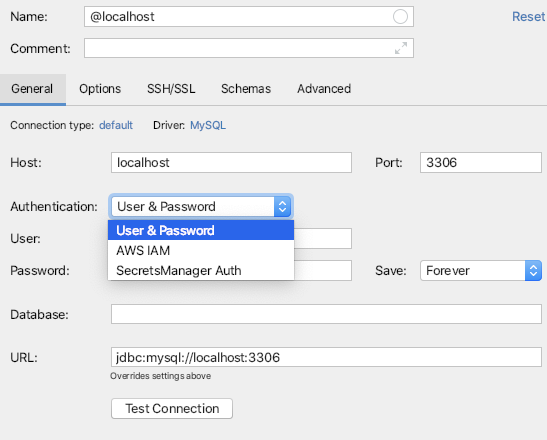
MariaDB driver does not appear to support the IAM authentication method at all:
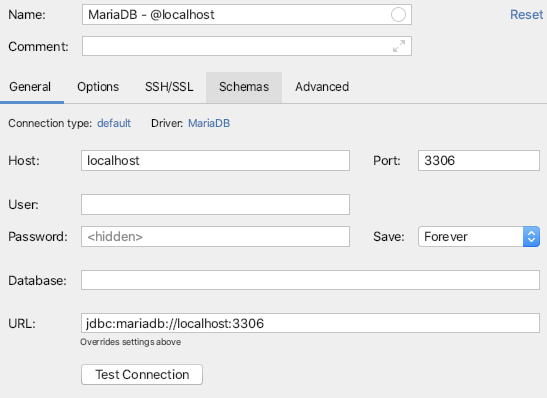
Compared to the MySQL driver:
martynfagg
on 19 Oct 2020
Sorry, I was referring to this driver:
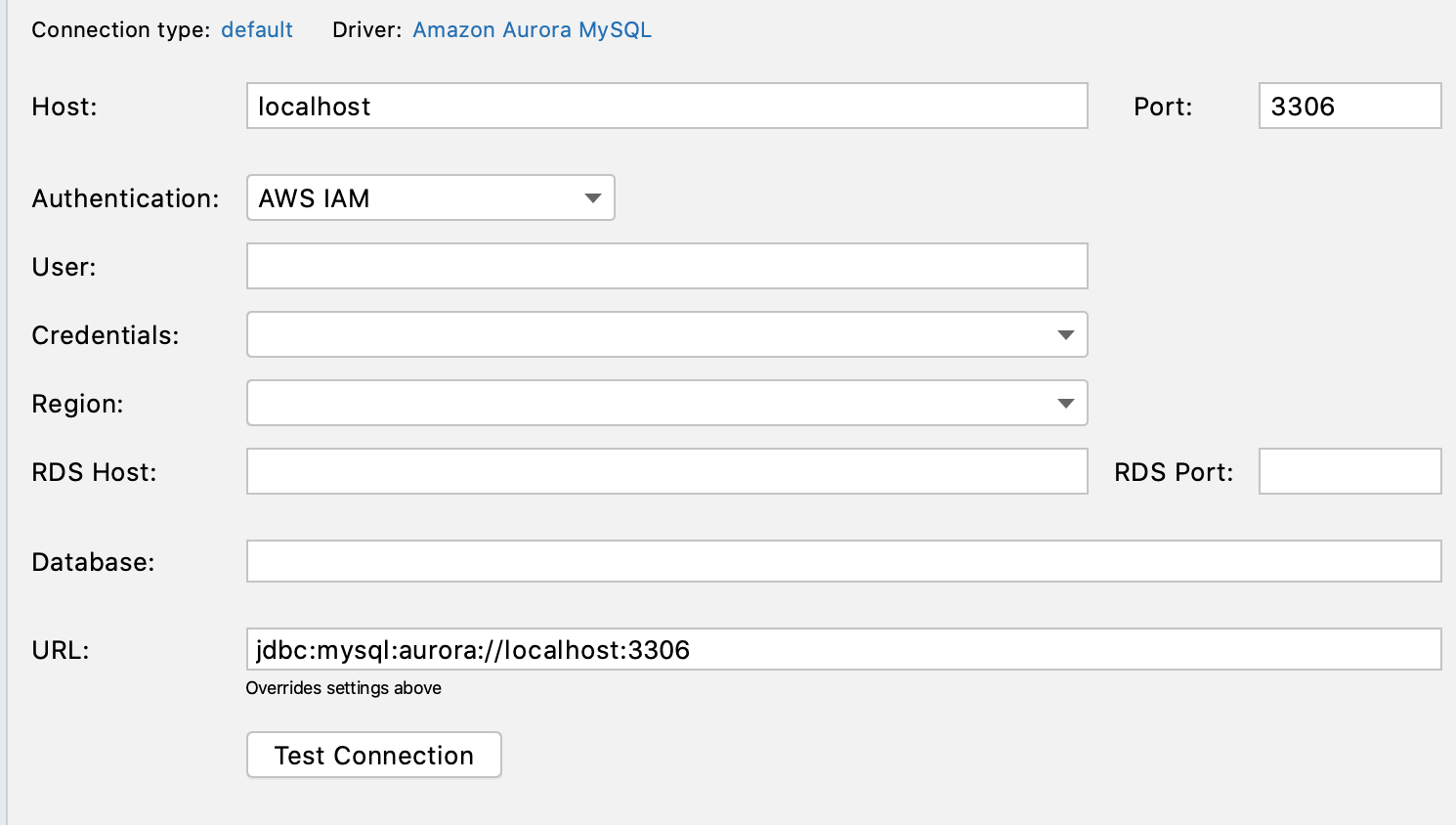
It uses MariaDB driver
abrooksv
on 19 Oct 2020
@abrooksv Using Amazon Aurora MySQL driver, with SSL turned on, and using an instance URL, I have same issue.
Steps:
- Configure connection with IAM creds
- "Test Connection" works
- Click Apply
- IAM creds are deleted and the only auth option the UI gives me is username/password
dseravalli
on 19 Oct 2020
We don't own constructing of the UI, which points at a datagrip bug. I'll see if I can reproduce and reach out.
abrooksv
on 19 Oct 2020
Thank you. I made a video of what I'm seeing that may help
https://youtu.be/LcXInBNwbAM
dseravalli
on 19 Oct 2020
Looks like it's not just a Datagrip bug - I get the same exception:
java.lang.IllegalStateException: node.dbInstance.dbName() must not be null
    at software.aws.toolkits.jetbrains.services.rds.actions.CreateIamDataSourceAction.checkPrerequisites$jetbrains_ultimate(CreateIamDataSourceAction.kt:84)
    at software.aws.toolkits.jetbrains.services.rds.actions.CreateIamDataSourceAction.actionPerformed(CreateIamDataSourceAction.kt:47)
    at software.aws.toolkits.jetbrains.services.rds.actions.CreateIamDataSourceAction.actionPerformed(CreateIamDataSourceAction.kt:45)
    at software.aws.toolkits.jetbrains.core.explorer.actions.SingleExplorerNodeAction.actionPerformed(AbstractActions.kt:57)
    at software.aws.toolkits.jetbrains.core.explorer.actions.ExplorerNodeAction.actionPerformed(AbstractActions.kt:82)
    at com.intellij.openapi.actionSystem.ex.ActionUtil.performActionDumbAware(ActionUtil.java:282)
    at com.intellij.openapi.actionSystem.impl.ActionMenuItem$ActionTransmitter.lambda$actionPerformed$0(ActionMenuItem.java:296)
    at com.intellij.openapi.wm.impl.FocusManagerImpl.runOnOwnContext(FocusManagerImpl.java:288)
    at com.intellij.openapi.wm.impl.IdeFocusManagerImpl.runOnOwnContext(IdeFocusManagerImpl.java:77)
    at com.intellij.openapi.actionSystem.impl.ActionMenuItem$ActionTransmitter.actionPerformed(ActionMenuItem.java:285)
    at java.desktop/javax.swing.AbstractButton.fireActionPerformed(AbstractButton.java:1967)
    at com.intellij.openapi.actionSystem.impl.ActionMenuItem.lambda$fireActionPerformed$0(ActionMenuItem.java:112)
    at com.intellij.openapi.application.TransactionGuardImpl.performUserActivity(TransactionGuardImpl.java:94)
    at com.intellij.openapi.actionSystem.impl.ActionMenuItem.fireActionPerformed(ActionMenuItem.java:112)
    at com.intellij.ui.plaf.beg.BegMenuItemUI.doClick(BegMenuItemUI.java:519)
    at com.intellij.ui.plaf.beg.BegMenuItemUI.access$300(BegMenuItemUI.java:36)
    at com.intellij.ui.plaf.beg.BegMenuItemUI$MyMouseInputHandler.mouseReleased(BegMenuItemUI.java:541)
    at java.desktop/java.awt.Component.processMouseEvent(Component.java:6654)
    at java.desktop/javax.swing.JComponent.processMouseEvent(JComponent.java:3345)
    at java.desktop/java.awt.Component.processEvent(Component.java:6419)
    at java.desktop/java.awt.Container.processEvent(Container.java:2263)
    at java.desktop/java.awt.Component.dispatchEventImpl(Component.java:5029)
    at java.desktop/java.awt.Container.dispatchEventImpl(Container.java:2321)
    at java.desktop/java.awt.Component.dispatchEvent(Component.java:4861)
    at java.desktop/java.awt.LightweightDispatcher.retargetMouseEvent(Container.java:4918)
    at java.desktop/java.awt.LightweightDispatcher.processMouseEvent(Container.java:4547)
    at java.desktop/java.awt.LightweightDispatcher.dispatchEvent(Container.java:4488)
    at java.desktop/java.awt.Container.dispatchEventImpl(Container.java:2307)
    at java.desktop/java.awt.Window.dispatchEventImpl(Window.java:2773)
    at java.desktop/java.awt.Component.dispatchEvent(Component.java:4861)
    at java.desktop/java.awt.EventQueue.dispatchEventImpl(EventQueue.java:778)
    at java.desktop/java.awt.EventQueue$4.run(EventQueue.java:727)
    at java.desktop/java.awt.EventQueue$4.run(EventQueue.java:721)
    at java.base/java.security.AccessController.doPrivileged(Native Method)
    at java.base/java.security.ProtectionDomain$JavaSecurityAccessImpl.doIntersectionPrivilege(ProtectionDomain.java:85)
    at java.base/java.security.ProtectionDomain$JavaSecurityAccessImpl.doIntersectionPrivilege(ProtectionDomain.java:95)
    at java.desktop/java.awt.EventQueue$5.run(EventQueue.java:751)
    at java.desktop/java.awt.EventQueue$5.run(EventQueue.java:749)
    at java.base/java.security.AccessController.doPrivileged(Native Method)
    at java.base/java.security.ProtectionDomain$JavaSecurityAccessImpl.doIntersectionPrivilege(ProtectionDomain.java:85)
    at java.desktop/java.awt.EventQueue.dispatchEvent(EventQueue.java:748)
    at com.intellij.ide.IdeEventQueue.defaultDispatchEvent(IdeEventQueue.java:971)
    at com.intellij.ide.IdeEventQueue.dispatchMouseEvent(IdeEventQueue.java:906)
    at com.intellij.ide.IdeEventQueue._dispatchEvent(IdeEventQueue.java:838)
    at com.intellij.ide.IdeEventQueue.lambda$dispatchEvent$8(IdeEventQueue.java:452)
    at com.intellij.openapi.progress.impl.CoreProgressManager.computePrioritized(CoreProgressManager.java:744)
    at com.intellij.ide.IdeEventQueue.lambda$dispatchEvent$9(IdeEventQueue.java:451)
    at com.intellij.openapi.application.impl.ApplicationImpl.runIntendedWriteActionOnCurrentThread(ApplicationImpl.java:802)
    at com.intellij.ide.IdeEventQueue.dispatchEvent(IdeEventQueue.java:505)
    at java.desktop/java.awt.EventDispatchThread.pumpOneEventForFilters(EventDispatchThread.java:203)
    at java.desktop/java.awt.EventDispatchThread.pumpEventsForFilter(EventDispatchThread.java:124)
    at java.desktop/java.awt.EventDispatchThread.pumpEventsForHierarchy(EventDispatchThread.java:113)
    at java.desktop/java.awt.EventDispatchThread.pumpEvents(EventDispatchThread.java:109)
    at java.desktop/java.awt.EventDispatchThread.pumpEvents(EventDispatchThread.java:101)
    at java.desktop/java.awt.EventDispatchThread.run(EventDispatchThread.java:90)
in IntelliJ when right-clicking on a MySQL RDS instance and selecting Connect with IAM.
 maciejp
on 22 Oct 2020
maciejp
on 22 Oct 2020
Our code doesn't target a single IDE, it targets any JetBrains IDE and at runtime it turns logic on and off. In this case, if the plugin "com.intellij.database" is enabled (Database support in IntelliJ Ult or Datagrip itself), the same code runs.
We have fixes in main branch, but they are not released yet.
abrooksv
on 22 Oct 2020
We released fixes for RDS support in 1.20.
abrooksv
on 30 Oct 2020
Related issues
 G-Rath
·
6Comments
G-Rath
·
6Comments
 brunocuervo
·
4Comments
brunocuervo
·
4Comments
 keomaborges
·
4Comments
keomaborges
·
4Comments
 mchassy
·
4Comments
mchassy
·
4Comments
 eshanaka
·
5Comments
eshanaka
·
5Comments
Most helpful comment
We released fixes for RDS support in 1.20.