Aws-toolkit-jetbrains: `sam build` cannot find python 3.8 even though it's on the PATH
Describe the bug
The sam build command is failing when run by PyCharms, indicating python3.8 cannot be found on my PATH:
/usr/local/bin/sam build HelloWorldFunction --template /Users/ryonlife/peg/peg-sam-hello-world/template.yaml --build-dir /Users/ryonlife/peg/peg-sam-hello-world/.aws-sam/build
Building resource 'HelloWorldFunction'

Build Failed
Error: PythonPipBuilder:Validation - Binary validation failed for python, searched for python in following locations  : ['/Users/ryonlife/.pyenv/shims/python3.8', '/Users/ryonlife/.pyenv/shims/python', '/usr/bin/python'] which did not satisfy constraints for runtime: python3.8. Do you have python for runtime: python3.8 on your PATH?
However, the first two locations are indeed python 3.8:
MacBook-Air:~ ryonlife$ /Users/ryonlife/.pyenv/shims/python3.8
Python 3.8.0 (default, May 11 2020, 00:49:45)
[Clang 11.0.3 (clang-1103.0.32.59)] on darwin
Type "help", "copyright", "credits" or "license" for more information.
MacBook-Air:~ ryonlife$ /Users/ryonlife/.pyenv/shims/python
Python 3.8.0 (default, May 11 2020, 00:49:45)
[Clang 11.0.3 (clang-1103.0.32.59)] on darwin
Type "help", "copyright", "credits" or "license" for more information.
>>>


md5-4e447b2b55509326afc5b702c7d3dc9f


MacBook-Air:peg-sam-hello-world ryonlife$ which python
/Users/ryonlife/.pyenv/shims/python
MacBook-Air:peg-sam-hello-world ryonlife$ python --version
Python 3.8.0
MacBook-Air:peg-sam-hello-world ryonlife$ sam build
Building resource 'HelloWorldFunction'
Running PythonPipBuilder:ResolveDependencies
Running PythonPipBuilder:CopySource

Build Succeeded

Built Artifacts  : .aws-sam/build
Built Template   : .aws-sam/build/template.yaml

Commands you can use next
=========================
[*] Invoke Function: sam local invoke
[*] Deploy: sam deploy --guided
Your Environment
- OS: macOS 10.15.4
- JetBrains product: PyCharm CE
- JetBrains product version: 2020.1
- AWS Toolkit version: aws-cli/2.0.10 Python/3.8.2 Darwin/19.4.0 botocore/2.0.0dev14
- SAM CLI version: 0.48.0
- JVM/Python version: 3.8.0
 ryonlife
All 14 comments
Did you install py3.8 after starting PyCharm?
 abrooksv
on 11 May 2020
abrooksv
on 11 May 2020
After installing py3.8, I quit/restarted both PyCharm and Terminal.
ryonlife
on 11 May 2020
It is hard to debug this remotely.
The TL;DR of the Mac process is that the IDE runs a python script in a terminal and grabs all the env vars of that terminal to use in the IDE due to the way EnvVars work on Mac.
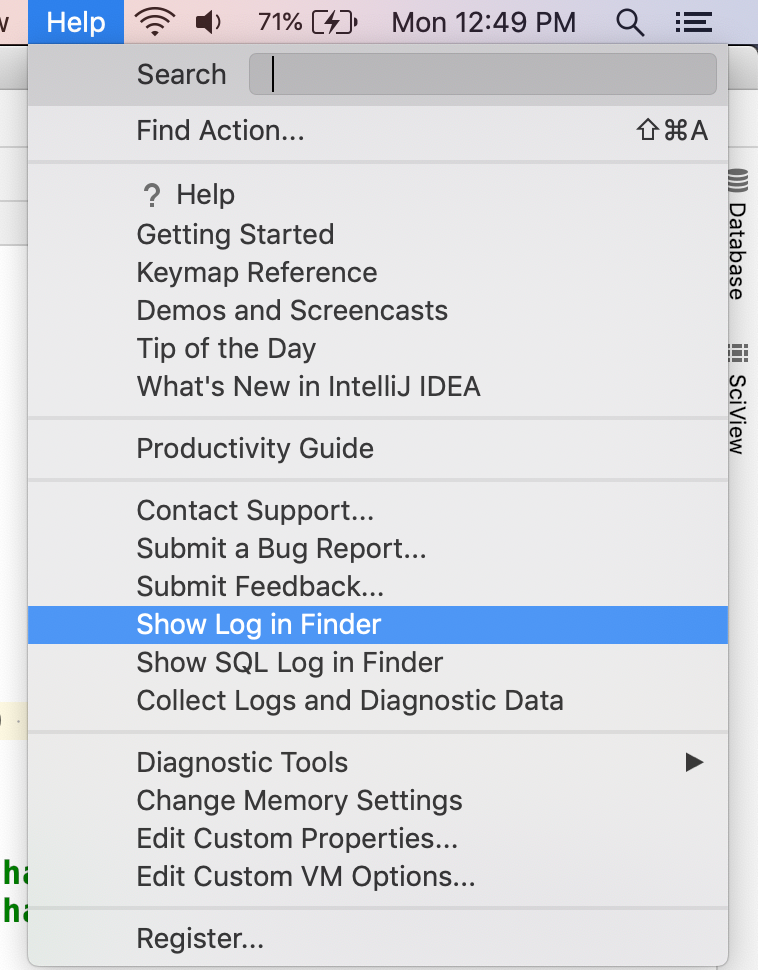
Luckily, they log this command to the idea.log. You can open it from Help->Show Log in Finder
Search for: loading shell env
You can run that in a terminal and see the env vars that the IDE sees by reading the temp file. You will need to escape any spaces and double quote the entire command. Mine is:
/bin/zsh -l -i -c "/Users/<username>/Library/Application\ Support/JetBrains/Toolbox/apps/IDEA-U/ch-0/201.7223.91/IntelliJ\ IDEA.app/Contents/bin/printenv.py /private/var/folders/q5/cfv4k63519vcllnnpwz5zsj0wnjvck/T/intellij-shell-env.tmp"
Things we have seen in the past is stuff like:
- It cant determine your shell
- It uses the wrong shell so it doesn't respect any rc files
So also look for any logs with EnvironmentUtil in them as that can also give hints.
abrooksv
on 11 May 2020
Thanks for the quick responses.
Is the expected behavior for it to use my user's default shell as well as rc files?
Using the Console.app (not sure about your Finder reference), I was able to pluck this out of the idea.log:
/bin/bash -c . '/Users/ryonlife/.local/share/virtualenvs/peg-sam-hello-world-XWBw_QGX/bin/activate';'/Applications/PyCharm CE.app/Contents/bin/printenv.py' '/private/var/folders/00/9r872f810sz481x6k9pqkldw0000gn/T/intellij-shell-env.2.tmp'
Seems to be properly escaped and quoted, through I'm having a bit of trouble getting the command to run:
MacBook-Air:peg ryonlife$ /bin/bash -c . '/Users/ryonlife/.local/share/virtualenvs/peg-sam-hello-world-XWBw_QGX/bin/activate';'/Applications/PyCharm CE.app/Contents/bin/printenv.py' '/private/var/folders/00/9r872f810sz481x6k9pqkldw0000gn/T/intellij-shell-env.2.tmp'
/Users/ryonlife/.local/share/virtualenvs/peg-sam-hello-world-XWBw_QGX/bin/activate: line 0: .: filename argument required
.: usage: . filename [arguments]
Thanks for the quick responses.
Is the expected behavior for it to use my user's default shell as well as rc files?
Yes, the IDE wants to respect them so that stuff like export PATH=$PATH;<stuff> is correct
Using the Console.app (not sure about your Finder reference), I was able to pluck this out of the idea.log:
The finder reference is just the name of the menu item for me.
/bin/bash -c . '/Users/ryonlife/.local/share/virtualenvs/peg-sam-hello-world-XWBw_QGX/bin/activate';'/Applications/PyCharm CE.app/Contents/bin/printenv.py' '/private/var/folders/00/9r872f810sz481x6k9pqkldw0000gn/T/intellij-shell-env.2.tmp'Seems to be properly escaped and quoted, through I'm having a bit of trouble getting the command to run:
MacBook-Air:peg ryonlife$ /bin/bash -c . '/Users/ryonlife/.local/share/virtualenvs/peg-sam-hello-world-XWBw_QGX/bin/activate';'/Applications/PyCharm CE.app/Contents/bin/printenv.py' '/private/var/folders/00/9r872f810sz481x6k9pqkldw0000gn/T/intellij-shell-env.2.tmp'
/Users/ryonlife/.local/share/virtualenvs/peg-sam-hello-world-XWBw_QGX/bin/activate: line 0: .: filename argument required
.: usage: . filename [arguments]
Try:
/bin/bash -c . "/Users/ryonlife/.local/share/virtualenvs/peg-sam-hello-world-XWBw_QGX/bin/activate;/Applications/PyCharm\ CE.app/Contents/bin/printenv.py /private/var/folders/00/9r872f810sz481x6k9pqkldw0000gn/T/intellij-shell-env.2.tmp"
Is bash your default shell?
abrooksv
on 11 May 2020
Same problem running that command with the double quotes:
MacBook-Air:peg ryonlife$ /bin/bash -c . "/Users/ryonlife/.local/share/virtualenvs/peg-sam-hello-world-XWBw_QGX/bin/activate;/Applications/PyCharm\ CE.app/Contents/bin/printenv.py /private/var/folders/00/9r872f810sz481x6k9pqkldw0000gn/T/intellij-shell-env.2.tmp"
/Users/ryonlife/.local/share/virtualenvs/peg-sam-hello-world-XWBw_QGX/bin/activate;/Applications/PyCharm\ CE.app/Contents/bin/printenv.py /private/var/folders/00/9r872f810sz481x6k9pqkldw0000gn/T/intellij-shell-env.2.tmp: line 0: .: filename argument required
.: usage: . filename [arguments]
Although I just managed to get it working by uninstalling and re-installing awscli and aws-sam-cli. Not sure whether to be happy it's working or frustrated I have no idea what was wrong.
ryonlife
on 11 May 2020
Same problem running that command with the double quotes:
MacBook-Air:peg ryonlife$ /bin/bash -c . "/Users/ryonlife/.local/share/virtualenvs/peg-sam-hello-world-XWBw_QGX/bin/activate;/Applications/PyCharm\ CE.app/Contents/bin/printenv.py /private/var/folders/00/9r872f810sz481x6k9pqkldw0000gn/T/intellij-shell-env.2.tmp"
/Users/ryonlife/.local/share/virtualenvs/peg-sam-hello-world-XWBw_QGX/bin/activate;/Applications/PyCharm\ CE.app/Contents/bin/printenv.py /private/var/folders/00/9r872f810sz481x6k9pqkldw0000gn/T/intellij-shell-env.2.tmp: line 0: .: filename argument required
.: usage: . filename [arguments]
Although I just managed to get it working by uninstalling and re-installing
awscliandaws-sam-cli. Not sure whether to be happy it's working or frustrated I have no idea what was wrong.
Probably picked up the python from one of those installations. Well glad it worked for you now. Sorry we did not find a clear resolution.
If you actually use zsh and not bash, it would mean $SHELL is wrong and that is a setting in the Terminal.app.
abrooksv
on 11 May 2020
All good. Thanks so much for the quick responses.
ryonlife
on 11 May 2020
By the way, I got the same error when I was trying to run a sample application.
After looking a little bit, I noticed that in the template.yml the runtime was set to python3.7 and I was using python3.8.
As soon as I updated the template.yml to match my python runtime the error went away.
Hope this helps someone.
 daniel-demelo
on 9 Jul 2020
daniel-demelo
on 9 Jul 2020
re-installing
awscliandaws-sam-cli
This was the solution for me. Should be more highlighted.
(Had to use python3.8 in my template)
 eliasws
on 23 Jul 2020
eliasws
on 23 Jul 2020
By the way, I got the same error when I was trying to run a sample application.
After looking a little bit, I noticed that in the template.yml the runtime was set to python3.7 and I was using python3.8.
As soon as I updated the template.yml to match my python runtime the error went away.
Hope this helps someone.
Yes Daniel,
It did help, appreciate it.
Thank you,
 JanakiramGit
on 13 Dec 2020
JanakiramGit
on 13 Dec 2020
Is there a solution to it, I already tried removing awscli and aws-sam-cli and then reinstalling it but it didn't solve the problem :(
Edit: Found this which solved the problem: https://stackoverflow.com/questions/65180787/how-to-export-path-to-sam-build-command
 muhammadaliamin
on 19 Dec 2020
muhammadaliamin
on 19 Dec 2020
I had this as well. Don't want to change /usr/bin/python of course and 3.9 is my standard python from brew. Adding this to ~/.profile fixed it. So basically, python 3.9 will always be found by default but when SAM goes looking for 3.8 it will find it.
# Add Python3.8 so aws sam can find it
export PATH=$PATH:/usr/local/opt/[email protected]/bin
 tg2861
on 15 Feb 2021
tg2861
on 15 Feb 2021
You can modify template.yaml, and change
Runtime: python3.7
to
Runtime: python3.8
 xinlaoda
on 8 Mar 2021
xinlaoda
on 8 Mar 2021
Related issues
 G-Rath
·
6Comments
G-Rath
·
6Comments
 katchi7
·
3Comments
katchi7
·
3Comments
 ppyong
·
5Comments
ppyong
·
5Comments
 flyinprogrammer
·
4Comments
flyinprogrammer
·
4Comments
 jakul
·
3Comments
jakul
·
3Comments
Most helpful comment
Yes Daniel,
It did help, appreciate it.
Thank you,