Aws-toolkit-jetbrains: Java lambda executions fail to run or hang
Hey, just updated to the latest plugin/intellij version, and my java lambda that once worked can't seem to find the jar file being generated by mvn clean install.
Here's my configuration:

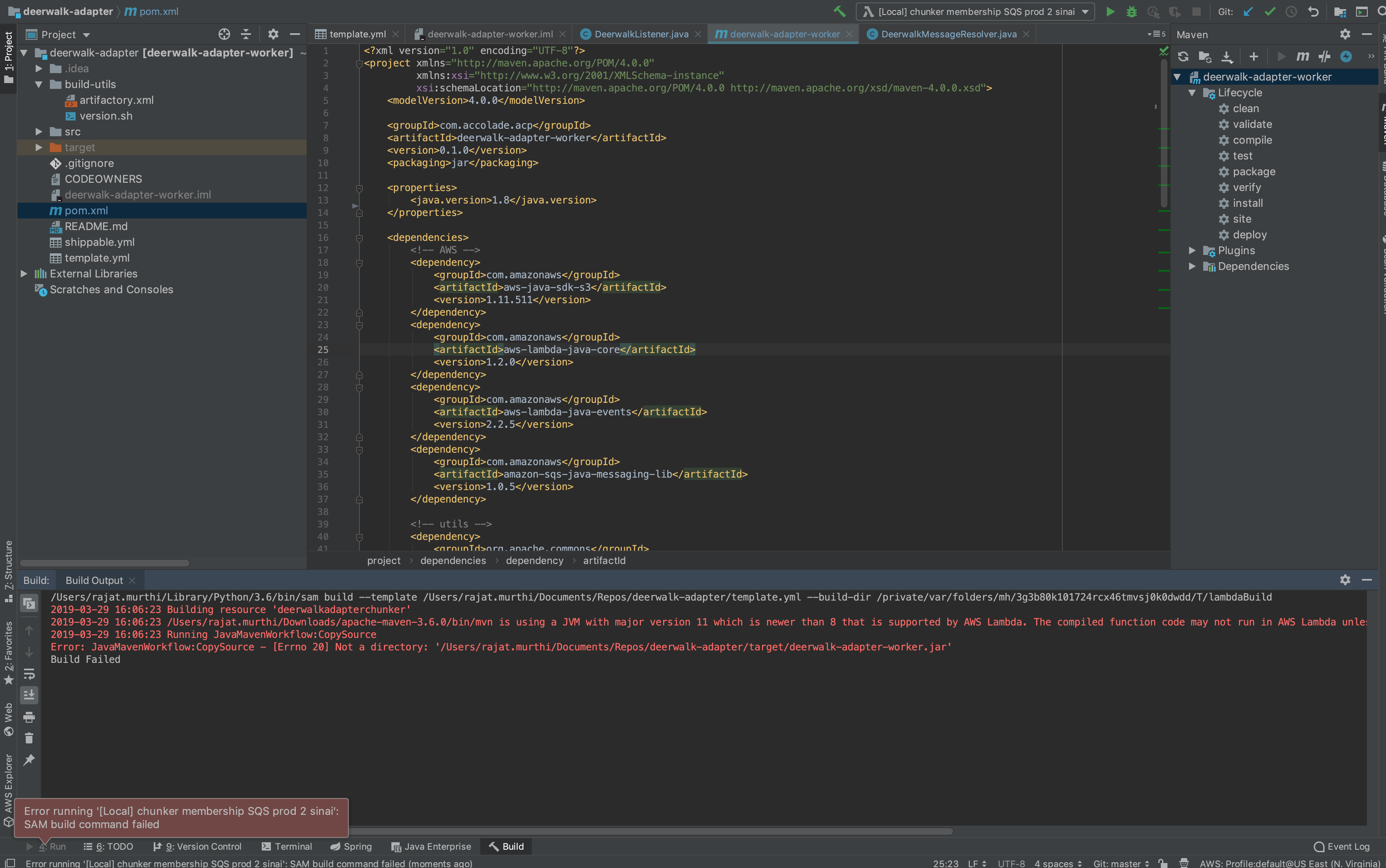
Here's a copy of the console output:
/Users/rajat.murthi/Library/Python/3.6/bin/sam build --template /Users/rajat.murthi/Documents/Repos/deerwalk-adapter/template.yml --build-dir /private/var/folders/mh/3g3b80k101724rcx46tmvsj0k0dwdd/T/lambdaBuild
2019-03-29 16:06:23 Building resource 'deerwalkadapterchunker'
2019-03-29 16:06:23 /Users/rajat.murthi/Downloads/apache-maven-3.6.0/bin/mvn is using a JVM with major version 11 which is newer than 8 that is supported by AWS Lambda. The compiled function code may not run in AWS Lambda unless the project has been configured to be compatible with Java 8 using 'maven.compiler.target' in Maven.
2019-03-29 16:06:23 Running JavaMavenWorkflow:CopySource
Error: JavaMavenWorkflow:CopySource - [Errno 20] Not a directory: '/Users/rajat.murthi/Documents/Repos/deerwalk-adapter/target/deerwalk-adapter-worker.jar'
Build Failed
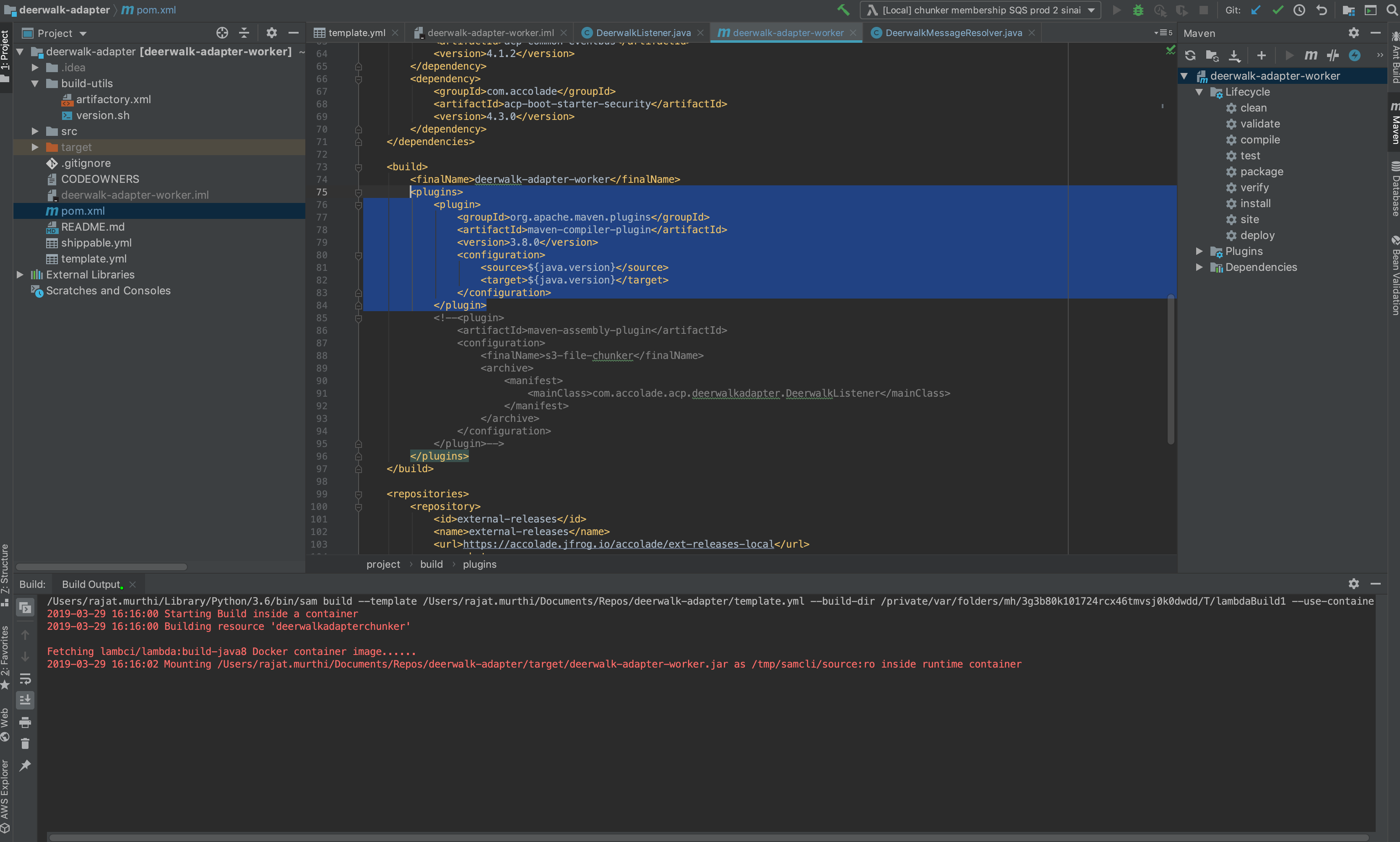
Considering I haven't really changed the configuration since the last released plugin version which was working, and you can see in the pom I'm setting the java version to 8 and target very clearly exists, I don't think this plugin is actually resolving my pom for some reason.
            <plugin>
                <groupId>org.apache.maven.plugins</groupId>
                <artifactId>maven-compiler-plugin</artifactId>
                <version>3.8.0</version>
                <configuration>
                    <source>${java.version}</source>
                    <target>${java.version}</target>
                </configuration>
            </plugin>
I noticed in the new SAM settings you can turn on "Build function inside a container" which seems to emulate the old plugin initialization behavior, but when run inside a container, the plugin simply hangs on startup (I can't even kill the process since it never makes it to started... meaning I have to restart intellij if I want to close that background thread).
Your Environment
- OS: macOS Mojave 10.14.3
- JetBrains' Product: IntelliJ IDEA (Ultimate Edition)
- JetBrains' Product Version: 2019.1
- Toolkit Version: 1.2
- SAM CLI Version: 0.14.2
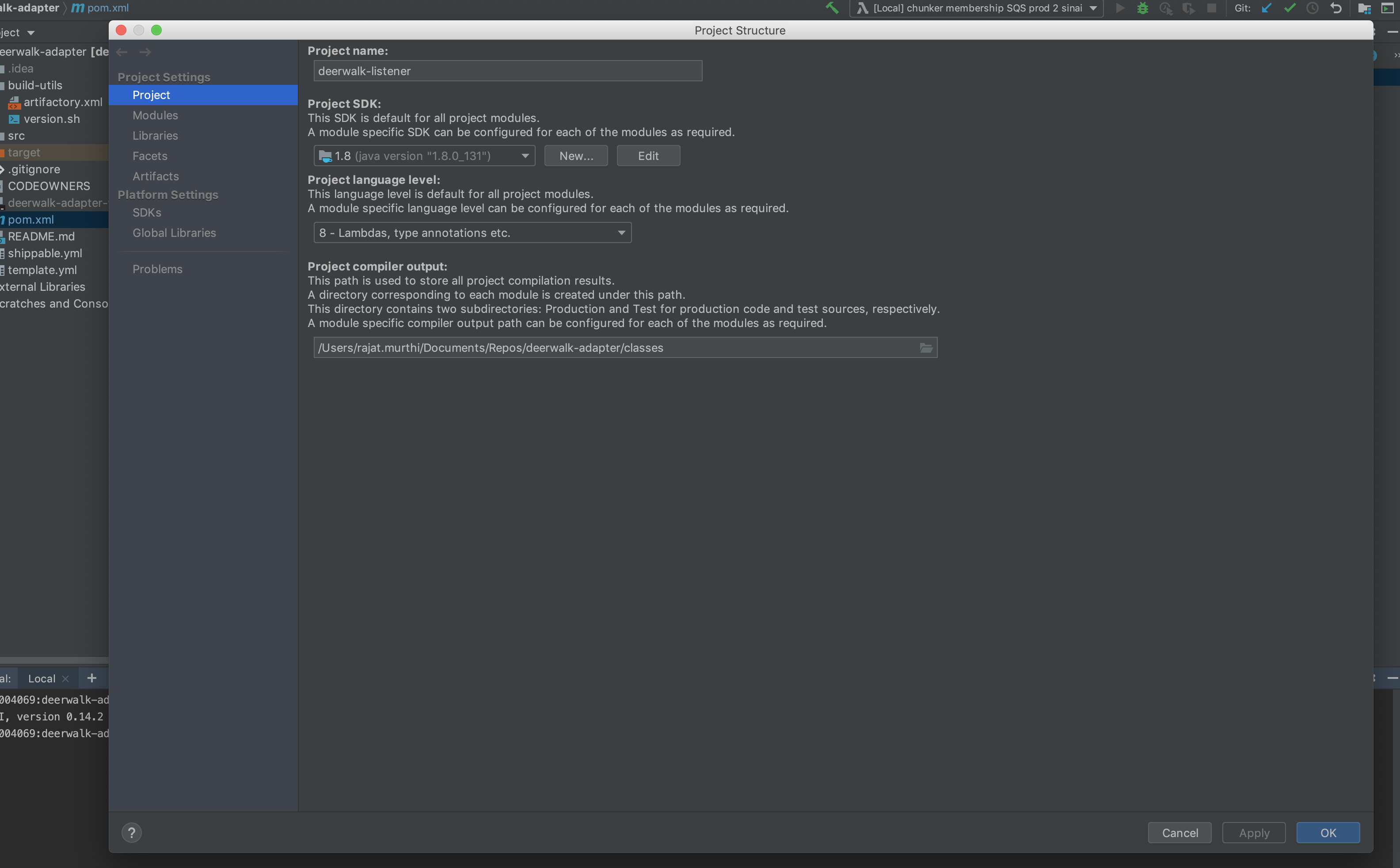
- JVM/Python Version: the project sdk is configured to use 1.8.0_131, though my normal command line java --version is set to 11

$ java --version
openjdk 11.0.1 2018-10-16
OpenJDK Runtime Environment 18.9 (build 11.0.1+13)
OpenJDK 64-Bit Server VM 18.9 (build 11.0.1+13, mixed mode)
seambp004069:~ rajat.murthi$
$ mvn --version
Apache Maven 3.6.0 (97c98ec64a1fdfee7767ce5ffb20918da4f719f3; 2018-10-24T11:41:47-07:00)
Maven home: /Users/rajat.murthi/Downloads/apache-maven-3.6.0
Java version: 11.0.1, vendor: Oracle Corporation, runtime: /Library/Java/JavaVirtualMachines/jdk-11.0.1.jdk/Contents/Home
Default locale: en_US, platform encoding: UTF-8
OS name: "mac os x", version: "10.14.3", arch: "x86_64", family: "mac"
 RMSD
RMSD
All 7 comments
As a note my /private/var/folders/mh/3g3b80k101724rcx46tmvsj0k0dwdd/T/lambdaBuild lambda build folder is empty...
RMSD
on 30 Mar 2019
We migrated to SAM build which changed how the CodeUri works. SAM build expects the CodeUri to point to the location of your pom.xml
 abrooksv
on 30 Mar 2019
abrooksv
on 30 Mar 2019
Oh, huh! That's neat, but the output still seems to fail in the same way after the change though it seems to get through more build steps:
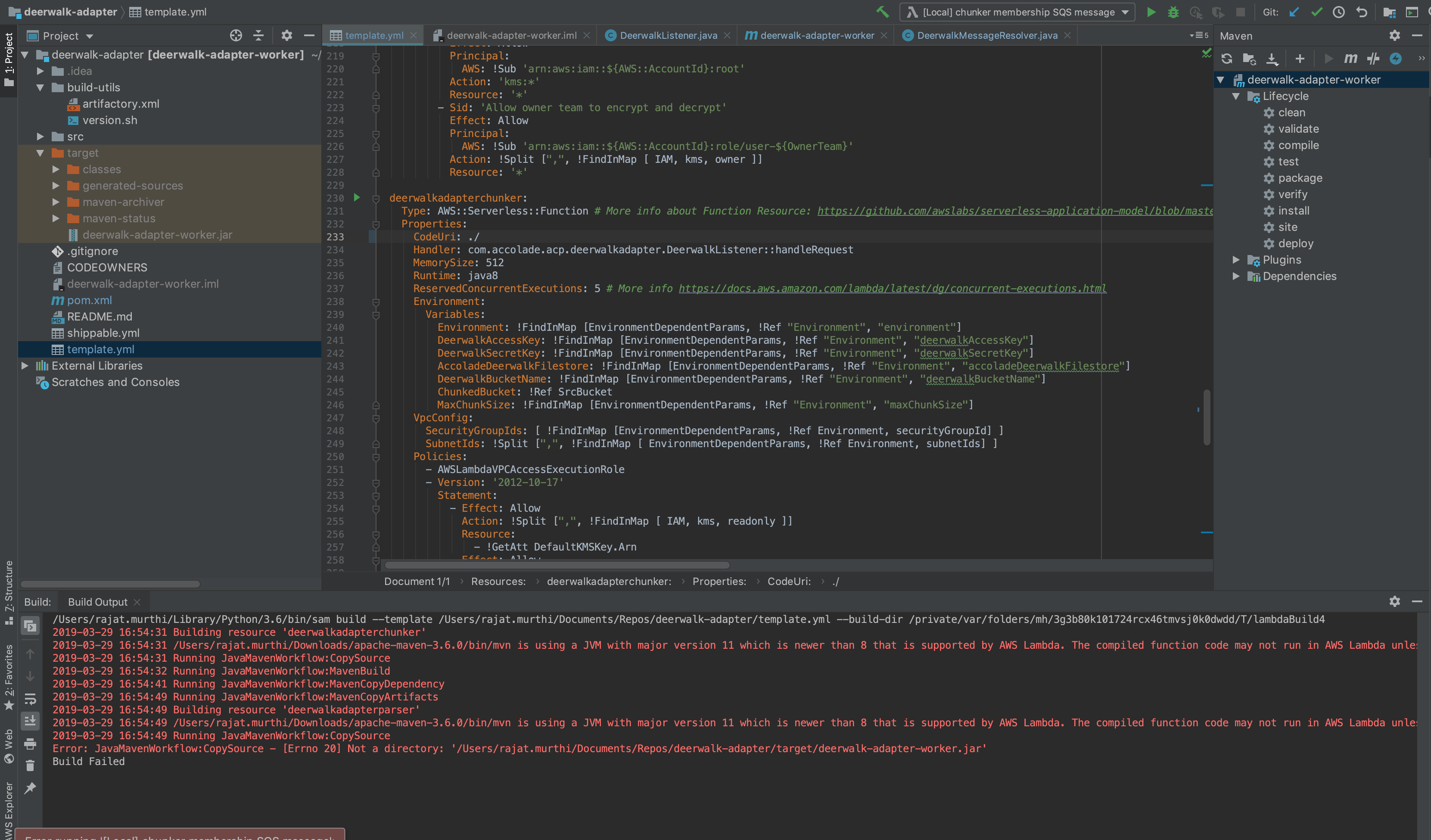
/Users/rajat.murthi/Library/Python/3.6/bin/sam build --template /Users/rajat.murthi/Documents/Repos/deerwalk-adapter/template.yml --build-dir /private/var/folders/mh/3g3b80k101724rcx46tmvsj0k0dwdd/T/lambdaBuild4
2019-03-29 16:54:31 Building resource 'deerwalkadapterchunker'
2019-03-29 16:54:31 /Users/rajat.murthi/Downloads/apache-maven-3.6.0/bin/mvn is using a JVM with major version 11 which is newer than 8 that is supported by AWS Lambda. The compiled function code may not run in AWS Lambda unless the project has been configured to be compatible with Java 8 using 'maven.compiler.target' in Maven.
2019-03-29 16:54:31 Running JavaMavenWorkflow:CopySource
2019-03-29 16:54:32 Running JavaMavenWorkflow:MavenBuild
2019-03-29 16:54:41 Running JavaMavenWorkflow:MavenCopyDependency
2019-03-29 16:54:49 Running JavaMavenWorkflow:MavenCopyArtifacts
2019-03-29 16:54:49 Building resource 'deerwalkadapterparser'
2019-03-29 16:54:49 /Users/rajat.murthi/Downloads/apache-maven-3.6.0/bin/mvn is using a JVM with major version 11 which is newer than 8 that is supported by AWS Lambda. The compiled function code may not run in AWS Lambda unless the project has been configured to be compatible with Java 8 using 'maven.compiler.target' in Maven.
2019-03-29 16:54:49 Running JavaMavenWorkflow:CopySource
Error: JavaMavenWorkflow:CopySource - [Errno 20] Not a directory: '/Users/rajat.murthi/Documents/Repos/deerwalk-adapter/target/deerwalk-adapter-worker.jar'
Build Failed
With the docker switch on, the program still hangs.
RMSD
on 30 Mar 2019
Actually my docker run actually just resolved after a long time:
[INFO] ------------------------------------------------------------------------
[INFO] BUILD FAILURE
[INFO] ------------------------------------------------------------------------
[INFO] Total time:  01:17 min
[INFO] Finished at: 2019-03-29T23:58:44Z
[INFO] ------------------------------------------------------------------------
[ERROR] Failed to execute goal on project deerwalk-adapter-worker: Could not resolve dependencies for project com.accolade.acp:deerwalk-adapter-worker:jar:0.1.0: Failed to collect dependencies at com.accolade.acp.resources:rulesengine:jar:3.14.0: Failed to read artifact descriptor for com.accolade.acp.resources:rulesengine:jar:3.14.0: Could not transfer artifact com.accolade.acp.resources:rulesengine:pom:3.14.0 from/to external-releases (*link to company artifactory here*): Not authorized -> [Help 1]
[ERROR]
[ERROR] To see the full stack trace of the errors, re-run Maven with the -e switch.
I can access the repo using my setting file as I have spring microservices using the same artifact, and running mvn clean verify from the command line works; so it seems SAM Build not picking up my repo access username/token from my settings.xml?
RMSD
on 30 Mar 2019
We migrated to SAM build which changed how the CodeUri works.
@abrooksv Is there a way to skip the build and simply invoke like how the previous versions did it? This is a breaking change because it was not gated behind an option or config value. This probably broke everyone's Java Lambda run configuration.
 AzureMarker
on 1 May 2019
AzureMarker
on 1 May 2019
I agree that an option to provide a jar may be nice until all the bugs around maven and maven settings are resolved.
I've been just using the older version of the plugin till then. Jetbrains toolbox lets you keep and maintain multiple versions of the IDE on your local.
RMSD
on 1 May 2019
Closing this issue as the original problem has been resolved.
@Mcat12 , @RMSD , feel free to create a new issue as a feature request for support of independent jar.
 zhangzhx
on 12 Aug 2019
zhangzhx
on 12 Aug 2019
Related issues
 AMcManigal
·
3Comments
AMcManigal
·
3Comments
 seans11
·
4Comments
seans11
·
4Comments
 G-Rath
·
4Comments
G-Rath
·
4Comments
 ppyong
·
5Comments
ppyong
·
5Comments
 mchassy
·
4Comments
mchassy
·
4Comments