Aws-sdk-js: S3 Upload file with stream takes a lot of memory
Hello,
I'm trying to upload many file in parallel to S3 to not spend too much time to do it.
While I'm uploading the memory usage explode as the chart below show it :
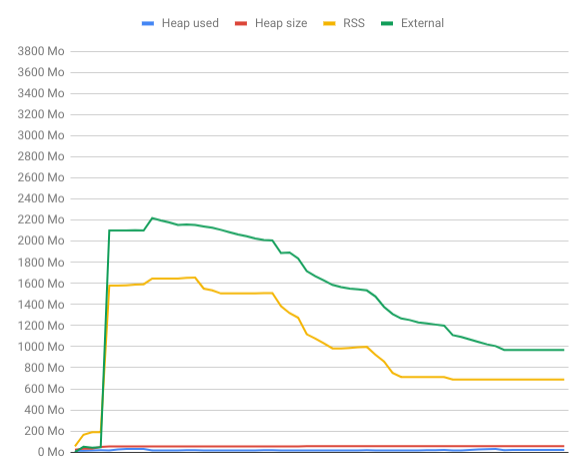
The heap stay low (in red), I think it might be due to backpreassure.
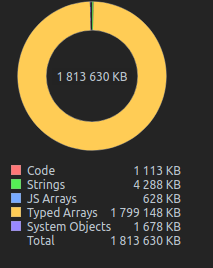
Here is a memory snapshot while uploading to S3 :
To reproduce
Here is a repository with two functions to reproduce this issue :
- One, classic, to save a file to the file system with stream
- One, using aws-sdk to save file to S3
https://github.com/BenjD90/aws-s3-ram-overconsumption
Versions :
- aws-sdk : 2.409.0
- node.js: 10.15.1
- os : ubuntu 18.04
 BenjD90
All 19 comments
something that might help narrow down the cause: can you eliminate promise-pool-executor as a dependency in aws-s3-ram-overconsumption, relying solely on aws-sdk and manual promise management to see if the problem goes away? I haven't looked at the implementation of promise-pool-executor internally but it's possible that it's doing something weird with promises and/or generators and gobbling up memory.
Anyway, just a thought.
 mreinstein
on 27 Feb 2019
mreinstein
on 27 Feb 2019
@mreinstein I've updated the project, and removed promise-pool-executor dependency. I've replaced it with a simple Promise.all on 100. So we upload many files at the same time, to simulate multiple concurrent calls to our api at the same time.
The result didn't change :cry:
Here the part that has changed :
await Promise.all(
      Array(100)
          .fill(0)
          .map(async (v, index) => {
            const fileStream = fs.createReadStream('media-sample.jpg');

            let uploadResult;
            if (storageType === 'fs') uploadResult = await saveToFileSystem(fileStream);
            else if (storageType === 's3') uploadResult = await saveToS3(fileStream);
            else throw new Error('unknown-storage-type');

            // printRAMUsage();
            // console.log(`DONE ${index} size: ${uploadResult.size} hash : ${uploadResult.hash}`);
          })
  );
I have the same issue! Is it related to the way AWS sdk handles streams ?
 victorboissiere
on 5 Mar 2019
victorboissiere
on 5 Mar 2019
Hey @BenjD90 Thanks for the easy-to-reproduce cases! I will look into this issue. Interestingly the memory usage is mainly in rss and external. I suspect it has something to do with the streams as @victorboissiere points out, especially the stream buffering.
When doing multi-part upload, the SDK buffers the stream until the buffer reaches the size of the partSize you specify(default 5MB) before making each uploadPart request. When you spin up 100 s3.upload streams, sdk will do the same thing to all these stream, so that you see SDK uses a lot of rss. But the buffer usage for each stream is fixed. I believe you will see less memory usage if you upload the same amount of data but concat them beforehand and use a single stream.
 AllanZhengYP
on 11 Mar 2019
AllanZhengYP
on 11 Mar 2019
Hello @AllanFly120,
Thank you for investigating the issue !
The purpose of the launch concurrently 100 s3.upload is to simulate 100 calls to my API that upload files to S3.
The first part of the reproduce project show how it reacts for the same task but saving to disk, with a slow disk writing NoeJS slows down the reading stream and do not use a lot of memory (backpreasure solution in NodeJS).
1 - Do you know if I can avoid multi-part upload and upload my file in one part with a stream ? I'm thinking of something like this with request library :
fs.createReadStream('file.json').pipe(request.put('http://mysite.com/obj.json'))
2 - If it is not possible, why there is a minimum of 5 MB for the multi-part buffer ?
3 - If I count, I upload 100 files each use a 5 MB buffer in memory, so I should use 200 MB (node idle) + 500 MB = 700 MB which not what I measure :disappointed:
BenjD90
on 12 Mar 2019
@AllanFly120 Do you have some ideas about how to solve this issue ? Do you need more informations ?
BenjD90
on 3 Apr 2019
Also having this issue, without parallelism.
 rfink
on 19 Jun 2019
rfink
on 19 Jun 2019
I was having a memory issue because of aws-sdk.
I changed the way I imported the library and it went back to normal...
Before:
import * as AWS from 'aws-sdk';
After:
const AWS = require('aws-sdk');
I'm not sure it will help for your issue but it might help other people...
 cesar3030
on 6 Aug 2019
cesar3030
on 6 Aug 2019
I am facing this type of problem in web browser itself. I am using Firefox on Ubuntu 18.04. I am trying to upload images. It is taking more than 4GB of RAM and CPU is running at about 75% utilisation.
 CognitiveClouds-Prasad
on 7 Aug 2019
CognitiveClouds-Prasad
on 7 Aug 2019
I am seeing the same issue and have isolated the problem as coming from the aws sdk by swapping it with my own writable stream.
The memory issue has existed since the s3 api was added in [email protected]. I also tried downgrading node to 8.16.2 and still saw this issue.
Edit: Using aws.s3.getSignedUrl and request.put().pipe I am able to pipe files to S3 without the excessive memory consumption. The next hidden gotcha is that you cannot set the Cache-Control header through getSignedUrl. I am trying out createPresignedPost now...
 brendanw
on 11 Nov 2019
brendanw
on 11 Nov 2019
Users are welcomed to use JS-SDK-V3 which is under developer preview right now and give their reviews.
One of the features introduced in V3 is the use of modularized packages which lets you deploy functions in very less time.
Will keep this issue open for developers to share their use cases and workarounds, we'd also encourage any PRs for the fix.
 ajredniwja
on 21 Nov 2019
ajredniwja
on 21 Nov 2019
@ajredniwja is JS-SDK-V3 not having this memory issue?
@brendanw Did you mean that there is actually a workaround to this issue if "Using aws.s3.getSignedUrl and request.put().pipe"? If yes could you please share some statements as guidance so that we try this out on our end?
Thank you both!
 nestoru
on 21 Nov 2019
nestoru
on 21 Nov 2019
Dear community and @AllanFly120 @ajredniwja,
I'm using above mentioned all suggested methods, but still memory consumption is too big, do you have other ideas on how to solve it?
BTW @brendanw your suggested solution is not working for me :(
 hharutyunov
on 22 Nov 2019
hharutyunov
on 22 Nov 2019
@nestoru JS-SDK-V3 is much lighter than the JS-SDK-V2 since it uses modularized packages, it is under developer preview right now for a great community of developers and leaders like you to give feedback so we can get the best product for our customers.
ajredniwja
on 28 Nov 2019
@hharutyunov,
Can you please share what your use case is?
ajredniwja
on 28 Nov 2019
This should be reopened as it has not been fixed. Mentioning an SDK that is in developer preview is not a fix. It only takes one Amazon engineer to fix this issue for the benefit of many developers. It takes a lot more work for all of us client developers to suffer through a buggy pre-1.0 library. We are paying customers, step up your game.
brendanw
on 20 Dec 2019
    s3.getSignedUrl('putObject', s3_params, function(err, data) {
      startUpload(req, data, contentLength, res)
    });

  function startUpload(req, signedRequest, contentLength, res) {
    const busboy = new Busboy({headers: req.headers});
    var totalSize = 0;
    busboy.on('file', function pipeFile(fieldname, fileStream, filename, encoding, mimetype) {
      let contentType = mimetype;
      fileStream.on('data', function handleData(data) {
        totalSize += data.size
      });
      let writeStream = request.put(signedRequest, {
        headers: {
          'Content-Type': contentType,
          'Content-Length': contentLength,
        }
      }, function s3Callback(err, response, body) {
        updateACL(req.query.key, res)
      });
      let emitter = fileStream.pipe(writeStream);
      emitter.on('end', function() {
        console.log("finished reading file");
      });
    });
    req.pipe(busboy);
    busboy.on('end', function pipeEnd() {
      res.json({success: true});
    });
  }
@ajredniwja @nestoru Here is a code from an internal service that works around the issue. Note it's missing size checks. You will need the Busboy dependency.
brendanw
on 20 Dec 2019
ajredniwja added the closing-soon-if-no-response label 8 days ago
Why? The issue outlined here is pretty straightforward. Excessive memory consumption.
Honestly this is something that drives me nuts about modern software maintenance on github. Just because an issue has not been replied to in X period of time doesn't mean it's not an issue. Closing the ticket just sweeps the problem under the rug, in exchange for a short term good feeling of having less open tickets.
Having more open tickets that track real problems is more important than warm fuzzy good feelings. This is just basic post-education entry level software development.
mreinstein
on 20 Dec 2019
This thread has been automatically locked since there has not been any recent activity after it was closed. Please open a new issue for related bugs and link to relevant comments in this thread.
![lock[bot] picture](https://avatars.githubusercontent.com/in/6672?v=4&s=40) lock[bot]
on 29 Dec 2019
lock[bot]
on 29 Dec 2019
Related issues
 anuradhag
·
3Comments
anuradhag
·
3Comments
 pocari
·
3Comments
pocari
·
3Comments
 kennu
·
3Comments
kennu
·
3Comments
 michaelwittig
·
3Comments
michaelwittig
·
3Comments
 ddo88
·
3Comments
ddo88
·
3Comments
Most helpful comment
I have the same issue! Is it related to the way AWS sdk handles streams ?