Aws-sdk-js: I am excluding aws-sdk in my webpack bundle for Lambda
When webpacking for lambda, I am removing aws-sdk completely from the webpack bundle since lambda has it built-in. However, it seems to be throwing errors. Is there a way to specify that it needs to use the lambda's aws-sdk?
 gatsbyz
All 17 comments
This is a question.
gatsbyz
on 10 Oct 2018
Hello @gatsbyz,
What error are you receiving? From webpack? Or Lambda?
 srchase
on 10 Oct 2018
srchase
on 10 Oct 2018
@srchase Hi. If I do node index.js (the webpack output file), I get an error saying that aws-sdk doesn't exist. Since lambda has aws-sdk built in, I assumed if I upload the zipped file to lambda, it would understand it. However, I'm getting an error in Lambda CloudWatch console saying Unable to import module 'index'
gatsbyz
on 10 Oct 2018
@gatsbyz
That sounds like a zip packaging error. Are you zipping the directory instead of the contents of the directory?
Your zip file should have index.js at the top level, not inside of a directory.
srchase
on 10 Oct 2018
@srchase I am zipping the contents of the directory. When I zip the directory, I get an error on the AWS Console UI.

gatsbyz
on 10 Oct 2018
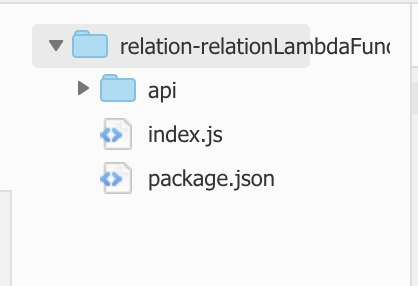
This is what it looks like now. When I include new webpack.IgnorePlugin(/aws-sdk/) in webpack configuration, it fails. (When I take out this config, it works) Below is the CloudWatch logs.

gatsbyz
on 10 Oct 2018
Logs when I upload the zip with aws-sdk in it.

gatsbyz
on 10 Oct 2018
I'm having a bit of trouble following what errors you are getting under which scenarios.
When you include aws-sdk (removing new webpack.IgnorePlugin(/aws-sdk/)), everything is working?
srchase
on 10 Oct 2018
@srchase Sorry for the confusion. When I ignore aws-sdk, it is failing. I assume it should work since lambda has this built in. I'm trying to reduce package size.
gatsbyz
on 10 Oct 2018
Are the directory structures the same whether or not aws-sdk is ignored? (Minus the ignored aws-sdk files).
In the first screenshot you posted, there is a build-lambda directory at the top level. Does that get added when you ignore aws-sdk?
srchase
on 10 Oct 2018
@srchase Yeah I just wanted to show you that zipping the directory and uploading gives me a different error than what I'm getting now. And yes, the directory IS the same in the case of having and not having aws-sdk included.
gatsbyz
on 10 Oct 2018
@srchase I guess my final question is that, do I need some annotation or configuration to tell lambda to include aws-sdk from it's built-in?
gatsbyz
on 10 Oct 2018
You want to use webpack's Externals, rather than ignore.
Try adding this to your webpack config:
  externals: {
    'aws-sdk': 'aws-sdk'
  }
That will keep aws-sdk from being bundled into index.js, and will instead use lambda-provided aws-sdk instead.
srchase
on 10 Oct 2018
Thank you so much. You're the best. It's funny to know that it was a built-in attribute all along. Doi.
gatsbyz
on 10 Oct 2018
You're welcome! Glad this helped.
srchase
on 10 Oct 2018
when specify
  externals: {
    'aws-sdk': 'aws-sdk'
  }
I'm able to build and deploy to lambda, but when invoke the function, it's throwing
{
  "errorMessage": "Cannot find module 'stream'",
  "errorType": "Error",
  "stackTrace": [
    "Array.forEach (<anonymous>)",
    "Object.e.require (/var/task/src/handler.js:16:70056)",
    "Object.<anonymous> (/var/task/src/handler.js:1:1323)",
    "n (/var/task/src/handler.js:1:186)",
    "Object.<anonymous> (/var/task/src/handler.js:16:68255)",
    "n (/var/task/src/handler.js:1:186)",
    "Object.<anonymous> (/var/task/src/handler.js:16:51436)",
    "n (/var/task/src/handler.js:1:186)"
  ]
}
 playground
on 10 Apr 2019
playground
on 10 Apr 2019
This thread has been automatically locked since there has not been any recent activity after it was closed. Please open a new issue for related bugs and link to relevant comments in this thread.
![lock[bot] picture](https://avatars.githubusercontent.com/in/6672?v=4&s=40) lock[bot]
on 28 Sep 2019
lock[bot]
on 28 Sep 2019
Related issues
 sebsto
·
3Comments
sebsto
·
3Comments
 arogulin
·
3Comments
arogulin
·
3Comments
 anuradhag
·
3Comments
anuradhag
·
3Comments
 pocari
·
3Comments
pocari
·
3Comments
 ataraxus
·
4Comments
ataraxus
·
4Comments
Most helpful comment
You want to use webpack's Externals, rather than ignore.
Try adding this to your webpack config:
That will keep aws-sdk from being bundled into index.js, and will instead use lambda-provided aws-sdk instead.