Aws-sdk-js: S3 multipart upload timeout policy
I've been struggling for some time with uploads of (relatively) large files to S3. In particular, I was using the upload() function to upload a ~20MB file to S3, from my house internet connection (~0.5Mbit/s, i.e roughly 3MB a minute).
Whereas small files uploads completed successfully, I was not able to upload this large file, always receiving an error in the callback. I've received 3 different error messages during several tries, the following being one of them: Error { RequestTimeout: Your socket connection to the server was not read from or written to within the timeout period. Idle connections will be closed..
After a bit of debugging, I've started to think that the timeout was relative to _a whole part_ of the multipart upload and that the error message _was not saying the truth_... Searching between older issues, I've read something that confirmed my hypothesis: here and here, @chrisradek states that:
The 2 minute timeout applies to each chunk
Now, I can't see it explained in the doc, neither I can see the rationale between this policy; this way, I must set the timeout parameter in function of the supposed bandwidth of the user? Being forced to adjust partSize and queueSize options to match users' network connection doesn't seem a solution to me, neither; furthermore, you cannot set partSize to a value lower than 5MB, so you are forced to act on the timeout value to allow users with slow connections to upload a file. Am I missing something?
So, in short:
1 - is what @chrisradek states in #949 and #1162 correct? Where can I find it in the doc?
2 - what is the rationale between this behavior for multipart uploads? Isn't the error message describing something else in contrast to what's happening under the hood?
3 - is there a _configuration_ (a choice of timeout, partSize and queueSize) that fits every _working_ connection, independently from its speed?
More info on my environment:
[aws-nodejs-sample]$ node --version
v6.11.0
[aws-nodejs-sample]$ npm --version
3.10.10
[aws-nodejs-sample]$ npm list aws-sdk
/.../dev/github/awslabs/aws-nodejs-sample
└── [email protected]
My bucket region: eu-central-1
Executed code:
const AWS = require('aws-sdk');
const path = require('path');
const fs = require('fs');

process.env.AWS_ACCESS_KEY_ID = 'keyId';
process.env.AWS_SECRET_ACCESS_KEY = 'secretKey';

const s3 = new AWS.S3({
  apiVersion: '2006-03-01',
  region: 'eu-central-1'
});

const filePath = process.argv[2];
const fileStream = fs.createReadStream(filePath);
fileStream.on('error', function (err) {
  console.log('File Error', err);
  process.exit(1);
});

s3.upload({
  Bucket: 'myBucket',
  Key: path.basename(filePath),
  Body: fileStream
},
  (err, data) => {
    if (err) {
      console.log("Error", err);
      process.exit(1);
    }
    if (data) {
      console.log("Upload Success", data.Location);
      process.exit();
    }
  });
Console output:
[aws-nodejs-sample]$ time node sample.js /path/to/the/big/file
Error { RequestTimeout: Your socket connection to the server was not read from or written to within the timeout period. Idle connections will be closed.
    at Request.extractError (/.../dev/github/awslabs/aws-nodejs-sample/node_modules/aws-sdk/lib/services/s3.js:577:35)
    at Request.callListeners (/.../dev/github/awslabs/aws-nodejs-sample/node_modules/aws-sdk/lib/sequential_executor.js:105:20)
    at Request.emit (/.../dev/github/awslabs/aws-nodejs-sample/node_modules/aws-sdk/lib/sequential_executor.js:77:10)
    at Request.emit (/.../dev/github/awslabs/aws-nodejs-sample/node_modules/aws-sdk/lib/request.js:683:14)
    at Request.transition (/.../dev/github/awslabs/aws-nodejs-sample/node_modules/aws-sdk/lib/request.js:22:10)
    at AcceptorStateMachine.runTo (/.../dev/github/awslabs/aws-nodejs-sample/node_modules/aws-sdk/lib/state_machine.js:14:12)
    at /.../dev/github/awslabs/aws-nodejs-sample/node_modules/aws-sdk/lib/state_machine.js:26:10
    at Request.<anonymous> (/.../dev/github/awslabs/aws-nodejs-sample/node_modules/aws-sdk/lib/request.js:38:9)
    at Request.<anonymous> (/.../dev/github/awslabs/aws-nodejs-sample/node_modules/aws-sdk/lib/request.js:685:12)
    at Request.callListeners (/.../dev/github/awslabs/aws-nodejs-sample/node_modules/aws-sdk/lib/sequential_executor.js:115:18)
  message: 'Your socket connection to the server was not read from or written to within the timeout period. Idle connections will be closed.',
  code: 'RequestTimeout',
  region: null,
  time: 2017-08-24T16:06:00.752Z,
  requestId: '54FB0906A7D2DA35',
  extendedRequestId: 'UP6q2Jq7CXGPGn2+SEiuanVSayhyba8xIfqkOsdc/qs9DiaGJEDQ529dYKgEgXXBgrzMOJHlatc=',
  cfId: undefined,
  statusCode: 400,
  retryable: true }
 morbo84
All 8 comments
Hi @morbo84
Multipart upload is also called Managed upload, see here to get more information. Basically, it partitions a big file into several parts (5MB each by default) and sends them individually. When sending these parts, ManagedUpload always maintains a queue with specified length(set as 4 by default) and concurrently upload the parts in the queue. The S3 server will reorganize them when all the parts are successfully uploaded, the method returns success. However, if no less than 1 parts fail, the SDK will use a 'DELETE' request to wipe out all the parts already uploaded by default.
The error you are encountered usually results from multiple reasons other than the poor connection. However, the connection may lead to request timeout in this case.
Return to your questions. 1) For default request timeout, you could find it in aws.config.httpOptions.timeout(see this for more information), which is set to 2 minutes by default.
2) The error message shows that the server is complaining that the connection is established but no data is written into the socket. So after the timeout the server will close the connection. This probably because that the connection is slow and only a few of parts in the queue I mentioned previously are actually uploading and others just maintain an idle connection. And when timeout, you will see the error.
3) With all varieties of network conditions and environments, there isn't a single configuration handles all the situations. But in your case, you can try setting the queueSize to 1, which means only one part is allowed to upload at any time, which enables one request to take up more bandwidth.
var options = {queueSize: 1};
var params = {
  Bucket: 'myBucket',
  Key: path.basename(filePath),
  Body: fileStream
}
s3.upload(params, options, function(err, data) {
  console.log(err, data);
});
You may also try to set a longer request timeout such as 5 minutes.
AWS.config.httpOptions.timeout = 300000;
UPDATE: This is incorrect. To make the timeout suitable for all slow connection situation, we should set the timeout to 0 to turn off the timeout.
AWS.config.httpOptions.timeout = 0;
 AllanZhengYP
on 30 Aug 2017
AllanZhengYP
on 30 Aug 2017
@AllanFly120 Thanks for the reply!
Replying point by point:
1 - The documentation for the timeout parameter of httpOptions states:
timeout [Integer] — Sets the socket to timeout after timeout milliseconds of inactivity on the socket. Defaults to two minutes (120000).
In my case, I'm pretty sure there is not a 2 minutes inactivity on the socket, on any of them. I can prove it by looking at the Wireshark output, for instance, that is something like this:
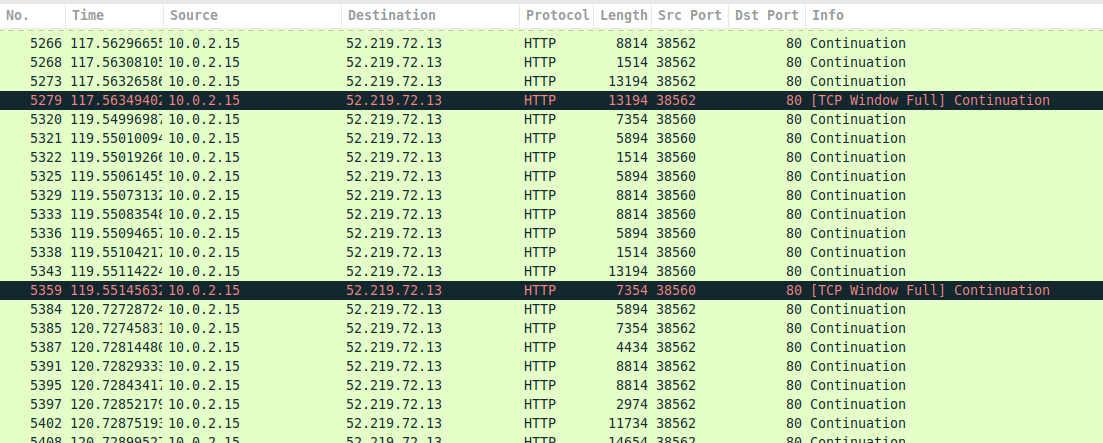
I've been able to capture this by some slight modifications to the original code, like setting sslEnabled: false in the AWS.S3 constructor and queueSize: 2. As you can see in the image, there are 2 distinct connection (identifiable by the _Src Port_ column) that keep sending data until the timeout is triggered by the aws-sdk with this error message:
Error { TimeoutError: Connection timed out after 120000ms
    at ClientRequest.<anonymous> (/.../dev/github/awslabs/aws-nodejs-sample/node_modules/aws-sdk/lib/http/node.js:83:34)
    at ClientRequest.g (events.js:292:16)
    at emitNone (events.js:86:13)
    at ClientRequest.emit (events.js:185:7)
    at Socket.emitTimeout (_http_client.js:629:10)
    at Socket.g (events.js:292:16)
    at emitNone (events.js:86:13)
    at Socket.emit (events.js:185:7)
    at Socket._onTimeout (net.js:338:8)
    at ontimeout (timers.js:386:14)
  message: 'Connection timed out after 120000ms',
  code: 'TimeoutError',
  time: 2017-08-31T08:40:15.286Z,
  region: 'eu-central-1',
  hostname: '<myBucket>.amazonaws.com',
  retryable: true }
I'm pretty sure that what is actually happening is not that a _two minutes inactivity on the socket_ occurs, but that _one or more parts are not completely uploaded in the time window specified by the timer_. This is definitely different and it should be mentioned in the doc, imho. Do you get my point? Am I doing something wrong?
Another test that supports my hypothesis is that setting queueSize: 1 and partSize to 10MB, I get the usual timeout error, while the connection was sending data. This is a counterintuitive behavior, because if I use the putObject() method I can successfully upload my file, even with my slow network.
2 - You are probably right; I have no evidence that what you suggest isn't the case. In fact, I've received the Your socket connection to the server was not read from or written to within the timeout period message only in a small fraction of tries, allegedly always with the default queueSize: 4.
3 - While is quite reasonable that slow connection won't take advantage of a parallel multipart upload (so adjusting the queueSize value to a lower value if one expects to have a majority of users with slow network connections could be a viable solution), it sounds pretty strange to me that I have to set the timeout value in order to match _slow_ connections; I see _timeout mechanism_ as a solution to another problem, i.e. the one of _pending idle connections_, pretty much like a _garbage collector_. On the contrary, the only solution I get in this case to support any connection independently from its speed is to give up with the timeout, setting it to zero. What do you think about it?
morbo84
on 31 Aug 2017
Hey @morbo84, thanks for all your experiment!
I see your point. My suggestion to set a longer timeout may not be appropriate for your case. Instead, you may set the timeout to 0 to turn off the timeout.
The original error message is the timeout on the server side. Sometimes even the data is sent out, it can not make it to the server, so the server will kill the idle connection at timeout.(I can hardly find the document for this but it's about 20s~30s according to experience). And the SDK will retry the request 3 times by default.(see here for more information)
On the other hand, the error of Connection timed out after 120000ms may not be caused by SDK, given you are sure that there's no idle connection and that connection times out. Actually, the SDK doesn't have any special time out policy. As you can see from the code here, the SDK calls request.setTimeout() to set time out for each connection, which is provided by Node. I don't know that deep how Node works this out, maybe you can dig into that.
For now, setting queueSize to 1 and setting timeout to 0 might be the best we can do at the SDK level. Or you can try using putObject(), since there's only one request here, hopefully it will make the upload get through.
AllanZhengYP
on 1 Sep 2017
In fact, my application will run on AWS EC2, so the network bandwidth won't be much of a concern, I guess. I run into this issue while doing some testing on my machine.
For what regards the _server side timeout_, I was guessing something like that; however, I can hardly see why a two minutes timeout is triggered by the S3 server when I'm streaming data to it; are those data buffered somewhere else?
About the Connection timed out after 120000ms error, now that I've seen the code, I don't know what to think... I can't explain the behavior I've noticed just looking at the code. As far as I know, node.js timeouts are all _idle timeouts_; so how can they be triggered if the multipart upload is still ongoing? I'd really appreciate if @chrisradek could clarify this point, since he has written on other issues about the _chunk timeout_ for multipart/managed upload.
Finally @AllanFly120, I think a few words could be spent in the doc of S3.upload() and ManagedUpload about this topic, don't you agree?
Thanks for your time.
morbo84
on 1 Sep 2017
The same problem happens in my network
 leonetosoft
on 27 Mar 2018
leonetosoft
on 27 Mar 2018
We had the same issue. It would be great if S3.upload() could detect slow connection and deal with it internally (e.g. reduce concurrency, reduce chunk size, increase timeouts). For now we had to implement manually on top of S3.upload().
 korya
on 2 Apr 2020
korya
on 2 Apr 2020
We had the same issue. It would be great if
S3.upload()could detect slow connection and deal with it internally (e.g. reduce concurrency, reduce chunk size, increase timeouts). For now we had to implement manually on top ofS3.upload().
@korya What did you implement on top of the upload() method to handle slow connections, and how did you choose to handle lost connections?
 djnorrisdev
on 3 Jun 2020
djnorrisdev
on 3 Jun 2020
@djnorrisdev We use the most straightforward approach:
- Have 2 S3 upload configurations for fast connections and for slow connections
- Try to upload using the "fast" config
- if it fails with
TimeoutError, try to upload using the "slow" config and mark the client as "slow" for future
In our case, it is more than enough. Most of our users use their home computers to upload big files.
The pseudo-code is:
if (isMarkedSlowConnection()) {
  return slowUploadToS3();
}

err = fastUploadToS3()
if (!err || err.name !== 'TimeoutError') {
  return err
}

markSlowConnection()
return slowUploadToS3();
Related issues
 lreher
·
3Comments
lreher
·
3Comments
 fastman
·
3Comments
fastman
·
3Comments
 jaggu07
·
3Comments
jaggu07
·
3Comments
 adolfosrs
·
3Comments
adolfosrs
·
3Comments
 bhishp
·
4Comments
bhishp
·
4Comments
Most helpful comment
Hi @morbo84
Multipart upload is also called Managed upload, see here to get more information. Basically, it partitions a big file into several parts (5MB each by default) and sends them individually. When sending these parts, ManagedUpload always maintains a queue with specified length(set as 4 by default) and concurrently upload the parts in the queue. The S3 server will reorganize them when all the parts are successfully uploaded, the method returns success. However, if no less than 1 parts fail, the SDK will use a 'DELETE' request to wipe out all the parts already uploaded by default.
The error you are encountered usually results from multiple reasons other than the poor connection. However, the connection may lead to request timeout in this case.
Return to your questions. 1) For default request timeout, you could find it in
aws.config.httpOptions.timeout(see this for more information), which is set to 2 minutes by default.2) The error message shows that the server is complaining that the connection is established but no data is written into the socket. So after the timeout the server will close the connection. This probably because that the connection is slow and only a few of parts in the queue I mentioned previously are actually uploading and others just maintain an idle connection. And when timeout, you will see the error.
3) With all varieties of network conditions and environments, there isn't a single configuration handles all the situations. But in your case, you can try setting the
queueSizeto 1, which means only one part is allowed to upload at any time, which enables one request to take up more bandwidth.You may also try to set a longer request timeout such as 5 minutes.
UPDATE: This is incorrect. To make the timeout suitable for all slow connection situation, we should set the timeout to 0 to turn off the timeout.