Aws-sdk-ios: AWSMobileClient, Sign in with Apple Sheet shows null as the app name.
Describe the bug
I'm using Amplify Auth to enable multiple Login providers to my app. When signing in with Apple, I can finish the sign in successfully and obtain requested user attributes.
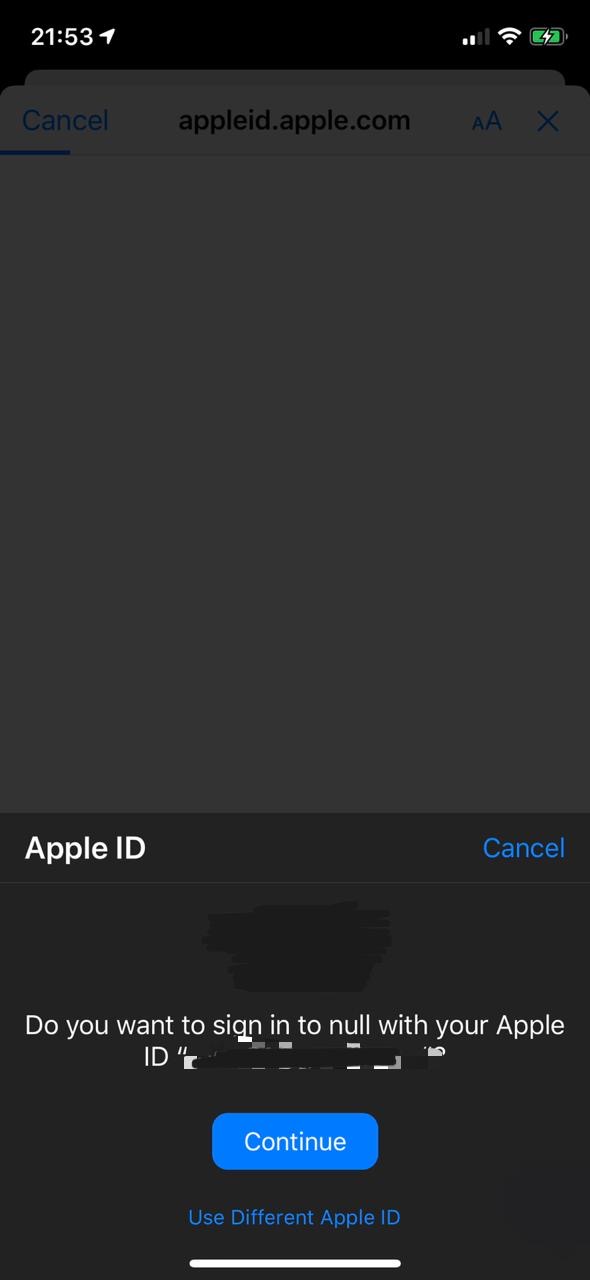
The problem when trying to sign in with a real device, is that when opening the Sign in with Apple Sheet, the app name is showing as "null". See attached picture below as an example of what I mean. The App Icon shows correctly, being the same from the Project assets.
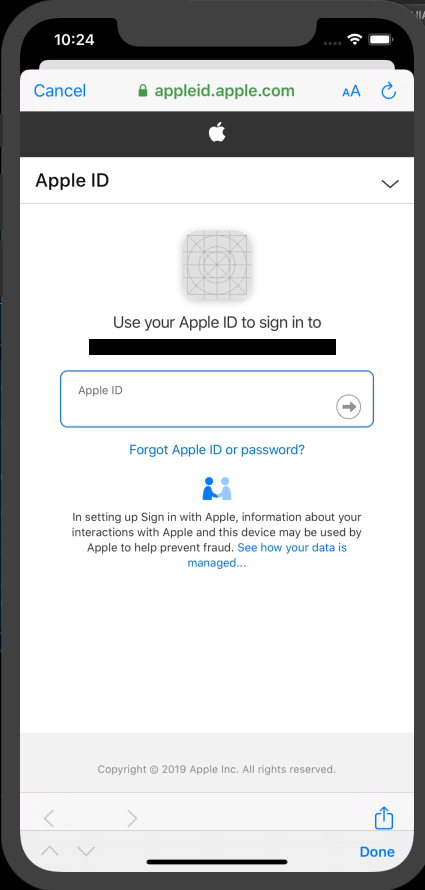
When trying to do the same on a simulator, since there is no Apple ID logged in on it, it opens a WebView, prompting for the Apple ID. Here there is no AppIcon and the name displayed is the Service ID being set up on developer.apple.com Identifiers.
When using the hosted UI, I can see the Cognito Endpoint as a name, but no AppIcon. (See the hosted UI below).
When looking about it in the app forums for Sign in with Apple for web (https://forums.developer.apple.com/thread/123054), it seems that this App Icon is derived from the App Store after having launched. Since our app is not yet launched, it displays no app icon.
Is it possible that when getting the app name in the real device, it is trying to get it from the App Store too? And that's why we are getting "null" as an app name? Or am I missing a configuration when performing the Sign In with AWSMobileClient?
To Reproduce
Steps to reproduce the behavior:
Follow the following guide to add Sign in with Apple to your Cognito Pool
https://aws.amazon.com/blogs/security/how-to-set-up-sign-in-with-apple-for-amazon-cognito/Add Apple Sign in to your Swift Project: (Following https://aws-amplify.github.io/docs/ios/authentication)
let hostedUIOptions = HostedUIOptions(scopes: ["openid", "email", "profile"], identityProvider: "SignInWithApple")
AWSMobileClient.default().showSignIn(navigationController: navController, hostedUIOptions: hostedUIOptions) { (userState, error) in .....
Which AWS service(s) are affected?
AWS Amplify
AWS Cognito
Expected behavior
I'm expecting the App name to be different than null. Since it's extracting the App Icon from the Assets, I was expecting that the iOS sign in sheet would also extract the app name from there.
Screenshots

Environment(please complete the following information):
- SDK Version: 'AWSMobileClient', '~> 2.12.1', 'AWSAuthUI', '~> 2.12.1', 'AWSUserPoolsSignIn', '~> 2.12.1'
- Dependency Manager: CocoaPods
- Swift Version : 5.0
Device Information (please complete the following information):
- Device: iPhone 11 Pro, iPad Pro 9.7
- iOS Version: [e.g. iOS 11.4]
- Specific to simulators: iPhone 11 Pro Max
Additional context
- App is not yet launched
 rolisanchez
All 7 comments
hi @rolisanchez, thanks for reporting the issue and providing the detailed information. We are currently investigating issues with Apple Sign-In and will provide an update regarding this "null
value when we can.
 lawmicha
on 5 Mar 2020
lawmicha
on 5 Mar 2020
I can confirm that this issue is reproducible. I get the same null as app name
 hossamghareeb
on 10 Mar 2020
hossamghareeb
on 10 Mar 2020
@lawmicha is there any updates on this?
hossamghareeb
on 30 Mar 2020
Same here.
 karasahinemre
on 17 Apr 2020
karasahinemre
on 17 Apr 2020
hi @rolisanchez, thanks for reporting the issue and providing the detailed information. We are currently investigating issues with Apple Sign-In and will provide an update regarding this "null
value when we can.
Hello. How is the investigation going? @lawmicha
 pedromancheno
on 5 May 2020
pedromancheno
on 5 May 2020
Hi all,
This seems to be not an issue with Amplify. The latest public beta 13.6 of iOS seems to have fixed this issue. I could not reproduce the issue in iOS 13.6 beta.
Similar issue in JS library - https://github.com/aws-amplify/amplify-js/issues/4580
 royjit
on 2 Jul 2020
royjit
on 2 Jul 2020
Could not reproduce this bug in the latest iOS version 13.6. Closing this issue, feel free to reach back if you face any problem.
royjit
on 27 Jul 2020
Related issues
 aTylerRice
·
3Comments
aTylerRice
·
3Comments
 bradgmueller
·
5Comments
bradgmueller
·
5Comments
 mackoj
·
5Comments
mackoj
·
5Comments
 minhthuc251
·
4Comments
minhthuc251
·
4Comments
 thomers
·
3Comments
thomers
·
3Comments
Most helpful comment
Hello. How is the investigation going? @lawmicha