Aws-sdk-ios: (Urgent) Huge memory issue when trying to upload a file. Lots of crashes Out of memory.
Describe the bug
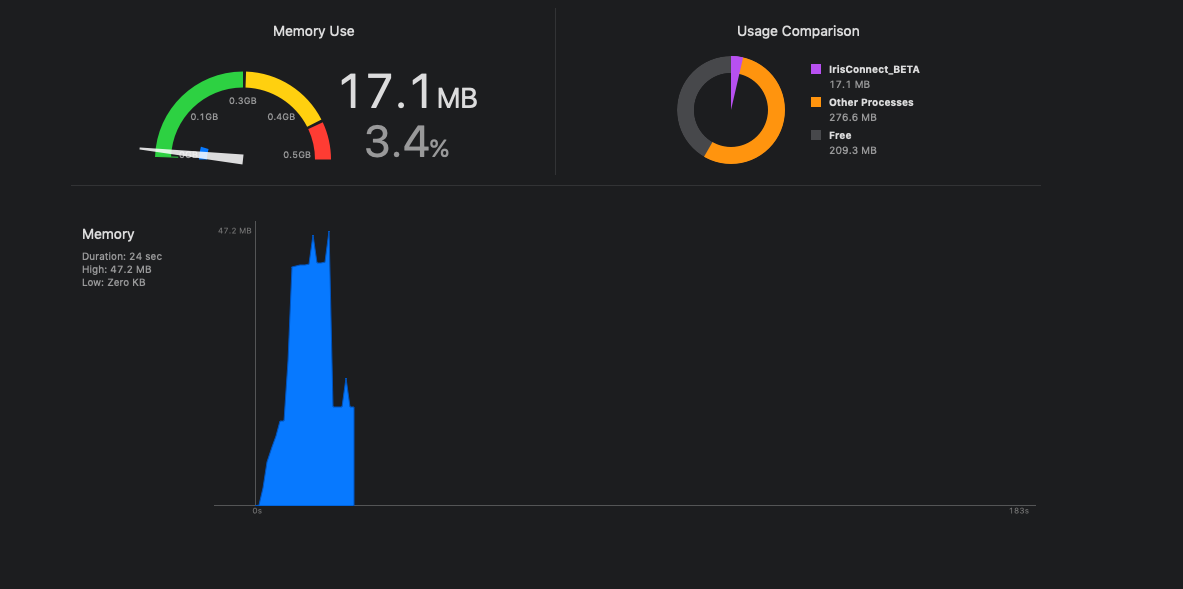
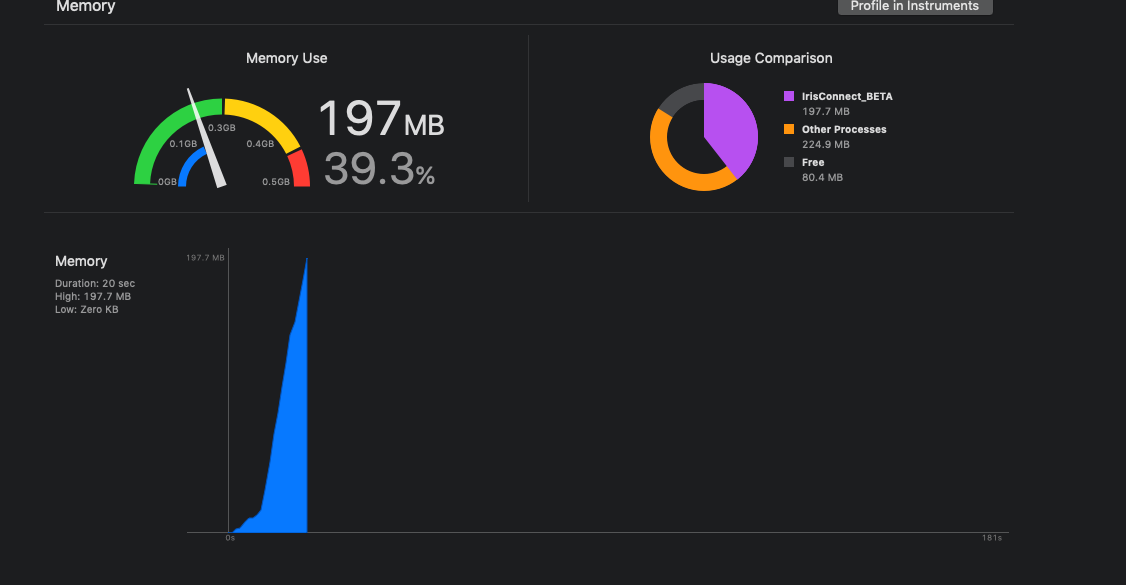
It always crashes when upload a big file like 1.5gb. It happens more often in iOS 9 devices because they don't have so much memory. So far I can reproduce the crash 100% of the times using an iPAd mini, iOS 9. This works fine in 2.6.35.
To Reproduce
Upload a big file using AWSTransferUtility
Which AWS service(s) are affected?
S3
Environment(please complete the following information):
- AWS iOS SDK Version: 2.9.1
- Dependency Manager: Cocoapods
- Swift Version : 4.2
- Device: iPad mini 1
- iOS Version: iOS9
- Specific to simulators: NO
using 2.6.35 uploading 1.4gb file
Same file in 2.9.1 and then crash
 pablogeek
All 7 comments
@pablogeek
I believe that this directly related to the strategy of creating all the parts comprising a multipart-upload when the transfer is initiated. I will look into a better way of creating the parts that doesn't have this memory spike.
 cbommas
on 28 Feb 2019
cbommas
on 28 Feb 2019
@pablogeek
I am testing a fix for this issue and am hoping to get it included in the next rev of the SDK. I will post back here once I have confirmation.
cbommas
on 6 Mar 2019
In AWSS3TransferUtility#internalUploadFileUsingMultiPart, a serial operation copies file chunks and writes them to a temp directory.
The memory for NSFileHandle in AWSS3TransferUtility#createTemporaryFileForPart is never released since we don't ever leave the end of an @autoreleasepool.
-(NSString *) createTemporaryFileForPart: (NSString *) fileName
                              partNumber: (long) partNumber
                              dataLength: (NSUInteger) dataLength
                                   error: (NSError **) error{
    if (![[NSFileManager defaultManager] fileExistsAtPath:fileName]) {
        NSString *errorMessage = [NSString stringWithFormat:@"Local file not found. Unable to process Part #: %ld", partNumber];
        NSDictionary *userInfo = [NSDictionary dictionaryWithObject:errorMessage
                                                             forKey:@"Message"];

        *error = [NSError errorWithDomain:AWSS3TransferUtilityErrorDomain
                                             code:AWSS3TransferUtilityErrorLocalFileNotFound
                                         userInfo:userInfo];
        return nil;
    }

    //Create a temporary file for this part.
    NSFileHandle *fileHandle = [NSFileHandle fileHandleForReadingAtPath:fileName];
    [fileHandle seekToFileOffset:(partNumber - 1) * AWSS3TransferUtilityMultiPartSize];
    NSData *partData = [fileHandle readDataOfLength:dataLength];
    NSString *partFile = [self.cacheDirectoryPath stringByAppendingPathComponent:[[NSUUID UUID] UUIDString]];
    NSURL *tempURL = [NSURL fileURLWithPath:partFile];
    [partData writeToURL:tempURL atomically:YES];
    partData = nil;
    [fileHandle closeFile];
    return partFile;
}
 timothyquach
on 6 Mar 2019
timothyquach
on 6 Mar 2019
As far as I can tell, the below fixes the problem.
In the interim, should I be using 2.6.35 @cbommas ?
for (int32_t i = 1; i <= partCount ; i++) {
          @autoreleasepool {
            NSUInteger dataLength = AWSS3TransferUtilityMultiPartSize;
            if (i == partCount) {
                dataLength = fileSize - ( (i-1) * AWSS3TransferUtilityMultiPartSize);
            }

            AWSS3TransferUtilityUploadSubTask *subTask = [AWSS3TransferUtilityUploadSubTask new];
            subTask.transferID = transferUtilityMultiPartUploadTask.transferID;
            subTask.partNumber = @(i);
            subTask.transferType = @"MULTI_PART_UPLOAD_SUB_TASK";
            subTask.totalBytesExpectedToSend = dataLength;
            subTask.totalBytesSent = (long long) 0;
            subTask.responseData = @"";
            subTask.file = @"";
            subTask.eTag = @"";

            NSError *subTaskCreationError;

            //Move to inProgress or Waiting based on concurrency limit
            if (i <= [self.transferUtilityConfiguration.multiPartConcurrencyLimit integerValue]) {
                subTaskCreationError = [self createUploadSubTask:transferUtilityMultiPartUploadTask subTask:subTask startTransfer:NO];
                if(!subTaskCreationError) {
                    subTask.status = AWSS3TransferUtilityTransferStatusInProgress;
                    AWSDDLogDebug(@"Added task [%@] to inProgress list", @(subTask.taskIdentifier));
                    [transferUtilityMultiPartUploadTask.inProgressPartsDictionary setObject:subTask forKey:@(subTask.taskIdentifier)];
                }
            }
            else {
                subTaskCreationError = [self createUploadSubTask:transferUtilityMultiPartUploadTask subTask:subTask startTransfer:NO];
                if (!subTaskCreationError ) {
                    subTask.status = AWSS3TransferUtilityTransferStatusWaiting;
                    AWSDDLogDebug(@"Added task [%@] to Waiting list", @(subTask.taskIdentifier));
                    [transferUtilityMultiPartUploadTask.waitingPartsDictionary setObject:subTask forKey:@(subTask.taskIdentifier)];
                }
            }

            if ( subTaskCreationError) {
                //Abort the request, so the server can clean up any partials.
                [self callAbortMultiPartForUploadTask:transferUtilityMultiPartUploadTask];
                transferUtilityMultiPartUploadTask.status = AWSS3TransferUtilityTransferStatusError;

                //Add it to list of completed Tasks
                [self.completedTaskDictionary setObject:transferUtilityMultiPartUploadTask forKey:transferUtilityMultiPartUploadTask.transferID];

                //Clean up.
                [self cleanupForMultiPartUploadTask:transferUtilityMultiPartUploadTask];
                return [AWSTask taskWithError:subTaskCreationError];
            };

            //Save in Database
            [AWSS3TransferUtilityDatabaseHelper insertMultiPartUploadRequestSubTaskInDB:transferUtilityMultiPartUploadTask subTask:subTask databaseQueue:self.databaseQueue];
          }
        }
@timothyquach Hey thanks for the update :) yes 2.6.35 is working really well. You should be using that version.
pablogeek
on 6 Mar 2019
@pablogeek @timothyquach
The latest version of the SDK, 2.9.2, has a fix for the memory issue. Please do give this a try and let me know how it goes.
cbommas
on 9 Mar 2019
Closing issue as I haven't heard back. Please feel free to post here if you are still encountering this issue.
cbommas
on 20 Mar 2019
Related issues
 aTylerRice
·
3Comments
aTylerRice
·
3Comments
 thomers
·
3Comments
thomers
·
3Comments
 mohab2014
·
4Comments
mohab2014
·
4Comments
 minhthuc251
·
4Comments
minhthuc251
·
4Comments
 cornr
·
4Comments
cornr
·
4Comments
Most helpful comment
@pablogeek
I am testing a fix for this issue and am hoping to get it included in the next rev of the SDK. I will post back here once I have confirmation.