Aws-sdk-ios: AWSMobileClient AWSUserPoolSignUpViewController validation error messages
Which AWS Services is the feature request for?
AWSMobileClient signUp UI (AWSMobileClient.sharedInstance().showSignIn), AWSUserPoolSignUpViewController
Is your feature request related to a problem? Please describe.
Desire to customize or improve readability of sign-up and other validation messages displayed to a non-technical end user. Error messages for invalid values return very technical, not-for-end-user, error messages, many containing regular expression patterns. Our end users, consumers of the app, don't understand them.
Our customers / users first impression of the app is negative given the cryptic, technical error messages. Many potential customers never complete sign up and abandon the app before completing the sign-up process.
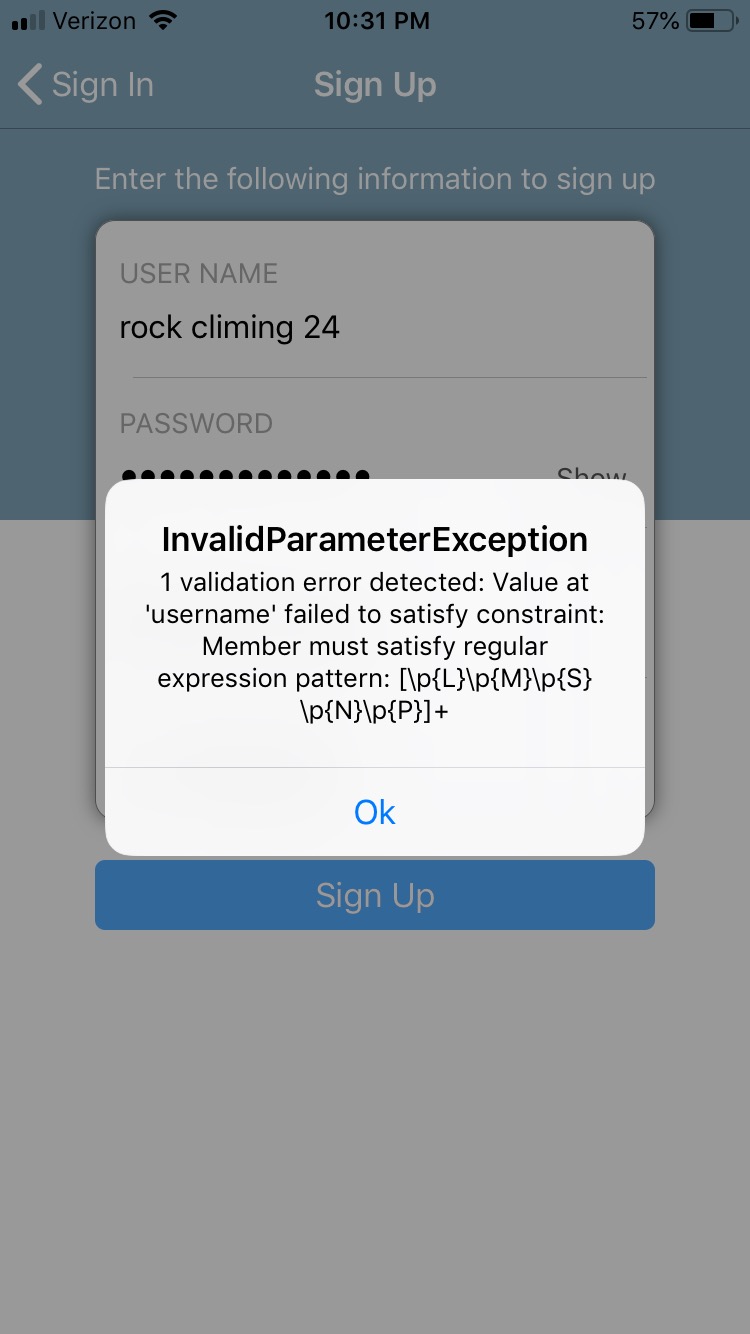
Example: User enters invalid user name as "rock climbing 24". Server returns errors through the AWSUserPoolSignUpViewController which displays "1 validation error detected: Value at 'username' failed to satisfy constraint: Member must satisfy regular expression pattern: [p{L}p{M}p{S}p{N}p{P}]+. In this case, the error should read "The username can not contain spaces."
Describe the solution you'd like
I would like to be able to customize error messages or at least have them more end-user friendly and more readable. Is this currently possible? If so, is there documentation? Can the messages be configured thought the AWS Console or elsewhere currently?
Describe alternatives you've considered
Prior to migrating to AWSMobileClient, I would intercept the messages, parse, and swap them out, but now that I'm using AWSMobileClient for all sign-in and sign-up features with the built in UI, I do not know how to do this.
(I was instructed to upgrade to AWSMobileClinet, but it does not seem ready for production use. (I have many other issues with it including Google sign-in returning always as "guest" or returning null, not refreshing tokens, etc.))
Here is an example screenshot of an error message. Real users of the app have not idea what this means.
Additional context
I chose AWSMobileClient.sharedInstance().showSignIn so I can concentrate on writing the functional code in my app, but regret I am spending a large amount of time dealing with bugs and issues in the AWSMobileClient sign-in and sign-up code. I'd really like to see some attention to fixing issues and making the AWSMobieClient sign-up and sign-in code more production ready. I'm committed to using it and hope it will improve. I'm currently on my third refactor of the sign-in/sign-up code in my app in the past two years because of the rapid development pace of this code base. I started with MobileHub in Objective C, and have converted parts of my app to swift using AWSMobileClient as a result of the fast-paced development. As much as 50% of my development time has centered around managing changes in the APIs and dealing with bugs and other problems.
Currently using AWS 2.8.1
PODS:
- AWSAPIGateway (2.8.1):
- AWSCore (= 2.8.1)
- AWSAuthCore (2.8.1):
- AWSCore (= 2.8.1)
- AWSAuthUI (2.8.1):
- AWSAuthCore (= 2.8.1)
- AWSCore (= 2.8.1)
- AWSCognito (2.8.1):
- AWSCore (= 2.8.1)
- AWSCognitoIdentityProvider (2.8.1):
- AWSCognitoIdentityProviderASF (= 1.0.1)
- AWSCore (= 2.8.1)
- AWSCognitoIdentityProviderASF (1.0.1)
- AWSCore (2.8.1)
- AWSDynamoDB (2.8.1):
- AWSCore (= 2.8.1)
- AWSFacebookSignIn (2.8.1):
- AWSAuthCore (= 2.8.1)
- FBSDKCoreKit (~> 4.0)
- FBSDKLoginKit (~> 4.0)
- AWSGoogleSignIn (2.8.1):
- AWSAuthCore (= 2.8.1)
- AWSMobileClient (2.8.1):
- AWSAuthCore (= 2.8.1)
- AWSCognitoIdentityProvider (= 2.8.1)
- AWSPinpoint (2.8.1):
- AWSCore (= 2.8.1)
- AWSS3 (2.8.1):
- AWSCore (= 2.8.1)
- AWSUserPoolsSignIn (2.8.1):
- AWSAuthCore (= 2.8.1)
- AWSCognitoIdentityProvider (= 2.8.1)
- Bolts (1.9.0):
- Bolts/AppLinks (= 1.9.0)
- Bolts/Tasks (= 1.9.0)
- Bolts/AppLinks (1.9.0):
- Bolts/Tasks
- Bolts/Tasks (1.9.0)
- CMPopTipView (2.3.2)
- FBSDKCoreKit (4.38.1):
- Bolts (~> 1.9)
- FBSDKLoginKit (4.38.1):
- FBSDKCoreKit
- FBSDKShareKit (4.38.1):
- FBSDKCoreKit
- FRHyperLabel (1.0.4)
- GoogleSignIn (4.3.0):
- "GoogleToolboxForMac/NSDictionary+URLArguments (~> 2.1)"
- "GoogleToolboxForMac/NSString+URLArguments (~> 2.1)"
- GTMOAuth2 (~> 1.0)
- GTMSessionFetcher/Core (~> 1.1)
- GoogleToolboxForMac/DebugUtils (2.2.0):
- GoogleToolboxForMac/Defines (= 2.2.0)
- GoogleToolboxForMac/Defines (2.2.0)
- "GoogleToolboxForMac/NSDictionary+URLArguments (2.2.0)":
- GoogleToolboxForMac/DebugUtils (= 2.2.0)
- GoogleToolboxForMac/Defines (= 2.2.0)
- "GoogleToolboxForMac/NSString+URLArguments (= 2.2.0)"
- "GoogleToolboxForMac/NSString+URLArguments (2.2.0)"
- GTMOAuth2 (1.1.6):
- GTMSessionFetcher (~> 1.1)
- GTMSessionFetcher (1.2.1):
- GTMSessionFetcher/Full (= 1.2.1)
- GTMSessionFetcher/Core (1.2.1)
- GTMSessionFetcher/Full (1.2.1):
- GTMSessionFetcher/Core (= 1.2.1)
 BillBunting
All 12 comments
Hi @BillBunting ,
Thanks for submitting this feedback. We will keep this in mind for improvements that we are working on.
 minbi
on 31 Dec 2018
minbi
on 31 Dec 2018
Hello @minbi , I continue to receive negative feedback from new app focus group members regarding the User Interface for sign-up using AWSMobileClient' sign-in UI. Users continue to complain about (1) lack of clear and understandable end-user-facing validation error messages and (2) the phone number format which requires users to include the international code (+1 for USA). Please keep this on your priority list. In production, app downloads are less than accounts created, suggesting that I have many users that do not complete the sign-in process, which may be in part due to the poor error validation and feedback. Many users also complain they are unable to enter a valid phone number (because they don't understand international phone number formats). Thank you.
BillBunting
on 14 Jan 2019
Thanks for the feedback @BillBunting. We will keep this in mind while prioritizing our next task.
Tagging @undefobj @muellerfr @nikhil-dabhade for visibility.
 rohandubal
on 14 Jan 2019
rohandubal
on 14 Jan 2019
Hi Rohan. I too was looking all over the Internet for a way to customize those alert messages for invalid user logins and sign up. Seems like the API doesn't have this feature yet, if I am not mistaken. If so, this seems like a critical aspect that is being overlooked since it may be a poor reflection of our app's user experience if it were in production with real users.
UPDATE:
In the meantime, I edited my UserPoolsUIOperations.m file with the following code to add custom messages for the failed login alerts:
-(void) didCompletePasswordAuthenticationStepWithError:(NSError*) error {
    NSErrorUserInfoKey errorType = error.userInfo[@"__type"];
    NSErrorUserInfoKey errorTitle = @"Login Failed";
    NSErrorUserInfoKey errorMessage = error.userInfo[@"message"];

    if([errorType  isEqual: @"UserNotFoundException"]){
        errorMessage = @"User Not Found";
    }else if([errorType  isEqual: @"NotAuthorizedException"]){
        errorMessage = @"Invalid password";
    }

    if(error){
        dispatch_async(dispatch_get_main_queue(), ^{

            UIAlertController *alertController = [UIAlertController alertControllerWithTitle:errorTitle
                                                                                     message:errorMessage
                                                                              preferredStyle:UIAlertControllerStyleAlert];
            UIAlertAction *ok = [UIAlertAction actionWithTitle:@"Retry" style:UIAlertActionStyleDefault handler:nil];
            [alertController addAction:ok];
            [[self.navigationController viewControllers].firstObject presentViewController:alertController
                                                                               animated:YES
                                                                             completion:nil];
        });
    }

}
Probably a crude way of resolving this limitation, but it got the job done for me. You would have to do this for any of the other exception types you want to customize for.
 bhargavat
on 18 Jan 2019
bhargavat
on 18 Jan 2019
Linking with #1158
rohandubal
on 18 Jan 2019
Rohan we appreciate the efforts looking into this. In the interim is there a decoder for what the localized description errors represent ? Apologies if I've missed the location in the documentation.
 JimCSaratoga
on 29 Jan 2019
JimCSaratoga
on 29 Jan 2019
Hello @JimCSaratoga
Currently, I believe we don't have documentation regarding the description of errors.
The description represents error messages sent to the client by the service. Every error returned by the service is coupled with a corresponding error message which is what related to end user.
Hope this helps,
Rohan
rohandubal
on 5 Feb 2019
It's probaably worth noting that this is an issue for AWSMobileClient in general, and not specific to the "drop-in" UI. I recently encountered an issue with a changePassword error where this was the message given:
"4 validation errors detected: Value at 'previousPassword' failed to satisfy constraint: Member must satisfy regular expression pattern: ^[S]+._[S]+$; Value at 'previousPassword' failed to satisfy constraint: Member must have length greater than or equal to 6; Value at 'proposedPassword' failed to satisfy constraint: Member must satisfy regular expression pattern: ^[S]+._[S]+$; Value at 'proposedPassword' failed to satisfy constraint: Member must have length greater than or equal to 6"
... yeah, I'm not showing that to my users.
 zigfreid5
on 13 Feb 2019
zigfreid5
on 13 Feb 2019
Hi @zigfreid5 ,
I agree with the drop-in UI doing a better job of mapping the exception to a more user-friendly message, but for the APIs, these are directed towards a developer. I do see a challenge mapping errors if the text is changing, but a dictionary lookup for partial matches may work.
minbi
on 13 Feb 2019
@minbi What I'm referring to is not just for the developer. Just about every other AWSTask.Error._userInfo["message"] is pretty much user-friendly. It's the password-related errors that look like garbage.
zigfreid5
on 14 Feb 2019
@zigfreid5 , Ah, thank you for that feedback, I will make sure the service team is made aware of this feedback, but in all transparency, this is not likely to change soon.
minbi
on 14 Feb 2019
I totally agree with the sentiment above, was hoping I could just use the Drop-In UI for simple auth across several social providers, but am finding this way to difficult. I finally got it working, only to find out that the error messages can't easily be customize and are not production ready, with no easy way of changing them.
 dmozealous
on 25 Mar 2020
dmozealous
on 25 Mar 2020
Related issues
 aymericio
·
5Comments
aymericio
·
5Comments
 bradgmueller
·
5Comments
bradgmueller
·
5Comments
 kshrikant
·
4Comments
kshrikant
·
4Comments
 fs-bonlook
·
3Comments
fs-bonlook
·
3Comments
 dougboberg
·
5Comments
dougboberg
·
5Comments
Most helpful comment
It's probaably worth noting that this is an issue for AWSMobileClient in general, and not specific to the "drop-in" UI. I recently encountered an issue with a changePassword error where this was the message given:
"4 validation errors detected: Value at 'previousPassword' failed to satisfy constraint: Member must satisfy regular expression pattern: ^[S]+._[S]+$; Value at 'previousPassword' failed to satisfy constraint: Member must have length greater than or equal to 6; Value at 'proposedPassword' failed to satisfy constraint: Member must satisfy regular expression pattern: ^[S]+._[S]+$; Value at 'proposedPassword' failed to satisfy constraint: Member must have length greater than or equal to 6"
... yeah, I'm not showing that to my users.