Aws-sdk-ios: AWSMobileClient-Swift.h not found
I use Cocoapods to install your framework. Version for 'AWSMobileClient' is 2.7.3, and for 'AWSIoT' is 2.7.3. After installation, Xcode report me error with message ''AWSMobileClient/AWSMobileClient-Swift.h' file not found'.
After that I downgrade both versions to 2.6.10, and now is working well.
Version of my Xcode is 10.1.
Swift 4
MacOs Mojave 10.14.1
 baljakbratislav
All 27 comments
The 2.7.0 version of AWSMobileClient is a mixed Swift and Objective-C project. I'm investigating to see if there is a project setting we missed, or whether we just need to update our integration docs (and changelog/release notes) to ensure that developers set header & framework search paths.
 palpatim
on 28 Nov 2018
palpatim
on 28 Nov 2018
That would be great :)
baljakbratislav
on 28 Nov 2018
Hello @baljakbratislav
Since the project was changed to be a Swift-ObjC code project from ObjC, you will have to do a clean build to clear all the cache files generated by XCode. You will also have to close your xcworkspace file and re-open it. You can clean the cache by pressing CMD + Shift + K
Hope this helps.
Thanks,
Rohan
 rohandubal
on 3 Dec 2018
rohandubal
on 3 Dec 2018
Fresh install with 2.8.1, I'm also seeing this issue, no amount of cleaning, clearing, or removing DerivedData seems to fix this for me.
 ecexplorer
on 18 Dec 2018
ecexplorer
on 18 Dec 2018
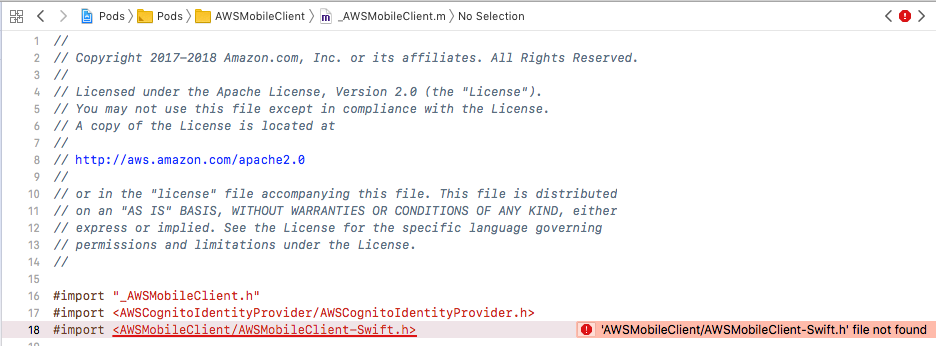
I am getting this also. pod install reported that AWSMobileClient (2.9.1) was installed. But Xcode is reporting: 'AWSMobileClient/AWSMobileClient-Swift.h' file not found
I did clean and also deleted derived data before building. Attached file may be helpful.
 SergiusPaulus
on 22 Feb 2019
SergiusPaulus
on 22 Feb 2019
I am having the same problem with"AWSCognitoAuth_Internal.h"
Anyone have a solution?
 Georycoco
on 17 Mar 2019
Georycoco
on 17 Mar 2019
I was able to resolve my issue by updating both my iOS project to deployment target 11.0 and this line in my Podfile
platform :ios, '11.0'
Before, both were set to 9.0. I have no idea why this fixed things.
SergiusPaulus
on 19 Mar 2019
Same issue here also using version 2.9.3 pods, both with project settings using iOS 9.0 and after trying the iOS 11.0 suggestion.
Rolling everything back to 2.9.1 resolved the issue.
 jamesatfish
on 20 Mar 2019
jamesatfish
on 20 Mar 2019
@Georycoco Same here, "AWSCognitoAuth_Internal.h file not found.", with 2.9.3 pods
 thomers
on 29 Mar 2019
thomers
on 29 Mar 2019
I forgot to mention, and this may be important, that my problem only occurred with Xcode's Simulator. I had exact same problem with Microsoft's ADAL. The
SergiusPaulus
on 29 Mar 2019
Getting this error now with 2.9.3 pods alongside Could not build Objective-C module 'AWSMobileClient' and Cannot override a Self return type with a non-Self return type.
None of the above proposed solutions have helped.
No amount of cleaning the build folder or updating the pods with the latest possible iOS target version have done anything to fix the issue.
 Foefirelord
on 29 Mar 2019
Foefirelord
on 29 Mar 2019
same problem, when they solve it?
 Gperez88
on 1 Apr 2019
Gperez88
on 1 Apr 2019
Same here. Changing to iOS11 does not solve it for us.
 ghost
on 3 Apr 2019
ghost
on 3 Apr 2019
any solution for this yet. Having same problem
 alionthego
on 4 Apr 2019
alionthego
on 4 Apr 2019
You already tried all the main answers in this Stack Overflow question? https://stackoverflow.com/questions/12002905/ios-build-fails-with-cocoapods-cannot-find-header-files
SergiusPaulus
on 4 Apr 2019
Have a look at https://github.com/aws-amplify/aws-sdk-ios/issues/1328
I could fix a similar issue by removing a few redundant pods from my Podfile.
thomers
on 4 Apr 2019
As mentioned by @thomers, the issue regarding AWSCognitoAuth_Internal file not found is due to redundant dependencies. Please see #1328 for explanation.
This looks to me more like a cocoapods bug which doen't correctly generate pods project. As @SergiusPaulus mentioned, setting the iOS platform resolves this issue.
rohandubal
on 4 Apr 2019
Note: Setting the iOS platform did not resolve my issue, I had to (also) remove the redundant pod from my Podfile.
thomers
on 4 Apr 2019
We're not using Cocoapods but Carthage
ghost
on 5 Apr 2019
I am having Could not build Objective-C module 'AWSMobileClient' and Cannot override a Self return type with a non-Self return type regardless of the target (I tried 9.0, 11.0, 12.1 und 12.2).
Libraries versions:
Using AWSAuthCore (2.9.4)
Using AWSAuthUI (2.9.4)
Using AWSCognitoIdentityProvider (2.9.4)
Using AWSCognitoIdentityProviderASF (1.0.1)
Using AWSCore (2.9.4)
Using AWSMobileClient (2.9.4)
Using AWSUserPoolsSignIn (2.9.4)
Xcode 10.2
The Could not build Objective-C module 'AWSMobileClient' is prepended by Header 'AWSMobileClient-Swift.h' not found and it's interesting that I don't see the missing .h in the Pod:
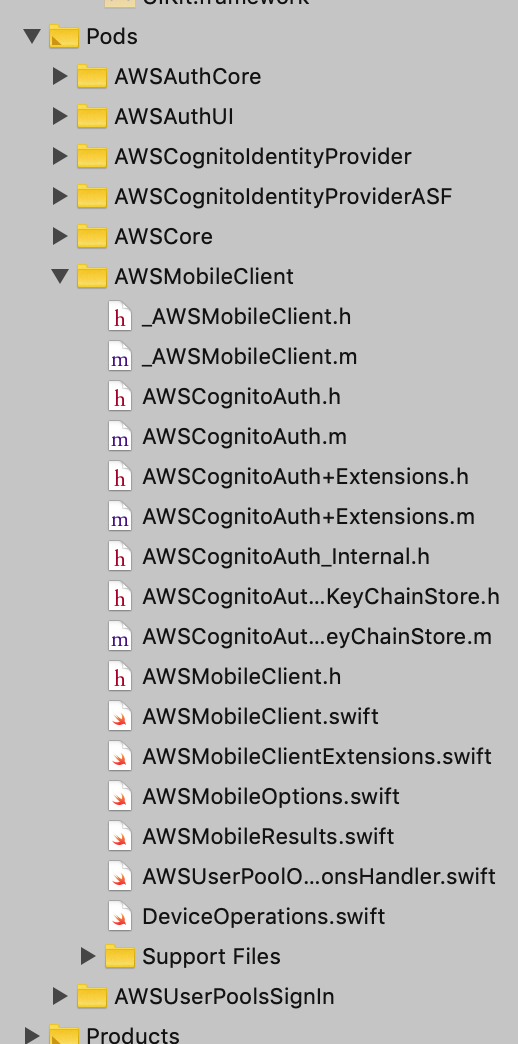
And actually I don't find it in the Pod's files:
rreimche ~/D/S/M/P/Pods> cd AWSMobileClient/
rreimche ~/D/S/M/P/P/AWSMobileClient> ls
AWSAuthSDK AWSCognito AWSCognitoAuth LICENSE LICENSE.AMAZON LICENSE.APACHE README.mdrreimche ~/D/S/M/P/P/AWSMobileClient> cd AWSAuthSDK/Sources/AWSMobileClient/
rreimche ~/D/S/M/P/P/A/A/S/AWSMobileClient> ls
AWSMobileClient.h AWSMobileClientExtensions.swift AWSMobileResults.swift DeviceOperations.swift
AWSMobileClient.swift AWSMobileOptions.swift AWSUserPoolOperationsHandler.swift Internalrreimche ~/D/S/M/P/P/A/A/S/AWSMobileClient> cd Internal/
rreimche ~/D/S/M/P/P/A/A/S/A/Internal> ls
AWSCognitoAuth+Extensions.h AWSCognitoAuth+Extensions.m _AWSMobileClient.h _AWSMobileClient.m
Another interesting detail is that I don't see AWSMobileClient.framework among Pods Frameworks, but I can add it to "Link Binary with Libraries" as is recommended in https://stackoverflow.com/questions/48092045/no-such-module-awsmobileclient-error-inside-appdelegate-swift :
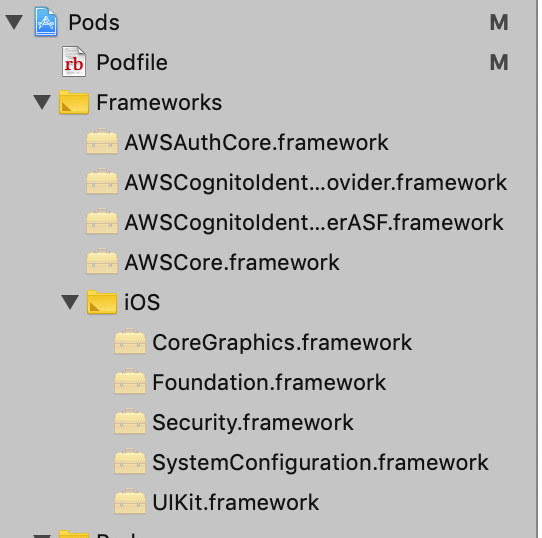
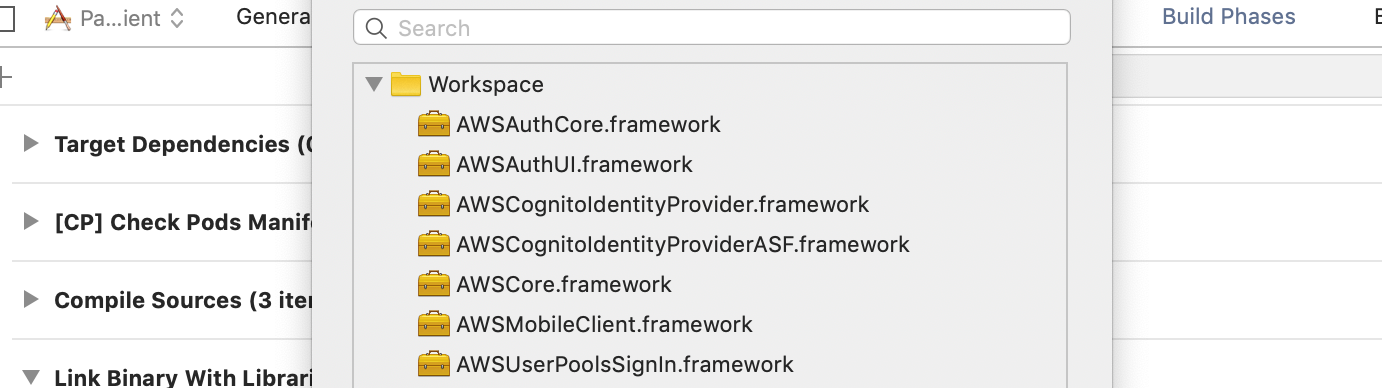
Is the pod broken?
UPDATE: I tried removing redundant pod dependencies as in https://github.com/aws-amplify/aws-sdk-ios/issues/1328. It did not help. It also did not help me to add the frameworks to "Link Binary with Libraries" as is recommended in https://stackoverflow.com/questions/48092045/no-such-module-awsmobileclient-error-inside-appdelegate-swift.
 rreimche
on 6 Apr 2019
rreimche
on 6 Apr 2019
There is an issue devoted to the Cannot override a Self return type with a non-Self return type error: https://github.com/aws-amplify/aws-sdk-ios/issues/1394
rreimche
on 6 Apr 2019
The issue still persists. No amount of pod re-installing or pruning dependencies helps.
ghost
on 7 Apr 2019
Is there a way to bypass the bug? Maybe to use an earlier version of the software? Can I access an earlier version of the Tutorial then?
rreimche
on 24 Apr 2019
Switching over to AWSMobileClient for authentication and removing all the older authentication-related code and pods (AWSCognitoAuth, AWSCognitoIdentityProvider, etc.) solved the problem.
The new AWSMobileClient has everything needed to setup authentication, whether using in-app views or the Hosted UI or a combination of in-app UI and direct-to-social login.
And the docs are now well-formatted and fairly thorough:
https://aws-amplify.github.io/docs/ios/authentication
Foefirelord
on 24 Apr 2019
Hello all,
Throughout the thread I am observing a bunch of issues causing the confusion around the type of error and scenario under which the error will happen. I will try to summarize the issues and fixes and identify the scenarios in which this still is an issue.
Issue 1 (Resolved) - The error Cannot override a Self return type with a non-Self return type shows up in Xcode. This was due to incompatibility with Swift 5 and has been resolved with #1377 and is available in the latest SDKs
Issue 2 (Resolved) - The error AWSCognitoAuth_Internal.h file not found. appears when compiling. This issue happens if you are using both AWSMobileClient and AWSCognitoAuth in the same Podfile. Removing AWSCognitoAuth will resolve the issue. This is discussed in #1328
Issue 3 (Needs details) - Some devs are reporting an issue where Xcode calls out that there is an error in compiling AWSMobileClient. The specific error is AWSMobileClient-Swift.h not found. I want to know what kind of configuration and tooling does this issue happen? Can someone post information about:
- Xcode Version
- Simulator Version
- macOS Version
- Contents of Podfile
The best scenario would be if someone could provide a small project where we can reproduce this issue. I will try to reproduce this issue on my side in the meanwhile.
Thanks,
Rohan
rohandubal
on 2 May 2019
This issue has been automatically closed because of inactivity. Please open a new issue if are still encountering problems.
![stale[bot] picture](https://avatars3.githubusercontent.com/in/1724?v=4&s=40) stale[bot]
on 23 May 2019
stale[bot]
on 23 May 2019
FYI to fix the issue for me, I updated to latest xCode (Version 11.2.1 (11B500)) and ran
pod deintegrate
pod install --repo-update
This got the build to work.
 rajuashok
on 7 Dec 2019
rajuashok
on 7 Dec 2019
Related issues
 dougboberg
·
5Comments
dougboberg
·
5Comments
 pawlowskialex
·
4Comments
pawlowskialex
·
4Comments
 fs-bonlook
·
3Comments
fs-bonlook
·
3Comments
 anbarasu0504
·
3Comments
anbarasu0504
·
3Comments
 victorleungtw
·
4Comments
victorleungtw
·
4Comments
Most helpful comment
You already tried all the main answers in this Stack Overflow question? https://stackoverflow.com/questions/12002905/ios-build-fails-with-cocoapods-cannot-find-header-files