Aws-sdk-ios: Frameworks are built with non-iOS architectures
The SDK is being built with i386 and x86_64 architectures which are MacOS, not iOS:
See file:
https://github.com/aws/aws-sdk-ios/blob/master/AWSiOSSDKv2.xcodeproj/project.pbxproj
Search for "VALID_ARCHS" and you'll see:
VALID_ARCHS = "arm64 armv7 armv7s i386 x86_64";
This is an issue when we go to submit or validate a release to Apple.
From the Organizer, either "Upload to App Store..." or "Validate..." the archived app. You'll need to have the app store side set up to receive the app.
This is related to issue #991
The bitcode is now being included since 2.6.26, but it includes archs for MacOS, which will not work for iOS releases. It should not include X86_64ALL and i386. There are no iOS devices that use anything other than the arm processors. (The simulators do, but we would never publish a release for simulator use).
The MacOS archs are still in there for 2.6.27 and 2.6.28.
Thanks!
-Nico
 ntewinkel
All 14 comments
I think the missing step before publishing the app is to strip the unwanted architectures as mentioned in
https://github.com/aws/aws-sdk-ios/blob/master/README.md#frameworks
The purpose was to have all architectures for debugging on devices like simulators.
Thanks,
Rohan
 rohandubal
on 5 Sep 2018
rohandubal
on 5 Sep 2018
@rohandubal thanks for the help! Just to make sure, I went through the whole process again, but I still get the error messages. So maybe the bug is that the strip frameworks step does not clear all the extra frameworks. I noticed in the instructions it only has the script for AWSCore. My error messages are for AWSAuthCore and AWSUserPoolsSignIn.
I'm following these instructions:
https://docs.aws.amazon.com/aws-mobile/latest/developerguide/how-to-ios-sdk-setup.html
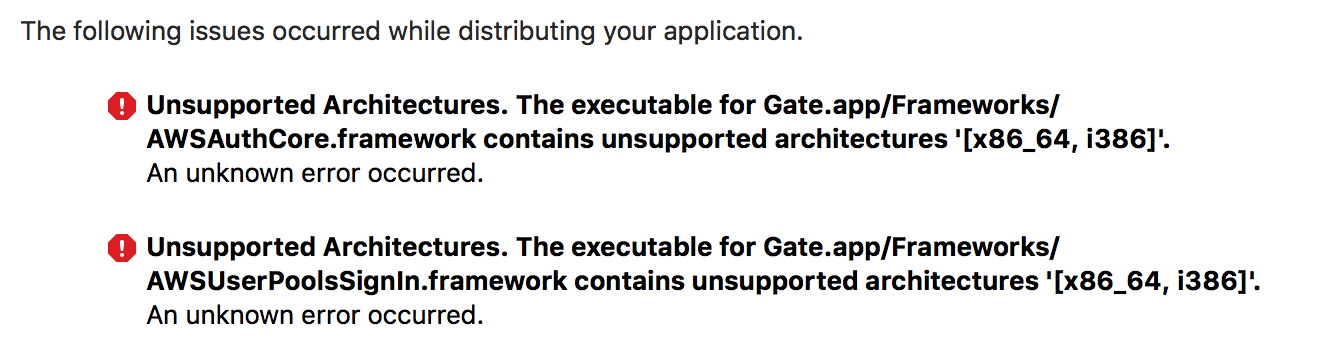
ntewinkel
on 7 Sep 2018
Hello @ntewinkel I will try the process on my side as well and check what the issue is.
rohandubal
on 7 Sep 2018
Looking at the script, I wonder if it's because I neatly organized the AWS frameworks into their own folder (rather than having them all in the default Frameworks folder)
ntewinkel
on 7 Sep 2018
I was able to reproduce it as well. I think there might be some bug with the strip script. Could you replace the Run Script section to use the following script:
APP_PATH="${TARGET_BUILD_DIR}/${WRAPPER_NAME}"

# This script loops through the frameworks embedded in the application and
# removes unused architectures.
find "$APP_PATH" -name '*.framework' -type d | while read -r FRAMEWORK
do
FRAMEWORK_EXECUTABLE_NAME=$(defaults read "$FRAMEWORK/Info.plist" CFBundleExecutable)
FRAMEWORK_EXECUTABLE_PATH="$FRAMEWORK/$FRAMEWORK_EXECUTABLE_NAME"
echo "Executable is $FRAMEWORK_EXECUTABLE_PATH"

EXTRACTED_ARCHS=()

for ARCH in $ARCHS
do
echo "Extracting $ARCH from $FRAMEWORK_EXECUTABLE_NAME"
lipo -extract "$ARCH" "$FRAMEWORK_EXECUTABLE_PATH" -o "$FRAMEWORK_EXECUTABLE_PATH-$ARCH"
EXTRACTED_ARCHS+=("$FRAMEWORK_EXECUTABLE_PATH-$ARCH")
done

echo "Merging extracted architectures: ${ARCHS}"
lipo -o "$FRAMEWORK_EXECUTABLE_PATH-merged" -create "${EXTRACTED_ARCHS[@]}"
rm "${EXTRACTED_ARCHS[@]}"

echo "Replacing original executable with thinned version"
rm "$FRAMEWORK_EXECUTABLE_PATH"
mv "$FRAMEWORK_EXECUTABLE_PATH-merged" "$FRAMEWORK_EXECUTABLE_PATH"

done
This worked for me and should unblock you as well. We will work on a fix in the meanwhile to have a permanent solution.
Thanks,
Rohan
rohandubal
on 7 Sep 2018
Hey @ntewinkel
Could you confirm if the fix worked for you?
Thanks,
Rohan
rohandubal
on 7 Sep 2018
Thank you so much for that solution, @rohandubal ! That worked perfectly and the app passed Apple Validation (in the Xcode Organizer).
-Nico
ntewinkel
on 7 Sep 2018
There does seem to be a new issue with that script, in that it doesn't seem to play nice with other frameworks that do not have the X86 archs in them:
SnapKit is one example (long paths removed for clarity)...
Executable is ...app/Frameworks/SnapKit.framework/SnapKit
Extracting x86_64 from SnapKit
fatal error: lipo: input file (...app/Frameworks/SnapKit.framework/SnapKit) must be a fat file when the -extract option is specified
Merging extracted architectures: x86_64
fatal error: lipo: can't open input file: ...app/Frameworks/SnapKit.framework/SnapKit-x86_64 (No such file or directory)
rm: ...app/Frameworks/SnapKit.framework/SnapKit-x86_64: No such file or directory
Replacing original executable with thinned version
mv: rename ...app/Frameworks/SnapKit.framework/SnapKit-merged to ...app/Frameworks/SnapKit.framework/SnapKit: No such file or directory
Could we scope the script to AWS frameworks? i.e.
Change
find "$APP_PATH" -name '*.framework' -type d | while read -r FRAMEWORK
to
find "$APP_PATH" -name 'AWS*.framework' -type d | while read -r FRAMEWORK
rohandubal
on 7 Sep 2018
Ah yes, good idea. I gave it the full test: None of the red build error marks, all of the happy validation!
ntewinkel
on 7 Sep 2018
Awesome! Great to hear.
rohandubal
on 8 Sep 2018
was there no update necessary to the strip-frameworks.sh file in this repository? I did not notice a file change on "strip-frameworks.sh"
 chriswill0w
on 20 Sep 2018
chriswill0w
on 20 Sep 2018
@ltblueberry0 , I agree, strip-frameworks.sh should be updated, or else this will fail for anyone using frameworks integration. The above was a temporary work-around. I assume Amazon has their own internal to-do list this has been added to (I hope).
ntewinkel
on 20 Sep 2018
@ntewinkel thanks for the info. Do i also have to use this script if I integrate via Carthage?
chriswill0w
on 23 Sep 2018
Related issues
 dougboberg
·
5Comments
dougboberg
·
5Comments
 pawlowskialex
·
4Comments
pawlowskialex
·
4Comments
 minhthuc251
·
4Comments
minhthuc251
·
4Comments
 ChrisInspect
·
4Comments
ChrisInspect
·
4Comments
 cornr
·
4Comments
cornr
·
4Comments