Aws-sdk-ios: SDK v2 - Resume uploads after close the app no longer working
We have just updated to the Amazon SDK v2 and now uploads wont resume after closing the app.
The amazon SDK v1 used to allow resuming uploads after the app was closed. This was a very useful feature for us. However, SDK v2 doesn't have it.
Are there any plans to enable this feature?
Or is there a way to get this to work?
It used to work as the SDK checked file URL to resume uploads (which remained constant), now SDK v2 uses the instance to see if this is a new one or not, so when you close the app you have a new instance
so the upload doesn't resume from the last complete chunk but restarts from 0.
Links to this ticket
https://github.com/aws/aws-sdk-ios/issues/154
 simeondrage
All 50 comments
Hi @simeondrage,
What version of SDK are you using?
Thanks for reporting to us. Are you referring to AWSS3TransferManager or AWSS3TransferUtility? The AWSS3TransferUtility supports background transfers.
Can you post the code snippet where you are uploading files and resuming transfer?
 kvasukib
on 12 Jan 2018
kvasukib
on 12 Jan 2018
Hello @kvasukib, I work with @simeondrage , So I will answer your questions.
We are using AWSS3TransferManager. I understand the AWSS3TransferManager is using multipart upload and you can pause and resume uploads. The problem comes when You close the entire app and reopen again. You lose the entire progress and it starts uploading from 0% again. This was something very useful in AWS SDK v1.
this is our code
let transferManager = AWSTManager(video: video)

        let uploadRequest = self.uploadRequest(video: video)

        video?.uploadStatus = ApolloVideoUploadStatusInProgress
        sendNotificationChangedStatusVideo(video: video)


        uploadRequest?.uploadProgress = {(bytesSent: Int64, totalBytesSent: Int64, totalBytesExpectedToSend: Int64) -> Void in
            DispatchQueue.main.async(execute: {() -> Void in
                //Update progress
                video?.updateUploadProgress(totalBytesSent, totalBytesExpectedToWrite: totalBytesExpectedToSend, speed: 0.0)

            })
        }

        transferManager?.upload(uploadRequest!).continueWith(executor: AWSExecutor.mainThread(), block: {[weak video, weak self] (task:AWSTask<AnyObject>) -> Any? in

            if let error = task.error as NSError? {
                if error.domain == AWSS3TransferManagerErrorDomain, let code = AWSS3TransferManagerErrorType(rawValue: error.code) {
                    switch code {
                    case .cancelled, .paused:
                        break
                    default:

                        break
                    }
                } else {

                }
                self?.errorVideo(error, video: video)
                return nil
            }
            self?.completeUploadBackground(video: video)
            return nil
        })
 pablogeek
on 12 Jan 2018
pablogeek
on 12 Jan 2018
Hi @simeondrage @pablogeek, We have introduced multi-part support for uploads with ability to pause/resume/cancel transfers in AWSS3TransferUtility. You can take a look at our documentation here. This was released in 2.6.13. Please let us know if this solves your problem.
kvasukib
on 29 Mar 2018
Hello @kvasukib thanks for the update! I will integrate the new version and I will let you know.
pablogeek
on 30 Mar 2018
Thank you @pablogeek for confirming!
kvasukib
on 30 Mar 2018
Hello @kvasukib I'm having a problem with multipart uploads (Same code without multipart works perfectly). This what I'm doing
let expression = AWSS3TransferUtilityMultiPartUploadExpression()
        expression.progressBlock = { [weak video] _, progress in
            DispatchQueue.main.async(execute: {
                video?.updateUploadProgress(progress.completedUnitCount, totalBytesExpectedToWrite: progress.totalUnitCount, speed: 0.0)
            })
        }

        let completionBlockUpload: AWSS3TransferUtilityMultiPartUploadCompletionHandlerBlock? = {
            [weak video, weak self] _, error in
            DispatchQueue.main.async {
                // perform some action on completed upload operation
                if let e = error as NSError? {
                    print("Error: \(e.localizedDescription)")
                    self?.errorVideo(e, video: video)
                    return
                }
                self?.completeUpload(video: video)
            }
        }

        let transferUtility = AWSTransfer(video: video)

        let fileURL = URL(fileURLWithPath: video.localFilePath)

        let task = transferUtility?.uploadUsingMultiPart(fileURL: fileURL,
                                              bucket: video.amazonBucket,
                                              key: video.uploadKey,
                                              contentType: "video/mov",
                                              expression: expression, completionHandler: completionBlockUpload)

        task?.continueWith { [weak video, weak self]
            (task) -> AnyObject! in
            if let error = task.error as NSError? {
                print("Error: \(error.localizedDescription)")
                self?.errorVideo(error, video: video)
            }

            if let res = task.result {
                if let v = video {
                    // Do something with uploadTask.
                    self?.transferTasks[v.uploadKey] = res
                }
                DispatchQueue.main.async {
                    video?.uploadStatus = ApolloVideoUploadStatusInProgress
                    self?.sendNotificationChangedStatusVideo(video: video)
                }
            }

            return nil
        }
The upload never gets started. The callbacks are not called, and the task inside continueWith block has no error.
Help would be appreciated! Thanks!
pablogeek
on 11 Apr 2018
Thank @pablogeek for sharing the code snippet. Sorry for the inconvenience caused. Can you explain us what AWSTransfer is and what it does?
let transferUtility = AWSTransfer(video: video)
Does it construct a transfer utility object and return? If possible can you share us this code?
Which version of SDK are you using? We released 2.6.15 yesterday which contains updated to the S3 high-level and low-level client. Thanks.
kvasukib
on 11 Apr 2018
@kvasukib Thanks for your quick reply! I'm using 2.6.15 but I have tried with 2.6.13 and I'm experiencing the same.
private func AWSTransfer(video: ApolloVideo?) -> AWSS3TransferUtility? {
        let key: String = (video?.uploadKey)! + "\(arc4random())"
        AWSS3TransferUtility.register(with: self.configurationAWSfor(video: video)!, forKey: key)
        let transferUtility = AWSS3TransferUtility.s3TransferUtility(forKey: key)
        return transferUtility
    }


private func configurationAWSfor(video: ApolloVideo?) -> AWSServiceConfiguration? {

        guard let accessKey = video?.amazonAccessKey,
            let secretKey = video?.amazonSecretKey,
            let sessionToken = video?.amazonTokenTemporary,
            let endpoint = video?.amazonEndpoint
        else {
            self.errorVideo(NSError(domain: "Amazon credentials are not ready", code: 0, userInfo: nil), video: video)
            return nil
        }

        let credentialsProvider = AWSBasicSessionCredentialsProvider(accessKey: accessKey, secretKey: secretKey, sessionToken: sessionToken)

        let configuration = AWSServiceConfiguration(region: AWSRegionType.regionTypeForString(regionString: endpoint), endpoint: AWSEndpoint(urlString: "https://\(endpoint)"), credentialsProvider: credentialsProvider)

        return configuration
    }
Thanks!
pablogeek
on 11 Apr 2018
@kvasukib Hello :) Any news on this? I appreciate your help!
pablogeek
on 17 Apr 2018
@kvasukib The latest version of AWS S3 fixed the problem! but I can't resume if the app crashes. You can save the task id and resume but once your app crashes or you force close the app, you lose the reference to that task. AWS should persist the task in some kind of database. Do you know if this is in progress? Thanks!
pablogeek
on 6 May 2018
@kvasukib As I can see it works in Android, the documentation says that. But it is not mentioned in the iOS SDK
pablogeek
on 7 May 2018
@pablogeek
The latest version of the SDK (2.6.23) has additional support for resuming transfers after app restart. Three convenience methods have been added to the TransferUtilityTask
status: to get the current status of the transfer. Returns an enumeration of typeAWSS3TransferUtilityTransferStatusTypesetCompletionHandler: to set a completion handler to the transfersetProgressBlock: to set a progress block to the transfer for tracking.
If the app transitions from background to foreground, you don't need to re-associate or setup connection handlers. The ones that you setup before the app went to the background will be in place and will work fine.
To re-associate connectionHandlers and progressBlocks after app restarts, I'd recommend the following approach
 let uploadTasks = transferUtility.getUploadTasks().result

 for task in uploadTasks! {
       task.setCompletionHandler(completionHandler!)
       task.setProgressBlock(progressBlock!)
 }
You can repeat this for downloadTasks and MultipartUploadTasks.
Please try these out and let me know if you run into issues.
 cbommas
on 6 Jul 2018
cbommas
on 6 Jul 2018
Hello @cbommas thanks for the update!!
I tested this but transferUtility?.getMultiPartUploadTasks().result always gives me 0 results.
This is what I do to instanciate my transferUtility:
let transferUtility = AWSTransfer(video: video)


private func AWSTransfer(video: ApolloVideo?) -> AWSS3TransferUtility? {
        let key: String = (video?.uploadKey)!

        AWSS3TransferUtility.register(with: self.configurationAWSfor(video: video)!, forKey: key)
        let transferUtility = AWSS3TransferUtility.s3TransferUtility(forKey: key)
        return transferUtility
    }


private func configurationAWSfor(video: ApolloVideo?) -> AWSServiceConfiguration? {
        guard let accessKey = video?.amazonAccessKey,
            let secretKey = video?.amazonSecretKey,
            let sessionToken = video?.amazonTokenTemporary,
            let endpoint = video?.amazonEndpoint
        else {
            self.errorVideo(NSError(domain: "Amazon credentials are not ready", code: 0, userInfo: nil), video: video)
            return nil
        }

        let credentialsProvider = AWSBasicSessionCredentialsProvider(accessKey: accessKey, secretKey: secretKey, sessionToken: sessionToken)

        let configuration = AWSServiceConfiguration(region: AWSRegionType.regionTypeForString(regionString: endpoint), endpoint: AWSEndpoint(urlString: "https://\(endpoint)"), credentialsProvider: credentialsProvider)
        return configuration
    }
And then I call this
let task = transferUtility?.uploadUsingMultiPart(fileURL: fileURL,
                                              bucket: video.amazonBucket,
                                              key: video.uploadKey,
                                              contentType: "video/mov",
                                              expression: expression, completionHandler: completionBlockUpload)
It uploads well, but If I restart the app when it raises 50% of the upload it still tells me there are 0 uploads.
pablogeek
on 7 Jul 2018
@cbommas Would be really helpful if you could add more info here :) thanks! we really want this feature!
pablogeek
on 9 Jul 2018
@pablogeek
A best practice I would suggest is to register the TransferUtility in your app delegate. Once registered, you can look up the client wherever needed using the AWSS3TransferUtility.s3TransferUtility(forKey: key) method.
The transferUtility uses the value passed in for the key (see below) to link back to the transfers that were in progress in the previous run of the app
_AWSS3TransferUtility.register(with: self.configurationAWSfor(video: video)!, forKey: key_
Is the value of the key in your case a constant value?
cbommas
on 10 Jul 2018
@cbommas Yes that is always the same key for that specific video. I can't register this in my app delegate as I get the AWS configuration from a service before upload. That should be the same as soon as the key is the same, isn't?
an example of a key is eu/main/2014_07_14_11_21_27/videos/44/367389/vid/1234567890_part_1.mov
let task = transferUtility?.uploadUsingMultiPart(fileURL: fileURL,
                                              bucket: video.amazonBucket,
                                              key: video.uploadKey,
                                              contentType: "video/mov",
                                              expression: expression, completionHandler: completionBlockUpload)


        let uploadTasks = transferUtility?.getMultiPartUploadTasks().result
Even If I check the result after start the upload, it will give me 0 items.
pablogeek
on 10 Jul 2018
@pablogeek
I think there is some confusion. I am referring to the name (or key) that you register the transferUtility client with. The name that you use in the AWSS3TransferUtility.register call creates a TransferUtility client and sets it up within the SDK. This client can be used to transfer any number of files. The best practice here is to create a single instance of the TransferUtility, register it and do a lookup wherever you need to transfer a file.
The TransferUtility key is not the same as the key that you specify when you upload a file, which is typically unique for each file.
On why the getMultiPartUploadTasks().result return an empty list, it could be a timing issue. The call to the uploadUsingMultiPart is async and it looks like the next line is being executed immediately before the async function finishes. Can you try the following?
let task = transferUtility?.uploadUsingMultiPart(fileURL: fileURL,
                           bucket: video.amazonBucket,
                           key: video.uploadKey,
                           contentType: "video/mov",
                           expression: expression, completionHandler: completionBlockUpload). continueWith(block: { (task) -> Any? in
                                uploadTasks = transferUtility?.getMultiPartUploadTasks().result
                                return nil
                })
@cbommas I understand what you mean. In our case, the upload key We are using is the same one to register AWSUtility. This is because we can't really use the same utility for every upload. As I said the AWS configuration is coming from an API and we need to register a new AWSTransferUtility based in that config.
About the issue I'm having it works here:
        let transferUtility = AWSTransfer(video: video)
        //0 items
        let uploadTasks = transferUtility?.getMultiPartUploadTasks().result

        let fileURL = URL(fileURLWithPath: video.localFilePath)

        let task = transferUtility?.uploadUsingMultiPart(fileURL: fileURL,
                                              bucket: video.amazonBucket,
                                              key: video.uploadKey,
                                              contentType: "video/mov",
                                              expression: expression, completionHandler: completionBlockUpload)

        task?.continueWith(executor: AWSExecutor.mainThread()) { [weak self]
            (task) -> AnyObject! in

            //It works here!
            let uploadTasks = transferUtility?.getMultiPartUploadTasks().result

            return nil
        }
How can I actually check if I have pending uploads before start uploading?
pablogeek
on 10 Jul 2018
@pablogeek
I am working on adding a completionHandler to the TransferUtility registration call. This will enable you wait for the instantiation to complete and for all ongoing transfers to be loaded. Once that is in place, you should be able to get it working as you require.
I will post back on this thread once the completionHandler has been implemented and released.
cbommas
on 13 Jul 2018
@cbommas Thanks! that would be really good. I was thinking to add a timer or something like that. That approach sounds much better solution.
pablogeek
on 13 Jul 2018
@cbommas Hey first of all, thats for release the new version including this improvement. Unfortunately this doesn't work for me. Again how I register a AWSS3TransferUtility :
private func AWSTransfer(video: ApolloVideo?) -> AWSS3TransferUtility? {
        let key: String = (video?.uploadKey)!

        AWSS3TransferUtility.register(with: self.configurationAWSfor(video: video)!, forKey: key)
        let transferUtility = AWSS3TransferUtility.s3TransferUtility(forKey: key)
        return transferUtility
    }
video?.uploadKey is always the same in this case.
And then I do this:
let transferUtility = AWSTransfer(video: video)

        transferUtility?.getMultiPartUploadTasks().continueOnSuccessWith(block: { (tasks) -> Any? in

            // tasks.results is always empty

            let fileURL = URL(fileURLWithPath: video.localFilePath)

            let task = transferUtility?.uploadUsingMultiPart(fileURL: fileURL,
                                                             bucket: video.amazonBucket,
                                                             key: video.uploadKey,
                                                             contentType: "video/mov",
                                                             expression: expression, completionHandler: completionBlockUpload)

            task?.continueWith(executor: AWSExecutor.mainThread()) { [weak self]
                (uploadTasks) -> AnyObject! in


                if let error = task?.error as NSError? {
                    print("Error: \(error.localizedDescription)")
                    self?.errorVideo(error, video: video)
                }
                NSLog("continueWith!!")

                if let res = task?.result {
                    // Do something with uploadTask.
                    self?.transferTasks[video.uploadKey] = res
                }
                return nil
            }

            return nil
        })
@pablogeek
The latest rev of the SDK has the completion handler logic. Here is how you can invoke it
    //Create and register TransferUtility client.
    AWSS3TransferUtility.register(
        with: serviceConfiguration!,
        transferUtilityConfiguration: transferUtilityConfiguration,
        forKey: "S3TransferUtilityPauseResume-Sample"
        ) { (error) in
              // The Transfer Utility has finished loading. Add your code here
               ........
          }
See the following code as well to get a sense of how this works https://github.com/aws/aws-sdk-ios/blob/34cb80c57f6b8b57bbbe92530c2aab999f9eba6f/AWSS3Tests/AWSS3TransferUtilityTests.swift#L2307
In my tests, I have seen the following code to work ( after I have made sure to wait for the completion handler to fire, indicating that the TransferUtility has loaded completely)
 let uploadTasks = transferUtility.getUploadTasks().result
    for task in uploadTasks! {
         ......
   }
Can you give this a try and let me know it goes?
cbommas
on 27 Jul 2018
@cbommas Hey! now it works well. I get the pending upload when I restart the app. The only problem is resuming() is not working
AWSTransfer(video: video) { [weak self] transferUtility in

            transferUtility?.getMultiPartUploadTasks().continueOnSuccessWith(block: { (tasks) -> Any? in

                if let task = tasks.result?.firstObject as? AWSS3TransferUtilityMultiPartUploadTask {
                    task.setProgressBlock(expression.progressBlock!)
                    task.setCompletionHandler(completionBlockUpload)
                    task.resume()
                }else {
when I do task.resume() it doesn't start uploading again. It does nothing.
Thanks
pablogeek
on 27 Jul 2018
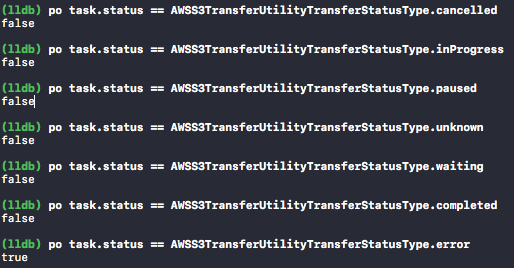
@cbommas Maybe this is a clue, I get the pending upload when I restart the app and the task status is AWSS3TransferUtilityTransferStatusType.error
pablogeek
on 27 Jul 2018
@pablogeek
Good to hear that you are seeing the tasks as you expected upon App restart. Can you provide the error details? It should be available in task.error. This will help in debugging this further.
cbommas
on 27 Jul 2018
@cbommas 'AWSS3TransferUtilityMultiPartUploadTask' has no member 'error'
pablogeek
on 27 Jul 2018
ah.. I see that it hasn't been exposed as part of the public interface. Lets try one more tack and see if that works - can you attach a completion handler to the task using the setCompletionHandler method? It should be called immediately with the error details and you can print the error details there.
cbommas
on 27 Jul 2018
@cbommas
let completionBlockUpload: AWSS3TransferUtilityMultiPartUploadCompletionHandlerBlock = {
            [weak self] _, error in
            DispatchQueue.main.async {
                if let e = error as NSError? {
                    print("Error: \(e.localizedDescription)")
                    self?.errorVideo(e, video: video)
                    return
                }
                self?.completeUpload(video: video)
            }
        }


AWSTransfer(video: video) { [weak self] transferUtility in

            transferUtility?.getMultiPartUploadTasks().continueOnSuccessWith(block: { (tasks) -> Any? in

                if let task = tasks.result?.firstObject as? AWSS3TransferUtilityMultiPartUploadTask {
                    task.setProgressBlock(expression.progressBlock!)
                    task.setCompletionHandler(completionBlockUpload)
                    task.resume()
                }
it does not call the completionBlockUpload
pablogeek
on 27 Jul 2018
@pablogeek
Let me think through this and get back to you. The code for setCompletionHandler calls the passed in completion handler immediately if the status is Completed or Error and I need to dig in to understand if we are missing an edge case or nuance.
Just to help debug this, can you try this experiment - set the setCompletionHandler code after the task.resume call and see if that makes it fire.
cbommas
on 27 Jul 2018
@cbommas
I did it this way
if let task = tasks.result?.firstObject as? AWSS3TransferUtilityMultiPartUploadTask {
                    task.setProgressBlock(expression.progressBlock!)
                    task.resume()
                    task.setCompletionHandler(completionBlockUpload)
                }
it still doesn't fire the completion block
pablogeek
on 27 Jul 2018
@cbommas okay it works but for some reason it doesn't work when I'm running the app from xcode. basically it doesn't work when the app is in debugging mode. If stop the app and run in normal mode it resumes
pablogeek
on 28 Jul 2018
@cbommas Also another bug is when it resumes the upload progress.totalUnitCount is always 0, but progress.completedUnitCount is okay
let expression = AWSS3TransferUtilityMultiPartUploadExpression()
        expression.progressBlock = { _, progress in
            NSLog("AWSS3TransferUtilityMultiPartUploadExpression progress")
            DispatchQueue.main.async(execute: {
                video.updateUploadProgress(progress.completedUnitCount, totalBytesExpectedToWrite: progress.totalUnitCount, speed: 0.0)
            })
        }
@pablogeek
Sorry for the delay in my response - regarding your post above, are you saying that the callback is being invoked when you are in normal mode?
Regarding the issue with the progress.totalUnitCount, the fix for this will be included in the next rev of the SDK.
cbommas
on 2 Aug 2018
@cbommas thanks for the update.
It doesnt start resuming if I’m in debug mode. In normal mode it resumes. I don’t mean the callback, I mean the whole functionality of resuming
pablogeek
on 2 Aug 2018
@pablogeek
The latest rev of the SDK (2.6.26) contains the fix for the progress.totalUnitCount issue. Please try this out and let us know how it goes.
I will continue to look into the callback issue.
cbommas
on 3 Aug 2018
@cbommas Thanks! it works really good now!
it is not a callback issue, basically if you run from debug mode (running the app from xcode) it won't resume, it will just start from 0% again.
pablogeek
on 3 Aug 2018
@pablogeek
Oh, good to hear! The reason why it sometimes starts from 0% is that the server will reject a resume on a paused transfer request depending on timing. I have empirically observed that if the transfer is resumed after 20-30s, it will start again from 0%.
When you are in debug mode, it is likely that enough time has elapsed between the pause and resume. I'll go ahead and close out this thread. Please feel free to reopen if you run into further issues.
cbommas
on 3 Aug 2018
@cbommas
I'm seeing now where some previously suspended tasks resume uploading and others don't (just stuck at 0%). This is even with making sure to try to resume within 20s. Note, the ones that don't resume don't start over, they just don't resume at all.
Also, I don't understand what you mean by the server is rejecting resumes if a task has been paused for more than 20-30s? What is the point of resuming a task if it must be done within 30s? The main scenario for it to get paused in the first place is the app getting terminated and in such a case it is unlikely the user will restart the app within 30s. Why am I going through the trouble of getting this resuming to work if it's just going to start from 0% if it's not done within 30s?
 jeffjvick
on 6 Aug 2018
jeffjvick
on 6 Aug 2018
Also, I don't understand what you mean by the server is rejecting resumes if a task has been paused for more than 20-30s? What is the point of resuming a task if it must be done within 30s? The main scenario for it to get paused in the first place is the app getting terminated and in such a case it is unlikely the user will restart the app within 30s. Why am I going through the trouble of getting this resuming to work if it's just going to start from 0% if it's not done within 30s?
I agree with this. However it does seem to resume even if app is closed for longer periods. @jeffjvick any clues as to why it would sometimes not resume? Ive found the chunks/resuming seem to vary from 5mb - 15mb so if you close too early it will resume from 0 as it might not have completed the first chunk
simeondrage
on 9 Aug 2018
@jeffjvick, @simeondrage
For non multipart uploads, I have observed that if you have a delay between pause and resume, the server rejects the request with a 400 Bad Request Request Timeout error. While I haven't seen any formal documentation about when this happens, I have seen it to occur after 20 to 30 seconds have elapsed. To account for this, there is logic to retry this transfer ( up to the retry limit), which restarts the transfer.
For multipart uploads, resume should work as per your expectations. Note that while the overall request to upload doesn't expire, each part that was in progress when it was paused will exhibit the same behavior as above and will be restarted. The parts that were already fully uploaded, however, do not need to be retransmitted.
@jeffjvick
Regarding the choppy behavior you are seeing, are all of these happening in the app-restart scenario? I will run some tests on my side and investigate this further.
cbommas
on 9 Aug 2018
@cbommas @simeondrage
So after some more testing I can confirm now that when it does resume, whichever parts had finished will not start over and if you don’t resume “quick enough”, the parts in progress will not pick up were they left off.
I’m okay with this behavior. I was getting confused in my testing because it seems I have a separate issue where the uploads sometimes won’t resume at all. The behavior is inconsistent though so I’m having a hard time figuring out the steps to predictively reproduce. It is only on app restart but that’s also the only time I do resumes (we don’t have a way to pause uploads).
It seems to work fine after a fresh install of the app but after trying the same file multiple times it domes resuming and then all future tries don’t work. I need to do more testing.
jeffjvick
on 10 Aug 2018
@jeffjvick I've tried to replicate the issue and haven't been able to
I hard quit the app about 4 times, then hard reset the device, throttled the bandwidth to 500mbps then quit the app for 15 minutes. After each test the file kept uploading.
Did you get any further finding reproduction steps?
I have encountered this issue however: https://github.com/aws/aws-sdk-ios/issues/1015
simeondrage
on 14 Aug 2018
@simeondrage
Are you calling .suspend() on each AWSS3TransferUtilityMultiPartUploadTask in applicationWillTerminate? This is what I was doing as I was under the impression we were required to do this ourselves as per: https://docs.aws.amazon.com/aws-mobile/latest/developerguide/how-to-transfer-files-with-transfer-utility.html#native-background-transfers.
I tested out not doing that and now I am no longer having issues with the transfers not resuming after restarting the app. I'm thinking this may be a case where things that we previously had to do on our own are now being taken care of for us and 'redundantly' doing them is causing errors. @cbommas can you comment on this?
And yes, I am now seeing #1015. The task status will say completed but it has not.
jeffjvick
on 16 Aug 2018
@jeffjvick I spoke to @pablogeek who is our developer. He says "we are not calling suspend(), the AWS manual says, you should call suspend when you want to pause an upload when you go to background for example"
Hope that helps
simeondrage
on 16 Aug 2018
@simeondrage @pablogeek
I told @cbommas back in June 12 that I was suspending all running tasks in appWillTerminate as per here: https://github.com/aws/aws-sdk-ios/issues/769#issuecomment-404652481 and he later wrote In any case, your strategy of suspending all transfers when applicationWillTerminate will enable you to fully control this as you see fit.. I took this to mean I was supposed to do that. It's possible something we previously needed to do ourselves has been integrated into the SDK (this has happened multiple times).
Regardless though, I'm hitting your same #1015 with the resumes stoping early so it's pointless if they now consistently resume, they don't finish correctly. I see back in June I said I would just abandon trying to resume and now I'm going to take my advice and actually abandon trying to get this to work.
jeffjvick
on 16 Aug 2018
@jeffjvick
Apologies if my earlier comment caused confusion. I was responding to your point _"Honestly though I'm considering not using this since if a user force quits the app or powers off their phone while uploading they shouldn't really expect it to continue where they left off and as long as I'm not a memory hog I shouldn't get terminated while in the background"_ My intent was to say that you _can_ pause all transfers upon app close and resume all transfers after app start, but you don't _have to_. As you are seeing, the sdk will take care of this for you.
Pausing a transfer will not cause any issues ( apart from the server timeout we discussed earlier) and resuming will work. Also, I am not sure if there is definitive guidance from the iOS side that the applicationWillTerminate will always be called - something for you to consider is to look at the status of the transfer and only issue a resume on a transfer it is in the paused status. I will add some logic in the SDK to noop redundant calls to resume/pause
That said, I think your overall point is valid. The documentation for the TransferUtility is out of date and is causing confusion and I will take steps on my side to get that addressed.
And finally, #1015 is definitely a bug that is causing the resumes to stop early for multi-part transfers. In the testing I've done, this is only occurring for the app-restart scenario. I am actively working to get that fixed.
cbommas
on 16 Aug 2018
@cbommas
No problem. I think the main thing is it's hard to know / keep track of what we need to do vs what the SDK does for us, especially since the changes are not being documented and the examples are not updated.
There definitely were issues caused by me pausing tasks in applicationWillTerminate. It would often result in me not being able to resume them when the app restarted. I'm not going to further debug it though.
jeffjvick
on 17 Aug 2018
@jeffjvick
Sounds good. I will loop back on this thread once the doc updates have been made and the bug has been fixed.
cbommas
on 17 Aug 2018
This issue has been automatically marked as stale because it has not had recent activity. It will be closed if no further activity occurs. Thank you for your contributions.
![stale[bot] picture](https://avatars3.githubusercontent.com/in/1724?v=4&s=40) stale[bot]
on 16 Sep 2018
stale[bot]
on 16 Sep 2018
Lets track this in https://github.com/aws/aws-sdk-ios/issues/769.
cbommas
on 24 Sep 2018
Related issues
 ChrisInspect
·
4Comments
ChrisInspect
·
4Comments
 mohab2014
·
4Comments
mohab2014
·
4Comments
 cornr
·
4Comments
cornr
·
4Comments
 premiumbosslimited
·
3Comments
premiumbosslimited
·
3Comments
 bradgmueller
·
5Comments
bradgmueller
·
5Comments
Most helpful comment
@kvasukib Hello :) Any news on this? I appreciate your help!