Aws-sdk-android: Passwordless Custom Auth flow
Hi all,
I'm having an issue when attempting sign in doing a custom auth flow for passwordless sign in.
I followed the docs here: https://aws-amplify.github.io/docs/android/authentication#custom-authentication-in-amplify
I got a awsconfiguration.json exactly like the one there, with those two sections including the custom part.
My issue is that when I attempt sign in, with a dummy password as it says there, the onError method gets called, with error code InvalidParameterException and message: USER_SRP_AUTH is not enabled for the client.
I assume this is because I'm sending a dummy password, but there is no way to NOT send a password right? and the doc says I should send a dummy password. Is there anything else I'm missing? does anyone know why that error specifically could be happening in a passwordless scenario?
These are my gradle imports:
implementation 'com.amazonaws:aws-android-sdk-core:2.16.3'
implementation 'com.amazonaws:aws-android-sdk-appsync:2.8.+'
implementation 'com.amazonaws:aws-android-sdk-cognitoidentityprovider:2.13.2'
I've only tried on a Pixel 2 with Android 9.
Thanks in advance for the help!
 ximenaperez
All 23 comments
@ximenaperez Thanks for reaching out. Can you share your user pool settings?
 desokroshan
on 19 Nov 2019
desokroshan
on 19 Nov 2019
Hi @desokroshan
I have moved forward with this issue a little bit, but still not getting it to work properly. I noticed that I was missing a few dependencies, and after updating my dependencies to the latest versions and adding a user pool dependency, the sign in worked.
My issue now is that the sign in returns SIGNINSTATE = DONE, when it should be CUSTOM_CHALLENGE. After adding logs on the lambda functions, particularly the define one, I was able to compare a web client that is working correctly versus my Android SDK client that it's not (both using the same lambda functions).
The main difference, is that when we log the SESSION object, the web client has an empty session when attempting sign in, like this:
a3083668-289d-4456-8528-d9e8de338691 INFO []
but the Android one (same user even) shows this:
064b13bf-9199-47fc-9399-527c1fc05de8 INFO [ { challengeName: 'SRP_A',
challengeResult: true,
challengeMetadata: null } ]
That means that by having that challenge name SRP_A, on the lambda function, it goes through a different (if) than the web client and it does not return the CUSTOM CHALLENGE I want.
Given that I'm supposedly doing the same sign in as provided by the documentation for custom auth flow, I don't understand why they're behaving differently. They are from the same user pool and it's even the very same exact user I've attempted the logins with, so I don't think the problem lies there.
These are my dependencies:
implementation ('com.amazonaws:aws-android-sdk-cognitoauth:2.16.+@aar') { transitive = true }
implementation 'com.amazonaws:aws-android-sdk-core:2.16.3'
implementation 'com.amazonaws:aws-android-sdk-appsync:2.10.1'
implementation 'com.amazonaws:aws-android-sdk-cognitoidentityprovider:2.16.3'
implementation ('com.amazonaws:aws-android-sdk-mobile-client:2.16.3') { transitive = true }
implementation ('com.amazonaws:aws-android-sdk-auth-userpools:2.16.3') { transitive = true }
I also have the custom_auth defined on the awsconfiguration.json, and this is my signIn method:
fun signIn(username: String) {
AWSMobileClient.getInstance().signIn(username, "dummypass", null, object : com.amazonaws.mobile.client.Callback
        override fun onResult(signInResult: SignInResult) {
            runOnUiThread {
                run {
                    Log.d("APP", "Sign-in callback state: " + signInResult.signInState)
                    when (signInResult.signInState) {
                        SignInState.DONE -> {
                            Log.d("DONE", "Sign-in done.")
                            Log.d("username", AWSMobileClient.getInstance().username)
                            Log.d("is signed in", AWSMobileClient.getInstance().isSignedIn.toString())
                       //     Log.d("identity id", AWSMobileClient.getInstance().identityId)
                            AWSMobileClient.getInstance().signOut()
                            bus.post(SignUpSuccessfullyEvent())
                        }
                        SignInState.SMS_MFA -> Log.d("SMS MFA", "Please confirm sign-in with SMS.")
                        SignInState.CUSTOM_CHALLENGE -> confirmSignIn()
                        else -> Log.d("ELSE", "Unsupported sign-in confirmation: " + signInResult.signInState)
                    }
                }
            }
        }

        override fun onError(e: Exception) {
            Log.d("ERRORRR SIGN IN", "Sign-in error")
        }
    })
}
The sign up should be irrelevant because it's the same user attempting login on both scenarios.
Thanks!
ximenaperez
on 21 Nov 2019
We're passing for a similar problem before we had also the problem in getting authenticated straight, it doesn't matter the password we sent. We just did an adjust on how we define the auth challenge on the server-side and fixed the problem.
But now the problem is by sending the SRP_A the server responds with Incorrect username or password. We never had a password and the way we do login right now is direct with the cognito pool sdk and on getAuthenticationDetails methods we create an instance from AuthenticationDetails using the constructor that has no password AuthenticationDetails(String userId, Map<String, String> authenticationParameters,
Map<String, String> validationData)
The problem is we don't have a method on AwsMobileClient that does a sign in without a password, so on the getAuthenticationDetails callback you guys always create a AuthenticationDetails object calling the constructor that has a password and the description is pretty clear
Constructs a new object for custom authentication that starts with SRP protocol.
The first to challenges to be answered are SRP_A and PASSWORD_VERIFIER.
Our server is waiting a request that says we gonna do a CUSTOM_CHALLENGE, but what we send is SRP_A
"session": [
            {
                "challengeName": "SRP_A",
                "challengeResult": true,
                "challengeMetadata": null
            }
        ]
 adrianolc
on 26 Nov 2019
adrianolc
on 26 Nov 2019
I'm suffering the same issue on Android. Sign in returns SIGNINSTATE = DONE, when it should be CUSTOM_CHALLENGE ....
 oenayet
on 27 Nov 2019
oenayet
on 27 Nov 2019
@oenayet @ximenaperez @adrianolc I wanted to verify your userpool settings before I go deeper with the issue. What is the Auth flow configuration for you App Client. Auth flow configuration should be ALLOW_CUSTOM_AUTH :
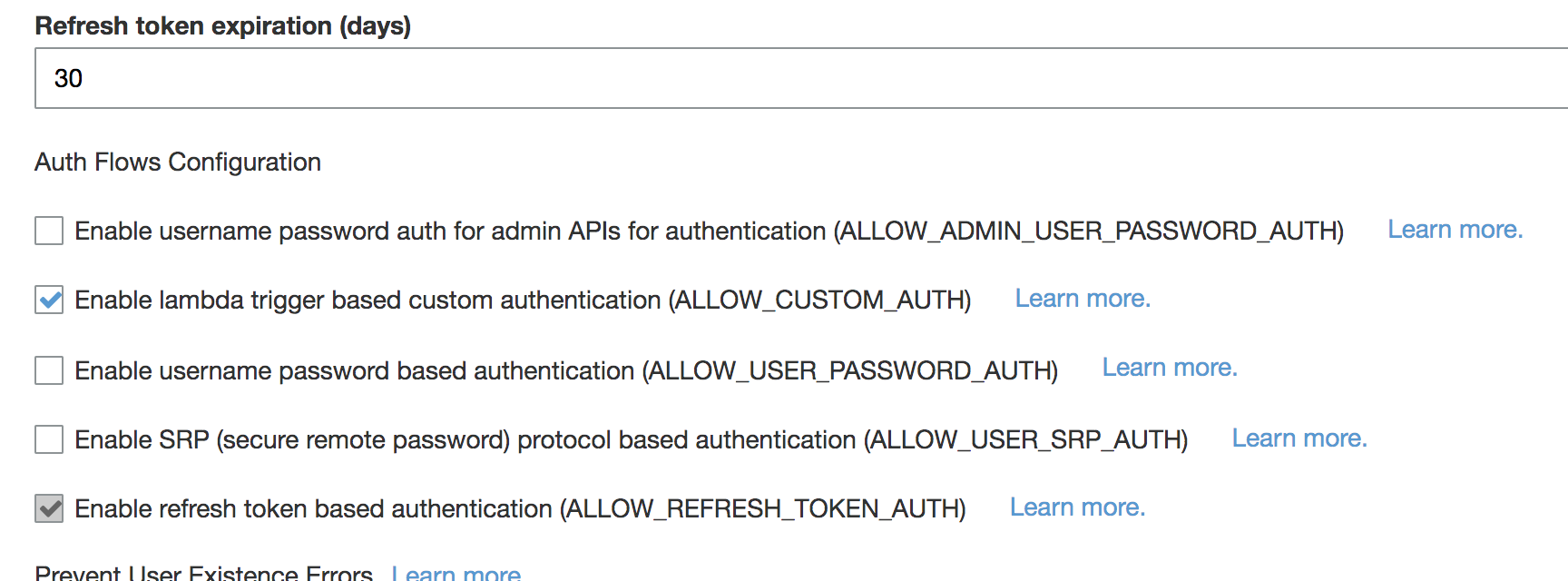
Do you have you lambdas setup appropriately? Did you use cli to generate the lambda or did you hand-write them?
desokroshan
on 27 Nov 2019
@desokroshan Here are my settings.
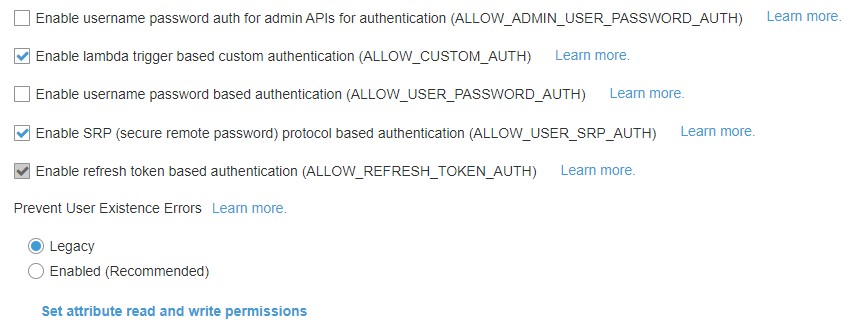
I generated the lambdas using both CLI client and using a serverless AWS application:
https://console.aws.amazon.com/lambda/home?region=us-east-1#/create/app?applicationId=arn:aws:serverlessrepo:us-east-1:552623489034:applications/amplify-passwordless-sms-auth
oenayet
on 27 Nov 2019
Hi @desokroshan , my userpool settings look exactly like the ones you posted.
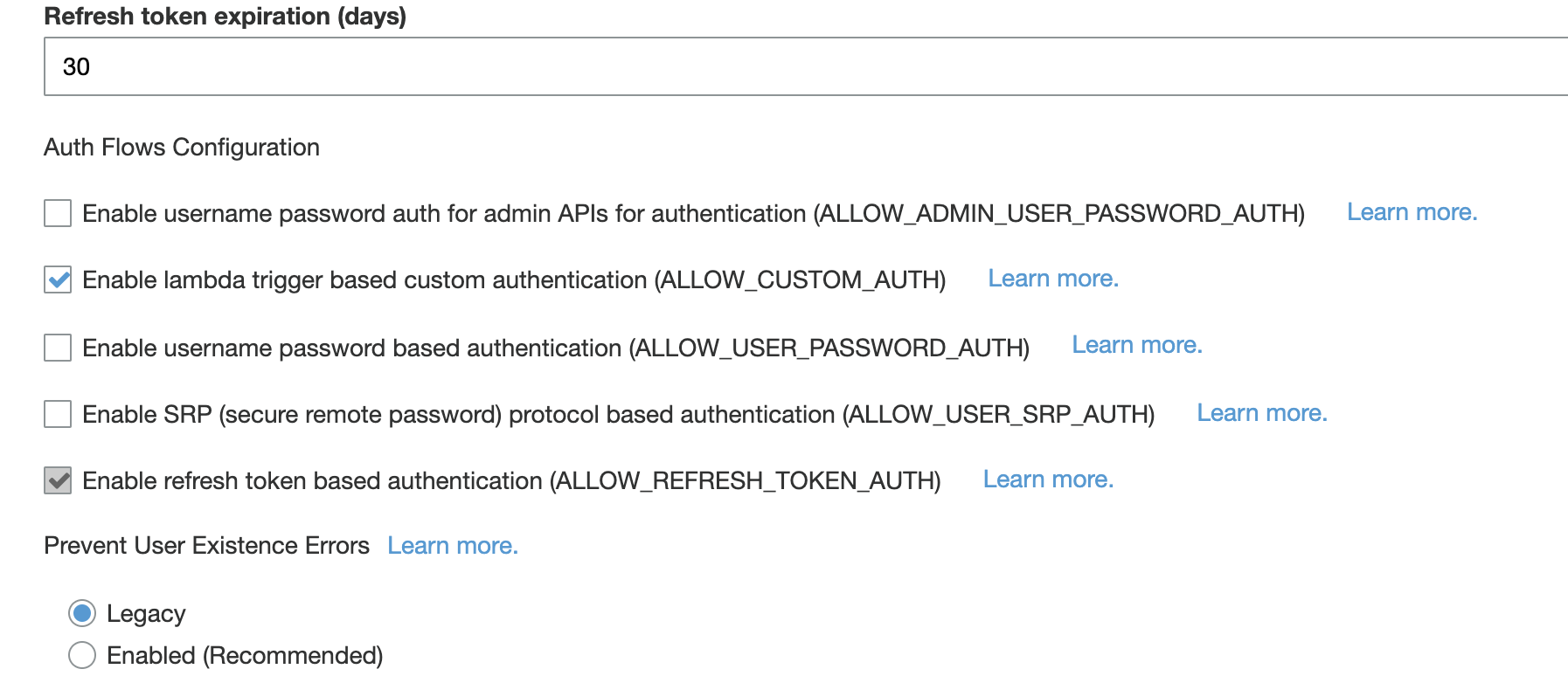
The lambdas are set up appropriately I think. I didn't write them myself but they are handwritten by another developer, and he tested them with a javascript custom auth client and it works correctly in that case. It just doesn't work with Android or iOS clients.
ximenaperez
on 27 Nov 2019
Great, thanks for the confirmation. I'll dig further.
desokroshan
on 27 Nov 2019
@desokroshan or config is also like you asked and we handwritten also the lambda. We're using cognito since the begin of the Project, this May, but using directly the CognitoUserPool, it's working fine since then.
As I said, I had also the problem with SIGNINSTATE = DONE we solve it changing the lambda, but now we get an exception saying Incorrect username or password as we don't use password the lambda expect we pass CUSTOM_CHALLENGE and the SDK is sending SRP_A on the session request
sorry for the late message
adrianolc
on 29 Nov 2019
@ximenaperez Did you find the solution for this?
I am facing two issues with this which are:
I have written a Lambda pre-authentication trigger to validate if the user is already existing in the database (RDS) or not. But when I try to sign in, this lambda method does not invoke.
Second is when I sign in using the CustomAuthFlow calling method AWSMobileClient.getInstance().confirmSignIn() the first time, it allows me to sign in without any issue. Thereafter when I sign out and try to sign in again, it trigger the lambda service Define auth challenge and Create auth challenge twice.
 poora-best
on 5 Dec 2019
poora-best
on 5 Dec 2019
@poora-best I haven't. I believe it's a bug somewhere because I'm having the same issue in iOS, and no one seems to have answers. I just tried doing a workaround in the lambdas that when I get SRP_A, I change it to what I want and then my sign up/sign in with confirmation works fine. But still waiting for a proper solution.
ximenaperez
on 5 Dec 2019
@ximenaperez Can you post your lambdas ?
Thanks
poora-best
on 5 Dec 2019
@poora-best sorry, I did not do that part myself. I know the workaround was something like that but I don't have access to the lambdas at the moment. The issue was always that when we were expecting an empty session, we were getting a session object with SRP_A, so when we got a session object like that we would just set it to null or something like that.
ximenaperez
on 5 Dec 2019
@ximenaperez Ok
poora-best
on 6 Dec 2019
@ximenaperez Sorry about the delay. Would you mind sharing your lambdas here and stack trace. I have not been able to reproduce the issue on my end. I suspect it has something to do with the Auth Flow definition. Here is a sample Define Auth Challenge lambda for passwordless sign-in that works seamlessly for me :
exports.handler = function(event, context) {
    if (event.request.session.length == 1 && event.request.session[0].challengeName == 'SRP_A') {
        event.response.issueTokens = false;
        event.response.failAuthentication = false;
        event.response.challengeName = 'CUSTOM_CHALLENGE';
    } else if (event.request.session.length == 2 && event.request.session[1].challengeName == 'CUSTOM_CHALLENGE' && event.request.session[1].challengeResult == true) {
        event.response.issueTokens = true;
        event.response.failAuthentication = false;
        event.response.challengeName = 'CUSTOM_CHALLENGE';
    } else {
        event.response.issueTokens = false;
        event.response.failAuthentication = true;
    }
    context.done(null, event);
}
In this Auth challenge definition, first is SRP_A where Cognito validates the username that is passed. When the username is successfully, user answers a custom challenge. If the custom challenge is validated the user is successfully signed-in.
Following are the sign-in and confirm sign-in code that I used :
If possible please share you define auth lambda and detailed stacktrace to help with further debugging.
desokroshan
on 6 Dec 2019
@desokroshan I gonna check with the backend developers here our Define Auth Challenge. Then I gonna write back here.
Thanks
adrianolc
on 10 Dec 2019
Hi @desokroshan!
So, I verify the Auth Definition lambda with our backend developer we didn't have the "SRP_A" verification there. We add this validation and tried again, but still getting 'Incorrect username or password`.
We saw the logs and seems that the Lambda is sending the right response, but still, the SDK or cognito throws this exception.
Request/Response
{
    "version": "1",
    "region": "",
    "userPoolId": "",
    "userName": "",
    "callerContext": {
        "awsSdkVersion": "aws-sdk-android-2.16.3",
        "clientId": ""
    },
    "triggerSource": "DefineAuthChallenge_Authentication",
    "request": {
        "userAttributes": {
            "sub": "78e969d7-1754-4a75-9948-81cc30c1a7ab",
            "cognito:user_status": "CONFIRMED",
            "phone_number_verified": "true",
            "cognito:phone_number_alias": "+4916200000001",
            "phone_number": "+4916200000001",
            "dev:custom:legacyToken": "false"
        },
        "session": [
            {
                "challengeName": "SRP_A",
                "challengeResult": true,
                "challengeMetadata": null
            }
        ]
    },
    "response": {
        "challengeName": "CUSTOM_CHALLENGE",
        "issueTokens": false,
        "failAuthentication": false
    }
}
Exception:
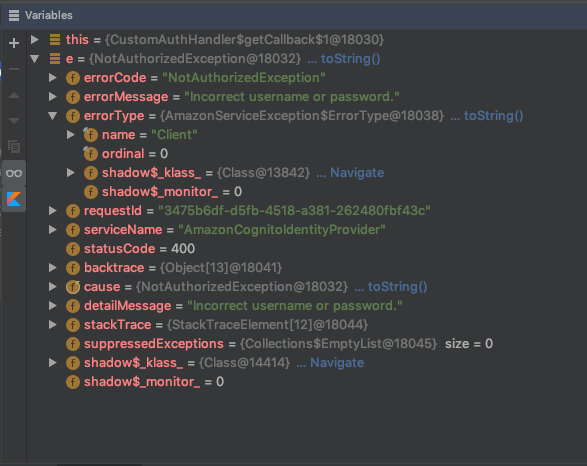
adrianolc
on 11 Dec 2019
@adrianolc Are you using this the updated lambda with the current SDK as is or are you using it with your changes in https://github.com/aws-amplify/aws-sdk-android/pull/1334?
desokroshan
on 14 Dec 2019
@desokroshan I'm not using my changes. Try to use the current SDK and for live app using directly CognitoUserPool
adrianolc
on 17 Dec 2019
@adrianolc Thanks for the clarification. I would recommend using AWSMobileClient instead of CognitoUserPool SDK directly with the Lambda I shared above. I expect it to work seamless. Please let me know if doesn't work for you.
desokroshan
on 18 Dec 2019
@adrianolc Were you able to get this working? The passwordless custom auth currently requires dummy password and the define auth challenge lambda trigger should have SRP_A as the first challenge as demonstrated in the following docs : https://aws-amplify.github.io/docs/android/authentication#lambda-trigger-setup. Please let us know if you continue to face issues.
desokroshan
on 24 Jan 2020
This issue has been automatically closed because of inactivity. Please open a new issue if are still encountering problems.
![stale[bot] picture](https://avatars3.githubusercontent.com/in/1724?v=4&s=40) stale[bot]
on 31 Jan 2020
stale[bot]
on 31 Jan 2020
I was having the same issue but turns out I had commented out the call to initialize the AWSMobileClient, which is necessary in order to do this. Cheers!
 CodingAleCR
on 31 Mar 2020
CodingAleCR
on 31 Mar 2020
Related issues
 osugikoji
·
4Comments
osugikoji
·
4Comments
 yairkukielka
·
3Comments
yairkukielka
·
3Comments
 bobguy1234
·
3Comments
bobguy1234
·
3Comments
 shabana0508
·
3Comments
shabana0508
·
3Comments
 chorniyn
·
3Comments
chorniyn
·
3Comments