Aws-sam-cli: SAM local commands misbehave for CDK Templates synthesized in PowerShell
Description
Operating on a Windows machine and using a Powershell terminal, when a user synthesizes a template from an AWS-CDK application, the output template does not behave as expected when invoking sam local commands.
Steps to reproduce
- Open a Powershell terminal
- Set the default out file encoding to utf8. See #1628 for details.
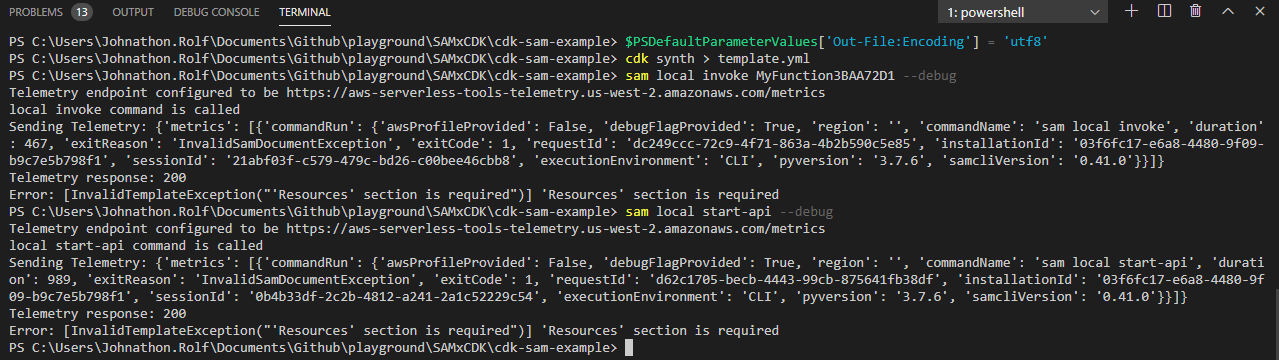
> $PSDefaultParameterValues['Out-File:Encoding'] = 'utf8' - Synthesize a template from a CDK application.
> cdk synth > template.yml - Invoke a sam local command
> sam local invoke MyFunction3BAA72D1 --debug
Observed result
The sam local commands fail with the error message
Error: [InvalidTemplateException("'Resources' section is required")] 'Resources' section is required
Expected result
I expected the lambda function to be executed in a container.
Additional environment details (Ex: Windows, Mac, Amazon Linux etc)
- OS: Windows 10 Enterprise
sam --version: 0.41.0- node: 12.14.1
- python 3.6.5
Interestingly when I synthesized the template from Git Bash instead of PowerShell, the sam local commands appeared to work as expected.

 JMRolf-Spok
All 5 comments
Have you checked for the line endings?
Can you open the same file in notepad++ maybe, and convert line ending to LF
 sriram-mv
on 11 Feb 2020
sriram-mv
on 11 Feb 2020
@sriram-mv yeah I tried that. In VS Code I switched the line endings from CRLF to just LF, but the result was the same.
Error: [InvalidTemplateException("'Resources' section is required")] 'Resources' section is required
JMRolf-Spok
on 11 Feb 2020
Any update on this?
I get the following error when synthesizing a CDK template to be consumed by AWS SAM with Powershell via VSCode (on Win10)
Error: Failed to parse template: unacceptable character #x0000: special characters are not allowed
  in "<unicode string>", position 3
Works fine running the same commands in command prompt
SAM version : 0.49.0
CDK version: 1.51.0
 conork-datacom
on 15 Jul 2020
conork-datacom
on 15 Jul 2020
Possible Causes:
Error: [InvalidTemplateException("'Resources' section is required")] 'Resources' section is required
UTF-8 BOM is included in the first line with "Resources".
The section name becomes "0xEF 0xBB 0xBF Resources:".
Error: Failed to parse template: unacceptable character #x0000: special characters are not allowed in "
Template is encoded in UTF-16 instead of UTF-8
 CoshUS
on 29 Jul 2020
CoshUS
on 29 Jul 2020
Any update on this?
I get the following error when synthesizing a CDK template to be consumed by AWS SAM with Powershell via VSCode (on Win10)
I had the same issue. I have been able to fix this in VS Code by installing a newer version of Powershell (I had version 5 on Win10) and changing the version of Powershell used by VS Code.
The issue (as I have understood it) is that Powershell 5 doesn't have the option to use utf8 with no BOM when redirecting output to a file. ">" is actually the same as using | Out-File in Powershell:
Use redirection operators (>, >>, 2>, 2>>, and 2>&1) to send the output of a command or expression to a text file. The redirection operators work like the Out-File
(from here: https://docs.microsoft.com/en-us/powershell/module/microsoft.powershell.core/about/about_operators?view=powershell-7)
And looking at the docs you can see that in version 5 default value for -Encoding is unicode (https://docs.microsoft.com/en-us/powershell/module/microsoft.powershell.utility/out-file?view=powershell-5.1):
unicode Uses UTF-16 with the little-endian byte order.
And there is no option for utf8 with no BOM.
In VS Code you can see UTF-16 LE in the blue bar at the bottom right if template.yaml has incorrect encoding. It will work to change the encoding in VS Code for this file, but then you have to do this manually every time. I tend to like having the correct behavior automatically by default.
So here is what I did:
Start by downloading version 6 or 7 (both have option to use utf8 with no BOM) from here: https://github.com/PowerShell/PowerShell
When in VS Code, go to File > Preferences > Settings. Type "powershell" in the searchbar to filter settings related to Powershell. Then look for Powershell Additional Exe Paths and click "edit settings.json". Make sure it contains this (or the path to where you have installed Powershell 6/7):
"powershell.powerShellAdditionalExePaths": [
        {
            "exePath": "C:\\Program Files\\PowerShell\\7\\pwsh.exe",
            "versionName": "PowerShell 7"
        }
    ],
    "powershell.powerShellDefaultVersion": "PowerShell 7",
    "terminal.integrated.shell.windows": "C:\\Program Files\\PowerShell\\7\\pwsh.exe"
The last line is added to make Terminal select Powershell 7 by default. After this I have been able to create template.yaml like this:
cdk synth --no-staging | Out-File -FilePath template.yaml -Encoding utf8NoBOM
or simply:
cdk synth --no-staging > template.yaml
since Powershell 7 uses utf8NoBOM by default.
 jorgenfroland
on 2 Sep 2020
jorgenfroland
on 2 Sep 2020
Related issues
 dinvlad
·
27Comments
dinvlad
·
27Comments
 walkerlangley
·
41Comments
walkerlangley
·
41Comments
 alanchavez88
·
53Comments
alanchavez88
·
53Comments
 matheusmaximo
·
30Comments
matheusmaximo
·
30Comments
 sanathkr
·
37Comments
sanathkr
·
37Comments