Aws-sam-cli: Error: PythonPipBuilder:ResolveDependencies - {pyodbc==4.0.27(sdist)}
Error Installing python pyodbc package in aws sam. (cmd used: sam build --use-container)
Error:
Build Failed
Error: PythonPipBuilder:ResolveDependencies - {pyodbc==4.0.27(sdist)}
Details:
Python Version: 3.6
sam version: SAM CLI, version 0.31.0
aws cli version: aws-cli/1.16.251
pip install pyodbc works, but when I include pyodbc in requirements.txt and run sam build --use-container it errors out.
Any comments or fixes to solve this issue
 thanuj11
All 19 comments
This is interesting, when building within the container we look for manylinux wheels. can you reproduce on a normal sam build as well?
 sriram-mv
on 26 Nov 2019
sriram-mv
on 26 Nov 2019
I tried using sam build, but sam build also failed
command: sam build
Build Failed
Error: PythonPipBuilder:ResolveDependencies - {pyodbc==4.0.27(wheel)}
thanuj11
on 26 Nov 2019
@thanuj11 pyodbc does not have linux wheels, so we have to build from source. I would assume this is the part that is failing (some missing dependency or something?). The path forward I can think of is to manually build it and vendor the dependency directly or place it in a layer that you can use.
 jfuss
on 26 Nov 2019
jfuss
on 26 Nov 2019
@jfuss, yes, It is not able to find Linux wheels for pyodbc. I will try to build manually and use it as a layer.
Thanks.
thanuj11
on 26 Nov 2019
I've built pyodbc and trying to attach as lambda layer, but I always get these two errors:
ImportError: libodbc.so.2: cannot open shared object file: No such file or directory
or this
AttributeError: module 'pyodbc' has no attribute 'paramstyle'
Here's he layer
pyodbc.zip
Thanks in advance!
 plantusd
on 1 Dec 2019
plantusd
on 1 Dec 2019
@plantusd I am not sure what's going on. Do you need to modify LD_LIBRARY_PATH env vars to point to .so files in the layer?
 sanathkr
on 9 Dec 2019
sanathkr
on 9 Dec 2019
I was able to get pyodbc working by using alexanderluiscampino's layer here.
 Mike-Nahmias
on 20 Dec 2019
Mike-Nahmias
on 20 Dec 2019
I was able to get pyodbc working by using alexanderluiscampino's layer here.
@Mike-Nahmias How did you setup your project?
 danyags
on 20 Dec 2019
danyags
on 20 Dec 2019
@danyags The pyodbc folder I linked to is in the root of my project and then I add it as a layer in my template:
Resources:
  pyodbcLayer:
    Type: AWS::Serverless::LayerVersion
    Properties:
      LayerName: pyodbcLayer
      Description: Layer containing pyodbc and SQL driver, as sam build failed to compile
      ContentUri: pyodbc/
      CompatibleRuntimes: [python3.7]
@Mike-Nahmias I downloaded the file, pyodbc folder is in the root of my project, but I'm getting an error: No module named 'pyodbc'.
my template.yaml file is as below
AWSTemplateFormatVersion: '2010-09-09'
Transform: AWS::Serverless-2016-10-31
Description: >
sam-app
Sample SAM Template for sam-app
More info about Globals: https://github.com/awslabs/serverless-application-model/blob/master/docs/globals.rst
Globals:
Function:
Timeout: 3
Resources:
pyodbcLayer:
Type: AWS::Serverless::LayerVersion
Properties:
LayerName: pyodbcLayer
Description: Layer containing pyodbc and SQL driver, as sam build failed to compile
ContentUri: pyodbc/
CompatibleRuntimes: [python3.7]
HelloWorldFunction:
Type: AWS::Serverless::Function # More info about Function Resource: https://github.com/awslabs/serverless-application-model/blob/master/versions/2016-10-31.md#awsserverlessfunction
Properties:
CodeUri: hello_world/
Handler: app.lambda_handler
Runtime: python3.7
Events:
HelloWorld:
Type: Api # More info about API Event Source: https://github.com/awslabs/serverless-application-model/blob/master/versions/2016-10-31.md#api
Properties:
Path: /hello
Method: get
Outputs:
# ServerlessRestApi is an implicit API created out of Events key under Serverless::Function
# Find out more about other implicit resources you can reference within SAM
# https://github.com/awslabs/serverless-application-model/blob/master/docs/internals/generated_resources.rst#api
HelloWorldApi:
Description: "API Gateway endpoint URL for Prod stage for Hello World function"
Value: !Sub "https://${ServerlessRestApi}.execute-api.${AWS::Region}.amazonaws.com/Prod/hello/"
HelloWorldFunction:
Description: "Hello World Lambda Function ARN"
Value: !GetAtt HelloWorldFunction.Arn
HelloWorldFunctionIamRole:
Description: "Implicit IAM Role created for Hello World function"
Value: !GetAtt HelloWorldFunctionRole.Arn
danyags
on 23 Dec 2019
@danyags I think you forgot to add the layer to your function. Sorry, I didn't make that clear. It should look something like this:
Resources:
  pyodbcLayer:
    Type: AWS::Serverless::LayerVersion
    Properties:
      LayerName: pyodbcLayer
      Description: Layer containing pyodbc and SQL driver, as sam build failed to compile
      ContentUri: pyodbc/
      CompatibleRuntimes: [python3.7]

  HelloWorldFunction:
    Type: AWS::Serverless::Function
    Properties:
      CodeUri: hello_world/
      Handler: app.lambda_handler
      Runtime: python3.7
      Layers:
        - !Ref pyodbcLayer
      Events:
        HelloWorld:
          Type: Api
          Properties:
            Path: /hello
            Method: get
@Mike-Nahmias I got a new error...According to your message, my template.yaml file looks as below:
`Resources:
pyodbcLayer:
Type: AWS::Serverless::LayerVersion
Properties:
LayerName: pyodbcLayer
Description: Layer containing pyodbc and SQL driver, as sam build failed to compile
ContentUri: pyodbc/
CompatibleRuntimes: [python3.7]
HelloWorldFunction:
Type: AWS::Serverless::Function
Properties:
CodeUri: hello_world/
Handler: app.lambda_handler
Runtime: python3.7
Layers:
- !Ref pyodbcLayer
Events:
HelloWorld:
Type: Api
Properties:
Path: /hello
Method: get`
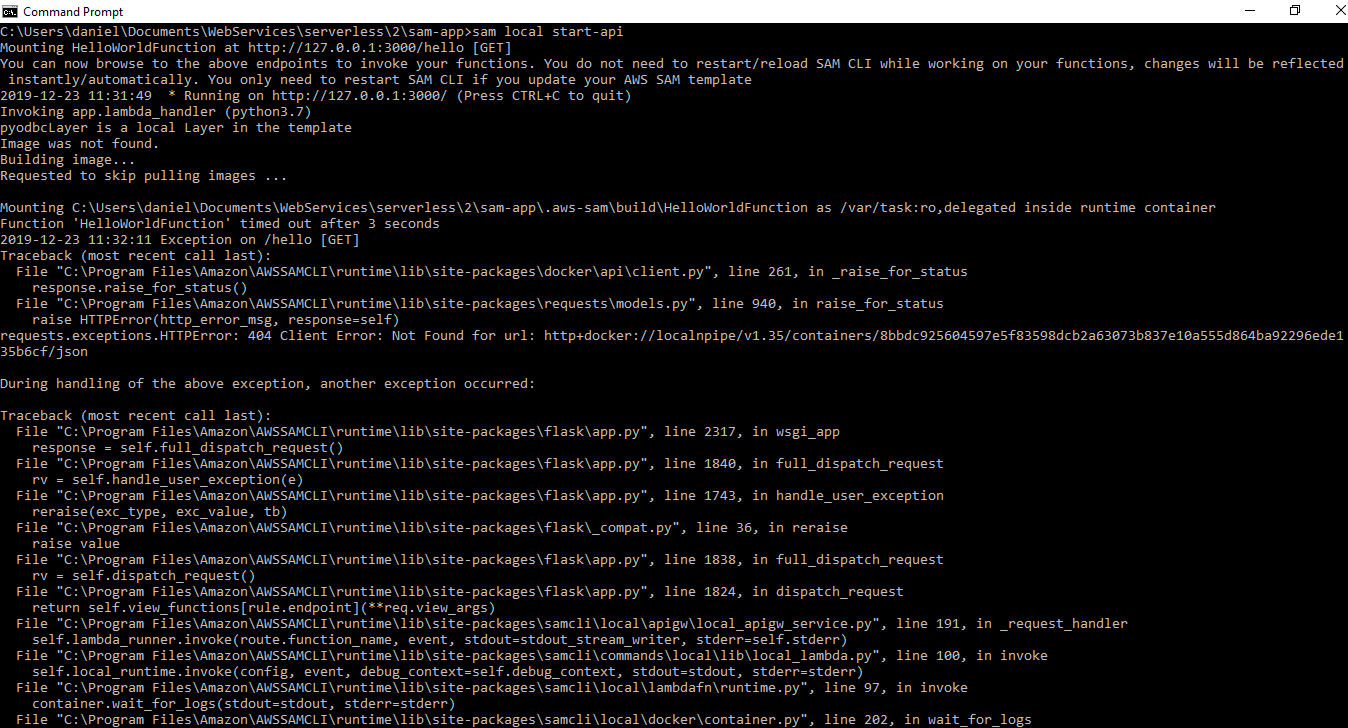
danyags
on 23 Dec 2019
@danyags I'm not sure, it works for me. Are you able to run the default hello-world app without the layer? The error makes me thing that would fail too. Did you run sam build before sam local start-api? Did you do the shared drive configuration when installing docker as described here?
Mike-Nahmias
on 23 Dec 2019
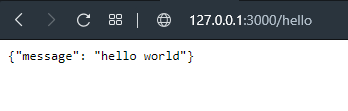
@Mike-Nahmias I had the configuration of dokcer as the links says, I run the build command before to start api.
If I run the function without layer configuration the result is OK
danyags
on 23 Dec 2019
If anyone is still after an answer for this:
pip install wheel fixed it for me, without having to use --use-container.
Longer explanation: aws-lambda-builders which is in control of the pip download process looks for linux compatable wheels for each dependency. For those where it only has the sdist (basically raw code) it attempts to build a wheel, and for that it requires the wheel package. If you don't have it installed you'll get this hard to debug error.
 djm
on 1 Feb 2020
djm
on 1 Feb 2020
Closing as original query has been answered.
sriram-mv
on 10 Feb 2020
@djm I made sure wheel is installed and my build still fails.
Mike-Nahmias
on 10 Feb 2020
+1
 aaronlelevier
on 14 Feb 2020
aaronlelevier
on 14 Feb 2020
@Mike-Nahmias do you have a repo with the folder structure? im still getting import errors after copying the folder into my root directory.
 mpeckdsd
on 3 Jun 2020
mpeckdsd
on 3 Jun 2020
Related issues
 red8888
·
3Comments
red8888
·
3Comments
 zhangzhx
·
3Comments
zhangzhx
·
3Comments
 asyba
·
3Comments
asyba
·
3Comments
 chestongo
·
3Comments
chestongo
·
3Comments
 cvuijst
·
3Comments
cvuijst
·
3Comments
Most helpful comment
If anyone is still after an answer for this:
pip install wheelfixed it for me, without having to use--use-container.Longer explanation: aws-lambda-builders which is in control of the
pipdownload process looks for linux compatable wheels for each dependency. For those where it only has thesdist(basically raw code) it attempts to build a wheel, and for that it requires thewheelpackage. If you don't have it installed you'll get this hard to debug error.