Aws-sam-cli: Windows 7 and sam-local Error pining docker
I download the docker toolkit enabled the virtualization in bios.I have setup docker to use virtual box.
. I installed the aws-sam-local and used a sample template.yml to run api-gateway. I am getting below error. What can I do to overcome this ?
C:\Users\user>sam local start-api
2017/10/04 11:26:28 Running AWS SAM projects locally requires Docker. Have you got it installed?
2017/10/04 11:26:28 error during connect: Get http://%2F%2F.%2Fpipe%2Fdocker_engine/_ping: open //./pipe/docker_engine: The system cannot find the file specified. In the default daemon
configuration on Windows, the docker client must be run elevated to connect. This error may also indicate that the docker daemon is not running.
template.yml
AWSTemplateFormatVersion : '2010-09-09'
Transform: AWS::Serverless-2016-10-31
Description: |
An example RESTful service
Resources:
ExampleFunction:
Type: AWS::Serverless::Function
Properties:
Runtime: nodejs6.10
Handler: index.handler
Events:
ListCustomers:
Type: Api
Properties:
Path: /
Method: any
 gopalramadugu
All 12 comments
try and run it with cmd or powershell or sommething but with admin rights, had the same prob.
you cannot acces the docker container if you do not have admin rights.
 Liamdelee
on 6 Oct 2017
Liamdelee
on 6 Oct 2017
I tried that earlier and again still same issue. I ran the cmd as admin and docker quicker start terminal as admin as well. Still get the same issue.
gopalramadugu
on 6 Oct 2017
did you use docker toolbox or the other docker installation?
i had some probs with the new docker installation so installed the docker toolbox and got it working.
also do you run sam local start-api in your project folder or on the C:\Users\user as you say??
Liamdelee
on 9 Oct 2017
I am also getting same error as
`
C:\Windows\system32>docker version
Client:
Version: 17.07.0-ce
API version: 1.31
Go version: go1.8.3
Git commit: 8784753
Built: Tue Aug 29 17:41:05 2017
OS/Arch: windows/amd64
error during connect: Get http://%2F%2F.%2Fpipe%2Fdocker_engine/v1.31/version: open //./pipe/docker_engine: The system cannot find the file specified. In the default daemon configuration on Windows, the docker client must be run elevated to connect. This error may also indicate that the docker daemon is not running
.`
Environment details:
- docker toolbox (17.09.0-ce)
- windows 7 pro
 pramodanarase
on 9 Oct 2017
pramodanarase
on 9 Oct 2017
Turns out issue with docker config.
I ran below two commands in cmd. Now it works.
C:\Users\user> docker-machine env --shell cmd default
C:\Users\user> @FOR /f "tokens=*" %i IN ('docker-machine env --shell cmd default') DO @%i
gopalramadugu
on 9 Oct 2017
@gopalramadugu - Thanks it works. But on running sam local gives error 'invalid bind mount spec'
log :
C:\Users\sam-local\aws-serverless-java-container\samples\jersey\pet-store>sam local start-api -t sam.yaml
←[34mINFO←[0m[0001] Unable to use system certificate pool: crypto/x509: system root pool is not available on Windows
2017/10/10 06:13:22 Connected to Docker 1.32
←[34mINFO←[0m[0001] Unable to use system certificate pool: crypto/x509: system root pool is not available on Windows
2017/10/10 06:13:22 Fetching lambci/lambda:java8 image for java8 runtime...
java8: Pulling from lambci/lambda
Digest: sha256:5e1f24ebf98bf010e94e8eb7d3eeec3d24d2a7d97a458756dda27134de526aa2
Status: Image is up to date for lambci/lambda:java8
Mounting com.amazonaws.serverless.sample.jersey.LambdaHandler::handleRequest (java8) at http://127.0.0.1:3000/{proxy+} [OPTIONS GET HEAD POST PUT DELETE TRACE CONNECT]
Mounting static files from public at /
You can now browse to the above endpoints to invoke your functions.
You do not need to restart/reload SAM CLI while working on your functions,
changes will be reflected instantly/automatically. You only need to restart
SAM CLI if you update your AWS SAM template.2017/10/10 06:13:32 Invoking com.amazonaws.serverless.sample.jersey.LambdaHandler::handleRequest (java8)
2017/10/10 06:13:32 Decompressing C:\Users\sam-local\aws-serverless-java-container\samples\jersey\pet-store\targetserverless-jersey-example-1.0-SNAPSHOT.jar
2017/10/10 06:13:34 unable to use container host config override file from '$HOME/.config/aws-sam-local/container-config.json': HOME env variable is not set
2017/10/10 06:13:34 Error invoking java8 runtime: Error response from daemon: invalid bind mount spec "C:\Users\admin\AppData\Local\Temp\aws-sam-local-1507596212162932800:/var/task:ro": invalid volume specification: 'C:\Users\admin\AppData\Local\Temp\aws-sam-local-1507596212162932800:/var/task:ro'
pramodanarase
on 10 Oct 2017
Fix coming soon!
 PaulMaddox
on 31 Oct 2017
PaulMaddox
on 31 Oct 2017
Ran into same issue attempting to try out some of the sample projects, look forward to when the fix is merged!
 sillmnvg
on 3 Nov 2017
sillmnvg
on 3 Nov 2017
https://github.com/awslabs/aws-sam-local/issues/158#issuecomment-335327502
@pramodanarase have you found the solution for the issue. Esp. for below error on win 7
Error invoking java8 runtime: Error response from daemon: invalid bind mount spec "C:\Users\admin\AppData\Local\Temp\aws-sam-local-1507596212162932800:/var/task:ro"
but i am getting different error like invalid volume specification
Error invoking java8 runtime: Error response from daemon:invalid volume specification: 'C:\Users\admin\AppData\Local\Temp\aws-sam-local-1510300728816793800:/var/task:ro'
 mvpmurali
on 10 Nov 2017
mvpmurali
on 10 Nov 2017
This fix is included in the latest release (v0.2.3).
Use npm update -g aws-sam-local to upgrade.
PaulMaddox
on 7 Dec 2017
Hi @gopalramadugu
Is the issue resolved for you in 0.2.3
I am running 0.2.4 and still the same error.
Though I resolved it by running below command in cmd
@for /f "tokens=*" %i IN ('docker-machine env') DO @%i
and "docker ps" started giving output
CONTAINER ID IMAGE COMMAND CREATED STATUS PORTS NAMES
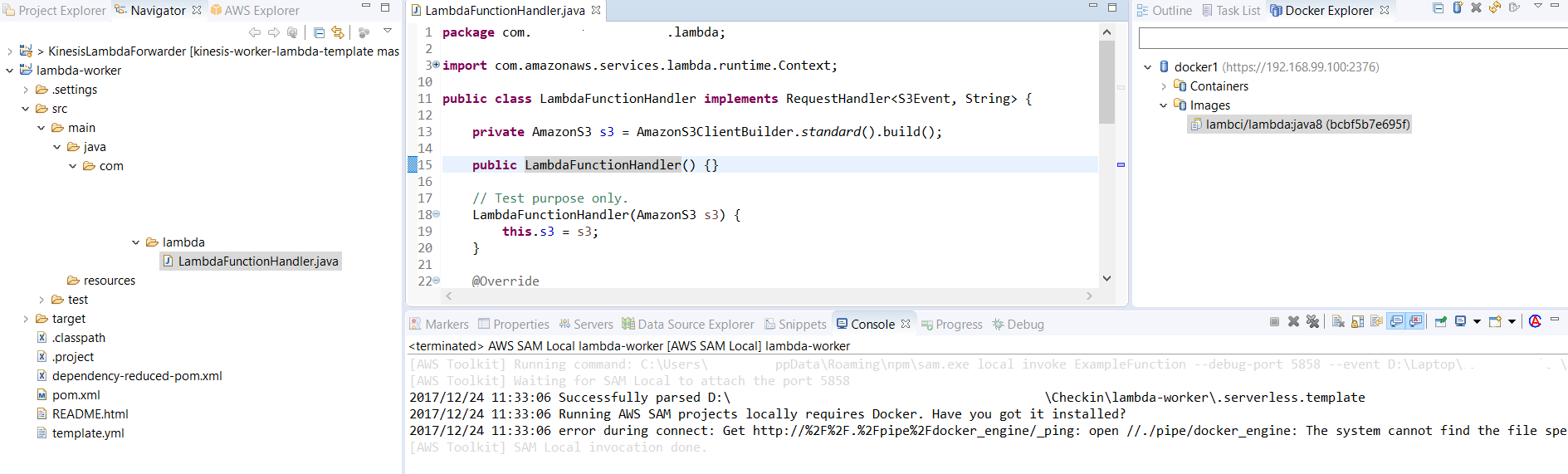
Now eclipse is also giving same error but I don't know how to resolve it there (screenshot attached).
In eclipse docker explore, I created a connection to my docker daemon as well and it says ping successful.
 addictedanshul
on 27 Dec 2017
addictedanshul
on 27 Dec 2017
I am running sam version 0.2.11, and still getting the same error mentioned above. Please help.
 Chandra-TechPassionate
on 12 Apr 2018
Chandra-TechPassionate
on 12 Apr 2018
Related issues
 GeoffreyBooth
·
29Comments
GeoffreyBooth
·
29Comments
 walkerlangley
·
41Comments
walkerlangley
·
41Comments
 charsleysa
·
33Comments
charsleysa
·
33Comments
 burck1
·
45Comments
burck1
·
45Comments
 enghwa
·
25Comments
enghwa
·
25Comments
Most helpful comment
Hi @gopalramadugu
Is the issue resolved for you in 0.2.3
I am running 0.2.4 and still the same error.
Though I resolved it by running below command in cmd
@for /f "tokens=*" %i IN ('docker-machine env') DO @%i
and "docker ps" started giving output
CONTAINER ID IMAGE COMMAND CREATED STATUS PORTS NAMES
Now eclipse is also giving same error but I don't know how to resolve it there (screenshot attached).
In eclipse docker explore, I created a connection to my docker daemon as well and it says ping successful.