Aws-parallelcluster: EBS volumes
I see that there are three EBS related paramters:
volume_size,
master_root_volume_size,
compute_root_volume_size
What is the relationship between these?
If I have a custom AMI with root volume of 100G, do I need to make all of these 3 params as 100G?
What if AMI has more volumes attached? Do I need to attach each one of them as snapshots in cluster template? Since AMI already has snapshots connected, cant it just launch cluster with whatever is connected to AMI?
Is there a document that explains how NFS setup works with cfncluster? Which volumes are shared volumes? Where do they get mounted?
 mukulagrawal78
All 5 comments
Hi,
volume_sizeis the size of the EBS external volume that is created, attached to the Master node and exported via NFS to the cluster. By default it's mounted under/shareddirectory by the nodes but it's configurable using the parametershared_dirin the config file.master_root_volume_sizeandcompute_root_volume_sizeare the sizes of the root volumes of the Master and Compute nodes respectively, so you can differentiate the capacity of the root filesystem for the Master and the Compute nodes.
Using custom AMI is not an encouraged approach, better to use pre/post installation scripts to customize CfnCluster instances. If it's really the case, the probably easiest way to build a custom AMI is to follow the Building a custom AMI doc.
If you start from standard CfnCluster AMIs an extra EBS volume is created and attached to the Master at cluster creation time. Please consider it's also possible to use an existing volume instead of a new one when creating the cluster (see the EBS section for further configuration details).
If you have the AMI with 100G root volume I think you should set both "compute_root_volume_size" and "master_root_volume_size" to that size, while volume_size, refer to an additional EBS volume as I could explain.
Concerning NFS, default setup involves two mount points exported by the Master and mounted by Compute nodes:
/sharedthat corresponds to the additional EBS volume attached to the Master/homethat resides instead in the Master root filesystem
I hope this could help.
 mauri-melato
on 25 May 2018
mauri-melato
on 25 May 2018
Thanks @mauri-melato . Just 2 clarifications:
Can you explain your last statement? I got that there is an additional default 20G volume (size controlled by volume_size parameter) attached to master, shared by NFS and mounted at /shared. I didn't understand your statement about /home. Can you explain that? Is home folder also shared through NFS?
Can I have multiple volumes attached to my AMI? (I cant avoid having custom AMI).
I don't need them to be exported through NFS.
Or, my only option is to mount them through postinstall scripts after cluster is launched?
mukulagrawal78
on 26 May 2018
/homeis exported by the Master through NFS and mounted by Compute nodes.- You can have multiple volumes attached to your AMI.
mauri-melato
on 29 May 2018
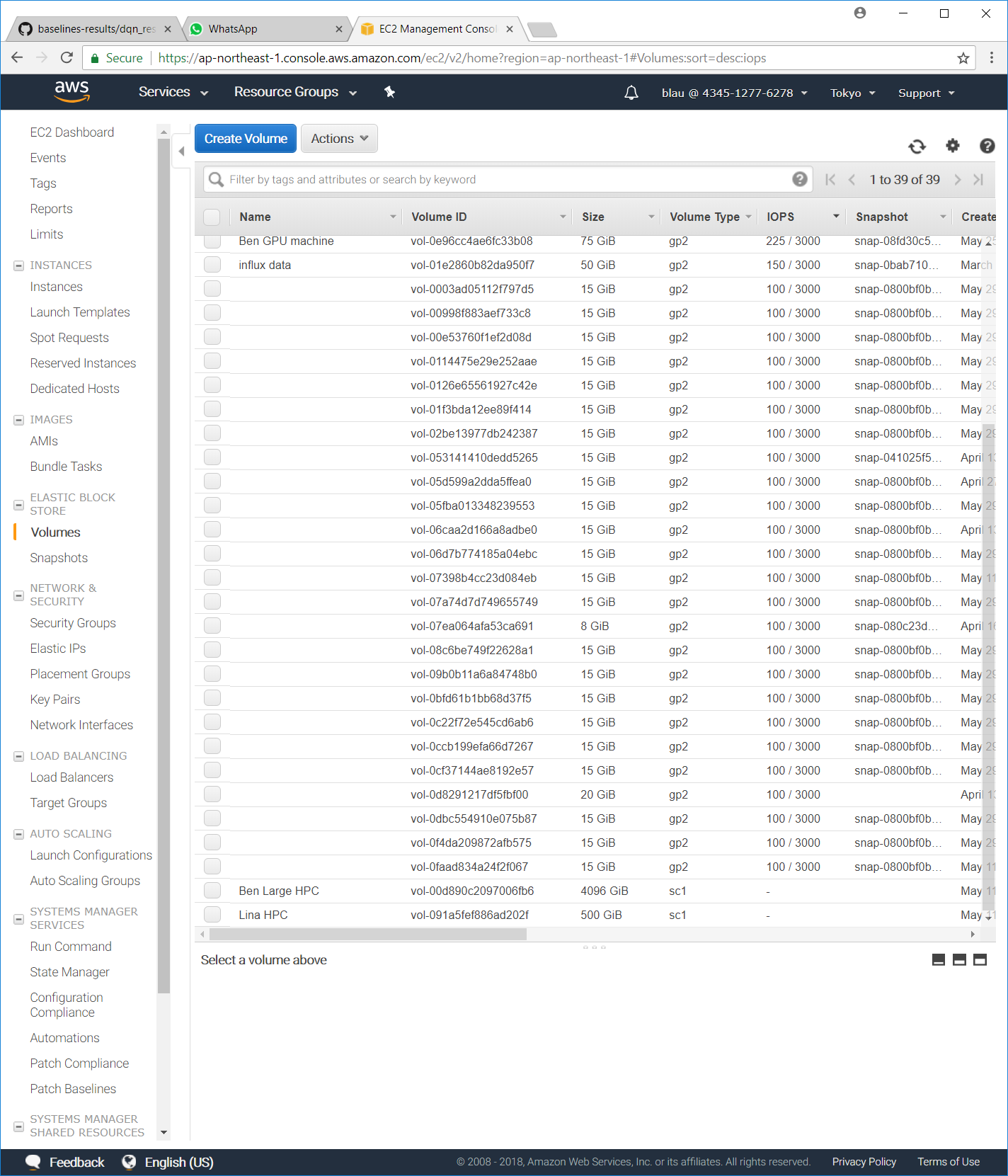
Hi, currently the EBS size in ComputeFleet default to 15GB and the volume type is gp2. Can I ask how to configure to use cheaper type like magnetic? My jobs are computationally heavy but I/O activity are very mild. Would like to find out the way to lower the cost. Thanks
 yanpanlau
on 30 May 2018
yanpanlau
on 30 May 2018
@yanpanlau at the moment the EBS volume for Master and Compute nodes has a minimum size of 15GB and fixed type gp2.
The shared volume instead can be reduced to 1GB but I understand that it's not a big saving since there is just one for cluster.
mauri-melato
on 30 May 2018
Related issues
 chrisdag
·
4Comments
chrisdag
·
4Comments
 senorkrabs
·
7Comments
senorkrabs
·
7Comments
 sumedhjain
·
4Comments
sumedhjain
·
4Comments
 calebwin
·
4Comments
calebwin
·
4Comments
 microbioticajon
·
7Comments
microbioticajon
·
7Comments
Most helpful comment
Hi,
volume_sizeis the size of the EBS external volume that is created, attached to the Master node and exported via NFS to the cluster. By default it's mounted under/shareddirectory by the nodes but it's configurable using the parametershared_dirin the config file.master_root_volume_sizeandcompute_root_volume_sizeare the sizes of the root volumes of the Master and Compute nodes respectively, so you can differentiate the capacity of the root filesystem for the Master and the Compute nodes.Using custom AMI is not an encouraged approach, better to use pre/post installation scripts to customize CfnCluster instances. If it's really the case, the probably easiest way to build a custom AMI is to follow the Building a custom AMI doc.
If you start from standard CfnCluster AMIs an extra EBS volume is created and attached to the Master at cluster creation time. Please consider it's also possible to use an existing volume instead of a new one when creating the cluster (see the EBS section for further configuration details).
If you have the AMI with 100G root volume I think you should set both "compute_root_volume_size" and "master_root_volume_size" to that size, while
volume_size, refer to an additional EBS volume as I could explain.Concerning NFS, default setup involves two mount points exported by the Master and mounted by Compute nodes:
/sharedthat corresponds to the additional EBS volume attached to the Master/homethat resides instead in the Master root filesystemI hope this could help.