Aws-mobile-appsync-sdk-js: Using subscriptions from nodejs throws `"errorMessage": "AMQJS0007E Socket error:undefined.",`
I am trying to test my subscriptions in nodejs,
I am logging in first,
let cognitoId = null;
let client: any = null;

beforeAll(() => {
  global.fetch = fetch;
  Amplify.configure(AmplifyConfig);

  client = new AWSAppSyncClient({
    disableOffline: true,
    url: AmplifyConfig.aws_appsync_graphqlEndpoint,
    region: AmplifyConfig.aws_appsync_region,
    auth: {
      type: AmplifyConfig.aws_appsync_authenticationType,
      credentials: () => Amplify.Auth.currentCredentials(),
    },
  });

  return Promise.resolve()
    .then(() => Auth.signIn(USER.username, USER.password))
    .then(result => {
      expect(result.username).not.toBeNull();
      cognitoId = result.username;
    });
});
I then do a couple of mutations and queries which are all working fine, but when I try to test the subscription
let hydratedClient: any = null;
return Promise.resolve()
  .then(() => client.hydrated())
  .then(client => (hydratedClient = client))
  .then(() => {
    hydratedClient.query;

    hydratedClient
      .subscribe({
        query: NewMessageSubscription,
      })
      .subscribe({
        next: data => {
          console.log('Data', data);
        },
        onError: data => {
          console.log('Error', data);
        },
      });

    return hydratedClient
      .mutate({
        mutation: InsertMessage,
        variables: { message },
      })
      .then(result => {
        expect(result.data.insertMessage).toEqual(
          expect.objectContaining(message),
        );

        // Give it time to break
        setTimeout(done, 2000);
      });
  });
This throws an error though
    thrown: Object {
      "errorCode": 7,
      "errorMessage": "AMQJS0007E Socket error:undefined.",
      "invocationContext": undefined,
    }
 philiiiiiipp
All 12 comments
Is this a NodeJS instance on your laptop or an EC2 instance? Or is it in a Lambda function? If it's a Lambda function that's not going to work as the environment doesn't support socket connections.
 undefobj
on 11 Nov 2018
undefobj
on 11 Nov 2018
This is on my local machine, running nodejs 8.
philiiiiiipp
on 11 Nov 2018
It's possible your authorization might be the issue. Have you tried with a API key as the header rather than trying username/password, and if that works then you can try to sort the auth issue out?
undefobj
on 12 Nov 2018
Also can you post your GraphQL schema as well as NewMessageSubscription?
undefobj
on 12 Nov 2018
I will try it with an API_KEY, but I am doing Mutations and Queries before with the same code without a problem
E.g.
    const GetUser = gql`
      query getUser($cognitoId: String!) {
        getUser(cognitoId: $cognitoId) {
          name
        }
      }
    `;

    return Promise.resolve()
      .then(() => client.hydrated())
      .then(client =>
        client
          .query({
            query: GetUser,
            variables: { cognitoId: cognitoId },
            fetchPolicy: 'network-only',
          })
          .then(result => {
            expect(result.data.getUser.name).toEqual(USER.attributes.name);
          }),
      );
So the authentication should be ok?
This is the complete schema
type Query {
  getUser(cognitoId: String!): User!
  getUsers: [User!]!
  getConversation(conversationId: String!): Conversation!
}

type Mutation {
  insertUser(user: NewUser!): ID!
  startConversation(users: [String!]!): Conversation!
  insertMessage(message: NewMessage!): Message!
}

type Subscription {
  insertedMessage: Message @aws_subscribe(mutations: ["insertMessage"])
}

type Conversation {
  id: String!
  participants: [String!]!
  messages(limit: Int, nextToken: String): PaginatedMessages!
}

type PaginatedMessages {
  items: [Message!]!
  nextToken: String
}

type PaginatedConversations {
  items: [Conversation!]!
  nextToken: String
}

input NewMessage {
  conversationId: String!
  senderId: String!
  message: String!
}

type Message {
  id: String!
  conversationId: String!
  senderId: String!
  createdAt: Int!
  message: String!
}

input NewUser {
  cognitoId: String!
  name: String!
  email: String!
}

type User {
  cognitoId: String!
  name: String!
  email: String!
  conversations(limit: Int!, nextToken: String): PaginatedConversations!
}
Here are the queries used:
const InsertMessage = gql`
  mutation insertMessage($message: NewMessage!) {
    insertMessage(message: $message) {
      id
      conversationId
      message
      createdAt
      senderId
    }
  }
`;

const message = {
  conversationId,
  senderId: cognitoId,
  message: 'This is a test message for the subscription',
};

const NewMessageSubscription = gql`
  subscription InsertedMessage {
    insertedMessage {
      id
      conversationId
      message
      createdAt
      senderId
    }
  }
`;
I changed the authentication to API_KEY, but with the same problem, all my other code works perfectly fine, but subscriptions close with this error:
    thrown: Object {
      "errorCode": 7,
      "errorMessage": "AMQJS0007E Socket error:undefined.",
      "invocationContext": undefined,
    }
On the frontend this is no problem, I am using the same subscriptions with the same appsync api.
philiiiiiipp
on 12 Nov 2018
Seems like #255 is describing a similar problem. Mutations and Queries seem to work fine but subscriptions make problems.
philiiiiiipp
on 12 Nov 2018
This could be the version of the websocket lib you have installed in node as a specific polyfill is needed. If you look here: https://docs.aws.amazon.com/appsync/latest/devguide/building-a-client-app-node.html
You will see "ws": "^3.3.1".
Could you try the instructions listed on that page?
undefobj
on 12 Nov 2018
Ah, that seems to indeed fix it.
philiiiiiipp
on 13 Nov 2018
confirmed using ws lib version ^4.0.0 and it works fine. but not with ^5.0.0, I guess it is related with some major version breaking changes
 nicklaros
on 14 Nov 2018
nicklaros
on 14 Nov 2018
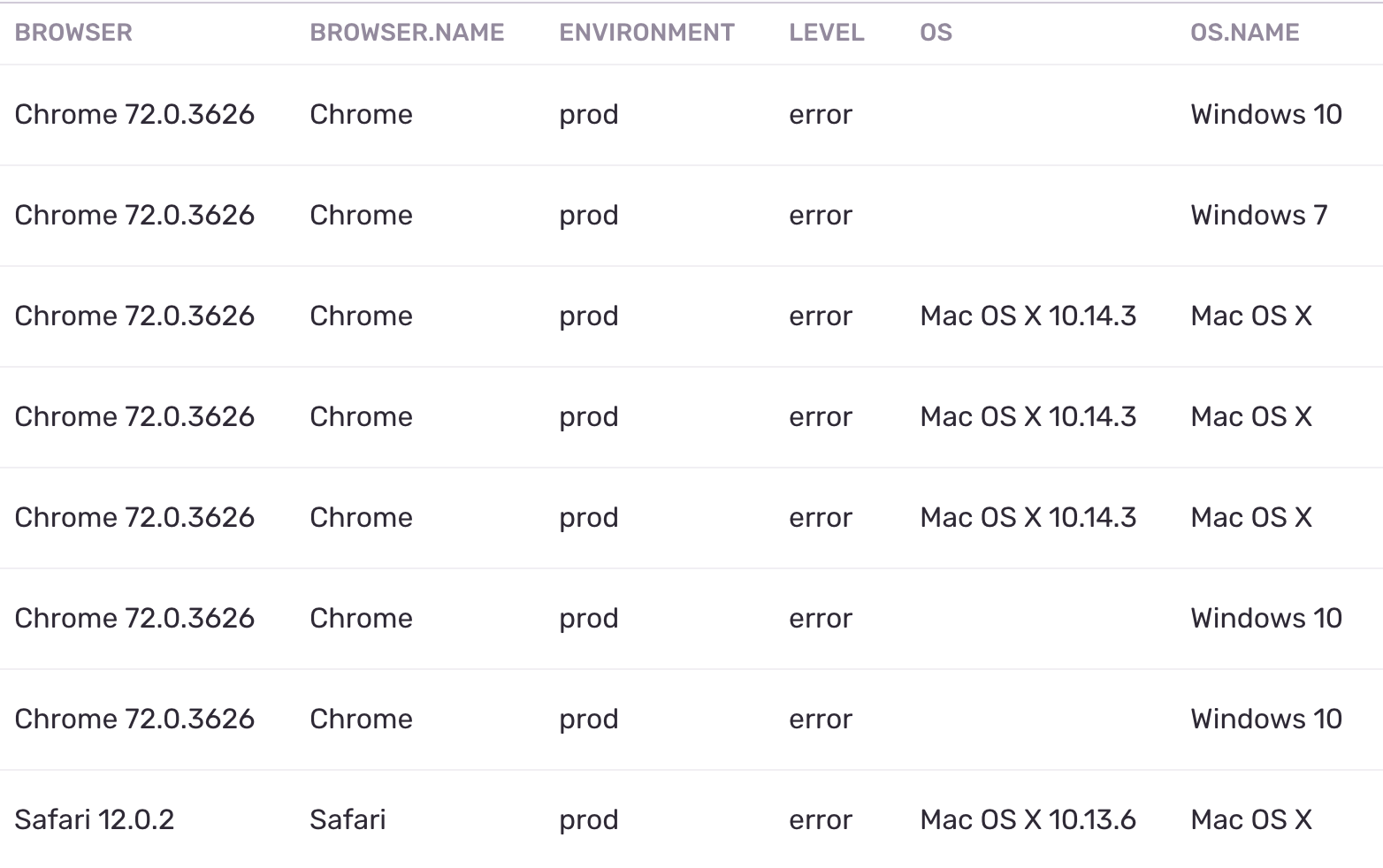
Seen this recently as well, for a number of customers on various platforms and browsers:
I have a couple dependencies that rely on a much newer version of ws, so I don't think I can pin my dependency to version 3 or 4...
> npm ls ws
[email protected] /Users/will.green/Development/myproject
├─┬ [email protected]
│ └─┬ [email protected]
│   └─┬ [email protected]
│     └─┬ [email protected]
│       └── [email protected]
├─┬ [email protected]
│ └─┬ @svgr/[email protected]
│   └─┬ @svgr/[email protected]
│     └─┬ [email protected]
│       └─┬ [email protected]
│         └─┬ [email protected]
│           └── [email protected]
└─┬ [email protected]
  └─┬ [email protected]
    └── [email protected]
 hotgazpacho
on 7 Mar 2019
hotgazpacho
on 7 Mar 2019
Interesting enough, I witnessed it myself first-hand, and refreshing the browser window, it was able to connect.
hotgazpacho
on 7 Mar 2019
Related issues
 peterservisbot
·
3Comments
peterservisbot
·
3Comments
 asadowns
·
3Comments
asadowns
·
3Comments
 ArronHsiao
·
3Comments
ArronHsiao
·
3Comments
 lklepner
·
4Comments
lklepner
·
4Comments
 wzup
·
3Comments
wzup
·
3Comments