Aws-load-balancer-controller: Error adding targets to target group,InvalidInstanceID: There are multiple interfaces attached to instance
Deployed alb controller on AWS EKS.
Attached policy to worker nodes.
Used 2048-game example to test.
Below are the config files:
apiVersion: extensions/v1beta1
kind: Ingress
metadata:
  name: "2048-ingress"
  namespace: "2048-game"
  annotations:
    kubernetes.io/ingress.class: alb
    alb.ingress.kubernetes.io/scheme: internal
    alb.ingress.kubernetes.io/target-type: ip
    #alb.ingress.kubernetes.io/security-groups: sg-0941bddfa4d5a39a5
    alb.ingress.kubernetes.io/subnets: subnet-xxxx, subnet-xxxx
  labels:
    app: 2048-ingress
spec:
  rules:
  - http:
      paths:
      - path: /
        backend:
          serviceName: "service-2048"
          servicePort: 80
```
apiVersion: v1
kind: Service
metadata:
name: "service-2048"
namespace: "2048-game"
spec:
ports:
- port: 80
targetPort: 80
protocol: TCP
selector:
app: "2048"
**Getting below error:**

Event(v1.ObjectReference{Kind:"Ingress", Namespace:"2048-game", Name:"2048-ingress", UID:"7c48f85e-a0ad-11e8-99ae-061cda1a6546", APIVersion:"extensions/v1beta1", ResourceVersion:"133013", FieldPath:""}): type: 'Warning' reason: 'ERROR' Error adding targets to target group xxxxxxxxxx: InvalidInstanceID: There are multiple interfaces attached to instance 'i-xxxxxxx'. Please specify an interface ID for the operation instead.
And instance security groups are not attached to nodes.
 sashanka-kandala
All 27 comments
I get the same error in here as well.
 Kefa7y
on 18 Aug 2018
Kefa7y
on 18 Aug 2018
I have the same error.
 kalelc
on 22 Aug 2018
kalelc
on 22 Aug 2018
I have the same error.
 sa-mao
on 23 Aug 2018
sa-mao
on 23 Aug 2018
I was able to fix this problem by leaving the worker node with 1 interface. I suppose that the problem is because Ingress cannot resolve which IP can use if the instance has 2 ENI.
Ingress Log:
Two ENI
Warning  ERROR   19m                aws-alb-ingress-controller  Error adding targets to target group 1be2e68f-ed00840058b4cd19079: InvalidInstanceID: There are multiple interfaces attached to instance 'i-0c24e1e4feb8a231b'. Please specify an interface ID for the operation instead.
           status code: 400, request id: bffb00b8-0ac5-47ca-984d-73742f0ed833
One ENI
Normal MODIFY 19m aws-alb-ingress-controller 1be2e68f-default-beetrack-3016 tags modified
10.3.2.227 | 3000 | us-west-2b | healthy
10.3.2.157 | 3000 | us-west-2b | healthy
10.3.2.49 | 3000 | us-west-2b | healthy
10.3.2.154 | 3000 | us-west-2b | healthy
10.3.2.111 | 3000 | us-west-2b | healthy
10.3.2.189 | 3000 | us-west-2b | healthy
@kalelc But it shouldn't matter since we use alb.ingress.kubernetes.io/target-type: ip and this will cause the ingress to use the pod IP which should be only one IP?
sa-mao
on 24 Aug 2018
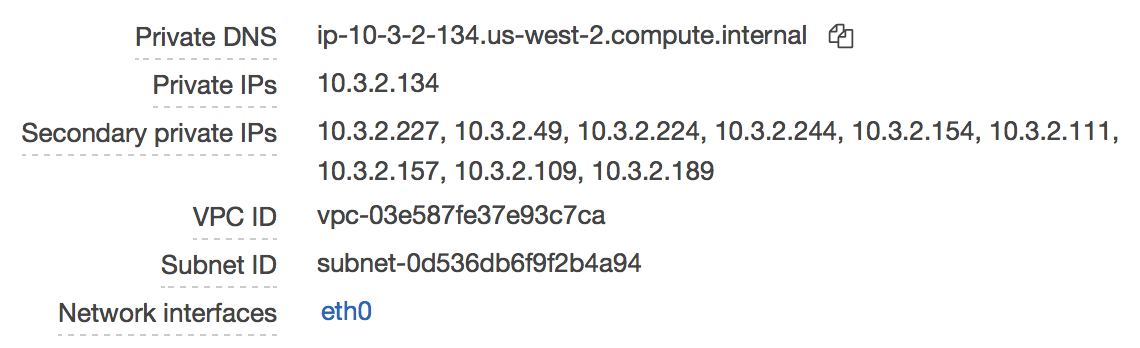
Yes, but AWS creates one IP by Pod. Example:
backend-76cc5f5966-9pw5g   1/1       Running             0          11m       10.3.2.227   ip-10-3-2-134.us-west-2.compute.internal
backend-76cc5f5966-9twf5   1/1       Running             0          11m       10.3.2.111   ip-10-3-2-134.us-west-2.compute.internal
backend-76cc5f5966-m5kld   1/1       Running             0          17h       10.3.2.49    ip-10-3-2-134.us-west-2.compute.internal
backend-76cc5f5966-m8x95   1/1       Running             0          11m       10.3.2.154   ip-10-3-2-134.us-west-2.compute.internal
backend-76cc5f5966-t9px6   1/1       Running             0          11m       10.3.2.189   ip-10-3-2-134.us-west-2.compute.internal
backend-76cc5f5966-wr9rr   1/1       Running             0          11m       10.3.2.157   ip-10-3-2-134.us-west-2.compute.internal
...
kalelc
on 24 Aug 2018
@kalelc
Can you tell me the steps followed to resolve this. How to leave worker node withe one interface.
sashanka-kandala
on 24 Aug 2018
@sashanka-kandala Yeah, sure.
- EC2
- Select you instance worker.
- click on the Network Interfaces.
- In the network Interfaces Menu, there is the option to detach ENI from the instance.
Obviously, that is not the solution to production. When I have tried to recreate the problem building the cluster, sometimes ingress adds other Network Interface when I have multiples interfaces I get the same error.
kalelc
on 27 Aug 2018
I'm able to reproduce this issue by creating an alb ingress after multiple ENI attach to the node (can happen when creating multiple pods as each pod will consume one secondary ip)
Will start to investigate the root cause and solve this
 M00nF1sh
on 29 Aug 2018
M00nF1sh
on 29 Aug 2018
This root cause is alb-ingress controller calls ModifyInstanceAttribute when attaching security groups to nodes (which allows alb to route traffic into it).
According to https://docs.aws.amazon.com/AWSEC2/latest/APIReference/API_ModifyInstanceAttribute.html, it can cause errors when nodes already have multiple ENIs attached.
I'll change it to use ModifyNetworkInterfaceAttribute instead, and submit a PR for this
M00nF1sh
on 29 Aug 2018
Ok, Thanks. I'll hope for the fix.
kalelc
on 29 Aug 2018
I am Facing the Same issue.
 vallurupallikhetan
on 10 Sep 2018
vallurupallikhetan
on 10 Sep 2018
Same issue here
 ricktbaker
on 11 Sep 2018
ricktbaker
on 11 Sep 2018
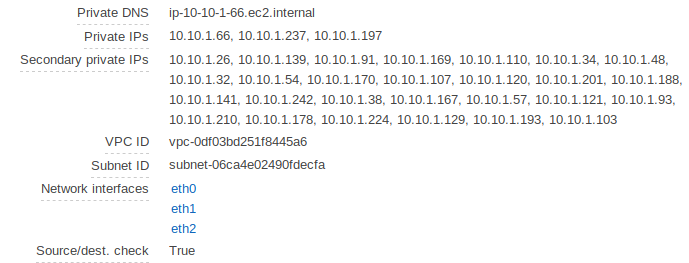
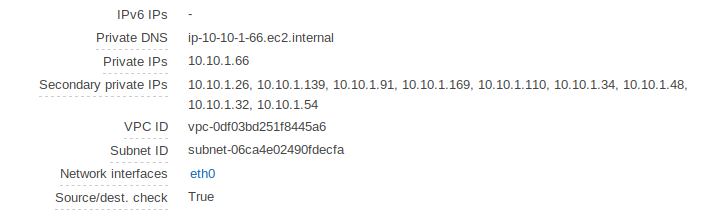
I have the same issue. I figured out that I only have one eth0 network interface in the beginning. However, the moment I deploy an ingress resource, the AWS ALB Ingress Controller adds two more network interfaces.
EKS cluster is setup and before deploying an ingress resource:
After deploying an ingress resource:
My AWS Alb Ingress Controller Policy and installation file in Terraform:
resource "aws_iam_role_policy_attachment" "aws_alb_ingress_controller_policy_attachment" {
    role       = "${module.eks.worker_iam_role_name}"
    policy_arn = "${aws_iam_policy.aws_alb_ingress_controller.arn}"
}

resource "aws_iam_policy" "aws_alb_ingress_controller" {
  name = "AWSAlbIngressController"
  path = "/"
  policy = "${data.aws_iam_policy_document.aws_alb_ingress_controller_policy_document.json}"

}

data "aws_iam_policy_document" "aws_alb_ingress_controller_policy_document" {
  statement {
    actions = [
      "acm:DescribeCertificate",
      "acm:ListCertificates",
      "acm:GetCertificate"
    ]

    resources = [
      "*"
    ]
  }

  statement {
    actions = [
      "ec2:AuthorizeSecurityGroupIngress",
      "ec2:CreateSecurityGroup",
      "ec2:CreateTags",
      "ec2:DeleteSecurityGroup",
      "ec2:DescribeInstances",
      "ec2:DescribeInstanceStatus",
      "ec2:DescribeSecurityGroups",
      "ec2:DescribeSubnets",
      "ec2:DescribeTags",
      "ec2:DescribeVpcs",
      "ec2:ModifyInstanceAttribute",
      "ec2:RevokeSecurityGroupIngress"
    ]

    resources = [
      "*"
    ]
  }

  statement {
    actions = [
      "elasticloadbalancing:AddTags",
      "elasticloadbalancing:CreateListener",
      "elasticloadbalancing:CreateLoadBalancer",
      "elasticloadbalancing:CreateRule",
      "elasticloadbalancing:CreateTargetGroup",
      "elasticloadbalancing:DeleteListener",
      "elasticloadbalancing:DeleteLoadBalancer",
      "elasticloadbalancing:DeleteRule",
      "elasticloadbalancing:DeleteTargetGroup",
      "elasticloadbalancing:DeregisterTargets",
      "elasticloadbalancing:DescribeListeners",
      "elasticloadbalancing:DescribeLoadBalancers",
      "elasticloadbalancing:DescribeLoadBalancerAttributes",
      "elasticloadbalancing:DescribeRules",
      "elasticloadbalancing:DescribeSSLPolicies",
      "elasticloadbalancing:DescribeTags",
      "elasticloadbalancing:DescribeTargetGroups",
      "elasticloadbalancing:DescribeTargetGroupAttributes",
      "elasticloadbalancing:DescribeTargetHealth",
      "elasticloadbalancing:ModifyListener",
      "elasticloadbalancing:ModifyLoadBalancerAttributes",
      "elasticloadbalancing:ModifyRule",
      "elasticloadbalancing:ModifyTargetGroup",
      "elasticloadbalancing:ModifyTargetGroupAttributes",
      "elasticloadbalancing:RegisterTargets",
      "elasticloadbalancing:RemoveTags",
      "elasticloadbalancing:SetIpAddressType",
      "elasticloadbalancing:SetSecurityGroups",
      "elasticloadbalancing:SetSubnets",
      "elasticloadbalancing:SetWebACL"
    ]

    resources = [
      "*"
    ]
  }

  statement {
    actions = [
      "iam:GetServerCertificate",
      "iam:ListServerCertificates"
    ]

    resources = [
      "*"
    ]
  }

  statement {
    actions = [
      "waf-regional:GetWebACLForResource",
      "waf-regional:GetWebACL",
      "waf-regional:AssociateWebACL",
      "waf-regional:DisassociateWebACL"
    ]

    resources = [
      "*"
    ]
  }

  statement {
    actions = [
      "tag:GetResources"
    ]

    resources = [
      "*"
    ]
  }

  statement {
    actions = [
      "waf:GetWebACL"
    ]

    resources = [
      "*"
    ]
  }
}

resource "null_resource" "install_aws_alb_ingress_controller" {
  provisioner "local-exec" {
    command = "scripts/install-aws-alb-ingress-controller.sh"
  }

  depends_on = ["aws_iam_role_policy_attachment.aws_alb_ingress_controller_policy_attachment", "null_resource.install-helm-tiller"]
}
scripts/install-aws-alb-ingress-controller.sh:
#!/usr/bin/env bash

# Install the ALB ingress controller using Helm
helm registry install quay.io/coreos/alb-ingress-controller-helm -f configs/aws-alb-ingress-controller-values.yaml
configs/aws-alb-ingress-controller-values.yaml:
awsRegion: us-east-1

clusterName: cluster

rbac:
  create: true
the ingress resource echoserver-ingress.yaml. A modified version of the echoserver example from the walkthrough tutorial
apiVersion: extensions/v1beta1
kind: Ingress
metadata:
  name: echoserver
  namespace: echoserver
  annotations:
    kubernetes.io/ingress.class: alb
    alb.ingress.kubernetes.io/target-type: ip
    alb.ingress.kubernetes.io/scheme: internet-facing
    alb.ingress.kubernetes.io/tags: Environment=testing,AWSAlbIngressController=true
spec:
  rules:
    - host: echoserver.example.com
      http:
        paths:
          - path: /
            backend:
              serviceName: echoserver
              servicePort: 80
the relevant parts of the VPC configuration to autodetect the ALB placement:
```
module "vpc" {
source = "terraform-aws-modules/vpc/aws"
version = "1.41.0"
...
public_subnet_tags = {
Subnet = "public"
# this is a workaround for the case in which terraform is run twice.
# Otherwise Terraform will remove those tags.
"kubernetes.io/cluster/${var.cluster_name}" = "shared"
"kubernetes.io/role/elb" = ""
}
private_subnet_tags = {
Subnet = "private"
"kubernetes.io/cluster/${var.cluster_name}" = "shared"
"kubernetes.io/role/internal-elb" = ""
}
}
 Jeeppler
on 12 Sep 2018
Jeeppler
on 12 Sep 2018
A full fix for this issue should be ready by this week(works on both ip mode & instance mode)
For now to unblock you, you can update the deployment of ingress controller to use docker.io/m00nf1sh/alb-ingress-controller:1.0-beta.7, which is based on https://github.com/M00nF1sh/aws-alb-ingress-controller/tree/sg-instance-temp-fix
This temporary fix only works for instance mode(alb.ingress.kubernetes.io/target-type: instance)
M00nF1sh
on 13 Sep 2018
@M00nF1sh did you create a PR for your fix?
Jeeppler
on 13 Sep 2018
@M00nF1sh did you create a PR for your fix?
I haven't, since that fix only works for instance target mode. I'm doing a refactoring to securityGroup handling, which will support ip target mode too
M00nF1sh
on 13 Sep 2018
I just tested if I get the same behavior if I use the walkthrough tutorial. And I did get the exact same behavior as with the helm chart.
Jeeppler
on 13 Sep 2018
are you using docker.io/m00nf1sh/alb-ingress-controller:1.0-beta.7 or the one default in "walkthrough tutorial"?
Also, you need to use alb.ingress.kubernetes.io/target-type: instance
M00nF1sh
on 13 Sep 2018
@M00nF1sh no, I did not. I used 1.0-beta.6 from the "walkthrough tutorial".
I will give your image a try.
Jeeppler
on 13 Sep 2018
@M00nF1sh tried docker.io/m00nf1sh/alb-ingress-controller:1.0-beta.7 and healthprobe 500s. Manually disabled health probe and still no love. eventually exits with this error:
AWS ALB Ingress controller
  Release:    1.0-beta.6
  Build:      git-d1782a00
  Repository: https://github.com/M00nF1sh/aws-alb-ingress-controller.git
-------------------------------------------------------------------------------

I0919 19:42:20.200588       1 flags.go:132] Watching for Ingress class: alb
W0919 19:42:20.200766       1 client_config.go:552] Neither --kubeconfig nor --master was specified.  Using the inClusterConfig.  This might not work.
I0919 19:42:20.200946       1 main.go:159] Creating API client for https://10.100.0.1:443
I0919 19:42:20.217298       1 main.go:203] Running in Kubernetes cluster version v1.10 (v1.10.3) - git (clean) commit 2bba0127d85d5a46ab4b778548be28623b32d0b0 - platform linux/amd64
I0919 19:42:20.218089       1 alb.go:85] ALB resource names will be prefixed with e83cef4b
I0919 19:42:20.226955       1 alb.go:158] Starting AWS ALB Ingress controller
I0919 19:42:21.430413       1 leaderelection.go:185] attempting to acquire leader lease  kube-system/ingress-controller-leader-alb...
I0919 19:42:21.444833       1 leaderelection.go:194] successfully acquired lease kube-system/ingress-controller-leader-alb
I0919 19:42:21.444846       1 status.go:152] new leader elected: alb-ingress-controller-7c54f87cbd-8gtfb
F0919 19:47:30.936810       1 alb.go:176] RequestError: send request failed
caused by: Post https://tagging.us-west-2.amazonaws.com/: dial tcp: i/o timeout
 dokipen
on 19 Sep 2018
dokipen
on 19 Sep 2018
It appears that /etc/resolv.conf was pointed at kube-dns IP, which isn't working. Not sure if this is specific to me or not.
dokipen
on 19 Sep 2018
Hi bob,
It's not related to this issue, seems you cannot connect to aws tagging api somehow.
(would you check your node's securityGroup settings), and in your pod, try ping other outside world and see what happens.
e.g. kubectl exec alb-ingress-controller-fd76994bd-qnw9p ping www.google.com -ti -n kube-system
BTW, /etc/resolv.conf always points to kube-dns, that correct.
M00nF1sh
on 20 Sep 2018
BTW, for the multiple-interface issue, an more robust change have been merged into master, and available as quay.io/coreos/alb-ingress-controller:latest, so no need to use docker.io/m00nf1sh/alb-ingress-controller:1.0-beta.7 anymore 😸
The fix in master works in both instance mode and ip mode
M00nF1sh
on 20 Sep 2018
It was a separate issue, my SGs were preventing DNS traffic across nodes. Works when that is resolv'd ;).
dokipen
on 20 Sep 2018
Thank you @M00nF1sh,
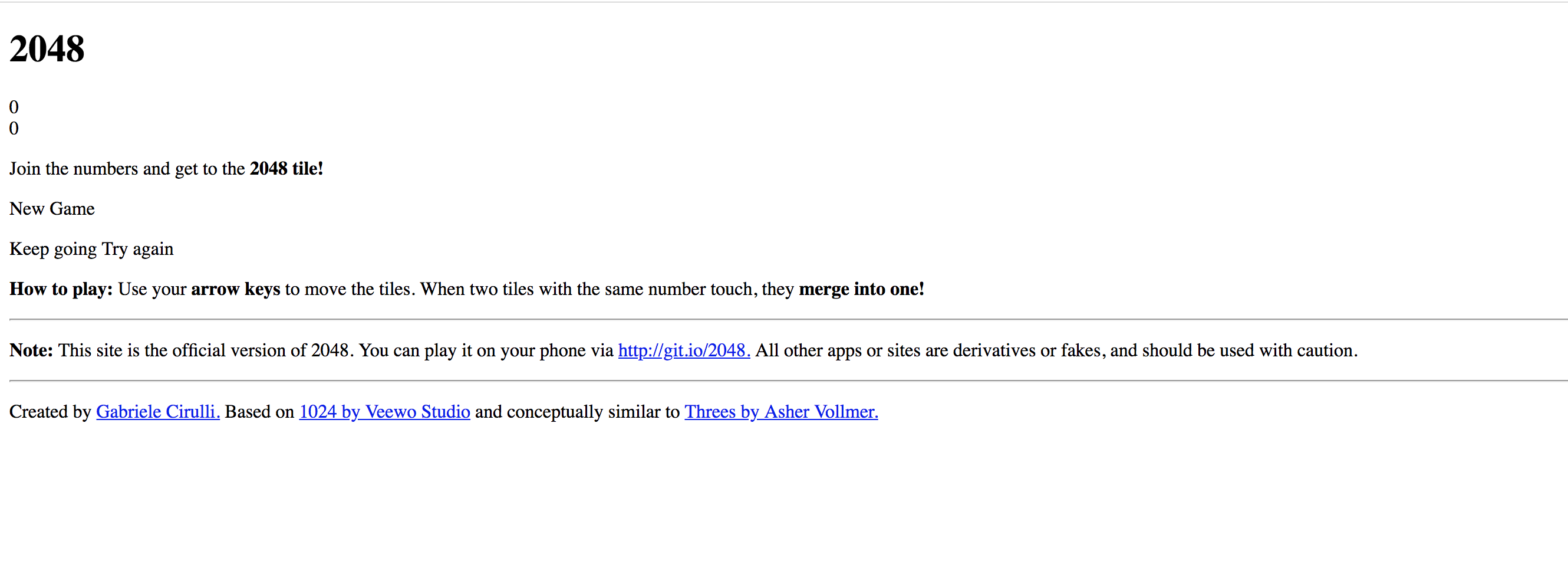
It is working now. But, pages are not loading properly while using those alb's.
I am using the latest version of alb controller and testing with 2048-game example.
target type:ip
sashanka-kandala
on 21 Sep 2018
Hi Sashanka,
The issue of 2048 can be resolved by https://github.com/kubernetes-sigs/aws-alb-ingress-controller/pull/636, (only need to update path:/ to path:/*)
I'll resolve this issue 😸
M00nF1sh
on 22 Sep 2018
Related issues
 jcderr
·
3Comments
jcderr
·
3Comments
 joseppla
·
5Comments
joseppla
·
5Comments
 jwickens
·
4Comments
jwickens
·
4Comments
 madhu131313
·
3Comments
madhu131313
·
3Comments
 JakubJecminek
·
5Comments
JakubJecminek
·
5Comments
Most helpful comment
This root cause is alb-ingress controller calls ModifyInstanceAttribute when attaching security groups to nodes (which allows alb to route traffic into it).
According to https://docs.aws.amazon.com/AWSEC2/latest/APIReference/API_ModifyInstanceAttribute.html, it can cause errors when nodes already have multiple ENIs attached.
I'll change it to use ModifyNetworkInterfaceAttribute instead, and submit a PR for this