Aws-load-balancer-controller: ingress rule always point to first listed service in rules
I am new to setting up ingress-controller. I am facing problem to access multiple services using single ALB DNS created using nodeports type service.
With below config, I am only able to access first listed service using the created ALB DNS. If I am appending path to DNS url then its not redirecting me to the other services.
Example -
standalone dns url => working (pointing to first listed service tes1)
dns url/s1 => not pointing to any service(404 error)
dns url/s2 => not pointing to any service(404 error)
My Services -
NAME             TYPE       CLUSTER-IP       EXTERNAL-IP   PORT(S)        AGE
test1   NodePort   172.20.72.188    <none>        80:31017/TCP   53m
test2   NodePort   172.20.114.180   <none>        80:31487/TCP   54m
Ingress Rule file -
apiVersion: extensions/v1beta1
kind: Ingress
metadata:
  name: echoserver
  namespace: echoserver
  annotations:
    #kubernetes.io/ingress.class: alb
    #nginx.ingress.kubernetes.io/rewrite-target: /
    alb.ingress.kubernetes.io/scheme: internet-facing
    #alb.ingress.kubernetes.io/listen-ports: '[{"HTTP": 80, "HTTPS": 443}, {"HTTP": 8080, "HTTPS": 443}]'
    alb.ingress.kubernetes.io/subnets: subnet-f97d1680,subnet-ba1683f1
    alb.ingress.kubernetes.io/security-groups: alb.ingress.kubernetes.io
    alb.ingress.kubernetes.io/tags: Environment=dev,Team=test
spec:
  rules:
  - http:
      paths:
      - path: /s1
        backend:
          serviceName: test1
          servicePort: 80
      - path: /s2
        backend:
          serviceName: test2
          servicePort: 80
kubectl describe ingress -n echoserver
Name:             echoserver
Namespace:        echoserver
Address:          ******************************************************
Default backend:  default-http-backend:80 (10.0.57.177:8080)
Rules:
  Host  Path  Backends
  ----  ----  --------
  *
        /s1   test1:80 (<none>)
        /s2   test2:80 (<none>)
Annotations:
  alb.ingress.kubernetes.io/scheme:                  internet-facing
  alb.ingress.kubernetes.io/security-groups:         alb.ingress.kubernetes.io
  alb.ingress.kubernetes.io/subnets:                 subnet-f97d1680,subnet-ba1683f1
  alb.ingress.kubernetes.io/tags:                    Environment=dev,Team=test
  kubectl.kubernetes.io/last-applied-configuration:  {"apiVersion":"extensions/v1beta1","kind":"Ingress","metadata":{"annotations":{"alb.ingress.kubernetes.io/scheme":"internet-facing","alb.ingress.kubernetes.io/security-groups":"alb.ingress.kubernetes.io","alb.ingress.kubernetes.io/subnets":"subnet-f97d1680,subnet-ba1683f1","alb.ingress.kubernetes.io/tags":"Environment=dev,Team=test"},"name":"echoserver","namespace":"echoserver"},"spec":{"rules":[{"http":{"paths":[{"backend":{"serviceName":"test1","servicePort":80},"path":"/s1"},{"backend":{"serviceName":"test2","servicePort":80},"path":"/s2"}]}}]}}


md5-cb6d9bd177b948147322692641cc326d


kubectl get ingress -n echoserver
NAME         HOSTS     ADDRESS            PORTS     AGE
echoserver   *         dtekscluste-e...   80        1h
 amit-kansal
All 17 comments
@bigkraig Can you please help me! Please let me know if I need to provide more information/steps about the issue.
Note : I am not using any host, just trying to access application with the loadbalancer DNS address. and able to access first listed service.
amit-kansal
on 26 Jun 2018
@amit-kansal i'm going to try to reproduce (and then fix) this today 👍
 bigkraig
on 26 Jun 2018
bigkraig
on 26 Jun 2018
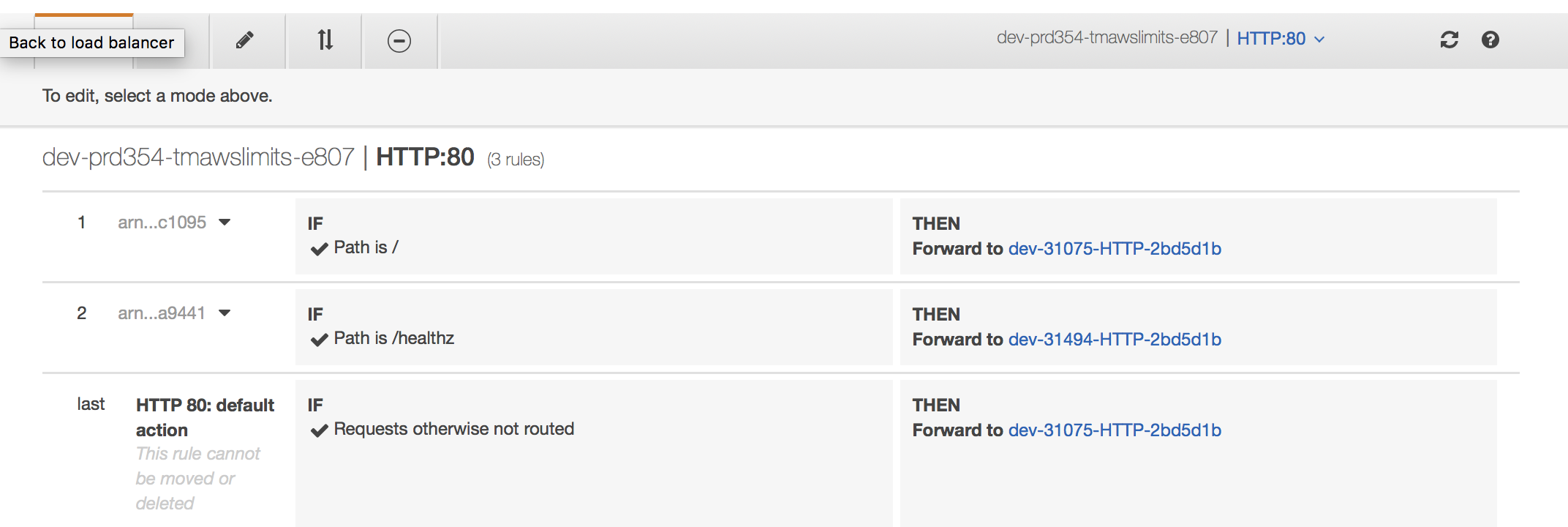
What version of the controller are you using? I'm unable to reproduce this.
spec:
rules:
- http:
paths:
- path: /
backend:
serviceName: svc1
servicePort: 8080
- path: /healthz
backend:
serviceName: svc2
servicePort: 9093
bigkraig
on 27 Jun 2018
@bigkraig I am using version 1.0-alpha.9.
And in aws console I am also able to see rules are creating defined in controller yaml file. Can you please share the annotation which you used in your ingress controller.
amit-kansal
on 27 Jun 2018
Please try it out with 1.0-beta.2, the annotations on mine were specific to ticketmasters subnets/tags/security groups, i only have the HTTP port 80 as seen in the rules
bigkraig
on 28 Jun 2018
What is the default action supposed to be? I see in your screenshot that it is pointing to svc1. I would expect there to be a third service for the http-default-backend service? Or am I missing the reason for the existence of the 'default service'?
 natefox
on 28 Jun 2018
natefox
on 28 Jun 2018
@natefox it currently defaults to the first rule in the ingress. there is another issue #405 to address support for the backend parameter, but that work hasn't been done yet
bigkraig
on 28 Jun 2018
@bigkraig Today I tried multiple times and updated the version with 1.0-beta.2 but still no luck :(
Loadbalancer always points to the default rule. The rules with custom path are not pointing to related services.
Can you please one more time check my ingress yaml. If all the required annotations are in place ?
`apiVersion: extensions/v1beta1
kind: Ingress
metadata:
name: echoserver
namespace: echoserver
annotations:
alb.ingress.kubernetes.io/scheme: internet-facing
alb.ingress.kubernetes.io/subnets: subnet-f97d1680,subnet-ba1683f1
alb.ingress.kubernetes.io/security-groups: alb.ingress.kubernetes.io
alb.ingress.kubernetes.io/tags: Environment=dev,Team=test
spec:
rules:
- http:
paths:
- path: /codexweb
backend:
serviceName: codex-web
servicePort: 8080
- path: /codexrestapi
backend:
serviceName: codex-rest-api
servicePort: 8080`
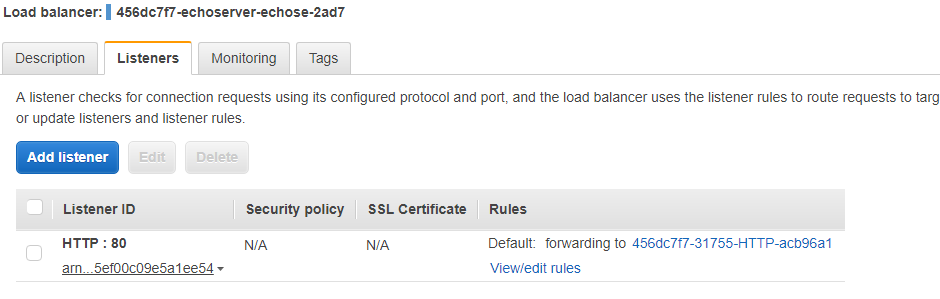
can you show me a screenshot of the listener?
bigkraig
on 28 Jun 2018
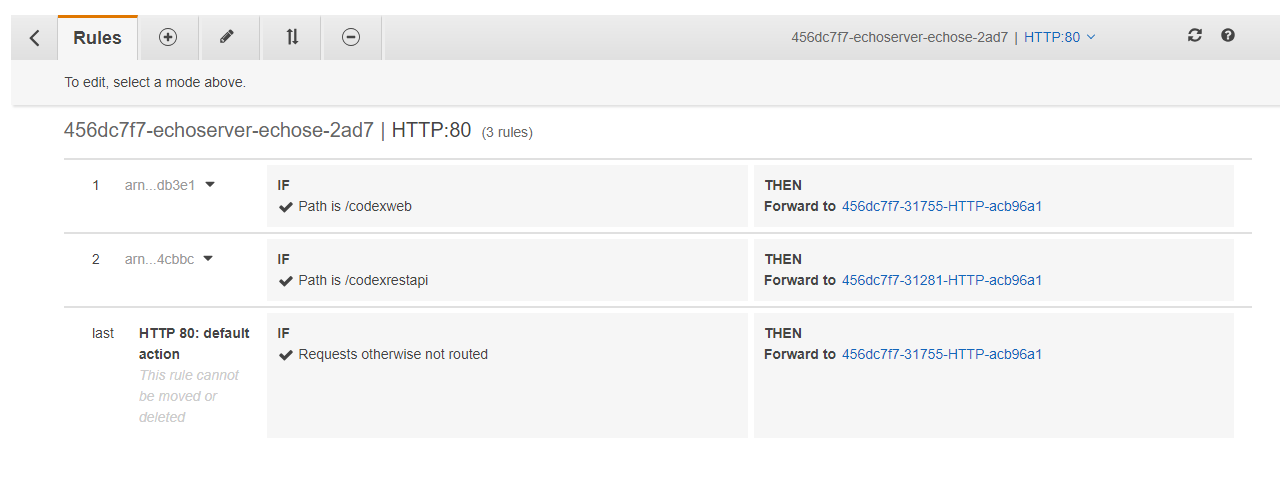
@bigkraig Below are the screenshots -
#
amit-kansal
on 28 Jun 2018
So that looks correct, requests to /codexweb are going to the 31755 nodeport service and /codexrestapi are going to the 31281 service.
There are no rewrite rules in ALBs, so the services need to respond on those specific paths.
bigkraig
on 28 Jun 2018
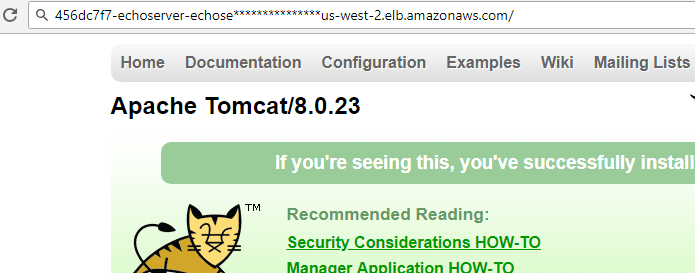
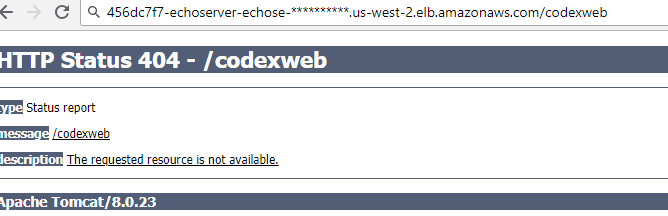
But the 1st and 2nd rules never works for me only the last rule works(default one). And if you see the last default rule points to first listed service 31755 nodeport in path rules. So I am only able to access first service.
Below are the screenshots for serivces access through client.
Default Rule-
1st Rule
amit-kansal
on 28 Jun 2018
The ALB is redirecting the /codexweb request to the 31755 service, the service is not responding to the request made to /codexweb, it does not go to / on 31755. Does that make sense?
bigkraig
on 28 Jun 2018
@bigkraig sorry I really didn't get it. Here what I understood; ALB doing its job If request is not routed to any path then its routing to last one(default action) and in default action its again pointing to 31755 service and that's why I am able to access that service.
I made some manual change to my ELB listeners. I changed 31755 nodeport to 31281(2nd rule service). And now on / I am able to access second service.
Appreciate if you can guide me what I need to make changes to access my 2nd rule service (/codexrestapi).
As I already said I am new to setup all this stuff but let me know if first I need to go through some doc to understand it better. Thanks for your support! :)
amit-kansal
on 28 Jun 2018
@amit-kansal how are the full URLs to /codeweb and /coderestapi paths?
I guess your problem is due to the missing wildcards on the paths. I mean, the target group of the rule with path /codeweb only responds to URLs like http://xxxxx/codeweb (without slash) and not http://xxxxx/codeweb/blahblah. Same for /codeapi path.
If the path of your URL is not exactly the path specified in the rule, you need to specify a path similar to this:
  rules:
    - http:
        paths:
          - path: /codexweb*
            backend:
              serviceName: codex-web
              servicePort: 8080
          - path: /codexrestapi*
            backend:
              serviceName: codex-rest-api
              servicePort: 8080`
Note the asterisk added to the end of the paths. Also remember that you are not specifying any rule for root path, so currently, the behavior is set the default rule to the first rule specified, as @bigkraig said.
Read more about Path Conditions of Listener Rules of AWS, here.
 ehbello
on 28 Jun 2018
ehbello
on 28 Jun 2018
Hello, thank you, @ehbello! I was experiencing the same issue and just had to add the wildcard to it.
 mariomerco
on 11 Jul 2018
mariomerco
on 11 Jul 2018
Hello ,How to change the default last rule by alb ingress controller?I didn't have any solution for these question.
 wjl120
on 21 Jul 2020
wjl120
on 21 Jul 2020
Related issues
 jcderr
·
3Comments
jcderr
·
3Comments
 JakubJecminek
·
5Comments
JakubJecminek
·
5Comments
 ghostsquad
·
4Comments
ghostsquad
·
4Comments
 jchoi926
·
3Comments
jchoi926
·
3Comments
 rootd00d
·
4Comments
rootd00d
·
4Comments
Most helpful comment
@amit-kansal how are the full URLs to
/codeweband/coderestapipaths?I guess your problem is due to the missing wildcards on the paths. I mean, the target group of the rule with path
/codewebonly responds to URLs likehttp://xxxxx/codeweb(without slash) and nothttp://xxxxx/codeweb/blahblah. Same for/codeapipath.If the path of your URL is not exactly the path specified in the rule, you need to specify a path similar to this:
Note the asterisk added to the end of the paths. Also remember that you are not specifying any rule for root path, so currently, the behavior is set the default rule to the first rule specified, as @bigkraig said.
Read more about
Path Conditionsof Listener Rules of AWS, here.