Aws-data-wrangler: Reading from Aurora
Hi, When I try to read from aurora like this:
import awswrangler as wr
df = wr.pandas.read_sql_aurora(
sql="SELECT ...",connection=con)
I got error:
pymysql.err.OperationalError: (2003, "Can't connect to MySQL server on 'xxxxxx.rds.amazonaws.com' (timed out)")
It looks like default Wrangler has very small value for validation timeout.
static generate_connection(database: str, host: str,
port: Union[str, int], user: str, password:str, engine:
str = 'mysql', tcp_keepalive:  bool = True,
applica-tion_name:  str = 'aws-data-wrangler',
connection_timeout:  Op-tional[int] = None,
validation_timeout: int = 10)
Is it possible to increase validation_timeout? or even better to allow users to modify?
 GlibMartynenko
All 12 comments
Hi @GlibMartynenko!
Makes sense expose this configuration on wr.pandas.read_sql_aurora(), we will consider that for version 1.0.0.
By now you could create your own connection and pass it to wr.pandas.read_sql_aurora() to overcome this limitation.
ex:
import awswrangler as wr
conn = wr.Aurora.generate_connection(
database="...",
host="...",
port=3306,
user="...",
password="...",
engine="mysql")
df = wr.pandas.read_sql_aurora(sql="...", connection=conn)
P.S. Are you sure that you have access through the database SecurityGroup and Subnet? More than 10 seconds to establish a connection seems to be a network/security issue.
 igorborgest
on 6 Mar 2020
igorborgest
on 6 Mar 2020
Privet Igor, I did like you suggested and still the same error.
I`m not able to connect also via SQL client.
So probably you right about network issue.
However, when I use Boto3 client('rds-data')
I`m able to get data like this:
rds_client = boto3.client('rds-data')
database_name = "XXXX"
db_cluster_arn = "arn:aws:rds:XXXX"
db_credentials_secrets_store_arn = "arn:aws:secretsmanager:XXXXXX"
sql_query = "select * from {rds_table}".format(rds_table=table)
def execute_statement(sql):
response = rds_client.execute_statement(
secretArn=db_credentials_secrets_store_arn,
database=database_name,
resourceArn=db_cluster_arn,
sql=sql
)
return response
Here the full picture:
- Aurora in a private network
- glue connection is established and works.
- Create df from Glue Python shell is not working.
- Connection from external client (like MySQL Workbench ) via endpoint is not working.
So, my question is:
Why Glue connection is working, but when I put the connection name into read_sql_aurora() I got timeout error.
GlibMartynenko
on 6 Mar 2020
Sorry, Igor... It was my mistake. I didn`t connect Glue's connection to Python shell initially.
I will close this "issue"
GlibMartynenko
on 9 Mar 2020
hi, I got the same issue with you, would you please tell me how did you fix the problem?
 fen9ru1
on 15 Jun 2020
fen9ru1
on 15 Jun 2020
Sorry, Igor... It was my mistake. I didn`t connect Glue's connection to Python shell initially.
I will close this "issue"
would you show some details about how to connect Glue's connection to Python shell ?
fen9ru1
on 15 Jun 2020
Sorry, Igor... It was my mistake. I didn`t connect Glue's connection to Python shell initially.
I will close this "issue"would you show some details about how to connect Glue's connection to Python shell ?
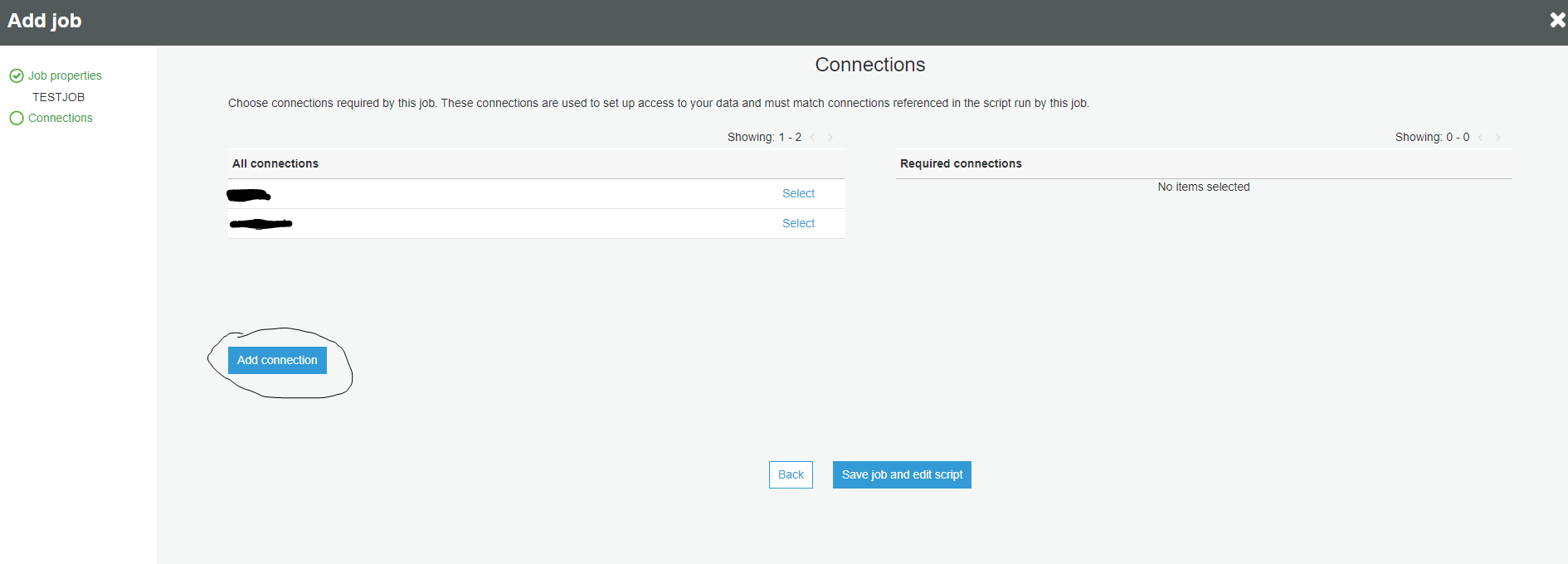
Hi, It was my mistake. When I created a Python shell job in GLUE I forgot to specify the connection. It is the second step when you create Python shell job in Glue. See attached screenshot:
GlibMartynenko
on 15 Jun 2020
There are some different alternatives, but let me walk through the easiest one:
First you need to create your connection in the catalog:

Second, configure the connection in your job:

Third, load your connection:
# Get MySQL connection (SQLAlchemy) from Glue Catalog and LOAD the data into MySQL
engine = wr.catalog.get_engine("my-mysql-connection")
wr.db.to_sql(df, engine, schema="test", name="my_table")
P.S. Make sure to create your connection in a subnet with internet access (To download the wheel file dependencies from pypi) and with access to the database itself.
igorborgest
on 15 Jun 2020
@fen9ru1 👆
igorborgest
on 15 Jun 2020
thanks for replying, many thanks, i still have the problem,here is my issue
i tested the glue connection, it is work
with that glue connection, i run a crawler, and it is works too
and inside the sagenotebook based on glue dev endpoint, I got error:
OperationalError: (pymysql.err.OperationalError) (2003, "Can't connect to MySQL server on 'abc*.rds.amazonaws.com' (timed out)")
here is my code
##GLUE DB Connection
eng_mysql = wr.catalog.get_engine(connection="glue-con")

## test
record = wr.db.read_sql_query("SELECT * FROM db_a.tb_b", con=eng_mysql)
i tried use "pymysql" as following, and it works
import pymysql
pymysql.install_as_MySQLdb()
import MySQLdb

# JDBC Connection, Pay Attention to Security Group

# db = MySQLdb.connect("URL", "USERNAME", "PASSWORD", "DATABASE")
db = MySQLdb.connect(
    host="abc***",
    port=3306,
    user="admin",
    passwd="***",
    db="db_name",
)
i am confused where is the issue
fen9ru1
on 15 Jun 2020
@fen9ru1 are you sure that both codes are running in the same environment and with the same inputs?
If yes, could you please send the connection string that appears into your glue connection HIDING/REPLACING ALL SENSITIVE INFO, please?
igorborgest
on 15 Jun 2020
@igorborgest hello, i am sure that both codes are running in the same notebook,
here is my glue connection(SENSITIVE INFO REPLACED )
jdbc:mysql://hoge-mysql57.cluster-abcedfghigk.ap-northeast-1.rds.amazonaws.com:3306/my_db
P.S. my subnet is private, used for of SageMaker Notebook and Glue dev point, i did not set internet gw on My VPC.
inside of SageMaker Notebook, with following code, i got no problem.
!pip install awswrangler
fen9ru1
on 17 Jun 2020
Related issues
 martinSpears-ECS
·
3Comments
martinSpears-ECS
·
3Comments
 bryanyang0528
·
4Comments
bryanyang0528
·
4Comments
 radcheb
·
4Comments
radcheb
·
4Comments
 jar-no1
·
4Comments
jar-no1
·
4Comments
 vfrank66
·
3Comments
vfrank66
·
3Comments
Most helpful comment
There are some different alternatives, but let me walk through the easiest one:
First you need to create your connection in the catalog:
Second, configure the connection in your job:
Third, load your connection:
P.S. Make sure to create your connection in a subnet with internet access (To download the wheel file dependencies from pypi) and with access to the database itself.