Aws-cli: [v2] invalid grant when doing sso login
Here's what I do and what happens:
OS: Ubuntu 19 with chrome as default browser. aws cli version aws-cli/2.0.2 Python/3.7.3 Linux/5.3.0-40-generic botocore/2.0.0dev6
I wipe the ~/.aws folder.
Chrome is open, and I'm logged in to my landing page ('https://
I run aws configure sso --profile platform-nonprod, get prompted for start url (I copy in the open url from Chrome) and region (eu-central-1).
the aws cli opens a new chrome tab, and after 1 or 2 redirects, I get prompted to "Sign in to AWS CLI". Once I hit that button, I get this:
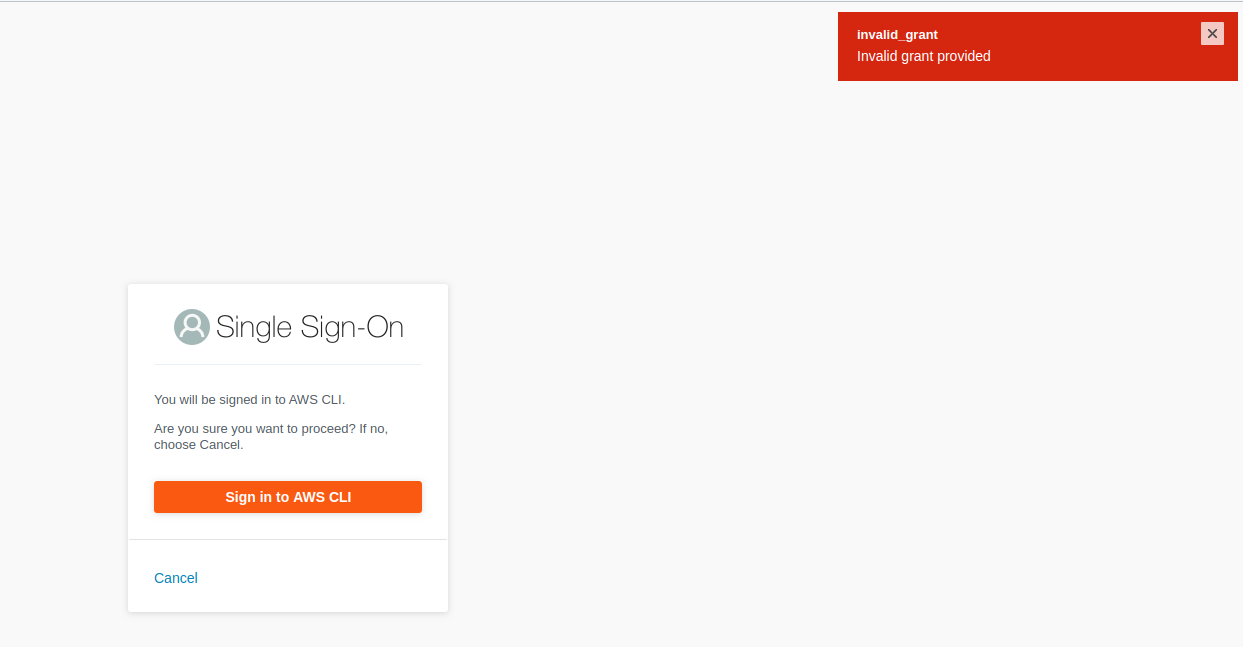
According to chrome dev tools, this is the url that fails:
https://oidc.eu-west-1.amazonaws.com/device_authorization/associate_token, which returns a HTTP 400 with this payload: {"error":"invalid_grant","error_description":"Invalid grant provided"}
The same thing happens if I use another browser:
BROWSER=brave aws configure sso --profile myprofile
All in all, I'm unable to use sso from aws cli v2.
 trondhindenes
All 9 comments
Update on this. The steps above was when I chose "eu-central-1" as the region, since that's the region we have most of our stuff. However, I can see that the "device_authorization" url that fails is in the eu-west-1 region which makes sense because that's where the AWS SSO instance is running. Actually, eu-central-1 isn't even a valid choice for AWS SSO afaik.
So, if I chose the region "eu-central-1" in the "aws configure sso" dialog, everything works as it should.
I guess it would maybe make sense to see if its possible ti discover that the user has chosen an incorrect aws sso url (maybe by doing a dns query on the SSO start URL value or similar.
In any case, I'm not blocked by this, it was a user error after all.
trondhindenes
on 13 Mar 2020
Hi @trondhindenes ,
Glad to see you found your problem, I saw that you closed and reopened the issue though, is there anything that you're missing about this? Are you asking for a clearer error or a get endpoint function?
 KaibaLopez
on 16 Mar 2020
KaibaLopez
on 16 Mar 2020
I reopened it because I'm thinking that there are things that can be done to make sure this doesn't happen. For instance, AWS SSO isn't available in eu-central-1 so ideally that shouldn't be in the list of regions that are suggested. I don't know if its possible to lookup a list of available regions dynamically, I fully understand that those types of things shouldn't be hardcoded in a library.
Further, the error message itself is difficult to understand, but I'm guessing that this is something that maybe has to be fixed by AWS SSO rather than in this repo.
So, I decided to keep it open just in case there's anything that can be done to improve the experience from the cli side of things. Feel free to close if there isn't.
trondhindenes
on 17 Mar 2020
Yea I think this is all reasonable, I'll ask around see what can be done and update you, probably I'll end up escalating to the service teams so even if we can't improve these things from the sdk we might be able to get the services to do something for us.
KaibaLopez
on 18 Mar 2020
Changing it to the correct region worked for me too. Thanks
 vibhuyadav
on 6 Apr 2020
vibhuyadav
on 6 Apr 2020
Thanks! This helped me as well. The correct region was us-east-1.
 Umkus
on 4 May 2020
Umkus
on 4 May 2020
@trondhindenes The list of available regions that are suggested is based on the list of regions that SSO is modeled to support, which should be accurate. However, what we don't know is what region your specific SSO configuration is in.
Just to clear up any confusion, when creating/setuping up SSO as an administrator it's created in a particular region and all interaction with SSO must happen within that region, including logins by the end user. Right now, there isn't any official way to derive the region from the start url. Unfortunately, this means that one simply has to know the region their SSO configuration is in or get it from the administrator that created the SSO configuration.
I definitely agree that the error message is confusing. Ideally, the login flow would fail at the API level letting us know the incorrect region was used before we even redirect the user to the browser.
 joguSD
on 4 May 2020
joguSD
on 4 May 2020
thank you, this has also helped me.
 luisamador
on 15 May 2020
luisamador
on 15 May 2020
Make sure you use the correct region. I got this same error while using the wrong regions.
 vineethelias
on 11 Aug 2020
vineethelias
on 11 Aug 2020
Related issues
 schams-net
·
3Comments
schams-net
·
3Comments
 ikim23
·
3Comments
ikim23
·
3Comments
 ypant
·
3Comments
ypant
·
3Comments
 motilevy
·
3Comments
motilevy
·
3Comments
 pawelkilian
·
3Comments
pawelkilian
·
3Comments
Most helpful comment
Update on this. The steps above was when I chose "eu-central-1" as the region, since that's the region we have most of our stuff. However, I can see that the "device_authorization" url that fails is in the eu-west-1 region which makes sense because that's where the AWS SSO instance is running. Actually, eu-central-1 isn't even a valid choice for AWS SSO afaik.
So, if I chose the region "eu-central-1" in the "aws configure sso" dialog, everything works as it should.
I guess it would maybe make sense to see if its possible ti discover that the user has chosen an incorrect aws sso url (maybe by doing a dns query on the
SSO start URLvalue or similar.In any case, I'm not blocked by this, it was a user error after all.