Aws-cdk: [@aws-cdk/aws-apigatewayv2] Httpapi not deploying when new stack created when using custom domain
Httpapi not deploying when new stack created when using custom domain, and not accepting base path of '/'
I tried to follow the description of how to setup a base path mapping here:
https://docs.aws.amazon.com/cdk/api/latest/docs/aws-apigatewayv2-readme.html#custom-domain
My actual code was:
const domainName = "test.testdomain.com";

const dn = new apigw.DomainName(this, "DN", {
  domainName,
  certificate: certificate,
});

const httpApi = new apigw.HttpApi(this, "HttpApi", {
  defaultDomainMapping: {
    domainName: dn,
    mappingKey: "hello",
  },
});
When I run this with a stack that has never been deployed before, I get the following error:
Invalid stage identifier specified (Service: AmazonApiGatewayV2; Status Code: 400; Error Code: BadRequestException;
Secondly if I try to change mappingKey to '/' I get the following:
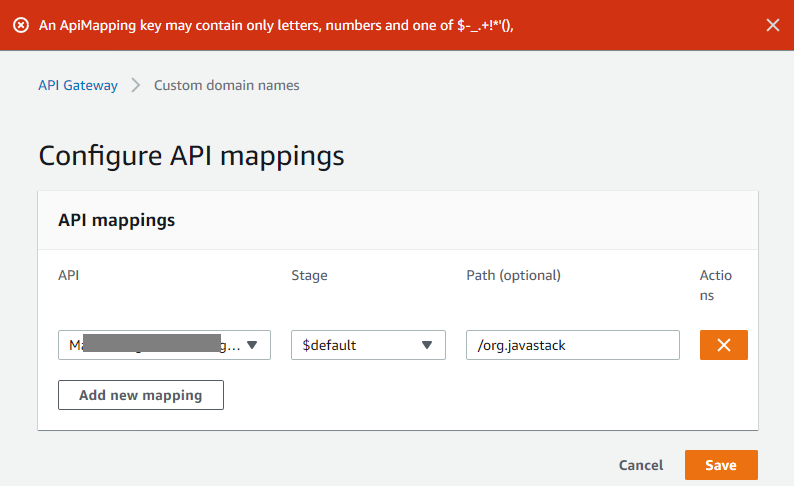
An ApiMapping key may contain only letters, numbers and one of $-_.+!*'(), (Service: AmazonApiGatewayV2; Status Code: 400; Error Code: BadRequestException;
Any help you can give is really appreciated, as this is such a great feature, and when it's possible to get authentication in there too, that will be icing on the cake!
Error Log
Environment
- CLI Version :
- Framework Version:
- Node.js Version:
- OS :
- Language (Version):
Other
This is :bug: Bug Report
 dave-graham
All 16 comments
In the aws console the error also appears...
 ggrandes
on 12 Jul 2020
ggrandes
on 12 Jul 2020
We probably need to improve the validation on the mapping key.
Let me pick this up. Will try reproduce it in my environment and create a PR when necessary.
 pahud
on 13 Jul 2020
pahud
on 13 Jul 2020
thanks @pahud you may also want to change the docs too, as I got the idea to add a "/" from https://docs.aws.amazon.com/cdk/api/latest/docs/aws-apigatewayv2-readme.html#custom-domain
dave-graham
on 13 Jul 2020
Empty string for mappingKey will achieve wanted behavior - however, just not passing the value would be preferable.
 nakedible
on 15 Jul 2020
nakedible
on 15 Jul 2020
Appreciated the bug report. I am still working on it. Yes, we probably should leave it as an empty string for mappingKey as the default root base path which is the expected behavior from cloudformation's perspective and mappingkey containing the '/' character is not allowed. However, I noticed there's a condition which API Gateway returns 400 errors with ConflictException error and I am still trying to get it sorted internally before we can fix this issue with another PR.
I will post more details in the following comments later.
pahud
on 17 Jul 2020
👍 thanks for looking into it @pahud
dave-graham
on 17 Jul 2020
OK this is what we already know:
- empty
ApiMappingKeyis allowed, which indicates the root path of the custom domain - multiple
ApiMappingKeysare allowed, but none of them is allowed to be empty
In this case, let's say our custom domain is abc.com:
If the $default stage is having an empty ApiMappingKey, https://abc.com will go to the $default stage of this API but no more additional ApiMapping would be allowed for this custom domain.
If we need multiple ApiMapping resources, they should all have non-empty ApiMappingKey which expands to different base paths e.g.
'foo' -> /foo
'bar' -> /bar
Let me know if I was wrong and I will start a new PR to fix according to this.
@dave-graham
pahud
on 17 Jul 2020
👍 @pahud that looks good to me
dave-graham
on 17 Jul 2020
@dave-graham PR underway
pahud
on 17 Jul 2020
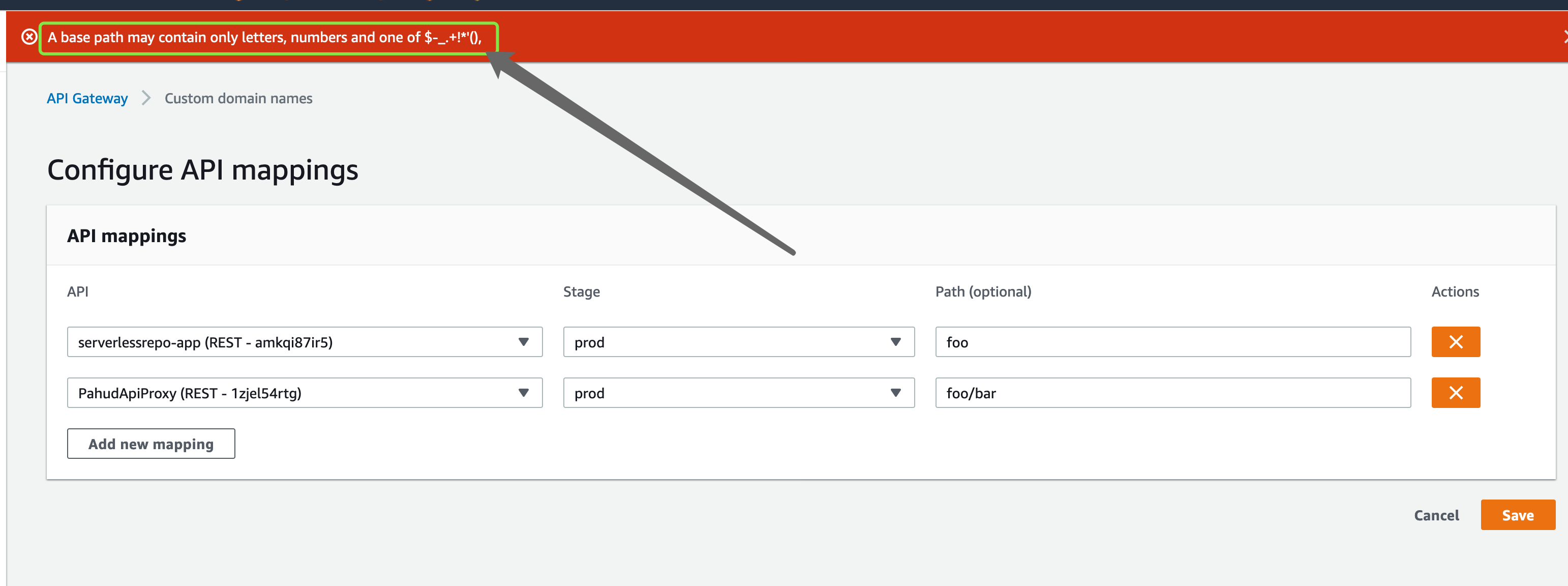
And how about "/foo/bar"? how this case is mapped in ApiMapping?
ggrandes
on 19 Jul 2020
And how about "/foo/bar"? how this case is mapped in ApiMapping?
Looks like the api mapping key only support the 1-level bath path mapping at this moment.
Unfortunately, the character '/' is not allowed for the mapping key.
pahud
on 20 Jul 2020
@ggrandes I may be missing something, but a path that has 2 levels can be achieved by mapping the domain to an api at one level e.g. /foo, then adding a route for the next level e.g. /bar.
I don't have the exact code, but would look something like:
const domainName = "test.testdomain.com";

const dn = new apigw.DomainName(this, "DN", {
  domainName,
  certificate: certificate,
});

const httpApi = new apigw.HttpApi(this, "HttpApi", {
  defaultDomainMapping: {
    domainName: dn,
    mappingKey: "foo",
  },
});

httpApi.addRoutes({
      path: "/bar",
      methods: [HttpMethod.GET],
      integration: booksDefaultIntegration,
    });
Hi @dave-graham
CDK v1.54.0 released and the fix is available now. Please let me know if it works. thanks.
pahud
on 22 Jul 2020
The following mapping works for me now:
defaultDomainMapping: {
     domainName: domainName,
     mappingKey: 'v1'
}
But how would I add an empty mappingKey? Both '/' and '' don't work.
 Shamshiel
on 22 Jul 2020
Shamshiel
on 22 Jul 2020
The following mapping works for me now:
defaultDomainMapping: {
     domainName: domainName,
     mappingKey: 'v1'
}
But how would I add an empty mappingKey? Both '/' and '' don't work.
Hi
At this moment, custom domain only allows to create root base path mapping when there is only one api mapping for this domain. Starting from v1.54.0 in AWS CDK, simply leave the mappingKey undefined and behind the scene an api mapping with empty api mapping key will be created.
However, please note if you create a root path mapping, you can't create any more api mapping key. This is what we can do with current apigateway v2 custom domain now.
pahud
on 22 Jul 2020
This is the best I could get going:
const proxy = new apigatewayv2.HttpApi(this, "DemoProxy", {
  defaultDomainMapping: { domainName, mappingKey: "graphql" },
});

const integration = new apigatewayv2.HttpProxyIntegration({ url: api.graphqlUrl });

proxy.addRoutes({ path: "/", methods: [apigateway.HttpMethod.POST], integration });
mappingKey could neither be "" nor "/".
path couldn't be empty, so the "/" at the end of the URL is required now.
I have the feeling this should work better, but don't know how.
 kay-is
on 21 Oct 2020
kay-is
on 21 Oct 2020
Related issues
 slipdexic
·
3Comments
slipdexic
·
3Comments
 sudoforge
·
3Comments
sudoforge
·
3Comments
 kawamoto
·
3Comments
kawamoto
·
3Comments
 v-do
·
3Comments
v-do
·
3Comments
 artyom-melnikov
·
3Comments
artyom-melnikov
·
3Comments