Aws-cdk: New Docker-based Parcel Build does not work on CircleCI (and likely other CI platforms)
In 1.38.0, the build was moved into a docker container by this PR: https://github.com/aws/aws-cdk/pull/7169
This is causing builds to fail on our CircleCI platform used for continuous delivery of CDK changes.
The issue
You can see the error in the CircleCI interface here: https://app.circleci.com/pipelines/github/blimmer/cdk-parcel-docker-circleci-issue/4/workflows/a4808b45-a04c-48af-851f-960f888518fd/jobs/7
We can easily start up docker-in-docker by using Circle's setup_remote_docker command.
However, when the parcel image tries to run lscpu, the failure causes the build to break.
#!/bin/bash -eo pipefail
npx cdk synth

Failed to build file at /home/circleci/project/lib/index.ts: Error: [Status 1] stdout: 🚨  No entries found.

    at Bundler.bundle (/usr/local/share/.config/yarn/global/node_modules/parcel-bundler/src/Bundler.js:275:17)

stderr: /bin/sh: lscpu: not found

Subprocess exited with error 1
Exited with code exit status 1
CircleCI received exit code 1
There are a number of issues on the parcel issue tracker about this issue on CI platforms: https://github.com/parcel-bundler/parcel/issues?q=is%3Aissue+sort%3Aupdated-desc+lscpu+is%3Aclosed
Reproduction Steps
I've created this example repo to show the problem: https://github.com/blimmer/cdk-parcel-docker-circleci-issue
Error Log
Failed to build file at /home/circleci/project/lib/index.ts: Error: [Status 1] stdout: 🚨  No entries found.

    at Bundler.bundle (/usr/local/share/.config/yarn/global/node_modules/parcel-bundler/src/Bundler.js:275:17)

stderr: /bin/sh: lscpu: not found
Environment
- CLI Version : 1.38.0
- Framework Version: 1.38.0
- OS : MacOS / Ubuntu (on CircleCI)
- Language : English
Other
A fix
I can confirm that passing the PARCEL_WORKERS environment variable to the docker run parcel-bundler image resolves the problem. I got the idea to try that from this comment on the parcel side: https://github.com/parcel-bundler/parcel/issues/133#issuecomment-619991475
I used CircleCI's SSH feature to interactively test this.
circleci@0d67793e2a50:~/project$ docker run parcel-bundler
Server running at http://localhost:1234
/bin/sh: lscpu: not found
🚨  No entries found.
    at Bundler.bundle (/usr/local/share/.config/yarn/global/node_modules/parcel-bundler/src/Bundler.js:275:17)
    at async Bundler.serve (/usr/local/share/.config/yarn/global/node_modules/parcel-bundler/src/Bundler.js:842:7)
    at async Command.bundle (/usr/local/share/.config/yarn/global/node_modules/parcel-bundler/src/cli.js:241:20)
no errors when passing the PARCEL_WORKERS param.
circleci@0d67793e2a50:~/project$ docker run parcel-bundler -e PARCEL_WORKERS=2
Suggestion
Most all CI platforms set the CI environment variable to true. Maybe if CI is set, CDK automatically passes the PARCEL_WORKERS parameter in the docker run args?
https://github.com/aws/aws-cdk/pull/7169/files#diff-30cb98bb231179d8900591911d5cc8a4R75-R80
Alternatively, you could try to fix this problem in the docker image itself if lscpu is not present.
This is :bug: Bug Report
 blimmer
All 17 comments
Can you try setting the nodeDockerTag prop to 12? The default is to use an alpine version which might cause the issue.
 jogold
on 11 May 2020
jogold
on 11 May 2020
Isn't the error here 🚨 No entries found?
jogold
on 11 May 2020
Nope, that appears to be a side-effect of the other error. I can run cdk synth locally on my Mac without any problems.
Resources:
MyNodeLambdaServiceRole574D4541:
Type: AWS::IAM::Role
Properties:
AssumeRolePolicyDocument:
Statement:
- Action: sts:AssumeRole
Effect: Allow
Principal:
Service: lambda.amazonaws.com
Version: "2012-10-17"
ManagedPolicyArns:
- Fn::Join:
- ""
- - "arn:"
- Ref: AWS::Partition
- :iam::aws:policy/service-role/AWSLambdaBasicExecutionRole
Metadata:
aws:cdk:path: CdkParcelDockerCircleciIssueStack/MyNodeLambda/ServiceRole/Resource
MyNodeLambda2AC3DD0D:
Type: AWS::Lambda::Function
Properties:
Code:
S3Bucket:
Ref: AssetParametersd1b0c241067f143ee4c920b31d74801402cfdca9741aa51b2552345d334d1ce8S3Bucket8D88B2BD
S3Key:
Fn::Join:
- ""
- - Fn::Select:
- 0
- Fn::Split:
- "||"
- Ref: AssetParametersd1b0c241067f143ee4c920b31d74801402cfdca9741aa51b2552345d334d1ce8S3VersionKey38189809
- Fn::Select:
- 1
- Fn::Split:
- "||"
- Ref: AssetParametersd1b0c241067f143ee4c920b31d74801402cfdca9741aa51b2552345d334d1ce8S3VersionKey38189809
Handler: index.handler
Role:
Fn::GetAtt:
- MyNodeLambdaServiceRole574D4541
- Arn
Runtime: nodejs12.x
DependsOn:
- MyNodeLambdaServiceRole574D4541
Metadata:
aws:cdk:path: CdkParcelDockerCircleciIssueStack/MyNodeLambda/Resource
aws:asset:path: asset.d1b0c241067f143ee4c920b31d74801402cfdca9741aa51b2552345d334d1ce8
aws:asset:property: Code
CDKMetadata:
Type: AWS::CDK::Metadata
Properties:
Modules: aws-cdk=1.38.0,@aws-cdk/assets=1.38.0,@aws-cdk/aws-cloudwatch=1.38.0,@aws-cdk/aws-ec2=1.38.0,@aws-cdk/aws-events=1.38.0,@aws-cdk/aws-iam=1.38.0,@aws-cdk/aws-kms=1.38.0,@aws-cdk/aws-lambda=1.38.0,@aws-cdk/aws-lambda-nodejs=1.38.0,@aws-cdk/aws-logs=1.38.0,@aws-cdk/aws-s3=1.38.0,@aws-cdk/aws-s3-assets=1.38.0,@aws-cdk/aws-sqs=1.38.0,@aws-cdk/aws-ssm=1.38.0,@aws-cdk/cloud-assembly-schema=1.38.0,@aws-cdk/core=1.38.0,@aws-cdk/cx-api=1.38.0,@aws-cdk/region-info=1.38.0,jsii-runtime=node.js/v12.16.3
Condition: CDKMetadataAvailable
Parameters:
AssetParametersd1b0c241067f143ee4c920b31d74801402cfdca9741aa51b2552345d334d1ce8S3Bucket8D88B2BD:
Type: String
Description: S3 bucket for asset "d1b0c241067f143ee4c920b31d74801402cfdca9741aa51b2552345d334d1ce8"
AssetParametersd1b0c241067f143ee4c920b31d74801402cfdca9741aa51b2552345d334d1ce8S3VersionKey38189809:
Type: String
Description: S3 key for asset version "d1b0c241067f143ee4c920b31d74801402cfdca9741aa51b2552345d334d1ce8"
AssetParametersd1b0c241067f143ee4c920b31d74801402cfdca9741aa51b2552345d334d1ce8ArtifactHashC66B91D5:
Type: String
Description: Artifact hash for asset "d1b0c241067f143ee4c920b31d74801402cfdca9741aa51b2552345d334d1ce8"
Conditions:
CDKMetadataAvailable:
Fn::Or:
- Fn::Or:
- Fn::Equals:
- Ref: AWS::Region
- ap-east-1
- Fn::Equals:
- Ref: AWS::Region
- ap-northeast-1
- Fn::Equals:
- Ref: AWS::Region
- ap-northeast-2
- Fn::Equals:
- Ref: AWS::Region
- ap-south-1
- Fn::Equals:
- Ref: AWS::Region
- ap-southeast-1
- Fn::Equals:
- Ref: AWS::Region
- ap-southeast-2
- Fn::Equals:
- Ref: AWS::Region
- ca-central-1
- Fn::Equals:
- Ref: AWS::Region
- cn-north-1
- Fn::Equals:
- Ref: AWS::Region
- cn-northwest-1
- Fn::Equals:
- Ref: AWS::Region
- eu-central-1
- Fn::Or:
- Fn::Equals:
- Ref: AWS::Region
- eu-north-1
- Fn::Equals:
- Ref: AWS::Region
- eu-west-1
- Fn::Equals:
- Ref: AWS::Region
- eu-west-2
- Fn::Equals:
- Ref: AWS::Region
- eu-west-3
- Fn::Equals:
- Ref: AWS::Region
- me-south-1
- Fn::Equals:
- Ref: AWS::Region
- sa-east-1
- Fn::Equals:
- Ref: AWS::Region
- us-east-1
- Fn::Equals:
- Ref: AWS::Region
- us-east-2
- Fn::Equals:
- Ref: AWS::Region
- us-west-1
- Fn::Equals:
- Ref: AWS::Region
- us-west-2
@jogold I still see the error, even with setting nodeDockerTag as you recommended. The build still passes locally on my mac. See https://github.com/blimmer/cdk-parcel-docker-circleci-issue/pull/2
EDIT: I also added you, @jogold, as a collaborator on the project in case you want to tinker with the CircleCI configuration or anything there.
blimmer
on 11 May 2020
@eladb - I also invited you to collab on the sample repo in case that's helpful to you.
blimmer
on 12 May 2020
@blimmer after #7898 gets merged we can get back to this. Do you know by any chance if there are similar issues with Parcel v2?
jogold
on 21 May 2020
@blimmer why/how did you choose between PARCEL_WORKERS=2 and PARCEL_WORKERS=1?
jogold
on 21 May 2020
@jogold It looks like the issue is resolved in Parcel 2. I tested this out in Circle CI using this Dockerfile:
FROM node:13.8.0-alpine3.11
RUN yarn global add parcel@next
CMD [ "parcel" ]
Then I built and tested on CircleCI (no errors were reported).
circleci@d28d3ed3f221:~$ cd project/
circleci@d28d3ed3f221:~/project$ docker build . -t parcel-2
Sending build context to Docker daemon 204.6MB
Step 1/3 : FROM node:13.8.0-alpine3.11
13.8.0-alpine3.11: Pulling from library/node
c9b1b535fdd9: Pull complete
8be11b68dc4b: Pull complete
0e57bf91e5a4: Pull complete
887e48057ed2: Pull complete
Digest: sha256:e3b2fab0d3416360276e90da29e3ac05d5b6b632e1babc1b6875fb23db4563e1
Status: Downloaded newer image for node:13.8.0-alpine3.11
---> b7dc3fe8d4f8
Step 2/3 : RUN yarn global add parcel@next
---> Running in 4bb709298a48
yarn global v1.21.1
[1/4] Resolving packages...
warning parcel > @parcel/config-default > @parcel/optimizer-htmlnano > htmlnano > uncss > [email protected]: request has been deprecated, see https://github.com/request/request/issues/3142
warning parcel > @parcel/config-default > @parcel/optimizer-htmlnano > htmlnano > uncss > jsdom > [email protected]: request has been deprecated, see https://github.com/request/request/issues/3142
warning parcel > @parcel/config-default > @parcel/reporter-dev-server > http-proxy-middleware > micromatch > snapdragon > source-map-resolve > [email protected]: https://github.com/lydell/resolve-url#deprecated
warning parcel > @parcel/config-default > @parcel/reporter-dev-server > http-proxy-middleware > micromatch > snapdragon > source-map-resolve > [email protected]: Please see https://github.com/lydell/urix#deprecated
[2/4] Fetching packages...
warning [email protected]: Invalid bin entry for "sha.js" (in "sha.js").
[3/4] Linking dependencies...
[4/4] Building fresh packages...
success Installed "[email protected]" with binaries:
- parcel
Done in 25.91s.
---> e0530a81b55b
Removing intermediate container 4bb709298a48
Step 3/3 : CMD parcel
---> Running in 08b721a0e495
---> 658b8230a991
Removing intermediate container 08b721a0e495
Successfully built 658b8230a991
Successfully tagged parcel-2:latest
circleci@d28d3ed3f221:~/project$ docker run parcel-2
No entries found
It looks like they now have a try/catch in the Parcel source code: https://github.com/parcel-bundler/parcel/blob/db7e3a12105630abc44058bff7a88eb612f12e75/packages/core/workers/src/cpuCount.js
RE: the question about 2 vs. 1, I chose "2" just because it was listed in the original comment thread as a suggestion to fix on Heroku (https://github.com/parcel-bundler/parcel/issues/133#issuecomment-619991475).
It looks like they default to 1 in parcel v2 if they can't determine how many CPU cores are present: https://github.com/parcel-bundler/parcel/blob/db7e3a12105630abc44058bff7a88eb612f12e75/packages/core/workers/src/cpuCount.js#L55-L58
There are cases where a CircleCI user might want to configure more workers to run based on the machine size they're using. You can select between 1 - 20 vCPUs: https://circleci.com/docs/2.0/executor-types/#available-docker-resource-classes
blimmer
on 22 May 2020
Hey @jogold - I see that #8169 is marked to close this issue. While that PR will allow manually working around the problem, it doesn't feel like this issue will truly be resolved until either:
a) CDK uses Parcel v2 by default (where the problem is resolved)
b) When CDK detects the CIRCLECI (or maybe even just CI) variable PARCEL_WORKERS is automatically set to 1 in the docker environment.
What do you think?
blimmer
on 26 May 2020
@blimmer removed it from #8169.
a) CDK uses Parcel v2 by default (where the problem is resolved)
b) When CDK detects theCIRCLECI(or maybe even justCI) variablePARCEL_WORKERSis automatically set to1in the docker environment.
looks to me that a) is the long term solution. Not sure CDK should include CI vendor specific code (note that it works in AWS CodeBuild so forcing the workers to 1 could impact users using CodeBuild).
jogold
on 27 May 2020
That sounds totally fine to me. We can use the env variable workaround in the meantime. Relatedly - is there a recommended way to "monkey patch" a class like NodejsFunction so we don't have to spread the workaround to all of our functions? Or would you recommend us creating a new base class to do this?
blimmer
on 27 May 2020
is there a recommended way to "monkey patch" a class like
NodejsFunction
You can use https://github.com/ds300/patch-package until the env variable workaround gets released, after that I would personally create a NodejsCircleCiFunction (or something with a broader scope that sets good defaults) that extends NodejsFunction.
jogold
on 27 May 2020
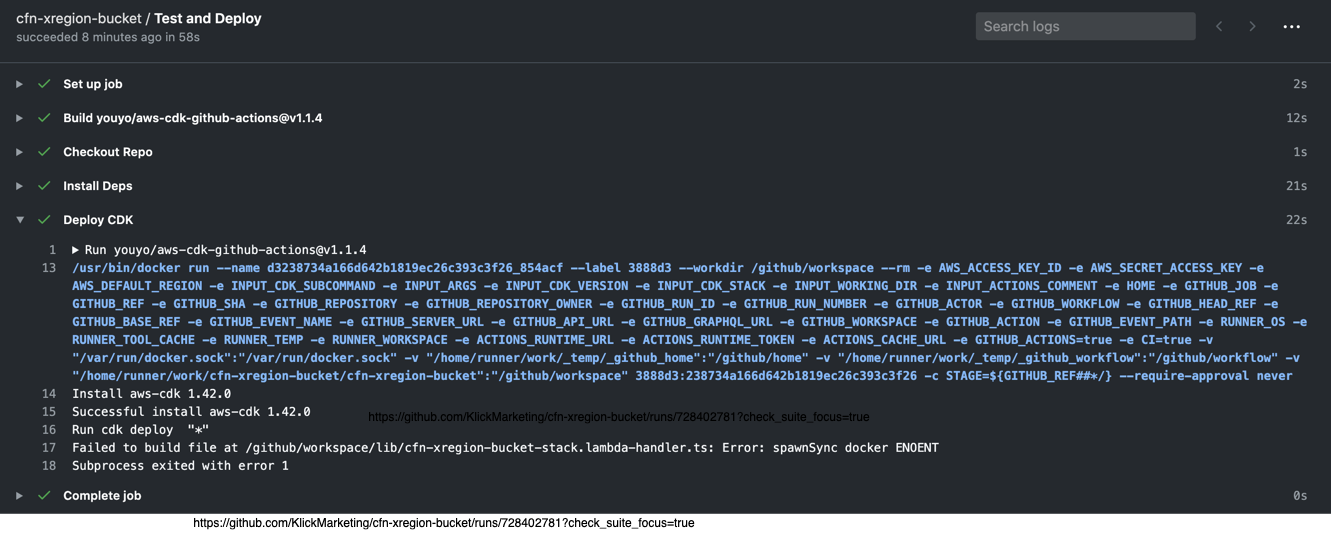
@jogold Perhaps related issue on GitHub Actions. (works locally fine)
Not sure if there is anything special required in the main container but on Actions it fails with...
main.yml
name: cfn-xregion-bucket
on:
push:
branches:
- feat-*
jobs:
build-deploy:
name: Test and Deploy
runs-on: ubuntu-latest
defaults:
run:
shell: bash
steps:
- name: Checkout Repo
uses: actions/checkout@v1
- name: Install Deps
run: npm install
- name: Deploy CDK
uses: youyo/[email protected]
with:
cdk_subcommand: deploy
args: -c STAGE=${GITHUB_REF##*/} --require-approval never
cdk_version: "1.42.0"
env:
AWS_ACCESS_KEY_ID: ${{ secrets.SANDBOX_AWS_ACCESS_KEY_ID }}
AWS_SECRET_ACCESS_KEY: ${{ secrets.SANDBOX_AWS_SECRET_ACCESS_KEY }}
AWS_DEFAULT_REGION: us-east-1
 iDVB
on 1 Jun 2020
iDVB
on 1 Jun 2020
@iDVB looks like docker is not available in your action.
jogold
on 1 Jun 2020
For others that might be running into this problem in CircleCI, I highly recommend switching from the Docker executor to the Machine executor. Even with the improvements referenced in this ticket, there are still issues with how CircleCI runs docker-in-docker that causes tons of headaches with lambda bundling.
Simply change your job definition from something like this:
docker:
  - image: circleci/node:lts
to using a machine executor like this:
machine:
  image: ubuntu-1604:202004-01
Ended up here because I was having trouble getting our cdk deploy running in CircleCI. Can confirm that switching to the machine executor still works.
 TLadd
on 23 Dec 2020
TLadd
on 23 Dec 2020
By the way, the new esbuild build process, supported in 1.77+ of the CDK, allows local (non-docker) bundling if you have esbuild installed locally. If you don't want to use the machine executor, you could utilize this feature. https://github.com/aws/aws-cdk/blob/v1.77.0/packages/@aws-cdk/aws-lambda-nodejs/README.md#local-bundling
blimmer
on 24 Dec 2020
Related issues
 abelmokadem
·
3Comments
abelmokadem
·
3Comments
 ababra
·
3Comments
ababra
·
3Comments
 EduardTheThird
·
3Comments
EduardTheThird
·
3Comments
 cybergoof
·
3Comments
cybergoof
·
3Comments
 schof
·
3Comments
schof
·
3Comments
Most helpful comment
For others that might be running into this problem in CircleCI, I highly recommend switching from the Docker executor to the Machine executor. Even with the improvements referenced in this ticket, there are still issues with how CircleCI runs docker-in-docker that causes tons of headaches with lambda bundling.
Simply change your job definition from something like this:
to using a machine executor like this: