Aws-cdk: hidden characters in doc causing problem for copy/paste
On https://docs.aws.amazon.com/cdk/api/latest/docs/@aws-cdk_aws-ec2.Vpc.html the value maxAzs is being written as max­Azs so it copy/pastes poorly, specifically on VS Code that retains characters like that apparently, so you end up with an invisible character and your code doesn't work.
Inspecting with Chrome shows the issue:

This is how it looks when you copy paste it, because it is being pasted as max-Azs:

I don't know if this issue exists elsewhere in the docs.
The change I would like to have happen is to make it possible to copy/paste that variable from the docs without an invisible character ending up in it.
 0xdabbad00
All 5 comments
That is my bad. We are doing this to make long identifiers wrap naturally when the screen size gets narrow, or for very long columns.
I will investigate another way achieving this. Replacing soft hyphens with a <wbr> tag might be sufficient.
 rix0rrr
on 9 Aug 2019
rix0rrr
on 9 Aug 2019
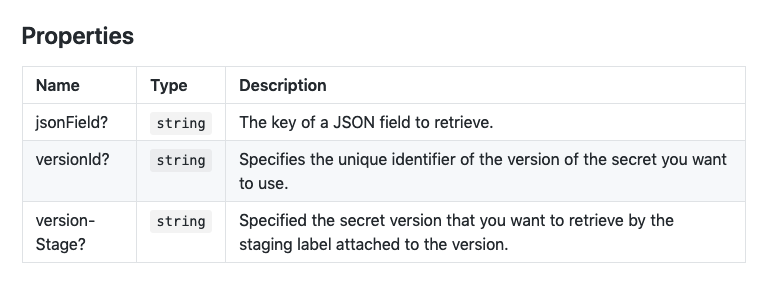
Same happened to me in https://docs.aws.amazon.com/cdk/api/latest/docs/@aws-cdk_core.SecretsManagerSecretOptions.html#properties
Took a while to understand what's actually going on here:

Turns out there is a zero-width space character between json and Field.
This is what it looks like in Firefox:
 aripalo
on 14 Aug 2019
aripalo
on 14 Aug 2019
@rix0rrr It doesn't look like this issue has been resolved if I look at https://docs.aws.amazon.com/cdk/api/latest/docs/@aws-cdk_aws-ec2.Vpc.html . Have the docs not been updated to reflect the change?
0xdabbad00
on 19 Aug 2019
@rix0rrr Looks like the docs are updated now to using a <wbr> element, which seems to have resolved my previous issue, but now is causing those characters to show up in the text in some places. For example on https://docs.aws.amazon.com/cdk/api/latest/docs/@aws-cdk_aws-iam.PolicyStatement.html you can see the in the "Initializer" section the text new Policy<wbr>Statement as shown in the screenshot below.

0xdabbad00
on 24 Aug 2019
My preference would be for the docs to not care about word breaks. You can see here an example where the string ConstructNode breaks awkwardly currently, and that is totally fine. I'd much rather have the docs appear like this than have these hidden character tricks that are happening currently. https://docs.aws.amazon.com/cdk/api/latest/docs/@aws-cdk_aws-s3.BucketPolicy.html

0xdabbad00
on 24 Aug 2019
Related issues
 cybergoof
·
3Comments
cybergoof
·
3Comments
 ababra
·
3Comments
ababra
·
3Comments
 eladb
·
3Comments
eladb
·
3Comments
 EduardTheThird
·
3Comments
EduardTheThird
·
3Comments
 artyom-melnikov
·
3Comments
artyom-melnikov
·
3Comments
Most helpful comment
That is my bad. We are doing this to make long identifiers wrap naturally when the screen size gets narrow, or for very long columns.
I will investigate another way achieving this. Replacing soft hyphens with a
<wbr>tag might be sufficient.