Awesome: [Question]: Override notification widget, attaching a wibox.
Output of awesome --version:
awesome v4.3-862-g7a759432d-dirty (Too long)
- Compiled against Lua 5.3.5 (running with Lua 5.3)
- API level: 4
- D-Bus support: yes
- xcb-errors support: no
- execinfo support: yes
- xcb-randr version: 1.6
- LGI version: 0.9.2
- Transparency enabled: yes
- Custom search paths: no
I'm a beginner and got to a point where I need help. So I have 2 questions so far, I did a lot of documentation and code reading before coming here.
My goal is to override the notification widget, I stumbled upon one way to do it and that's:
naughty.connect_signal('request::display', function(n)
    naughty.layout.box { ... } -- create a naught box here
)
This works fine, I'm just curious if it's the right way or is there any other way?
My second question is about awful.placement, I create a wibox with the notification icon and attached it to the notification box using:
    local notificationBox = naughty.layout.box { ... }
    local box = wibox({ ... })

    awful.placement.left(
        box,
        {
            parent = notificationBox,
            attach = true,
        })
I used attach because from the documentation I had the impression that when the notification is destroyed the wibox will move somewhere else, but it just stays there as if the notification is still visible, which made me think that the notification is maybe destroyed but the naughty.layout.box is not.
Anyways I want to destroy that box when the notification is destroyed, basically I think I can listen to:
naughty.connect_signal('request::display', function(n)
    local notificationBox = naughty.layout.box { ... }
    local box = wibox({ ... })

    awful.placement.left(
        box,
        {
            parent = notificationBox,
            attach = true,
        })

    n:connect_signal("destroyed", function()
        -- code to destroy the box
    end)
)
So how can I destroy that wibox?
Thank you very much.
 slickroot
All 9 comments
CC @Elv13
 psychon
on 31 Aug 2020
psychon
on 31 Aug 2020
Why do you create a normal wibox rather than add widgets into the notification? What is the use case?
attach isn't really going to work right away since it is attached to an object which is destroyed, thus disconnecting it before it does anything. That behind said, the notification use some very similar code, so it can be tweaked to work.
 Elv13
on 31 Aug 2020
Elv13
on 31 Aug 2020
Why do you create a normal wibox rather than add widgets into the notification? What is the use case?
My use case:
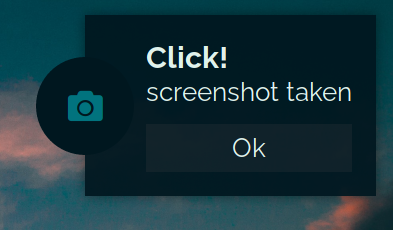
The icon was the wibox, I made some progress though, I used awful.popup instead of a wibox
    local notification_icon = build_notification_icon(n) -- this is a popup now

    -- place icon at the left of the notification box
    awful.placement.left(notification_icon, {
        parent = notification_box,
        attach = true,
        offset = { x = -dpi(30) }
    })

    n:connect_signal("destroyed", function()
        notification_icon.visible = false -- this is how I destroy the icon, I don't know how GC work but the popup is probably still in memory
    end)
This is the only way I could make that look happen, before that I used just the notification box and added some transparent padding on the left, but with the shadows on, the padding had shadows on top, bottom, left, so It was not good looking.
Could you think of any other solutions for this look? I'm pretty sure there are.
slickroot
on 31 Aug 2020
Wow, that's very nice! Don't forget to post in the screenshot thread when you are done.
As for the implementation, I think the best way is to implement a custom gears.shape (it's actually rather easy) for your notification and use normal widgets for the circle part. It will save you the wold of pain required to get all the wiboxes geometry in sync.
Elv13
on 31 Aug 2020
Wow, that's very nice! Don't forget to post in the screenshot thread when you are done.
Sure! Thanks
As for the implementation, I think the best way is to implement a custom gears.shape (it's actually rather easy) for your notification and use normal widgets for the circle part. It will save you the wold of pain required to get all the wiboxes geometry in sync.
I'm actually just a beginner, I don't know if I can pull it off with gears.shape. I will try..
slickroot
on 31 Aug 2020
I'm actually just a beginner, I don't know if I can pull it off with gears.shape. I will try..
It should be pretty simple. It's a function that take cr, width, height as arguments. cr is a cairo context. All you need is add 5 line_to, 1 arc (or maybe arc_negative depending on the direction you start with, math.PI / 180 degree + whatever angle offset depending on the direction) and finally a close_path.
Elv13
on 31 Aug 2020

Wow I got it. This is really nice, excited to play with this, so basically I can make any shape. The arc looks a little kind of aliased?
slickroot
on 1 Sep 2020
Nice! (I think you got the arc backward tho, the half circle is supported to extrude the rectangle?)
Anyway
so basically I can make any shape.
It's AwesomeWM, you can make anything :)
The arc looks a little kind of aliased?
The trick for that is to set the shape on the background too. Assuming you are running picom or any compositing manager, it would work fine. Clients "cannot"[1] have AA, but wibox derived elements can with some work.
[1] This is workarounds, but they suck
Elv13
on 1 Sep 2020
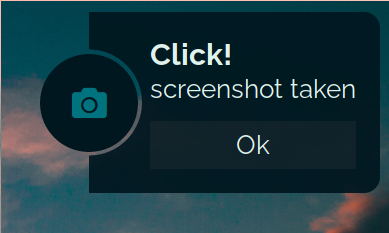
Having a blast! Thank you very much. I'll be around.
slickroot
on 1 Sep 2020
Related issues
 robn
·
4Comments
robn
·
4Comments
 doronbehar
·
5Comments
doronbehar
·
5Comments
 liquiddandruff
·
6Comments
liquiddandruff
·
6Comments
 ghost
·
4Comments
ghost
·
4Comments
 philer
·
3Comments
philer
·
3Comments
Most helpful comment
Having a blast! Thank you very much. I'll be around.