Awesome: Wibar seems to ignore setup layout (height)
Hello,
I am trying to add some widgets to wibar (fixed vertically) but without any luck. The only way I managed to do so is by changing the wibar's height.
Output of awesome --version:
awesome v4.3-814-g158cc37a0 (Too long)
• Compiled against Lua 5.3.5 (running with Lua 5.3)
• API level: 4
• D-Bus support: yes
• xcb-errors support: no
• execinfo support: yes
• xcb-randr version: 1.6
• LGI version: 0.9.2
• Transparency enabled: yes
• Custom search paths: no
How to reproduce the issue:
Create this code:
bar:setup {
    {
        {
            {
                align = "center",
                valign = "center",
                text = "first text,
                widget = wibox.widget.textbox
            },
            layout = wibox.layout.fixed.horizontal
        },
        bg = "#ff0000",
        fg = "#00ff00",
        shape = gears.shape.rectangle,
        widget = wibox.container.background
    },
    {
        {
            {
                align = "center",
                valign = "center",
                text = "second text",
                widget = wibox.widget.textbox
            },
            layout = wibox.layout.fixed.horizontal
        },
        bg = "#ff0000",
        fg = "#0000ff",
        shape = gears.shape.rectangle,
        widget = wibox.container.background
    },
    spacing = 10,
    layout = wibox.layout.fixed.vertical,
}
Actual result:
The bar's height hasn't changed, I can only see the first text. With the
layout = wibox.layout.fixed.vertical isn't suppose to :
Each widget will get as much space as it asks for and each widget will be drawn next to its neighboring widget
(from the documentation)
Expected result:
To see all the widgets.
Thank you very much in advance.
 BigfootN
All 12 comments
Could you provide more information on what you see and what you want to see?
With the following patch to the default config (basically: Just move the wibar to the left and paste your code (+ a small fix to it)):
diff --git a/awesomerc.lua b/awesomerc.lua
index 6e2a3a6a6..38b13aed3 100644
--- a/awesomerc.lua
+++ b/awesomerc.lua
@@ -179,7 +179,7 @@ screen.connect_signal("request::desktop_decoration", function(s)

     -- @DOC_WIBAR@
     -- Create the wibox
-    s.mywibox = awful.wibar({ position = "top", screen = s })
+    s.mywibox = awful.wibar({ position = "left", screen = s })

     -- @DOC_SETUP_WIDGETS@
     -- Add widgets to the wibox
@@ -200,6 +200,40 @@ screen.connect_signal("request::desktop_decoration", function(s)
             s.mylayoutbox,
         },
     }
+    s.mywibox.widget = {
+    {
+        {
+            {
+                align = "center",
+                valign = "center",
+                text = "first text", -- There was a missing " here which I added
+                widget = wibox.widget.textbox
+            },
+            layout = wibox.layout.fixed.horizontal
+        },
+        bg = "#ff0000",
+        fg = "#00ff00",
+        shape = gears.shape.rectangle,
+        widget = wibox.container.background
+    },
+    {
+        {
+            {
+                align = "center",
+                valign = "center",
+                text = "second text",
+                widget = wibox.widget.textbox
+            },
+            layout = wibox.layout.fixed.horizontal
+        },
+        bg = "#ff0000",
+        fg = "#0000ff",
+        shape = gears.shape.rectangle,
+        widget = wibox.container.background
+    },
+    spacing = 10,
+    layout = wibox.layout.fixed.vertical,
+}
 end)
 -- }}}
...I get the following result (this is a part of a screenshot; the black is the wallpaper and the not-fully-black is the default wibox background color):

I can only see the first text.
Clearly, I can see more than just "first text", so there is already s difference here.
 psychon
on 16 Apr 2020
psychon
on 16 Apr 2020
Thank your for your answer.
With the code in my first post, I can only see this:

while I would like to have both text (first text and second text). It's like the bar doesn't take into account it's children.
Here is my wibar:
local bar = awful.wibar ({
    position = 'top',
    type = "dock",
    screen = screen[1],
    bg = <some bg>,
    border_width = 3,
    border_color = <some color>,
    shape = gears.shape.rectangle
})
Also, what I wish to achieve, since it doesn't seem to be case in your screenshot, is to have a horizontal bar. I know that in my setup it ends with layout = wibox.layout.fixed.vertical, but it is in order to have both texts vertically aligned.
Hoping I managed to be clear enough and provided enough information, thank you very much for your answer.
BigfootN
on 16 Apr 2020
Sorry, I am still confused.
If you change your code from position = 'top' to position = 'left' (= the wibar should be on the left edge of the screen and not on the top), does it then do what you want it to do?
what I wish to achieve, since it doesn't seem to be case in your screenshot, is to have a horizontal bar.
Hm... apparently I am wrong in what you want to achieve.
So... I did again what I did in my last comment. Only difference is that I did not set position = "left" and now I have this result:
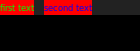
From your screenshot I would guess that this is exactly what you want to get. Only that I get this result, but you do not. Even though we both use the same code...?
psychon
on 16 Apr 2020
Hello, thank you for your response.
I'll try to explain what I am trying to achieve by a more general approach.
I am trying to have the wibar look like this:
|  widget 1  |                                         |
+------------+                                         |
|  widget 2  |                                         |
+------------+            Whole wibar                  |
.                                                      |
.                                                      |
+------------+                                         |
|  widget N  |                                         |
+------------+-----------------------------------------+
And I would like to add widget 1, widget 2..widget N vertically in the wibar setup without setting the wibar height. I would like the wibar to adapt it's height accordingly to it's inner widgets.
Hoping I made myself clear enough, thank you very much for your precious help.
BigfootN
on 16 Apr 2020
I would like the wibar to adapt it's height accordingly to it's inner widgets.
You should use awful.popup instead. It will automatically adjust its height/width accordingly to its inner widgets. @BigfootN
 manilarome
on 17 Apr 2020
manilarome
on 17 Apr 2020
You should use awful.popup instead. It will automatically adjust its height/width accordingly to its inner widgets.
Thank you for the advice. So if I understand well, wibar doesn't automatically adapt it's height ? If this is the case, why not ?
Thank you for all your help.
BigfootN
on 17 Apr 2020
If this is the case, why not ?
It would be super annoying if some "normally 1 line, but someone multiline" scripts caused the size to flicker all the time.
 Elv13
on 17 Apr 2020
Elv13
on 17 Apr 2020
It would be super annoying if some "normally 1 line, but someone multiline" scripts caused the size to flicker all the time.
Thank you for your great answer. I understand now. But, just one last question if I may, wouldn't the result be same with awful.popup ?
Thank you very much for your great help.
BigfootN
on 17 Apr 2020
Popups and bars are 2 different use cases. Popups are when you explicitly want this behavior. The normal wibox is when you don't want it. Then awful.wibar is explicitly for a bar on the side of the screen with a specific size.
In the end, there is ~10 different classes of box with different attributes for different use cases. They all share the same code under the hood and and just specialized version with some pre-defined settings.
Elv13
on 17 Apr 2020
Thank you very much for your great answer. I have all the answers I need now.
Thank you very much.
BigfootN
on 17 Apr 2020
One more small piece of information: awful.wibar defaults to "font size * 1.5" for its size. For example, with position="top", this is the relevant piece of code:
https://github.com/awesomeWM/awesome/blob/245f38ccd57f9fc4a6b090aca2c8ec800356fb5d/lib/awful/wibar.lua#L384-L385
What I want to emphasize/say is that the default height of a wibar is also pretty dumb and nothing magic.
psychon
on 17 Apr 2020
Thank you very much for this valuable piece of information.
BigfootN
on 17 Apr 2020
Related issues
 bew
·
5Comments
psychon
·
6Comments
bew
·
5Comments
psychon
·
6Comments
 philer
·
3Comments
philer
·
3Comments
 xordspar0
·
5Comments
xordspar0
·
5Comments
 SethBarberee
·
3Comments
SethBarberee
·
3Comments
Most helpful comment
Popups and bars are 2 different use cases. Popups are when you explicitly want this behavior. The normal
wiboxis when you don't want it. Thenawful.wibaris explicitly for a bar on the side of the screen with a specific size.In the end, there is ~10 different classes of box with different attributes for different use cases. They all share the same code under the hood and and just specialized version with some pre-defined settings.